

 iOS Tips & Latest Updates
 Bug Fixes, Unlock Guides
 Giveaways & Freebies


UltData - Best iPhone Data Recovery Tool
Recover Deleted & Lost Data from iOS Devices Easily, No Backup Needed!
UltData: Best iPhone Recovery Tool
Recover Lost iPhone Data without Backup
Many people use Gemini for work, study, writing, and daily questions. After spending time on useful conversations, you may want to keep them for later. Learning how to save Gemini chat helps you avoid losing important information. In this guide, you will learn how Gemini stores conversations, different ways to save your chats, and what to do if saved files disappear.

Gemini usually saves your conversations when you use your Google account. This makes it easy to return to earlier discussions from different devices. However, some situations may prevent chats from being stored. Understanding how gemini saves chat history helps you know when your information is available and when you should save a copy yourself.
Gemini connects your conversations to your Google account. After you sign in, it stores your Gemini conversation history automatically. You can open Gemini on another phone, tablet, or computer and continue where you stopped. Your saved chats stay in your conversation history until you remove them. This synced history makes it easy to review research, writing ideas, work discussions, and study notes without starting over.
Sometimes Gemini cannot save your conversations.
Common reasons include:
If you notice missing chat records, first check whether you are using the correct Google account. Many users think they lost their conversations when they simply switched accounts. Although Gemini normally stores conversation history, many users still prefer keeping another copy. Saving important chats gives extra protection for work files, school notes, business discussions, and AI-generated content.
If you create reports, articles, homework, or research with Gemini, saving your conversations is a smart habit. Many users ask can you save gemini chat because they want to keep useful answers even if they later delete their history.
One of the easiest ways to save a Gemini chat is by using the Export to Google Docs feature. Open your conversation, select the export option, and Gemini will automatically generate a Google Docs file containing your chat. You can then rename the document, move it into folders, and edit it whenever needed. Because it's stored in Google Drive, your exported chats stay accessible across all devices as long as you're signed in with your Google account.
This method is especially useful for students, writers, researchers, and professionals who need to organize and update their conversations regularly.

Another popular option is to save a Gemini chat as a PDF. Most browsers include a built-in Print feature, which lets you choose "Save as PDF" instead of printing on paper. This generates a PDF version of your conversation that you can store on your computer, phone, or cloud drive.
Some users also use browser extensions to save Gemini chats as PDFs with fewer steps, especially when exporting frequently. PDFs are easy to share and help preserve formatting, but they are less flexible than Google Docs if you need to edit or update the content later.

Google also offers Google Takeout for exporting account data. Google Takeout lets you download information connected to your Google account, including supported Gemini data.
To export:

The export may include conversation history and other supported account information depending on your account settings. Even after exporting conversations, files may still become misplaced or deleted. For that reason, it helps to know where to look before assuming they are gone.
Sometimes you cannot find a conversation even after you save it. Before you try any recovery software, check the places where Gemini files are usually stored. In many cases, the file is still available but saved in a different location.
Open Gemini using the same Google account you used before. Check your conversation history by scrolling through older chats or using the search function if available.
In many cases, chats are not deleted but simply buried in the list. Also make sure you are signed in to the correct account, since conversations are only saved under the Google account where they were originally created.
If you exported the conversation, check Google Docs and Google Drive. Search by document name or keywords from the chat. Also look through your recent files and the Trash folder, since deleted documents are kept there for a limited time. If the file is missing on another device, make sure Google Drive sync is enabled and working properly.
If you chose to save gemini chat as pdf, check your Downloads folder first.

If you used a save gemini chat as pdf extension, confirm that the extension saved the file in the expected location.
Google account sync keeps your files updated across devices.
Make sure:
These simple checks solve many problems without needing file recovery. If Gemini chats, exported documents, PDFs, screenshots, or other saved files still cannot be found after checking Gemini History, Google Docs, Google Drive, and local storage, the files may have been deleted from your device. In that case, file recovery software may help.
Many users wonder if they can save Gemini chats to protect important conversations. While deleted chats usually cannot be restored directly, you may still recover related files such as exported Google Docs, PDFs, screenshots, images, or research documents created during use. In some cases, recovery tools like Tenorshare UltData may help restore these locally stored or deleted files.




People often use Gemini to create:
These projects usually include several file types instead of only chat messages.
Tenorshare UltData can recover:
The software also supports recovery of more than 35 data types, including photos, videos, contacts, messages, notes, call history, WhatsApp data, LINE data, WeChat data, and many other personal files.
If exported Gemini files were deleted, UltData helps you search your device and recover them.
Follow these steps:
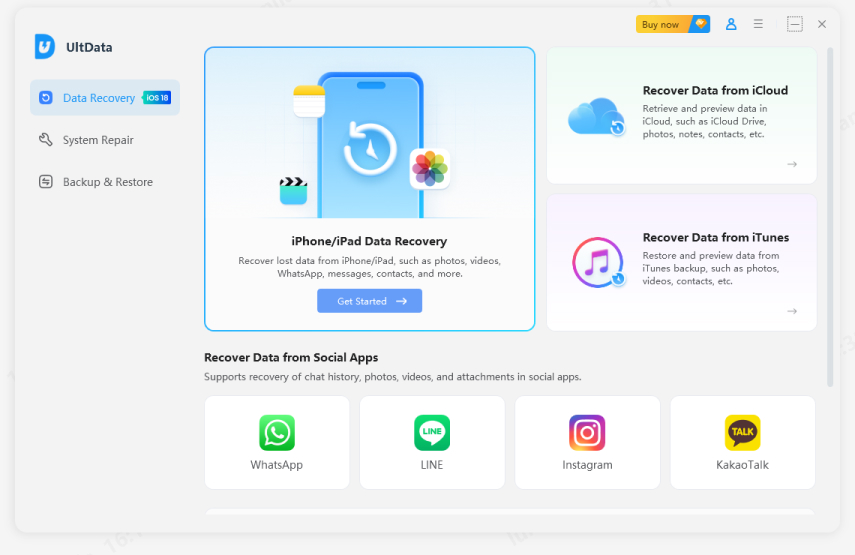
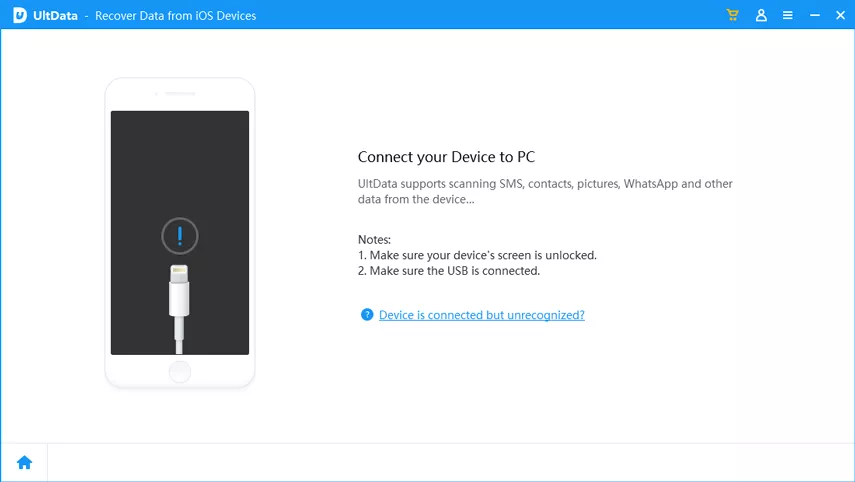
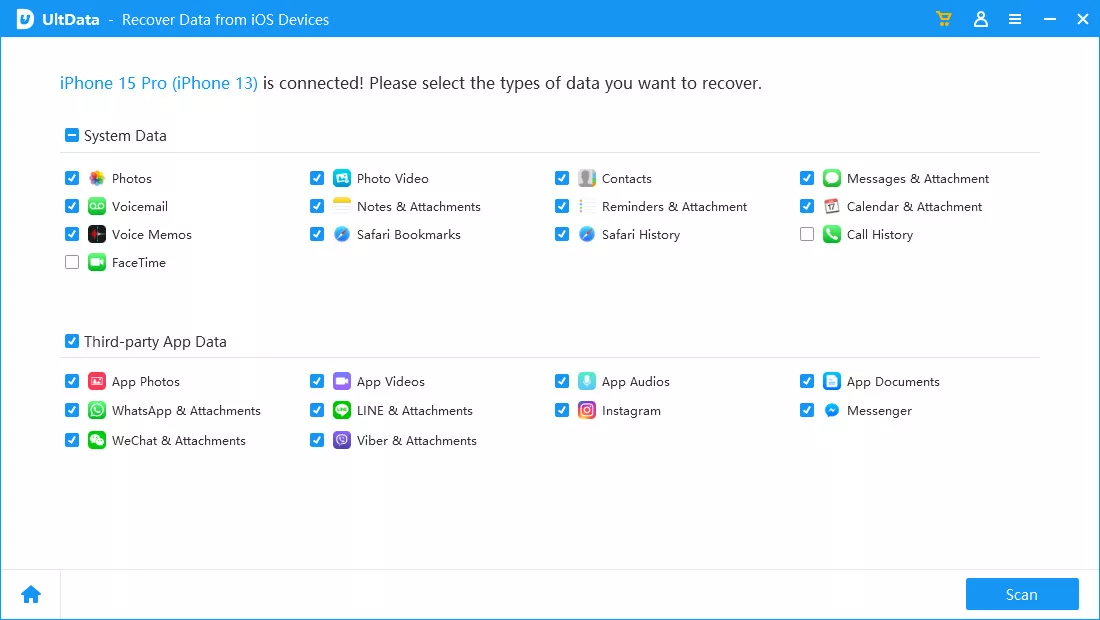
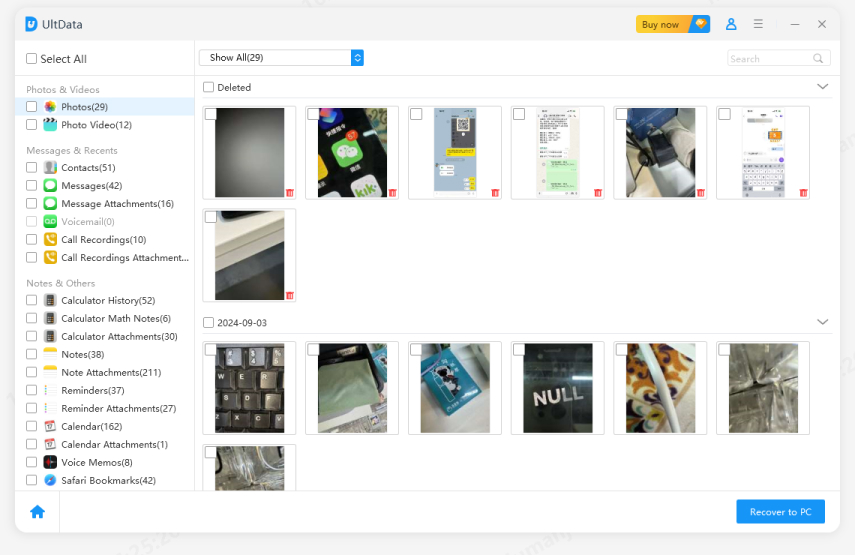
This process helps recover exported Gemini documents, deleted screenshots, uploaded images, and other important files even if you no longer remember where they were stored.
Learning how to save Gemini chat helps protect your work, study notes, research, and AI-generated content. You can keep your conversations by exporting them to Google Docs, creating PDF files, or using Google Takeout for a larger backup. If your exported files are deleted, Tenorshare UltData offers a practical way to recover documents, screenshots, PDFs, and other important Gemini-related files, helping you avoid losing valuable information.


UltData - Best iPhone Data Recovery Software






then write your review
Leave a Comment
Create your review for Tenorshare articles

Share this post


UltData - Best iPhone Data Recovery Tool
Recover Deleted & Lost Data from iOS Devices Easily, No Backup Needed!
UltData: Best iPhone Recovery Tool
Recover Lost iPhone Data without Backup
By Jenefey Aaron
2026-09-28 / AI Recovery