

 iOS Tips & Latest Updates
 Bug Fixes, Unlock Guides
 Giveaways & Freebies


UltData - Best iPhone Data Recovery Tool
Recover Deleted & Lost Data from iOS Devices Easily, No Backup Needed!
UltData: Best iPhone Recovery Tool
Recover Lost iPhone Data without Backup
ChatGPT is a commonly used tool by many people for their work, study, or personal tasks. It can be frustrating if you suddenly lose access to the account. Whether you forgot the password or used any wrong method for login other than the one you set initially, it's essential to understand the recovery options.
This guide covers ChatGPT account recovery in the simplest means, by following common access problems, and walks you through the practical steps to get access back or recover important files from your account.

If you are unable to access your ChatGPT account, luckily, many account-related issues can be resolved before attempting any fixes. Understand what this recovery actually means and when it is needed.
ChatGPT account recovery is a common process of restoring access to the already existing ChatGPT account when you no longer sign in normally.
Account recovery process involves a few verification steps; identity verification is used to confirm your login origin method, or to reset the credentials. The purpose is to get access to the old account rather than a new account.
The scenarios in which users may need to recover access after:

It is necessary to understand that recovering a ChatGPT account is different from opening a new account. If you create a new account, you will not be able to restore your previous conversations, settings, and subscriptions linked with the original account. Everything will start from scratch.
There are several issues related to accounts that restrict ChatGPT access:
Certain conditions require you to perform account recovery if:
Once you know the reason behind the underlying problem, it helps you determine the effective recovery method.
People often confuse password reset with account recovery and assume they are the same, but they are not.
A password reset is basic and works under specific conditions:
However, you may need additional account recovery steps when:
Once you clearly understand your condition, it saves time when trying to recover a ChatGPT account.
Before you proceed with any recovery attempt, it is necessary to identify the reason behind lost access. Many issues are basic and can be resolved without much effort.
This is a common issue with lost account access. It occurs when the user inputs the wrong authentication method. For example, instead of logging in with Google, try to log in with email and password, which was held by Google.
The same happens when registered with Apple and trying to log in with Google. All such scenarios can result in lost login access.

Users sometimes add the wrong email address and think it's a major issue. Instead, it is easily manageable by looking for typographical errors, some alternate email accounts, and confusion in personal and professional accounts.
If the ChatGPT account was intentionally deleted, recovery chances are limited.
Some possible situations where there are still chances to recover deleted ChatGPT account include:
Some scenarios include an account that still exists, but due to some technical issues, the account's appearance is missing. It can be due to:
Such issues can include trying another browser or device to determine whether the problem is account-related or device-related.
It is always a concern for many people whether a deleted ChatGPT account can be restored. The answer totally depends on the account deletion status and how much time has passed.
If you have recently encountered a deleted account, contacting the support team will immediately give you the best chance to determine the available options. In certain conditions, it is important because recovery opportunities may become more limited over time.
However, if your account has been permanently removed, restoration is not possible. In such cases, users may need to create a new account and explore alternative ways that will help recover the files or exported content associated with their previous ChatGPT usage.
To improve your chances for better recovery:
If you set realistic expectations, it can help avoid frustration during the recovery process.
It is important to understand the ways through which you can recover ChatGPT account access. Let us walk through the most effective methods for restoring accounts.
The most common yet easy to regain access method is to try every sign-in option available. Sometimes users forget their login method and try the wrong method, resulting in no access. Go to the login page and continue with Google. If it doesn't work, select continue with Apple. After both attempts, you can try standard email credentials for login to the previously linked account.
If you have signed up with an email and a password, then a safe approach is to reset the password to regain access to the account quickly. Go to the login page and select forget password after entering a registered email. You will get an email to reset the password. Open and create a new password. It will regain login access.

If you are unable to log in to your account, you need to verify that another email was used during registration.
Looking in your inbox for OpenAI emails can help you identify the correct account.
Sometimes, technical issues become a hurdle to your login. A few steps can clear the cache and let you log in safely.

Trying these options can eliminate the local device-level problems that interfere with account access.
In case no other method works, contact the ChatGPT support. Prepare your account details, including email address, account creation date, subscription details, description of the concerning issue, and a few screenshot to display the error messages.
Support can help you verify account status and identify login issues. They can provide you with a suitable recovery option.
It is important to understand that account recovery and data recovery are not the same processes. Even if you are wondering how to find my ChatGPT account, certain files under your usage can still be recovered from your device and storage locations.
With the help of data recovery software, you can locate:
The tools are mostly helpful when files are accidentally deleted from a device but have not yet been permanently overwritten.
If the files were removed from your iPhone, your specialized recovery software should be able to scan the device and identify recoverable content before it's too late to recover it.
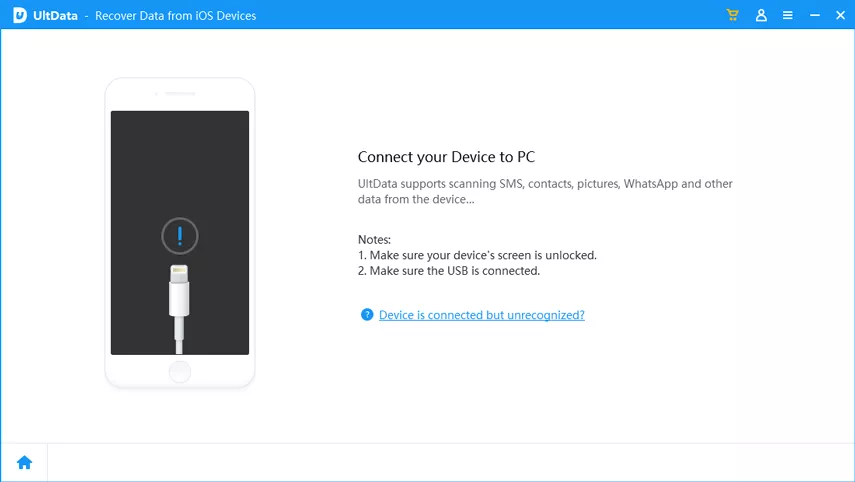
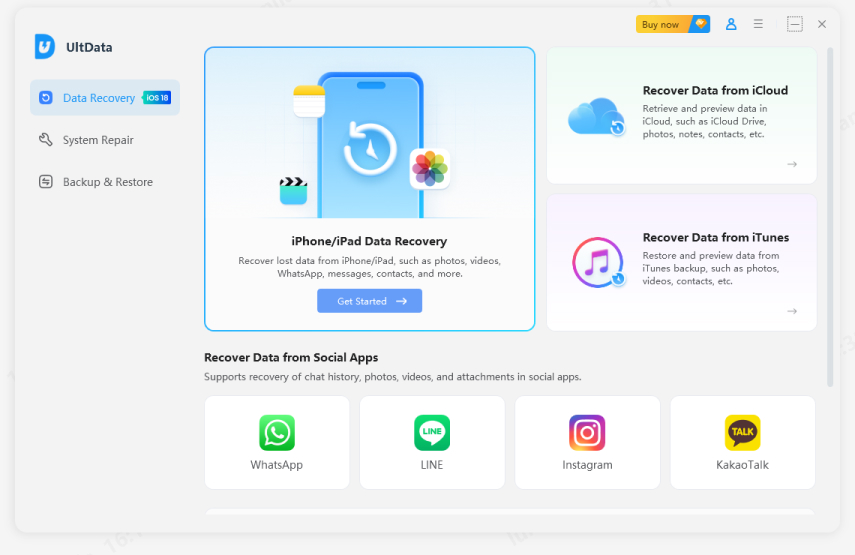
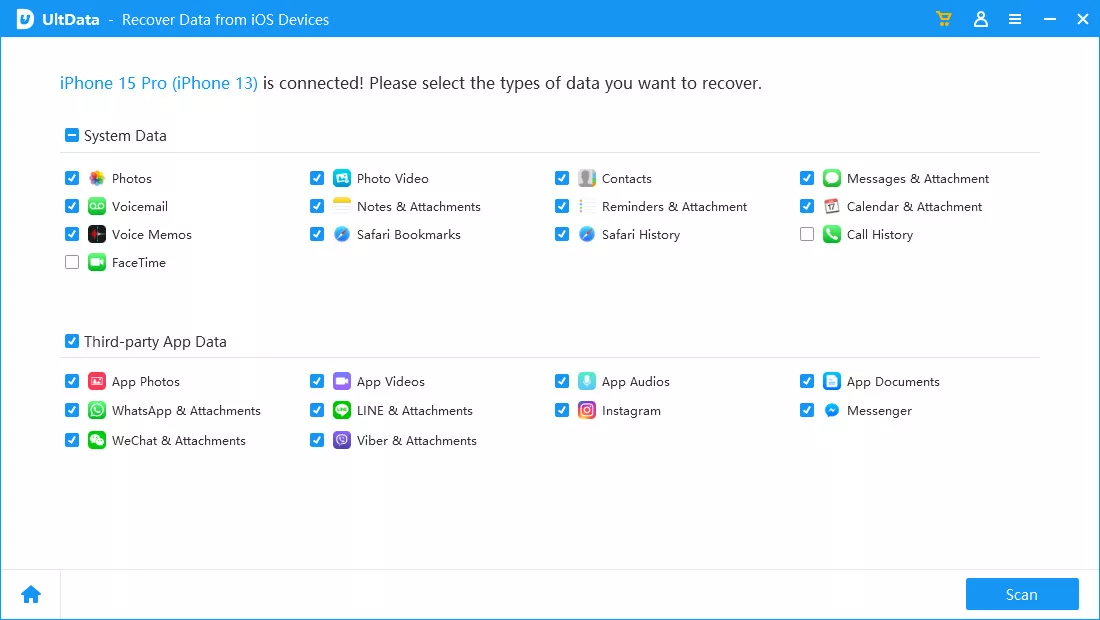
If you had any backup or downloaded ChatGPT files on your iPhone and deleted them later, Tenorshare UltData is your top choice to consider. It is an iOS-based data recovery tool that is designed for scanning iPhones, iPads, iCloud backups, and iTunes backups for recoverable data. Further, it supports various file types, including photos, documents, notes, messages, attachments, and other files containing ChatGPT-related information.
Steps to recover data




The success of your recovery process depends on factors such as file type, device condition, and whether the deleted data has been overwritten.
ChatGPT account recovery is an important concern nowadays. It can be achieved by verifying the login method, resetting your password, checking alternative email accounts, clearing browser issues, or contacting support. While some of the deleted accounts often have limited recovery options, it is essential to react quickly to get a chance to recover.
If there is no way to recover the account, you can still recover the related files, like screenshots, exported conversations, PDFs, and other uploaded content. In such a condition, Tenorshare UltData can provide you with an additional option for recovering valuable ChatGPT-related files stored on your device.


UltData - Best iPhone Data Recovery Software






then write your review
Leave a Comment
Create your review for Tenorshare articles

Share this post


UltData - Best iPhone Data Recovery Tool
Recover Deleted & Lost Data from iOS Devices Easily, No Backup Needed!
UltData: Best iPhone Recovery Tool
Recover Lost iPhone Data without Backup
By Jenefey Aaron
2026-09-28 / AI Recovery