



UltData - Best iPhone Data Recovery Tool
Recover Deleted & Lost Data from iOS Devices Easily, No Backup Needed!
UltData: Best iPhone Recovery Tool
Recover Lost iPhone Data without Backup
Google Gemini has become one of the best AI tools to brainstorm ideas, draft content, and conduct conversations. Users are moving to Gemini Chats for their daily tasks. However, the need to export these chats for backups and save the data is essential. The Gemini exporter is helpful to naturally keep the backups; however, there are different third-party tools that can help you save your data in an organized way.
In this guide, we are going to discuss a few of the methods that can help you export Gemini chats to keep your data organized and saved.

Google helps users to directly export the Gemini chats through built-in methods. You are allowed to save individual chats and reports to Google Docs, Gmail, or PDF files.
Exporting Gemini Chats and Deep Research Reports directly to Google Docs is one of the easiest methods. Here is how you can do it.
Gemini Chats are also exported to your Gmail, helping you save a lot of time while copying the conversation. Here is how you can do it.

Gemini chats are also exported to your PDF files for more professional work. Here is what you need to do.

Third-party exporters can help save Gemini Chats in bulk. You can export Chats through Extensions and archiving tools.
Gemini Chat exporter extensions are useful to save chats in bulk. However, you need to further organize them in folders and use them afterward. They are mostly saved as HTML, Markdown, or Text files. Here are a few of the extensions that can be used to export chats in Gemini.
Browser-based archiving tools are quite useful while saving the whole webpage, including images and chats. Here is how you can do it.
Gemini chats can be exported using various methods, but you may occasionally encounter difficulties during the process. Here are some common issues you might face.
While exporting Gemini chats, you might lose some files after saving due to the name of the file or be deleted by mistake.
Gemini chat without a complete conversation might get you in trouble. Sometimes, the conventional methods lose whole chats, or partial details are missing while exporting.
PDF might get deleted due to some sort of virus or accidental deletion.
While Google Docs are generally a safer way to store your work, there is still a chance that you might misplace the links to your chats.
Many Gemini export issues can be fixed through downloads, Google Drive searches, or account verification. However, if export files have been deleted, corrupted, or lost due to a failed export process, basic troubleshooting may not be enough.
In these cases, a dedicated data recovery solution can help restore valuable Gemini-generated content and recover files that appear permanently lost.
Tenorshare UltData recovery tool is your go-to option to get back your deleted Gemini chats. Here are a few of the main features of the Tenorshare UltData recovery tool.




Let's check out how to recover your deleted data through the Tenorshare UltData recovery tool.
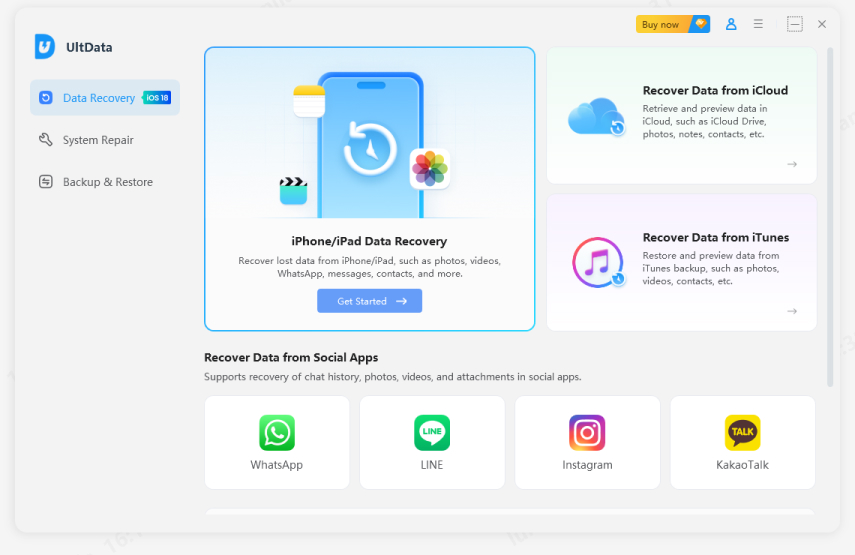
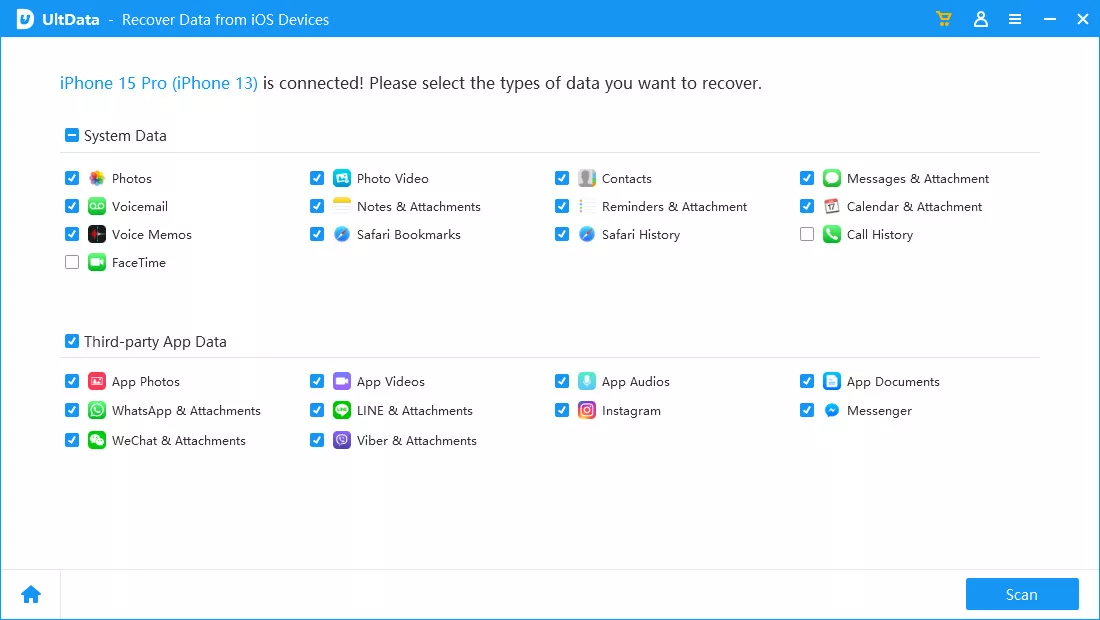
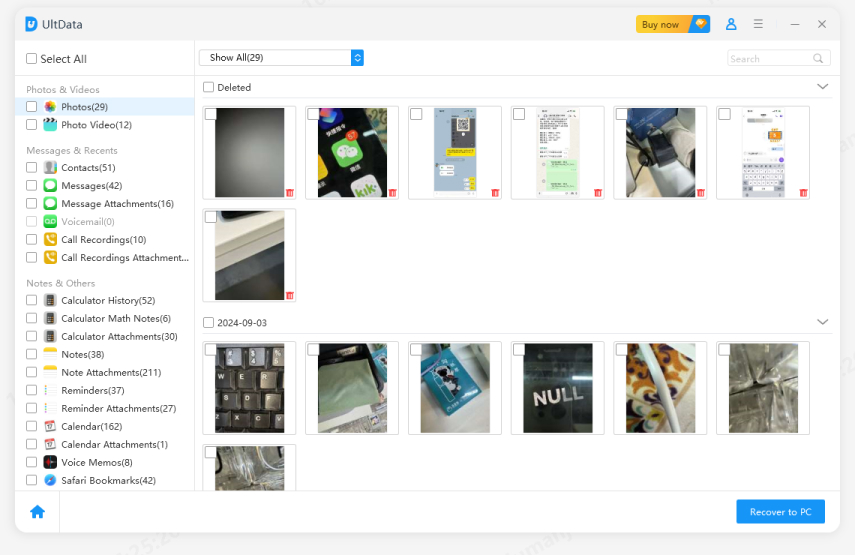
That is how easy it is to recover any lost file with the help of the UltData recovery tool.
Your Gemini chats and reports represent hours of hard work and valuable insights. Losing them can be a real headache, but you can easily avoid this by using a reliable gemini exporter to keep consistent, offline backups.
If you ever accidentally delete something, don't worry---tools like the Tenorshare UltData recovery tool can help you get back your lost files, images, or PDFs in just minutes. By staying prepared with regular backups and keeping a recovery tool handy, you'll ensure your hard-earned research stays safe and sound.


UltData - Best iPhone Data Recovery Software




then write your review
Leave a Comment
Create your review for Tenorshare articles

Share this post


UltData - Best iPhone Data Recovery Tool
Recover Deleted & Lost Data from iOS Devices Easily, No Backup Needed!
UltData: Best iPhone Recovery Tool
Recover Lost iPhone Data without Backup
By Jenefey Aaron
2026-09-15 / AI Recovery