Whether you’re using a MacBook Pro or MacBook Air, managing apps efficiently
has become more important than ever. From controlling startup items, delete persistent apps to
removing stubborn app leftovers, macOS users increasingly rely on application
managers to stay organized and fast.
In this guide, we’ll review the best Mac application managertools in 2026, compare their features, and help you choose the right
solution for managing, monitoring, and optimizing apps on your Mac.
A Mac application manager is a tool designed to help users manage installed
programs, background processes, and startup items more efficiently than
macOS alone.
In simple terms, it acts as a Mac program manager, allowing you to:
Monitor system performance (CPU, memory, disk usage)
Update applications from one place
While macOS includes basic tools like Activity Monitor and Finder, they lack
advanced features such as deep cleanup, batch management, and automation.
That’s why many users turn to a dedicated Mac task manager or application
manager for better control and long-term performance.
Part 2. Top 8 Best Mac Application Managers in 2026
If you are looking for the best application manager for your Mac, here are
your top 8 options:
1. Tenorshare Cleamio -- Best All-in-One Mac Application Manager &
Cleaner
Tenorshare Cleamio
is a powerful all-in-one Mac application manager that combines app
management, system monitoring, cleanup, and optimization into a single
intuitive interface. It goes far beyond basic uninstallers by managing
startup apps, updating software, cleaning junk files, and even
batch-renaming files, making it the most comprehensive solution in 2026.
2. Raycast -- Best Modern Mac App Launcher & Manager
Raycast is a lightning-fast, keyboard-first productivity tool that replaces
traditional app launching with powerful commands and workflows. It allows
users to open apps, run scripts, manage system actions, and automate tasks
entirely from the keyboard, making it a favorite among productivity-focused
and technical Mac users.
Rating: 4.4/5
Best for: Developers and keyboard-centric users
Key Features:
App launching and switching
It gives you workflow automation
Plugin ecosystem is also available in it
Clipboard and snippet manager
Pros
Extremely fast and modern UI
Highly extensible
Free core features
Cons
Not focused on cleanup or uninstalling
Learning curve for beginners
3. Alfred Powerpack with Workflows -- Best Customizable Workflow App Manager
for Mac
Alfred is a highly customizable Mac program manager that enhances app
launching, file navigation, and automation on macOS. With the Powerpack
upgrade, users can build complex workflows that connect apps, scripts, and
system commands, offering deep control over how applications and actions are
managed across the system.
Rating: 4.5/5
Best for: Advanced users who want total customization
Key Features:
App launcher and file search
Custom workflows will be offered
Clipboard history is available in it
Automation triggers makes it a good choice
Pros
Extremely flexible
Long-standing reputation
Strong community support
Cons
Paid upgrade required
No app cleanup features
4. BuhoCleaner -- Best Affordable Mac Cleaner with Startup Management
BuhoCleaner is a lightweight and affordable Mac utility designed for basic
system cleanup and app management. It combines junk file removal with simple
tools for uninstalling applications and managing startup items, making it a
practical choice for users who want straightforward Mac maintenance without
advanced configuration.
5. Hazel -- Best Automated File & App Management Tool for Mac
Hazel is an automation-focused app manager for Mac that manages files and
app-related tasks using customizable rules. Instead of manual cleanup, it
continuously monitors folders and triggers actions such as renaming,
organizing, or deleting files automatically, making it ideal for users who
prefer hands-off system organization.
Rating: 4.3/5
Best for: Users who want hands-off file and app-related automation
Key Features:
Rule-based automation
You can get folder monitoring
File renaming and sorting is available
Script execution is in it
Pros
Extremely powerful automation
Saves time long-term
Reliable and lightweight
Cons
Not beginner-friendly
No system monitoring
6. CleanMyMac -- Best Premium All-in-One Mac Cleaner & Optimizer
CleanMyMac is a premium Mac maintenance suite that combines app
uninstallation, junk cleanup, malware detection, and performance
optimization into a polished interface. It emphasizes ease of use and visual
clarity, making it appealing to users who want an all-in-one solution for
keeping their Mac clean and responsive.
Rating: 4.1/5
Best for: Users who prefer a polished, premium cleaner
7. AppCleaner -- Best Free Simple Mac App Uninstaller
AppCleaner is a minimal, free Mac software manager designed specifically for
uninstalling applications and removing leftover files. It avoids unnecessary
features and focuses entirely on clean app removal, making it ideal for
users who want a fast, no-cost solution without system optimization or
background processes.
Rating: 4.0/5
Best for: Users needing a free uninstaller
Key Features:
App removal can be done with it
Leftover file detection is a great thing to have
Lightweight operation
Pros
Completely free
Easy to use
Effective at leftover removal
Cons
No startup or performance management
No updates or monitoring
8. Nektony App Cleaner & Uninstaller -- Best Professional Mac App
Uninstaller with Leftovers Removal
Nektony App Cleaner & Uninstaller is a professional-grade Mac utility
focused on deep application removal. It
scans for hidden leftovers, manages startup items, and cleans extensions, offering more thorough
control than basic uninstallers while remaining accessible through a clean
and well-organized interface.
Rating: 4.3/5
Best for: Users who prioritize thorough app removal
Key Features:
Deep uninstall
Startup item manager
Extension cleanup
Disk usage insights
Pros
Deep scanning
Clear interface
Reliable results
Cons
Limited system monitoring
Paid version required for full features
Part 3. How to Completely Delete Apps & Manage Startup Apps on Mac Using
Cleamio Simply
If you want a simple and reliable way to uninstall apps and manage startup
items, Tenorshare Cleamio offers the easiest workflow.
Download and install Cleamio on your Mac and open it, then go to "App
Management" and click "Start”.
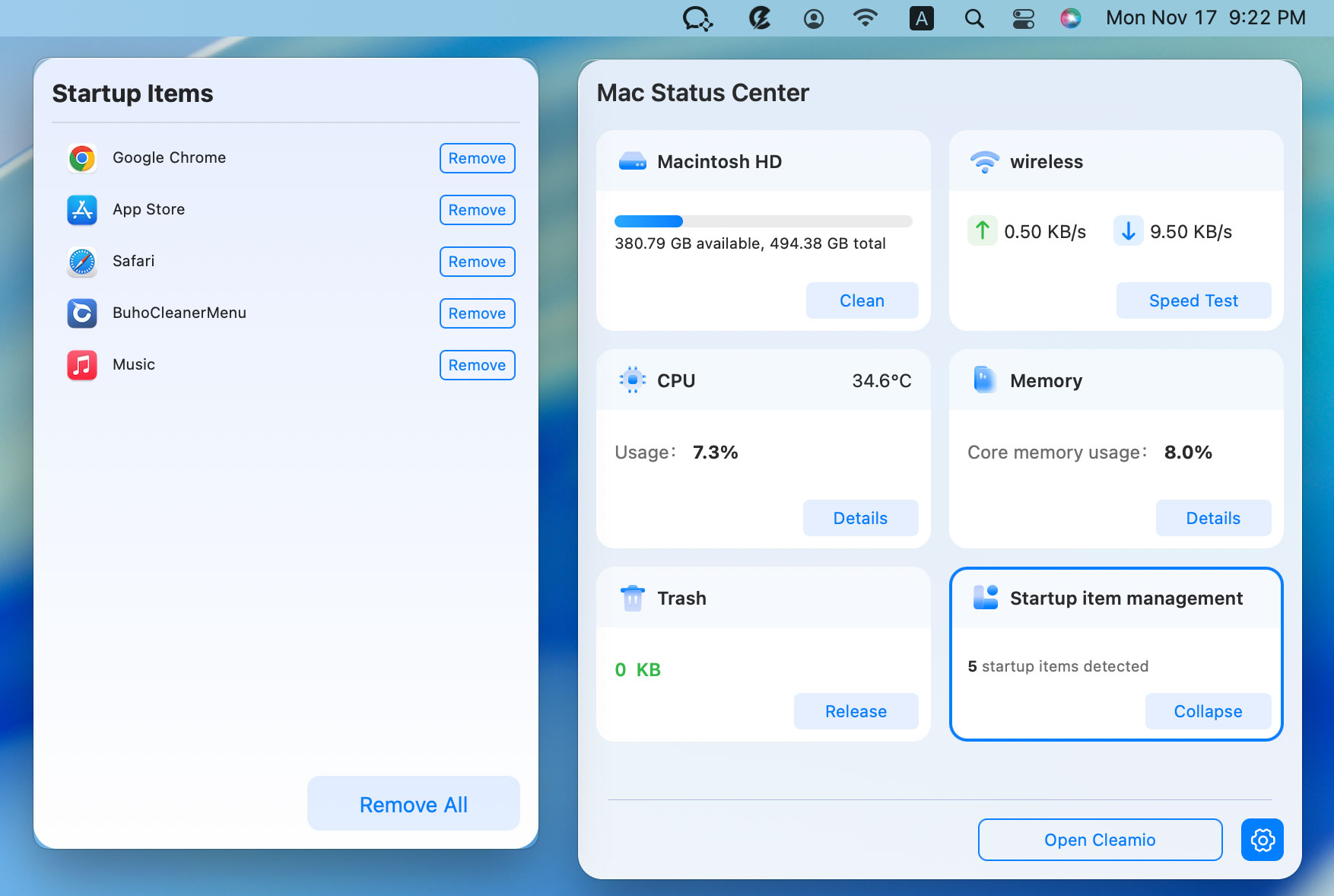
Manage Startup Items: Just tap on the top-right Cleamio logo, select
“Startup Item Management” module.
Then click “Remove” or “Remove All” to stop those apps from opening on
startup in Mac.
People Also Ask about Application Manager on Mac
Q1: Is there any Mac application manager shortcut?
Most managers rely on menu bar access or keyboard shortcuts within the app.
Q2: How to open the application manager on a Mac?
macOS doesn’t have a single “application manager,” but third-party tools
fill this role.
Q3: How to remove Adobe Application Manager from Mac?
Use a deep uninstaller like Cleamio to remove Adobe apps and leftovers.
Q4: How do I go to the application manager on my Mac?
Use Finder > Applications or a dedicated Mac application manager.
Q5: How to tell if someone is monitoring your computer on a Mac?
Check Activity Monitor, login items, and unknown background processes.
Conclusion
Choosing the best Mac application manager depends on how much control
you want over apps, startup items, and performance. While tools like Raycast
and Alfred excel at productivity, Tenorshare Cleamio stands out as
the most complete solution, combining app management, system monitoring,
cleanup, and optimization in one place.
For MacBook Pro and MacBook Air users in 2026, Cleamio is the smartest
all-in-one choice.




 iOS Tips & Latest Updates
 Bug Fixes, Unlock Guides
 Giveaways & Freebies





By Jenefey Aaron
2026-09-28 / Mac Optimization