Open your Calendar app expecting to see your schedule, and find it empty. An
iPhone Calendar not showing events is a common but stressful problem,
especially when the missing entries are meetings/appointments or reminders you
can't recreate from memory.
iPhone Calendar events may disappear because of:
iCloud Calendar sync turned off
Wrong calendar account selected
Calendar app sync issues
Events accidentally deleted
iOS update or system errors
Data loss without backup
Before trying recovery tools, check whether your events are simply hidden or
not synced. Stick with this guide to learn all the reasons and possible fixes
to restore iPhone Calendar events.
When Calendar events are not showing on iPhone, there isn't a single common
issue. There are multiple reasons that can lead to it:
iCloud Calendar Sync Is Disabled
Calendar events stored in iCloud only appear on your iPhone when iCloud
Calendar sync is switched on for that account.
Sometimes, it gets turned off due to a settings reset or an account change.
In that case, those events will stop appearing on your iPhone, but they will
still exist in iCloud.
Calendar App Filters Hide Events
The Calendar app lets you toggle individual calendars on and off from the
"Calendars" list at the bottom of the screen. If a calendar (say, a work or
shared calendar) got unchecked, every event tied to it disappears from view,
even though nothing was actually deleted.
iPhone Is Not Syncing Calendar Data
Poor network connectivity, a stuck background sync process, or an outdated
iOS version can all prevent new or existing events from syncing between
iCloud and your device.
Calendar Events Missing After iOS 27 Update
If your Calendar events disappeared after an iOS 27 update, the problem may be related to a temporary Calendar app issue, an interrupted sync, or changes to your account settings. In some cases, the Calendar app may even crash after the update, while in others, the calendar list returns but the events themselves remain missing.
Start by checking whether iCloud Calendar sync has been turned off and whether your events are still available on iCloud.com. Re-enabling iCloud Calendar Sync may restore the calendar list, but it does not necessarily restore events that were never successfully synced. This is particularly important for events that were stored locally on the iPhone rather than synced to iCloud.
Similar reports can also occur after later releases, such as iOS 27.1 or future iOS updates. So, if you're experiencing Calendar events missing after an iOS update, don't assume the issue is limited to one specific iOS version. Checking your sync settings, connected accounts, and available backups can help determine whether the missing events can still be restored.
Where Did Your Missing Calendar Events Go?
If you're dealing with the iPhone Calendar not showing events issue, the first step is to figure out where those missing events may have gone. The table below covers the most common situations and what to check first.
What You See
What It Could Mean
What to Try First
Calendar app is there, but some events are missing
Calendar hidden/ account filter
Check Calendars
Calendar app is there, but all events are gone
Sync or account issue
Check iCloud & Accounts
Events appear on iCloud.com but not iPhone
iPhone sync issue
Re-sync Calendar
Events are missing from both iPhone and iCloud.com
Possible data loss
iCloud Restore/ Backup/ Recovery
Events disappeared after an iOS update
Sync interruption /update issue
Check sync before recovery
App data
App-specific cloud backup
Within the individual app
Local Calendar events were never synced to iCloud
Local data loss
Data recovery
How to Fix iPhone Calendar Events Not Showing
Just like there are multiple reasons for "why is my iPhone Calendar not
showing events", there are multiple fixes. Follow them one by one if you
don't know the root cause of the issue:
Method 1: Check If Calendar Events Are Hidden
Open the Calendar app.
Tap the Calendars icon at the bottom of the screen.
Make sure all relevant calendars are checked/selected.
Sometimes events are still saved but hidden because the related calendar is
unchecked.
Method 2: Turn On Calendar Sync for Your Account
Go to
Settings → Apps → Calendar → Calendar Accounts → \Select account\ →
Enable Calendar.
If this toggle was off, switching it back on should bring your synced events
back within a few minutes.
Method 3: Refresh Calendar Sync
Go to Settings > \Your Name\ > iCloud.
Toggle iCloud Calendar off and back on. Alternatively,
switch Airplane Mode on and off to force the iPhone to
re-establish its sync connection with iCloud servers.
Method 4: Restart Your iPhone and the Calendar App
A quick restart clears temporary glitches that can interrupt background
syncing. Close the Calendar app fully, restart your iPhone, then reopen it
to see if events reappear.
Method 5: Check iCloud Calendar Online
Log in to
iCloud.com
on a browser and open Calendar. If your events appear there, the issue is a
local sync problem on your iPhone rather than lost data.
This confirms the events still exist and just need to be pulled back down.
However, if the events are also missing on iCloud, it indicates a possible
deletion/data loss.
Please swipe to view
Situation
Meaning
Events appear on iCloud
iPhone sync issue
Events missing on iCloud
Possible deletion/data loss
The next part covers how to restore iPhone Calendar events that are
deleted/lost.
How to Restore Deleted iPhone Calendar Events
If the steps above don't bring your events back and you don't see them in
iCloud, they may have been deleted.
Now the best recovery method depends on how the calendar was stored and
whether you have a recent backup. Apple provides several built-in recovery
options through iCloud and computer backups, while Tenorshare UltData can
provide more selective recovery with/without backup.
The following are different ways to restore iPhone Calendar not showing
events depending on what you have available:
Restore from
iCloud.com
If you use iCloud to sync your calendars, you may be able to restore deleted
events directly from
iCloud.com. Apple automatically archives earlier versions of your calendars. So, you
can roll back to a version from before the event was deleted.
Sign in to
iCloud.com
on a computer or tablet. Scroll down and select
Data Recovery.
Choose Restore Calendars.
iCloud will show available archived versions with their dates and times.
Select a version from before the event disappeared and click
Restore.
The
restored calendars
and events will then sync to devices that have iCloud Calendar enabled.
Limitations
Restores an entire calendar archive rather than individual events
Newer calendar changes may be overwritten.
Available archives are limited to Apple's stored versions.
Restore from iCloud Backup
If you had created an iCloud backup of your iPhone before calendar events
were deleted, that backup contains the record of lost events. Now, you can
restore that iCloud backup to your iPhone.
If the iPhone is already set up, Apple requires you to erase its current
contents before restoring from an iCloud backup (Settings > General > Transfer or Reset iPhone > Erase All
Content and Settings).
Begin the iPhone's initial setup. Select
From iCloud Backup when you reach the
Transfer Your Apps & Data window.
Log in with your Apple ID and pick the right backup.
Wait for the backup to restore.
After restoration, open the Calendar app and see if the events are restored.
Limitations
Requires a backup from before the event was deleted.
Usually requires erasing the iPhone first.
Restores the entire backup rather than just the calendar event.
Newer iPhone data may be lost or overwritten.
Restore from iTunes/Finder Backup
Just like iCloud, iPhone users can also create a backup on their PC or Mac
using iTunes/Finder. So, if there is a backup created before calendar events
deletion, here's how to restore deleted iPhone Calendar events by restoring
iTunes/Finder backup:
Launch iTunes/Finder and connect your iPhone to the computer using a USB
cable.
Select your device and tap Restore Backup.
Choose the right backup file and enter the password if asked.
After the restoration is completed, go check the Calendar app.
Limitations
Requires an existing computer backup.
Backup must contain the deleted event.
Restores the whole device backup.
Newer iPhone data is overwritten.
Recover iPhone Calendar Events with UltData (Two Methods)
The official backup-based iPhone Calendar events restoration requires
resetting the iPhone and restoring the entire backup. In contrast,
Tenorshare UltData offers a better alternative for restoring calendar
events, with or without a backup, but without requiring a full restoration.
UltData iPhone Data Recovery
is a dedicated iOS recovery tool that can recover 35+ data types, including
calendar events, contacts, photos, messages, WhatsApp chats, and more. It
can recover directly from your iPhone without backup or selectively from an
iCloud or iTunes backup.
Before recovery, it provides a preview of recoverable data, which makes it
easier to select and recover only specific event data. All this happens
without erasing your current device data.
The following are two methods on how to recover deleted iPhone Calendar
Events with UltData:
Method 1: No Backup Required (Direct iPhone Recovery)
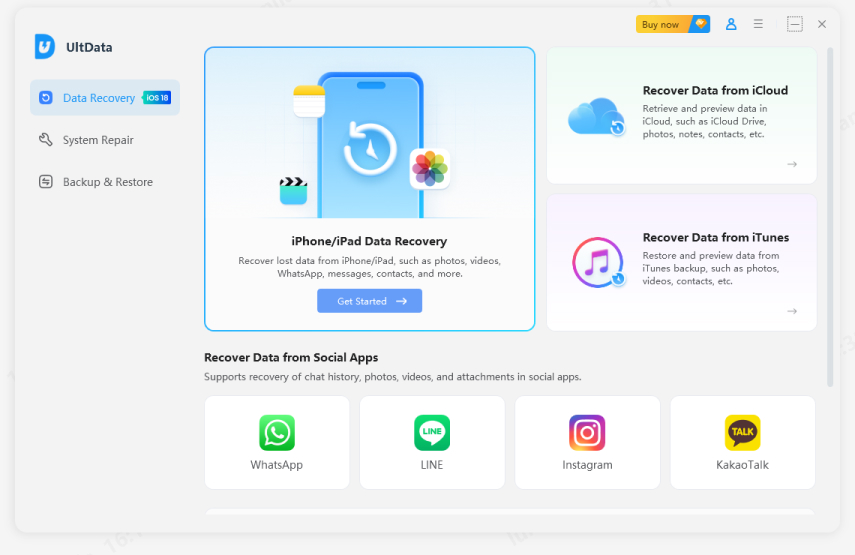
Install and launch UltData iPhone Data Recovery on your computer and
select iPhone/iPad Data Recovery.
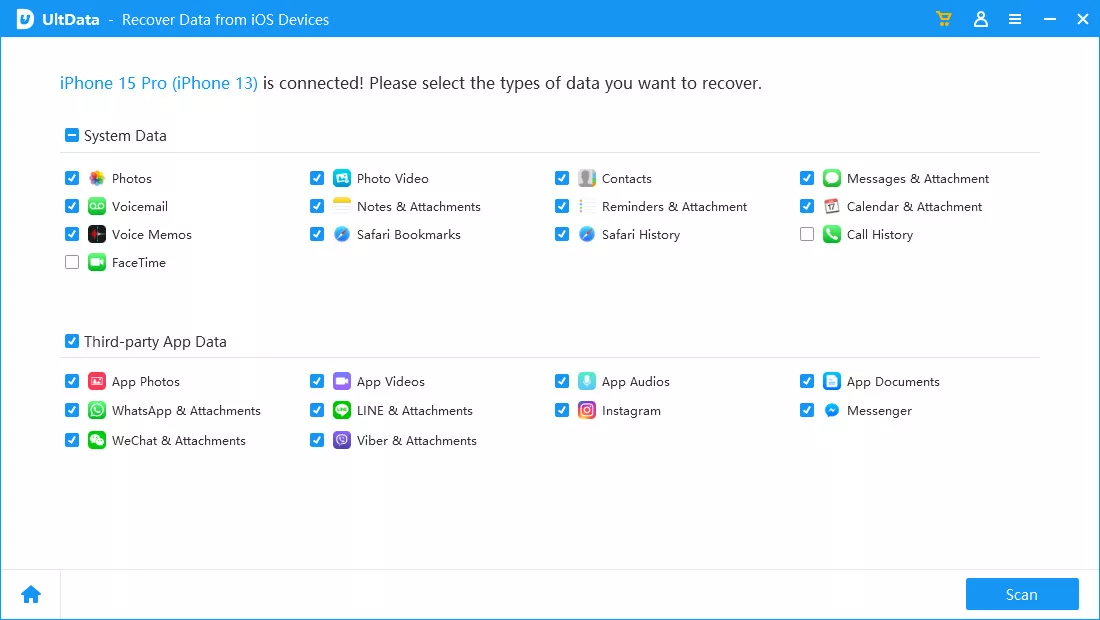
Connect your iPhone to your computer through a USB cable.
Select "Calendar" and other data types you want to scan
from the internal storage and click Scan.
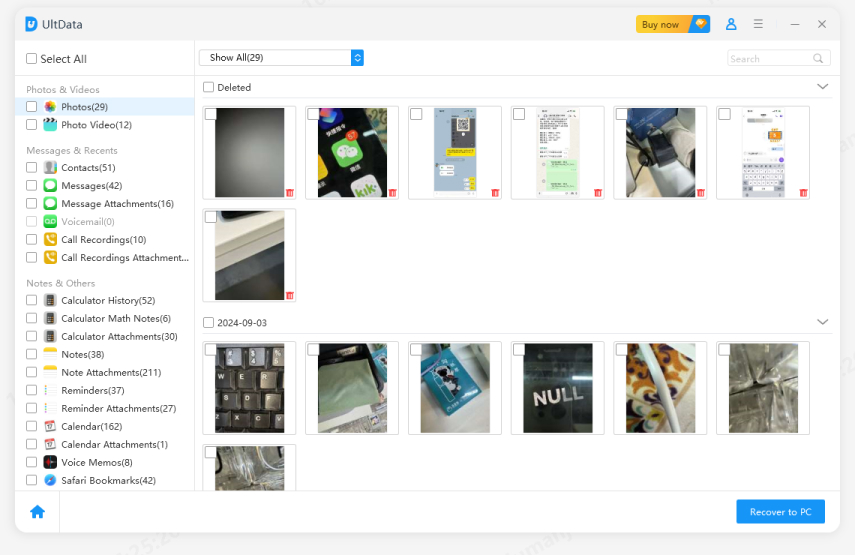
After the scan, preview and select the calendar events you want to restore
and click Recover to PC.
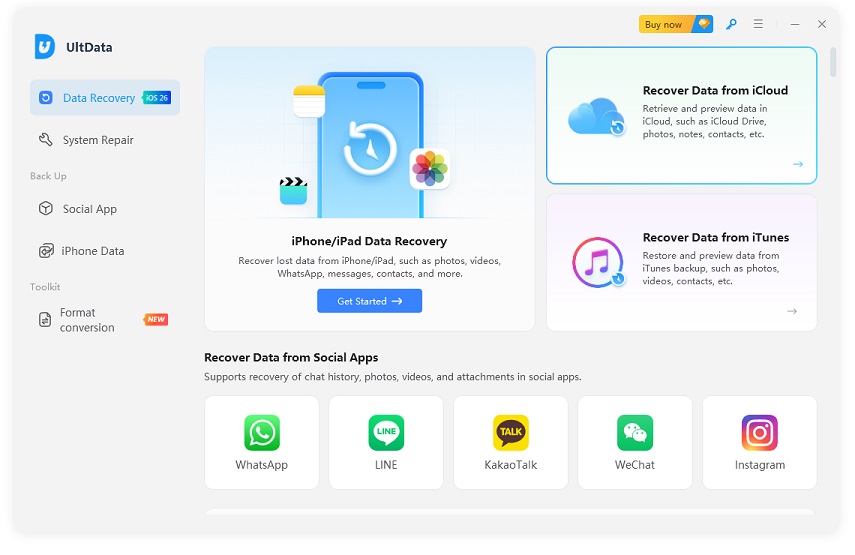
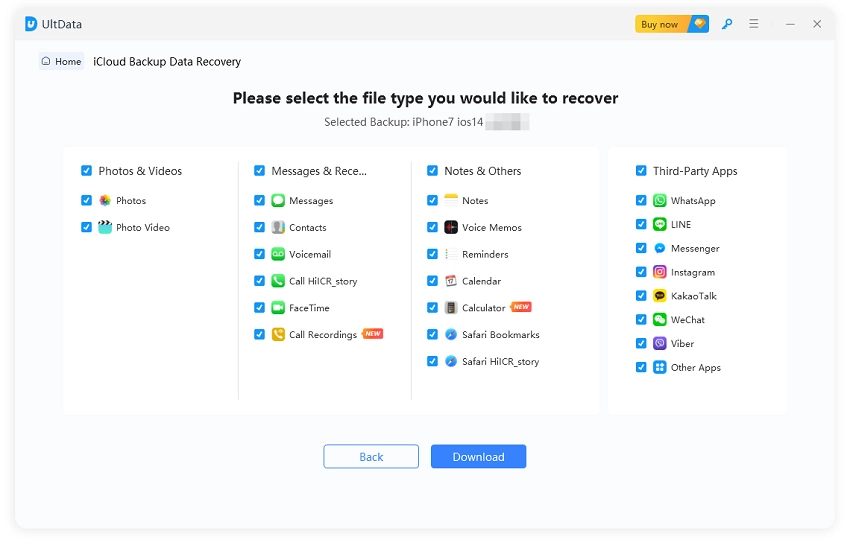
Select the backup file you want to restore and click
Next.
Select "Calendar" and other data types, then click
Download.
After the scan, preview the recoverable calendar events from the backup.
Select the lost ones you want to restore and click
Recover to PC.
That's how Tenorshare UltData offers an advanced solution to restore lost
calendar events without the need to restore the entire backup.
Download UltData
and give it a try yourself.
How to Prevent iPhone Calendar Events from Disappearing Again
Until now, we have learned the reasons and best fixes for calendar events
not showing on iPhone. Let's now look at the best prevention tips to make
sure you never have to troubleshoot this again:
Enable iCloud Calendar Sync: Keep Calendar sync switched
on for every account you rely on so future events are always backed up
automatically.
Keep Regular iPhone Backups: Regular iCloud or local
backups mean that even if something goes wrong, you have a recent snapshot
to fall back on.
Use Multiple Calendar Accounts Carefully: If you juggle
work, personal, and shared calendars, double-check which one is set as
default before adding new events, so nothing gets buried in the wrong
account.
Avoid Deleting Unknown Calendars: Don't remove a calendar
account you don't recognize without checking first. This move can silently
remove every event tied to it.
Conclusion
An iPhone Calendar not showing events issue can be caused by hidden calendars, sync problems, account settings, or even an iOS update. Start by checking your Calendar settings and iCloud sync to determine whether the events are still available. If they are missing from both your iPhone and available backups, Tenorshare UltData provides another way to check for and recover supported calendar data without restoring an entire backup.












 iOS Tips & Latest Updates
 Bug Fixes, Unlock Guides
 Giveaways & Freebies






By Jenefey Aaron
2026-10-20 / iOS Data Recovery