

 iOS Tips & Latest Updates
 Bug Fixes, Unlock Guides
 Giveaways & Freebies


UltData - Best iPhone Data Recovery Tool
Recover Deleted & Lost Data from iOS Devices Easily, No Backup Needed!
UltData: Best iPhone Recovery Tool
Recover Lost iPhone Data without Backup
Disk Drill iPhone Data Recovery is among the popular Mac tools to recover lost data from iOS devices. It helps recover data from various data loss scenarios, such as accidental deletion, iOS upgrade error, factory reset, water damage, and more. However, is Disk Drill by CleverFiles safe and reliable for iPhone data recovery?
In this comprehensive Disk Drill iPhone Data Recovery review, we will take a closer look at its features, pricing, real-world performance, and comparison with alternatives. By the end, you will be in a position to judge whether you should use it or its alternative.

First things first, let's clarify what CleverFiles is and how it relates to Disk Drill.
CleverFiles was established in 2009 to offer data management solutions. It develops data recovery and disk utility software for macOS and Windows. Because CleverFiles builds several tools (disk health monitors, cleanup utilities, backup tools), its name shows up in system permission prompts even when the app someone downloaded is called something else. This is what leads a lot of Mac users to search for what is CleverFiles on Mac in the first place.
Disk Drill is the flagship data recovery software developed by CleverFiles. As the company's primary data recovery application, it handles recovery from internal and external drives, memory cards, and mobile devices, including iPhones and iPads (iOS/iPadOS recovery is currently only available through the Mac version).

CleverFiles looks convincing in what it intends to deliver, but is it safe and reliable? Let's figure this out.
Disk Drill is digitally signed and notarized by Apple, which means macOS verifies the installer hasn't been tampered with before allowing it to run. The application also scans in read-only mode by default, which means it doesn't write to or modify the source device during a scan.
That said, "safe" still depends on where the installer comes from. Downloading Disk Drill from anywhere other than the official cleverfiles.com site introduces the usual third-party-download risks, since bundled or repackaged installers are a common vector for malware.

According to CleverFiles' published privacy policy, Disk Drill's scanning happens locally on the connected device and does not upload recovered files to CleverFiles' servers.
Permissions requested during an iPhone scan (such as Trust This Computer prompts and backup access) are typically standard iOS/Finder-level permissions other tools also ask for.
As with any recovery tool that needs deep access to a device's file system, users relying on this should still review the current privacy policy directly. This is because scanning methods and data-handling practices can change between versions.
The reliability of iPhone data recovery with CleverFiles comes down to two supported paths, i.e., scanning the device directly and scanning a local iTunes/Finder backup. The software supports compatibility with a diverse range of iPhone series, but recovery success depends on the data loss scenario and how recently it occurred.
Direct-device scanning is more limited on newer iOS versions due to Apple's sandboxing restrictions, which block third-party apps from accessing another app's deleted data. Backup-based recovery is generally more dependable, provided a recent and accessible backup exists to scan.
Disk Drill holds a Trustpilot rating in the mid-4-star range. Looking at user reviews on Trustpilot, Reddit, and other platforms, users have acknowledged the ease of use, performance reliability, and responsive customer service. However, some common complaints center on its free tier's recovery cap. It offers no free MBs of data recovery on Mac, so users are left with just a preview of recoverable files unless they get the paid plan.

The following are some of the common concerns users ask about Disk Drill before downloading:
Disk Drill claims to recover a wide range of data types from the iPhone. These include photos, videos, contacts, voice memos, calendar events, notes, bookmarks, and messages. It also claims to recover installed apps data, especially messaging apps like WhatsApp, Viber, WeChat, Kik, and Skype.
In practice, recovery success varies by category. Media files (photos, videos) tend to recover more consistently than granular data like individual message threads. Also note that Disk Drill cannot restore iPhone system settings the way a full iTunes/iCloud restore would. It is meant to recover specific lost files.
First thing, you must have a Mac to use Disk Drill iPhone Data Recovery because it currently does not support Windows. Putting that aside, whether Disk Drill is the right tool comes down to the type of data loss you are dealing with.
It handles some scenarios well and struggles with others. The recovery success largely depends on overwrite risk and backup availability.
Good fit for:
Less suited for:
In any case, the success depends on whether the data has been overwritten and whether a usable backup exists.
Many Disk Drill iPhone Data Recovery reviews show users' frustration with its pricing mechanism, but usually this frustration is because users download and use the software without going through the free vs paid version limits properly.
The free version allows a full scan of the connected device or backup so you can see exactly what's detected and preview many file types before paying anything. Actual recovery/export requires a paid yearly subscription or lifetime license.
The paid version removes the lock on recovering/exporting the recoverable files. There remains no limit on file size or recovery volume. All the data the tool scanned is now recoverable. You can either Select All and recover or only export selected files.
The free plan of Disk Drill iPhone Data Recovery only lets you scan and preview recoverable files. You won't be allowed to recover even a single file unless you purchase the premium plan.
That depends on whether Disk Drill actually identifies the data you need. You should avoid paying for recovery software before confirming that the relevant files are detectable. So, start with the free preview first and then purchase the license if you see those lost files in the scanned results.
Disk Drill Pro is available in two pricing plans (as of July 2026):
A single license lets you install the software on up to 3 devices.

Enough with the surface-level walks on Disk Drill iPhone Data Recovery review. Let's put the tool to the real test and see how it actually performs against the promising claims on its website.
The installer is straightforward. After downloading its ~70 MB file, the software installation took just a few moments.
After the installation, the first launch experience is also convenient. It offers a click-based interface, which is easy to get along with. However, you may feel overwhelmed by the tool's features if your sole purpose is to recover data.
The tool was able to detect the iPhone on the first attempt. After connecting the iPhone and selecting it from the left panel, we were given the option to choose from two recovery modes: directly from the iPhone or from an existing iTunes backup. We expected it to also support recovery from iCloud backup, but that isn't the case.

After selecting the option, the tool begins the scanning process. However, one thing to note here is that it does not give the option to select what data types to scan. Usually, many other popular iOS data recovery tools give the option to choose the data types before scanning. This ensures that only targeted data types are recovered.

Pulling that aside, the scanning speed is reliable. It can complete the scan in a decent time if you don't have a large amount of storage to scan.
After the scanning, Disk Drill gives a list of categories and the number of items it has pulled against them. The categories include images, videos, contacts, application photos, messages, and app data.

After that, we can preview the files in most of those categories. The preview interface is well organized and allows browsing recoverable items. However, preview reliability for text-based data like messages and notes is reported as more inconsistent, which lines up with the broader difficulty every iOS recovery tool has accessing granular data at the file-system level.

The most frequently reported issues across review sites and user feedback are about long scan times on larger backups, duplicate entries showing up in scan results, no option to select data types before scanning, and confusion around the free tier's limits only becoming clear after a full scan has already been run.
Pros
Cons
Disk Drill has competition with many other popular iOS data recovery tools. So, the question is whether it beats them or lags behind. To evaluate that, we will compare it with Tenorshare's UltData iPhone Data Recovery.
UltData iPhone Data Recovery is an advanced recovery software that can recover 35+ data types directly from iPhone or iCloud and iTunes backups. It is compatible with both Windows and Mac systems.




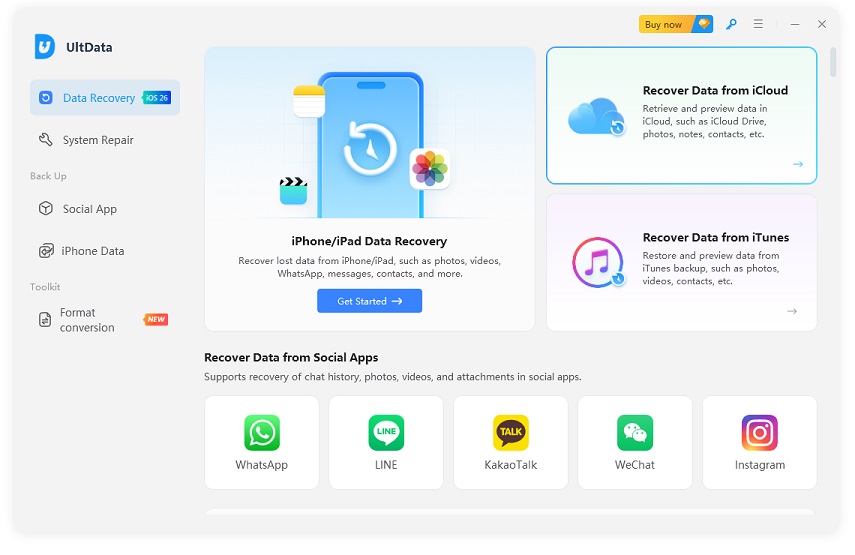
Let's take a closer look at how Disk Drill compares to Tenorshare's UltData iPhone Data Recovery:
 Please swipe to view
Tenorshare UltData offers broader recovery capabilities than Disk Drill. While both support direct iPhone recovery and iTunes backup recovery, UltData additionally supports iCloud backup recovery. It also covers more data types, including system data, third-party app data, and social app data such as WhatsApp, LINE, Kik, Messenger, and WeChat.
Disk Drill's free tier centers on a full scan and free preview. Tenorshare's free tier follows a similar preview-then-pay structure. The scanning speed is almost identical, but we felt UltData shows faster scanning in some cases. However, neither free version is intended to offer a free recovery solution.
Please swipe to view
There is only a marginal difference in the pricing of both tools. So, the real question is which one gives more value for money. Compared to Disk Drill, Tenorshare UltData also supports iCloud backup recovery, iOS device repair, and social apps backups and restores. So, if these features are also useful to you, then Tenorshare might be more valuable to you.
Disk Drill and Tenorshare UltData have a strong emphasis on a user-friendly, click-based interface. There isn't much of a learning curve involved in installation, while the scan-preview-recovery workflow is designed for non-technical users.
However, we felt Tenorshare UltData's interface to be more intuitive and tailored around smoother iPhone data recovery. Plus, it allows selecting data types before scanning.

When you are dealing with straightforward cases like recently deleted photos, both tools tend to perform well. For scenarios involving specific message threads or third-party app data, results vary more.
The recovery results of both tools are influenced by factors beyond the software itself, such as the time since deletion, whether the data has been overwritten, the iOS version, and whether a backup is available. Based on our testing, Tenorshare UltData delivered more consistent results, particularly in deep scans and more challenging data recovery situations.
Let's wrap up our Disk Drill iOS Data Recovery review by answering these two conclusive questions:
Disk Drill is a suitable choice for users who need an iPhone data recovery solution for their Mac and need to recover common data types. Its yearly and lifetime plans make it useful for both individual and business needs.
Disk Drill may not be an ideal choice if you want to recover data from iCloud backups, recover a wider range of social messaging apps, or use additional iOS tools such as system repair. For these purposes, you may find a specialized iPhone recovery solution, like Tenorshare UltData, more suitable.
Overall, Disk Drill is a legitimate and reliable data recovery application with an easy-to-use interface and a straightforward recovery workflow. It performs well for recovering data from iPhones and local iTunes/Finder backups.
However, it is not a one-size-fits-all solution. Its iPhone recovery capabilities are limited to macOS, and it does not currently support iCloud backup recovery.
If your recovery requirements are centred specifically around iOS devices and you need broader recovery options or additional iPhone management features, Tenorshare UltData may be a better fit. Simply put, the right choice depends on your recovery scenario.


UltData - Best iPhone Data Recovery Software






then write your review
Leave a Comment
Create your review for Tenorshare articles

Share this post


UltData - Best iPhone Data Recovery Tool
Recover Deleted & Lost Data from iOS Devices Easily, No Backup Needed!
UltData: Best iPhone Recovery Tool
Recover Lost iPhone Data without Backup
By Jenefey Aaron
2026-09-24 / Reviews