You have faced unexpected data loss. You searched the web for iOS data
recovery, and iToolab RecoverGo came up in the results. The tool looks exactly
like what you need, but you are confused about whether it's actually safe to
use and whether it can recover what you have lost. This iToolab RecoverGo
review guide uncovers everything about the tool based on the software's
claims, real user feedback, and our thorough testing.
Understanding iToolab RecoverGo iOS Before Evaluating Performance
First things first, let's understand what iToolab RecoverGo iOS is and what
it claims to do.
What Is iToolab RecoverGo iOS?
iToolab RecoverGo iOS is desktop software that recovers lost or deleted data
from iPhones, iPads, and iPod touch devices. It works by scanning the device
directly or by pulling data from an existing iTunes or iCloud backup.
What Does iToolab Claim to Do?
The company states that RecoverGo can retrieve data even without a backup.
It claims to provide secure in-depth data scanning and the highest data
recovery success rate. It also states that the tool is compatible with the
latest iPhone models (iPhone 17 series) and the current iOS version (iOS
26).
Supported Data Types
iToolab RecoverGo supports data recovery of:
System Data: Photos, Videos in album, Contacts, Messages,
Voicemails, Notes, Reminders, Calendars, Voice Memos, Safari
History/Bookmarks, FaceTime, and Call History.
It's aimed at everyday users who have accidentally deleted files, don't have
a recent backup, or want to selectively pull specific items from device
storage or iTunes/iCloud backup without restoring an entire device.
Trust Check --- Is iToolab Safe & Legit?
Trust is the first hurdle with any data recovery tool. So, before looking at
performance, let's first address the question: is
iToolab.com
safe?
Is
iToolab.com
Safe to Download From?
The official
itoolab.com
domain uses HTTPS and lists the company as a registered Apple developer for
its Mac builds. Downloading the same software from third-party mirror sites
carries a higher risk of malware infection or data theft. We won't recommend
downloading software outside the official domain.
Is iToolab RecoverGo Safe for iPhone Data?
The software scans device storage locally without requiring a network
connection. So, your scanned iPhone data will remain within your device. The
tool requires standard device-trust permissions during the PC-to-iPhone
connection.
Does iToolab Collect or Leak Your Data?
According to its stated policies, iToolab processes recovery data on the
user's own computer and does not upload it externally. Users concerned about
privacy should still review the current privacy policy before scanning a
device that isn't their own.
Plus, restoring an iCloud backup would require you to provide your Apple
login credentials, which means that you are trusting a third-party tool with
the keys to your entire Apple account. Only do it if you are comfortable
with that level of access.
Trustpilot & User Feedback Overview
There are over 1,100 iToolab reviews on Trustpilot with an overall rating of around 4.1/5 stars. Users praise its easy-to-use
interface and supportive customer service. A few recurring complaints are
related to refund friction and unsatisfactory performance. So, there are
both types of users. Some are praising the experience, while others are
criticizing it. This indicates that results depend heavily on individual
circumstances.
Does iToolab Actually Work? (Real Performance Analysis)
Reviews and ratings only tell half the story, so let's dig into "does
iToolab actually work" when it's put to the real test of recovering data
under different loss scenarios.
Recover Deleted Data Without Backup --- Does It Work?
iToolab RecoverGo offers a user-friendly approach to recover data directly
from an iPhone without backup. We were able to scan, preview, and recover
data.
However, one thing we want to highlight here. It asked us to enter the
password to decrypt the iTunes backup, which was strange because we were
asking it to scan internal storage, not the iTunes backup.
We also noticed that direct-device recovery depends a lot on whether the
deleted files have been overwritten by new data. The less a phone is used
after deletion, the higher the odds of a successful scan.
iTunes & iCloud Backup Recovery Performance
Backup-based recovery tends to be more consistent because it relies on a
saved snapshot. The iTunes backup recovery was easy and efficient, as we
were able to preview all the backed-up data and recover selective files.
iToolab RecoverGo iCloud backup recovery failed miserably. After entering
the Apple login credentials and hitting the "Sign In" button, it displayed a
pop-up message that said to check your internet connection. However, our
internet connection was working perfectly fine. We tried multiple times, but
faced the same issue.
Preview & Selective Recovery Feature Review
Like many other data recovery tools, iToolab RecoverGo provides a preview of
recoverable data after the scan. Users can preview the found files and
select specific items for recovery instead of restoring everything at once.
The workflow is simple and beginner-friendly, following a similar scan,
preview, and recovery process used by other popular recovery solutions such
as UltData.
After selecting, we can easily recover the data back to our device. However,
not all files are recoverable in high quality. Some may be blurry or
recovered with partial data.
Common Failures
Some of the common failures users may face with iToolab RecoverGo include:
No Scan Results: The device turns up nothing recoverable,
often because deleted data has already been overwritten by normal use.
Incomplete Recovery: Some files preview successfully but
fail to export cleanly, or only partial data comes through.
Compatibility Issues: Scans stall or behave
inconsistently on very new iOS releases or on older/jailbroken devices.
Backup-Related Gaps: If the source iTunes backup is
outdated or partial, recovery is limited to whatever that backup actually
contains.
Failed iCloud Sign-in: It won't sign in to iCloud even
after entering correct credentials multiple times.
How Much Does iToolab Cost?
Moving forward to our iToolab RecoverGo review, it's time to evaluate its
financial side.
iToolab Pricing Plans Explained
iToolab offers four types of pricing plans:
1 Device Plan: $19.95 (1 device, 1 PC)
1 Month Plan: $35.95 (5 devices, 1 PC)
1 Year Plan: $39.95 (5 devices, 1 PC)
Lifetime Plan: $49.95 (5 devices, 1 PC)
Free Version Limitations (What You Can & Cannot Do)
The free download allows scanning and previewing recoverable files only.
Exporting/recovering data requires upgrading to a paid license.
Subscription vs Lifetime License
This is a common debate for tools that offer both subscription and lifetime
licenses. The monthly and annual plans auto-renew unless canceled, while the
lifetime license is a one-time purchase covering future updates. The choice
depends on your needs.
For a one-time recovery, the monthly plan is the cheapest choice, but
remember to cancel before renewal. For repeat/future use, the lifetime
license is a cheaper choice.
Is iToolab Worth the Price?
Going for the monthly plan for a one-off recovery may feel steep relative to
the task. If you anticipate needing the recovery tool again, the lifetime
license is the most cost-effective route. However, it's still a
discretionary purchase decision based on how often you expect to use it.
iToolab RecoverGo Pros and Cons
Pros of iToolab RecoverGo
Multiple recovery paths (device, iTunes, iCloud)
Broad file-type support, including WhatsApp
Free preview before paying
Responsive customer support, per Trustpilot feedback
Cons of iToolab RecoverGo
Free version can't export or recover, only preview
Recovery success isn't guaranteed, especially without a backup
Some users report refund and cancellation friction
Struggle with iCloud sign-in
Important Limitations Users Often Overlook
Marketing claims aside, every recovery tool has boundaries it can't cross.
Some of the constraints you need to consider about RecoverGo are:
Data Recovery Is Not Guaranteed
RecoverGo cannot promise full retrieval. Results depend on overwrite status
and how the file system handles deletion.
Free Version Is Limited to Preview Only
Exporting recovered files requires a paid license. You can only preview
recoverable data, but retrieving even a single file requires payment.
Recovery Results Depend on Backup Condition
If the source backup is outdated or partial, backup-based recovery will only
be as complete as that backup allows.
Compatibility Limitations With iOS Versions
Very recent iOS releases can sometimes outpace software updates. So, confirm
compatibility with the current version before purchasing.
Overwriting Risk After Data Loss
If you continue to use the device after data loss, it increases the chance
that new data overwrites what could otherwise have been recovered.
iToolab RecoverGo vs UltData for iOS
The iToolab RecoverGo review is incomplete without evaluating it against a
similar tool. We have chosen Tenorshare UltData for iOS for this
side-by-side comparison because it offers many of the same features.
Overview of Tenorshare UltData for iOS
Tenorshare UltData for iOS
is an iOS data recovery tool that recovers data from an iPhone/iPad/iPod
device, iTunes backup, or iCloud backup with a similar scan, preview, and
export workflow. It also includes iOS system-repair functions to fix boot
loop issues.
Feature Comparison: iToolab vs UltData
Please swipe to view
Feature
iToolab RecoverGo
Tenorshare UltData
Recover from iOS device
✅
✅
Recover from iTunes backup
✅
✅
Recover from iCloud backup
✅
✅
System data types
30+
35+
Supported apps data
WhatsApp, LINE
WhatsApp, Instagram, Kik, LINE, Messenger, Viber, WeChat, KakaoTalk,
and other Social Apps
iPhone SE - iPhone 17 series~All iPadsiPod Touch 2-7
iOS system repair
✅
Backup and restore social media apps
✅
Free version
Scan and preview only
Scan and preview only
Platforms
Windows, Mac
Windows, Mac
While both tools support iOS device, iTunes backup, and iCloud backup recovery, Tenorshare UltData offers broader data recovery coverage with 35+ supported data types and more social app support, including WhatsApp, Instagram, Messenger, Kik, LINE, Viber, WeChat, and KakaoTalk . It also includes additional features such as iOS system repair and social app backup & restore.
We compared iToolab RecoverGo with Tenorshare UltData for the same test
iPhone and iTunes/iCloud backups. There were a few noticeable differences we
want to highlight.
No Encrypted Backup Blockage
Compared to iToolab's prompt of entering a password to decrypt iTunes backup
when scanning internal storage, Tenorshare UltData didn't ask for any such
passwords. It immediately let us pick the data types and started scanning
the same iPhone without any request to enter a decryption password.
Smooth iCloud Sign In
We failed to restore a backup from iCloud using iToolab RecoverGo because it
couldn't pass the sign-in step. However, Tenorshare UltData gave us a smooth
experience. Not only were we able to sign in instantly, but we were also
able to choose the right backup and pull out the required data from the
backup with simple clicks.
Scanning Speed & Efficiency
Comparing the scanning speed of RecoverGo and UltData side-by-side, we found
the latter to be much faster in completing the scan for the same iPhone.
However, the scan timing for both tools can vary depending on the amount of
data on the device and whether the scan is pulling from the device directly
or from a backup.
In terms of scanning efficiency, UltData surfaced a more complete set of
recoverable files
in our comparison. RecoverGo's results were solid, but we felt they were
less thorough by comparison, which suggests UltData's scanning engine may be
a bit more powerful. However, the true scanning efficiency still depends on
overwrite status and backup quality.
Ease of Use Comparison
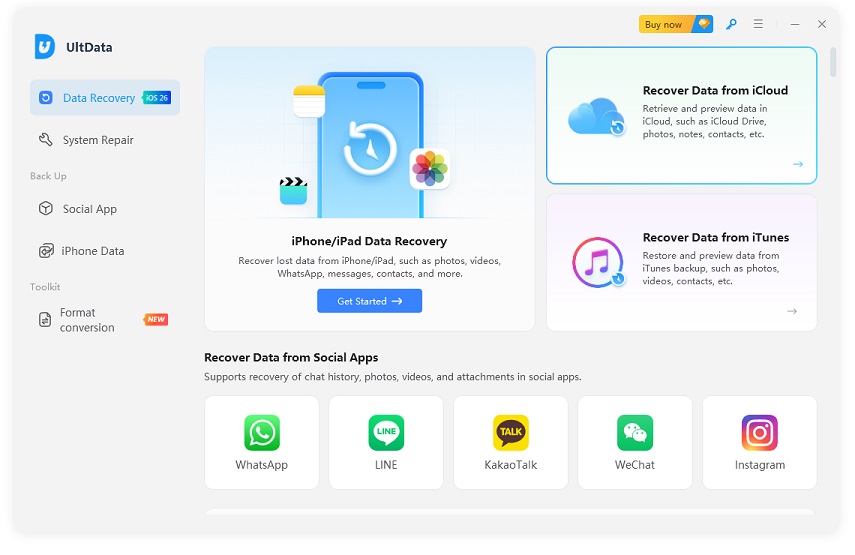
Tenorshare UltData offers a more modern and advanced interface than iToolab
RecoverGo. Check out their home screens below.
On the question of "is iToolab easy to use", the answer is yes. The workflow
steps in both tools are click-based and follow the same basic pattern
(connect, scan, preview, review). However, Tenorshare UltData's workflow
didn't cause any unnecessary hurdles as we faced in iToolab, such as an
encrypted backup hurdle, iCloud sign-up failure, and more. Everything went
smoothly and error-free with UltData.
Success Rate & Stability Comparison
The success rate of both tools can vary based on individual user scenarios
because everyone has a different data loss situation. In our case, UltData
had a slight edge in recovery performance. It managed to recover all the
lost data, and the recovery was also of high quality.
iToolab also did well at pulling data and exporting files, but UltData felt
like it performed a deeper scan and produced higher-quality exports.
Secondly, iToolab's struggle with accessing iCloud accounts also compromised
the platform's reliability.
Pricing Comparison
Both offer monthly, annual, and lifetime pricing plans. The pricing
comparison is presented in the following table:
iToolab offers cheaper plans than UltData, but don't base your decision just
on cost. The feature list, recovery efficiency, user experience, and other
factors contribute to the tool's overall value.
Why UltData Is a More Flexible Alternative
After our Tenorshare UltData vs iToolab RecoverGo review, our honest opinion
is that UltData is a flexible and powerful alternative. We found it to be
dominant for its advanced interface, smooth scanning, issue-free data
recovery, and additional iOS repair features. However, it costs a few extra
bucks compared to iToolab, but you get the assurance that the data recovery
tool will work when you need it most.
Final Verdict --- Should You Use iToolab RecoverGo?
Our thorough iToolab review has led us to reach this verdict:
Who Should Use iToolab RecoverGo?
iToolab RecoverGo iOS suits users with simple recovery needs, such as a
deleted photo album, a lost message thread, or files sitting in an iTunes
backup. It's also a reasonable fit for anyone on a tighter budget who
doesn't need iCloud recovery.
Who Should Avoid It?
Anyone who relies on iCloud backups for recovery should think twice, given
the repeated sign-in failures we encountered during testing. It may also not
fulfill your needs if you are looking for advanced/deeper scanning. It's
also not the right choice for users who want a single tool that handles both
data recovery and iOS system repair.
Best Alternative Recommendation (UltData for iOS)
First, try iToolab RecoverGo with a free trial. If you run into the same
iCloud and encrypted-backup issues or low-quality recovery, then Tenorshare
UltData for iOS is the best alternative. It offers a smooth, error-free, and
advanced recovery experience for all three modes. Plus, you get additional
iOS system repair tools.
Conclusion
Circling back to the questions we started with: is RecoverGo safe? We would
say "Yes", provided you use the official version.
Next, does iToolab actually work? We would say "mostly" when you are
performing simple device and iTunes recovery. However, iCloud recovery
failed in our testing.
Lastly, is it worth using? Well, our iToolab reviews comparison concludes
that it is good for basic use cases, but Tenorshare UltData for iOS is a
more dependable option.
Don't just trust our words. Give UltData a try with its free trial and then
make a decision yourself.
Download Tenorshare UltData
now and get started.










 iOS Tips & Latest Updates
 Bug Fixes, Unlock Guides
 Giveaways & Freebies






By Jenefey Aaron
2026-10-20 / Reviews