Unintentional deletion of iPhone data is painful when important photos,
messages, or contacts suddenly disappear. There are many iOS data recovery
tools that can help recover lost data. Among them, PanFone iOS Data Recovery
software is one of the popular options for recovering deleted files from
iPhones, iTunes backups, and iCloud backups. So, is PanFone safe and reliable
for this job?
In this PanFone iOS Data Recovery review, we will examine its features,
safety, pricing, and real-world usability to help you decide whether it meets
your recovery needs.
PanFone iOS Data Recovery is desktop software that recovers lost data from
iPhone/iPad/iPod Touch. It can recover data directly from the device or
restore selected data from an iTunes or iCloud backup. It can recover
photos, videos, messages, contacts, voice memos, and plenty of other data
types.
Key Recovery Scenarios It Claims to Support
PanFone claims to support data recovery from various scenarios, including:
Accidental deletion of photos, messages, contacts, and other files
Data loss after an iOS update or system crash
Recovery following a factory reset, provided recoverable data or backups
are available
Extracting files from iTunes backups without restoring the entire backup
Recovering selected data from iCloud backups
Keep in mind that actual recovery results may vary depending on the device's
condition and whether the original data has already been overwritten.
Who Is It Designed For?
PanFone iOS Data Recovery is for users who need a simple way to recover lost
iPhone data without advanced technical knowledge. It may be suitable for:
Basic recovery users who want to retrieve a few lost/deleted photos,
videos, contacts, etc.
People with existing iTunes or iCloud backups who want to recover specific
data instead of restoring everything.
Users attempting to retrieve files after an iOS issue or device reset.
Is PanFone iOS Data Recovery Safe and Legit?
If you are wondering "is PanFone trustworthy?", the answer depends on
factors such as where you download the software, how it handles data during
recovery, and the recovery method you use.
Is PanFone Software Trustworthy or a Scam?
PanFone is a software brand that has been offering several iOS and Android
management and recovery utilities for the past 17 years. The company
maintains an official website, product documentation, and customer support
resources, which indicates that it operates as a legitimate software vendor.
Legitimacy does not automatically guarantee that every user will have the
same experience. Online reviews and user feedback vary, with discussions
focusing on recovery success, licensing, customer support, and software
compatibility.
Regarding "is PanFone safe," the guidelines are the same as with any
third-party recovery tool. It is advisable to download the software only
from the official website and review its licensing terms before purchasing.
Does It Modify or Overwrite Your iPhone Data?
PanFone scans the internal storage of your iPhone or available backups and
extracts all the recoverable data. During the scanning, the software
attempts to read accessible data rather than writing changes to the iPhone.
When users choose to recover files, the recovered data is generally exported
to a computer or another selected location. So, it does not try to write the
data back to the device automatically.
Privacy Concerns: Is Your Data Secure During Recovery?
When you let PanFone scan your iPhone or backup, it will process personal
information such as photos, contacts, messages, call history, and
application data. Scanning is performed locally on the user's computer
during direct scanning and iTunes backup recovery, while iCloud recovery
requires signing in with an Apple ID to access cloud backups.
The level of data privacy may depend on factors such as the software
version, internet connection, recovery mode, and the user's own computer
security. Users should carefully review the software's privacy policy and
ensure they download the application from the official website to reduce
potential security risks.
PanFone iOS Data Recovery Features Explained
Moving forward to our PanFone iOS Data Recovery review, let's now talk about
its core features. This software organizes its recovery functions into three
recovery modes:
Recover from iOS Device
This mode scans a connected iPhone, iPad, or iPod touch for recoverable
data. After connecting the device via USB and starting a scan, the software
displays supported files that may still be recoverable. Users can preview
available items before selecting specific files to export.
The likelihood of recovering deleted data depends on factors such as device
usage after deletion and whether the original data has been overwritten.
Recover from iTunes Backup
PanFone eradicates the need to restore the entire iTunes backup on your
device and overwrite existing data. Instead, it allows users to browse
compatible backup files stored on the computer.
The general process includes:
Detect available iTunes backups.
Select the desired backup file.
Scan the backup contents.
Preview supported data.
Recover selected files to the computer.
This approach is useful for users who have a prior backup of lost data.
Recover from iCloud Backup
PanFone also includes an iCloud recovery mode for users with existing iCloud
backups. The workflow involves:
Sign in with an Apple ID.
Select the data types to recover.
Scan supported content.
Preview and recover selected files.
The availability of recoverable data depends on what was included in the
chosen iCloud backup.
Supported Data Types
PanFone iOS Data Recovery supports recovery for a variety of data types:
This diverse range of data types doesn't guarantee recovery every time. It
depends on deletion time, device use, recovery method, and overwritten
status.
Does PanFone iOS Data Recovery Actually Work?
PanFone iOS Data Recovery won't work the same for every user. Here's what to
expect from the tool:
Installation Hassle
PanFone has a strange installation experience. After downloading the
software and installing it, it again asks to download the iOS Data Recovery
module separately. Most similar tools don't ask for this extra installation.
When we tap the download button next to the iOS Data Recovery module, it
fails a few times before completing the download and installation.
The story doesn't end here. When we selected iOS Data Recovery, it again
asked us to install additional "necessary components" to use this feature.
This is really frustrating and time-consuming.
The worst part was that installing this new component was very slow.
We didn't experience any such hassle before with other tools. For example,
when we used UltData iOS Data Recovery software for the same job, we were
able to immediately launch and use the tool after the primary installation.
Scan Speed and Device Detection Issues
The time required to complete a scan depends on the amount of data stored on
the device and the capability of the computer hardware. So each user can
have a different experience.
Some users may also encounter device recognition issues, especially if:
The USB cable or connection is unstable.
The computer does not recognize the iPhone correctly.
Apple device drivers need updating.
The installed iOS version introduces compatibility differences.
One thing we weren't expecting was a prompt to enter an
"iTunes Backup Password" when trying to restore data
directly from an iOS device, because why does a tool need a backup password
when it has to scan the internal storage directly?
Preview Accuracy and Missing Data Problems
One useful feature of PanFone is its preview function, which allows users to
review supported files before recovery. This can make it easier to recover
only the items they need instead of restoring an entire backup.
Aside from preview accuracy, the scan results cannot guarantee complete data
recovery. There could be missing files or incomplete data.
Recovery Performance in Real Scenarios
Recovery results vary from one situation to another. For example, users with
recent iTunes or iCloud backups may have a higher chance of retrieving their
files than those attempting to recover permanently deleted data directly
from an iPhone.
The recovery success may depend on factors such as:
Whether the deleted data has been overwritten by new data
The availability and condition of iTunes or iCloud backups
The type of file being recovered
The iPhone model and iOS version
The condition of the device following data loss
Simply put, earlier recovery attempts generally provide a better chance of
finding recoverable files.
Here, it is important to mention that PanFone's Recover from iCloud isn't
reliable. When we tried to sign in with Apple ID, it always displayed the
error:
"The internet connection appears to be offline." However,
there was nothing wrong with our internet connection.
PanFone Pricing: Is It Worth the Cost?
PanFone iOS Data Recovery follows the common licensing model used by many
desktop recovery tools. It offers a free version alongside paid licenses
with additional functionality.
Free Version Limitations
The free version is intended to help users determine whether their lost data
can be detected before purchasing a license. So, it only allows you to scan
your iPhone or backup and preview supported recoverable files. Full recovery
requires a paid license.
Paid Plans Overview
PanFone iOS Data Recovery offers three pricing plans:
1 Month Plan: $32.95 (5 devices, 1 PC)
1 Year Plan: $39.95 (5 devices, 1 PC)
Lifetime Plan: $59.95 (5 devices, 1 PC)
Hidden Costs or Renewal Concerns
As with many software subscriptions, users should carefully review the
licensing details before checkout. Subscription plans may renew
automatically unless canceled, while lifetime licenses generally involve a
one-time payment.
Some users may also encounter upgrade offers for additional products or
premium features during installation or within the software. Reviewing the
purchase terms beforehand can help avoid unexpected renewal or licensing
questions.
Pros and Cons of PanFone iOS Data Recovery
Here are some of the crucial pros and cons we have pulled from our PanFone
iOS Data Recovery review:
Pros
Simple interface suitable for most users
Supports recovery from iPhone, iTunes backups, and iCloud backups
Allows previewing recoverable files before exporting
Supports a wide range of common iOS data types
Lets users recover selected files instead of restoring an entire
backup
Cons
Complex and time-consuming installation process
The free version is limited to scanning and previewing data
Scan times may vary depending on device storage and data volume
Recovery success depends on factors such as overwritten data and
backup availability
Occasional device detection or compatibility issues
Limited social apps data recovery
Best Alternative to PanFone iOS Data Recovery
PanFone iOS Data Recovery may work for some basic recovery scenarios, but it
is not the only option available.
Why You Need a More Reliable iOS Recovery Tool
No iOS data recovery tool can guarantee the same results in every situation.
The scanning algorithm, data analysis technology, and recovery mechanisms
used by the
software
can influence how it identifies and processes recoverable files.
Tools with more advanced scanning technology and multiple recovery methods
may offer users greater flexibility when standard recovery attempts are
insufficient.
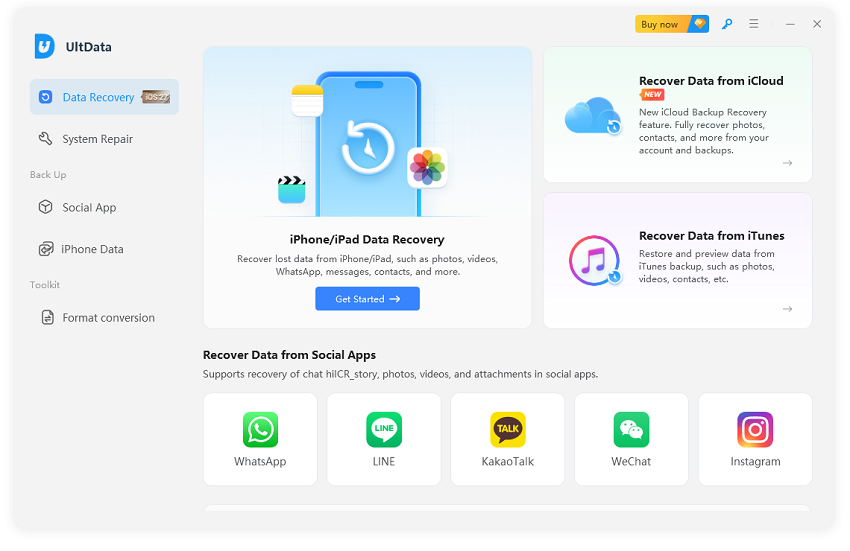
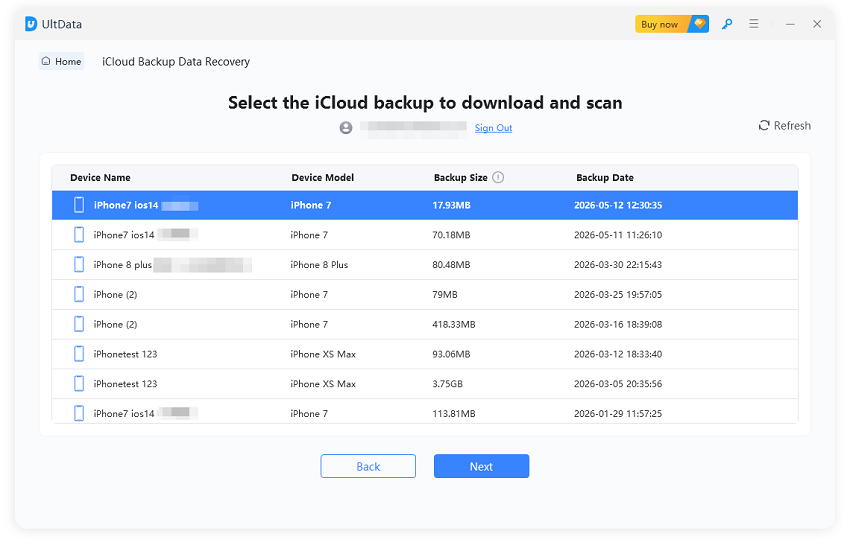
UltData for iOS: A More Stable Alternative
Tenorshare UltData for iOS
is an advanced iOS data recovery tool that recovers data from an
iPhone/iPad/iPod device or iTunes/iCloud backup through the scan, preview,
and recover mechanism. It supports recovery of 35+ data types, including
WhatsApp, LINE, KakaoTalk, WeChat, Instagram,
Viber, Messenger, Kik, and
more.
Key Advantages of UltData Compared to PanFone
The main difference between the two tools is the breadth of features and
recovery reliability. From our testing, UltData offers the following key
advantages:
Smooth installation with no need for a separate module download afterward.
Direct scanning of device data without the need for an iTunes backup
password.
Diverse range of supported data types, including more app data types.
Faster and deeper data scanning.
Higher-quality selected data recovery.
Reliable recovery from iCloud with no sign-in issues.
Access to additional features, including iOS system repair and
backup/restore of social media apps.
When UltData Is a Better Choice
UltData for iOS may be more suitable in scenarios where users need a broader
set of reliable and advanced recovery options. It is a better choice if:
A direct device scan from PanFone does not provide the required recovery
results.
You need support for diverse types of iOS data and attachments.
Your data loss situation is more complex than a simple accidental
deletion.
You need to recover data from WhatsApp, LINE, KakaoTalk, WeChat,
Instagram, Viber, Messenger, Kik, and more.
For users with a straightforward recovery situation and an accessible iTunes
backup, PanFone may be sufficient. However, users who want more flexibility
and a deeper scan can opt for UltData.
PanFone vs UltData for iOS: Full Comparison Table
Please swipe to view
Features
PanFone iOS Data Recovery
Tenorshare UltData for iOS
Recover from iOS device
✅
✅
Recover from iTunes backup
✅
✅
Recover from iCloud backup
⚠ (Cannot sign in)
✅
System data types
30+
35+
Supported apps data
WhatsApp, Kik, Viber
WhatsApp, Instagram, Kik, LINE, Messenger, Viber, WeChat, KakaoTalk,
and other Social Apps
Final Verdict: Should You Use PanFone iOS Data Recovery?
Here comes the decisive part in our PanFone iOS Data Recovery review. Using
this tool depends on the complexity of your data loss and the recovery
features you need.
Who Should Try It
PanFone is usable if you have a basic recovery need, such as retrieving
accidentally deleted photos, videos, contacts, or messages. It can also be
suitable for users with an accessible iTunes backup who want to extract
selected files without restoring the entire backup to their iPhone.
Users who prefer a simple desktop recovery tool and want to preview
recoverable files before exporting them may also find PanFone suitable for
simple recovery scenarios.
Who Should Avoid It
PanFone may not be the best fit for users with advanced recovery needs or
high expectations from a data recovery tool. Users who need reliable iCloud
recovery, deeper scanning capabilities, high-quality files, or support for a
wider range of social media app data may want to consider other options.
It may also be less suitable for users who prefer a faster and more
streamlined installation process or need additional features such as iOS
system repair and social app backup and restoration.
Final Recommendation
PanFone iOS Data Recovery is a reasonable option for basic recovery
scenarios, especially when users have an accessible iTunes backup or need to
recover common types of iPhone data. However, its installation process and
some recovery limitations may make it less suitable for more complex cases.
If you need broader data support, deeper scanning, error-free recovery, and
additional iOS recovery features, you can consider alternatives like
Tenorshare UltData for iOS.
Conclusion
PanFone iOS Data Recovery offers multiple recovery methods, a preview
feature, and support for common iOS data types, but its installation process
and recovery limitations may affect the overall experience. It may suit
users with basic recovery needs, while those requiring broader support and
deeper scanning can consider Tenorshare UltData for iOS as an alternative.
Ultimately, the right choice depends on your recovery situation and required
features.











 iOS Tips & Latest Updates
 Bug Fixes, Unlock Guides
 Giveaways & Freebies






By Jenefey Aaron
2026-10-26 / Reviews