

 iOS Tips & Latest Updates
 Bug Fixes, Unlock Guides
 Giveaways & Freebies


UltData - Best iPhone Data Recovery Tool
Recover Deleted & Lost Data from iOS Devices Easily, No Backup Needed!
UltData: Best iPhone Recovery Tool
Recover Lost iPhone Data without Backup
Deleted a FaceTime entry and now need the number or the time of a call? Can FaceTime calls be retrieved once they vanish from the list?
Sometimes they can, depending on whether records remain on another device or in a suitable backup. Recovery software may provide another recovery route. This guide covers ways to check for missing FaceTime call history and explains how to look for a recording if one was saved separately.

A FaceTime call history lists the contact and the time of each call. It contains no playable conversation. A recording is a separate file that holds the conversation itself, and it exists only if someone captured it with screen recording during the call.

The answer about can FaceTime calls be retrieved usually comes down to a few situations. Another Apple device may still show the entry, or an older backup may contain it. If neither applies, the record may be out of reach for standard methods, and only specialized recovery software has a chance.
Apple's own tools can often recover missing FaceTime call history, so try them before using any third-party software.
If you use the same Apple Account on an iPad, Mac, or second iPhone, the FaceTime call history may still appear there.

Availability depends on settings and synchronization. When iCloud sync is on, a deletion usually syncs across all devices. So this method helps most when the other device is offline and hasn't synced.
Apple lets you sync Phone and FaceTime data through iCloud, and a quick check shows whether that is active.

Note that turning sync on will not bring back an entry that was removed while sync was off or that was deleted on every device, because iCloud mirrors what your devices currently hold.
An old iCloud or computer backup may still hold the lost FaceTime call history. Check the dates first before restoring anything.


If a backup predates the deletion, you can restore it.


If you are restoring from a computer backup (Finder/iTunes), click Restore Backup after connecting your iPhone to the computer.


Restoring an older backup replaces current device data with the backup version, so anything created after that date disappears. Apple also notes that Phone and FaceTime data synced through iCloud isn't part of iCloud Backup, so a backup may not contain the entry at all. Recovery is never guaranteed.
Apple's built-in options don't provide a confident answer on can you retrieve deleted FaceTime calls without a backup. However, a deleted FaceTime call history may remain in device storage until new data overwrites it, which makes a quick response important.
Tenorshare UltData provides the additional check we need at this stage. It is an iPhone data recovery tool that performs a deep scan of the internal storage and pulls out the retrievable record of FaceTime calls, which means you have a chance to recover deleted history without a backup. Plus, you can preview what it finds before you recover anything, and the program runs on both Windows and Mac.

Tenorshare UltData can also scan and recover 35+ data types from your iPhone, such as photos, videos, music, saved recordings, contacts, messages, and other app data.


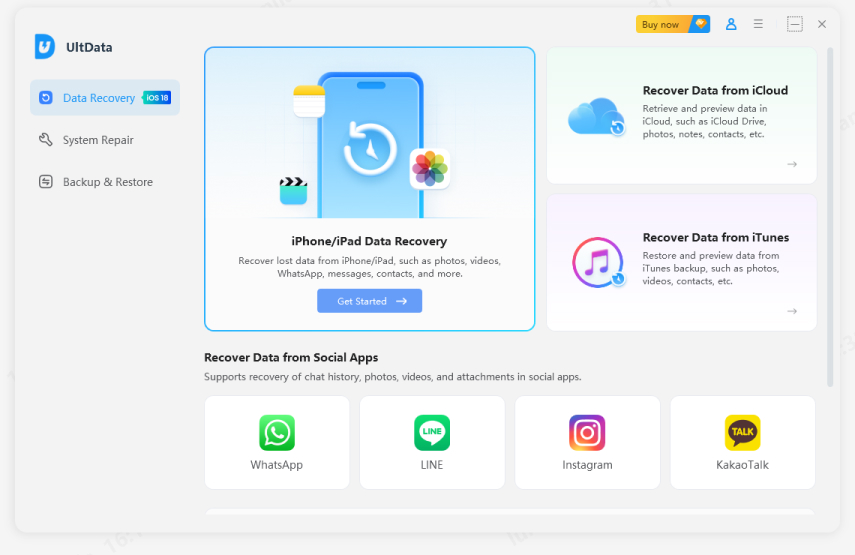
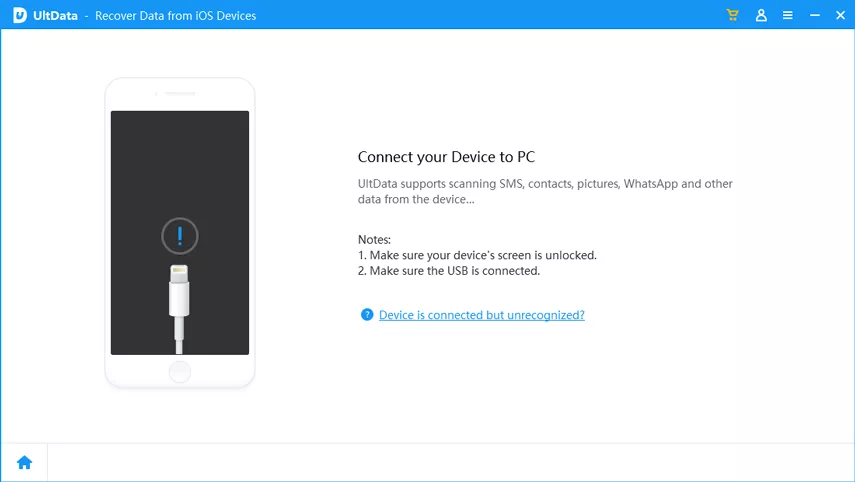
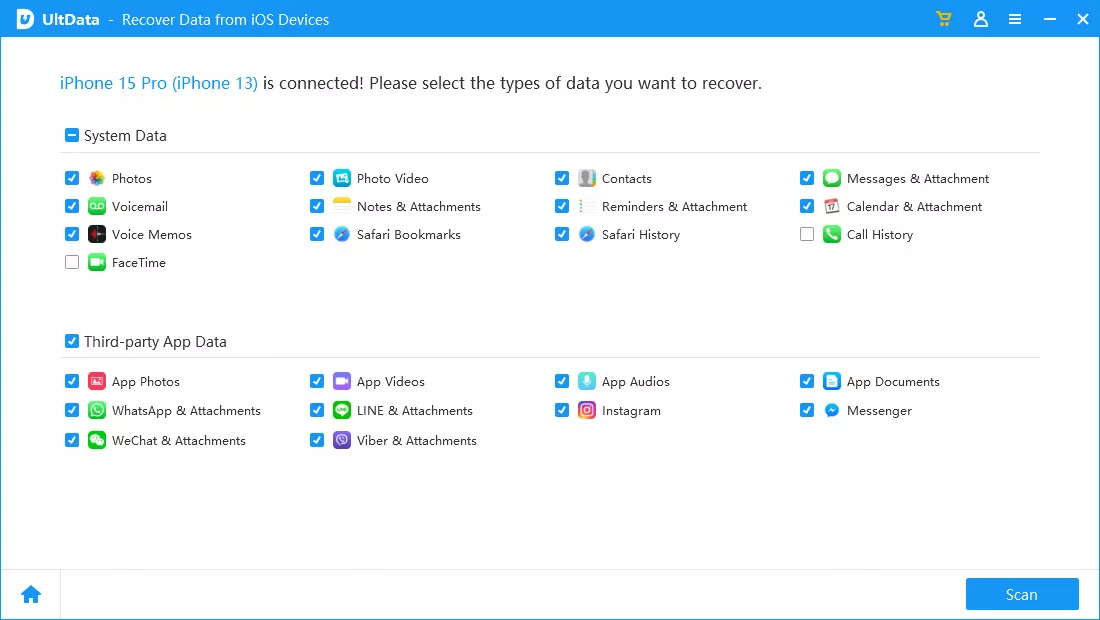

That's how Tenorshare UltData offers a click-based interface to scan and retrieve lost FaceTime calls without backup. Download UltData now and try these recovery steps for free.
Results depend on what remains on the device, and no software can promise a 100% recovery.
FaceTime does not automatically record conversations. You can rewatch a call only if someone captured it with screen recording and the file still exists. Check the Photos app first, since screen recordings land there by default. Files, iCloud Drive, and a Mac's Movies folder are the next places to look, especially for exported videos.
People often ask, "How can I download my FaceTime call history?" Apple has no standard feature that exports a complete archive from iCloud.com. Save screenshots of visible entries or use supported software export options for accessible records. A downloaded log just contains call details. It cannot replay the conversation.
Until now, we have addressed can you recover deleted FaceTime calls, let's now quickly look at some useful tips to prevent this situation in the future:
Remember: A call history backup saves call details only. It does not save the recordings of conversations.
Yes, sometimes. Check other Apple devices signed in to the same account. Recovery may also be possible from supported data in a suitable computer backup or through recovery software, though results vary.
Yes. Open the FaceTime app and check its recent call list. Depending on your device and settings, FaceTime calls may also appear in the Phone app's history.
Only if someone recorded the call and the recording is still saved. FaceTime call history shows details such as who called and when. It does not store the conversation.
Possibly. A recovery tool such as Tenorshare UltData can scan for supported call-history data and let you preview available results. Recovery is not guaranteed, and it cannot recreate an unrecorded conversation.
So now you are in a position to answer the question yourself: can FaceTime calls be retrieved? Call history sometimes returns through another Apple device or an older backup, and both carry limits such as sync deletions and overwritten data. Recordings exist only when someone made them. And when Apple's built-in methods fail, Tenorshare UltData acts as an additional option that lets you perform a quick scan and pull out recoverable FaceTime call history in seconds.


UltData - Best iPhone Data Recovery Software




then write your review
Leave a Comment
Create your review for Tenorshare articles

Share this post


UltData - Best iPhone Data Recovery Tool
Recover Deleted & Lost Data from iOS Devices Easily, No Backup Needed!
UltData: Best iPhone Recovery Tool
Recover Lost iPhone Data without Backup
By Jenefey Aaron
2026-11-03 / iOS Data Recovery