

 iOS Tips & Latest Updates
 Bug Fixes, Unlock Guides
 Giveaways & Freebies


UltData - Best iPhone Data Recovery Tool
Recover Deleted & Lost Data from iOS Devices Easily, No Backup Needed!
UltData: Best iPhone Recovery Tool
Recover Lost iPhone Data without Backup
When a FaceTime video disappeared from your iPhone, the first step is to work out what kind of video it was. A video message left after a missed call and a clip saved to Photos sit in different places. Similarly, a recording of a live conversation exists only if someone made one. This guide checks FaceTime and Photos first, then covers deleted files and backups. It also explains where recovery software can help with supported data.

Several situations can leave you unable to find a FaceTime video or message. Each one points to a different fix.
When someone leaves a video message after a missed FaceTime call, it shows up in your FaceTime call history. Many people miss it there. A normal call entry looks similar, but it only indicates that a call occurred and does not include a video.
Sending or receiving a video message and saving a copy to Photos are separate actions. A message does not automatically become a standalone video in your Photos library.
A video saved to Photos or another location may have been deleted by accident. Depending on where it was stored and how it was removed, it may still sit in Recently Deleted for a short time.
Your iCloud Photos settings, a slow sync, or a different Apple Account can change which videos show up on your iPhone. Syncing only keeps your devices matching each other. It is not a backup, so it cannot bring back a video that was removed everywhere.
FaceTime does not record your calls on its own. If you did not record the call or save a separate video, there is no recording to find. A missing video message, a deleted video in Photos, or a missing call history entry is a different problem, because each of those may still exist somewhere.
Before attempting recovery, establish whether the video still exists in FaceTime, Photos, or another location.
Best for: Users who can no longer find a video message or who see a FaceTime call entry but cannot locate the message itself.

The layout can vary by iOS version. If you see only a call entry, the caller may not have left a video message.
Best for: Users who previously saved a FaceTime video message to their Photos library.

A saved copy may still be in Photos even if you cannot see the message in FaceTime. This check works only when a copy was saved there.
Best for: Users who suspect that the missing FaceTime video was deleted from Photos.
Apple generally keeps deleted photos and videos there for 30 days, unless they are permanently deleted sooner. A FaceTime message that was never saved to Photos will not appear in this collection.

Best for: Users who have multiple Apple devices or use iCloud Photos.


Sometimes, the solution for can FaceTime videos be retrieved just require waiting for sync to complete, especially if a device has been offline. Keep in mind that deleting a video with iCloud Photos enabled can also remove it from other synced devices. Also note that iCloud Photos keeps a library in sync. It is different from a separate device backup.
If the above checks fail to resolve the FaceTime video disappeared issue, look for a backup made while the video was still available. What you can recover depends on how the file was stored and what the backup contains.
Best for: Users who may have saved the video on their iPhone before creating an available iCloud device backup.


A full restore replaces current device data with the selected backup's contents. So, try to preserve your current data and important videos elsewhere before restoring the backup. Also note that data already synchronized through iCloud Photos is handled differently from data included in a device backup.
Best for: Users who previously backed up their iPhone to a Mac or Windows computer.

Only restore the backup if it contains the relevant video, as restoring it is a full-device operation. You cannot extract individual files from a backup using the built-in restore method. It requires using dedicated recovery software, which we will cover in the next part.
Best for: Users who may have saved or shared the video outside FaceTime.
Check the Messages conversation to see if you shared the video, or search folders on a computer where you may have exported it. The person who sent or received it may also have saved a copy. This only works if someone created or sent another copy.
Tenorshare UltData iPhone Data Recovery is an additional option when Apple's methods and your backups fail. As the name implies, it scans a connected iPhone's internal storage to pull out videos and 35+ data types. Afterward, the preview before recovery lets you check whether the scan found the lost video files. It can also read iTunes and iCloud backups and offers selective data recovery from their backed-up files.


Follow these steps on how to recover FaceTime video messages disappeared on iPhone using Tenorshare UltData:
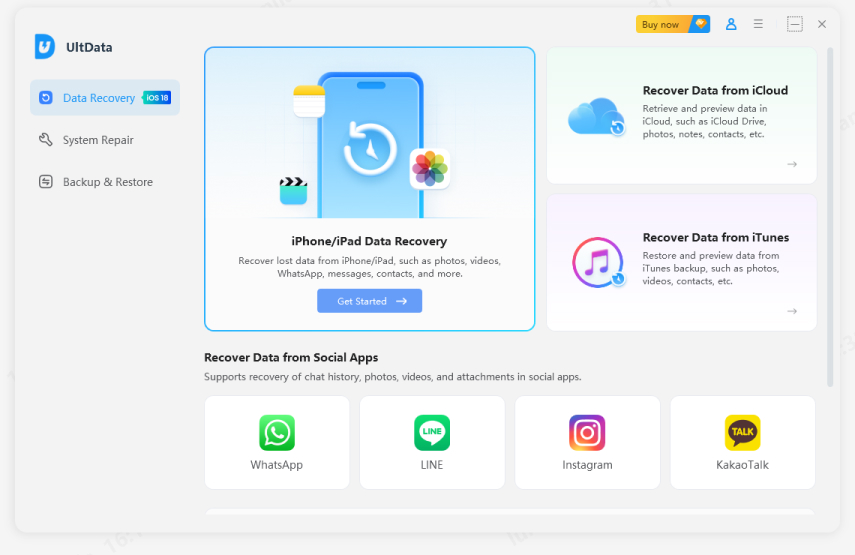
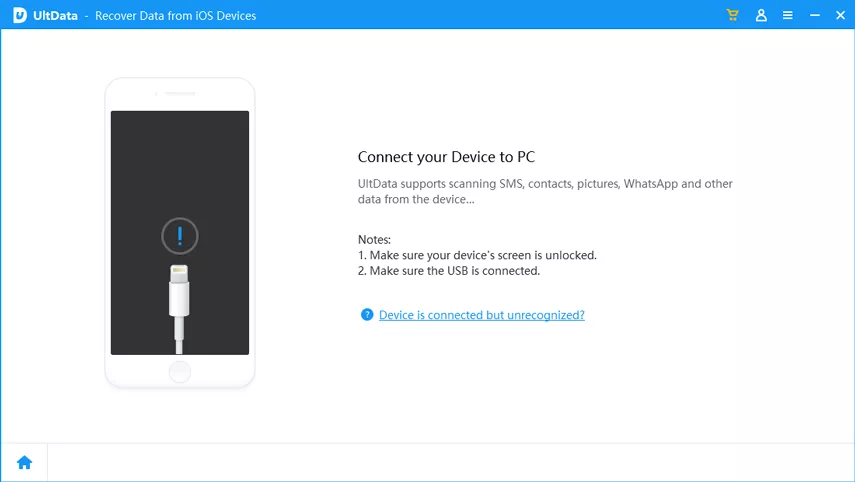
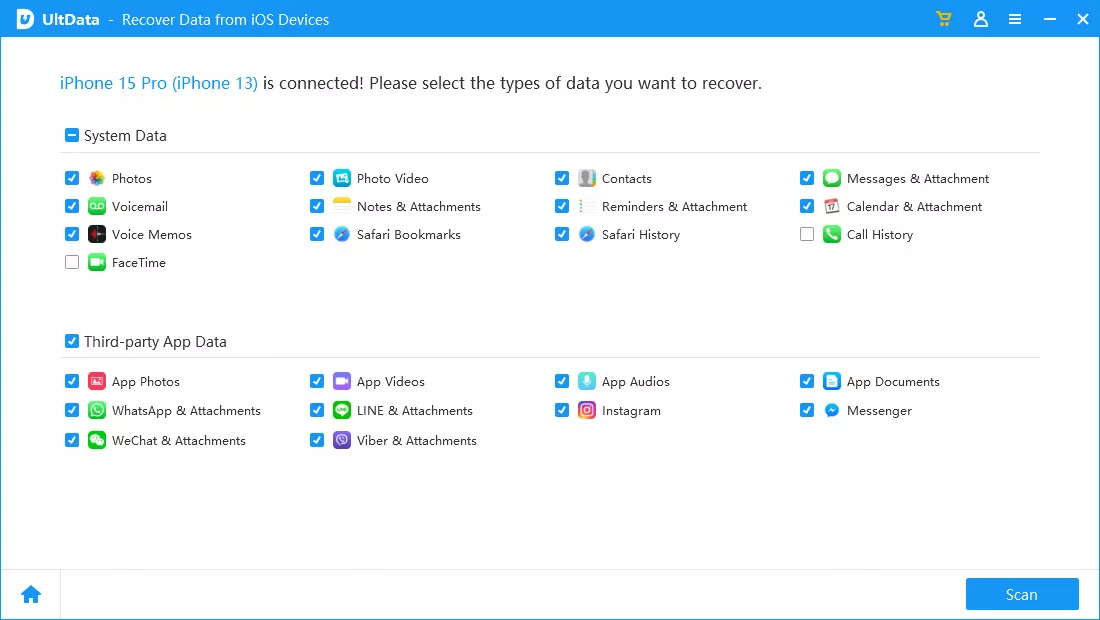

What Tenorshare UltData can recover depends on the data type, where the file was stored, and the recovery scenario. In your case, it can attempt to scan and retrieve video recordings saved to Photos. So, the recovery success rate varies for different users.
After addressing can FaceTime videos be retrieved, the following are a few recommended tips to prevent this issue from happening again:
Also, do not assume that FaceTime automatically records ordinary video conversations. Before erasing or restoring an iPhone, verify that important videos exist in another location.
A FaceTime video message may not appear because the sender did not complete or send the recording, the message was deleted, or a temporary FaceTime issue is preventing it from loading. If you saved a copy, an iCloud Photos delay or a different Apple Account may also keep it from appearing in Photos. First, check the contact's entry in FaceTime call history for a video thumbnail. Then search Photos and Recently Deleted for any saved copy.
A received message may appear in FaceTime. A separately saved copy could be in Photos, Recently Deleted, iCloud Photos, or another location where you shared or backed it up. The right place depends on how the video was saved.
Sometimes. Videos may be recoverable if they remain in Recently Deleted, exist in another location, or are included in a usable backup. A compatible recovery tool may also be useful for supported data types. However, an ordinary FaceTime call that was never recorded does not have a video recording to retrieve.
Check FaceTime, Photos, and Recently Deleted first. If the video was saved as a supported file, a compatible recovery tool may be an option. Recovery without a backup is not guaranteed.
When a FaceTime video disappeared, identify whether it was a video message, a saved clip, or a conversation you expected to have been recorded. Check FaceTime and Photos first, including Recently Deleted. Then look for another copy or restore a suitable backup. Tenorshare UltData is also a useful option for recovering supported files through direct scanning. So, begin the recovery process as soon as possible to improve your chances of finding the missing video before its data is overwritten.


UltData - Best iPhone Data Recovery Software




then write your review
Leave a Comment
Create your review for Tenorshare articles

Share this post


UltData - Best iPhone Data Recovery Tool
Recover Deleted & Lost Data from iOS Devices Easily, No Backup Needed!
UltData: Best iPhone Recovery Tool
Recover Lost iPhone Data without Backup
By Jenefey Aaron
2026-11-03 / iOS Data Recovery