Restoring iPhone data from iCloud during device upgrades or iOS failures can be frustrating when backups stall, fail, or recover incompletely. Professional iCloud backup recovery tools offer a faster, more reliable alternative to native restoration methods. With countless iPhone data recovery from iCloud options available, choosing the right software is crucial.
This comprehensive guide reviews the top 3 iCloud data recovery software solutions for 2026, helping you recover deleted photos, messages, contacts, and more from your iCloud backup with ease.
Top 3 Picks for iPhone/iPad/iPod Touch iCloud Data Recovery Software
Best 1. Tenorshare UltData - The Ultimate iCloud Data Recovery Tool
Tenorshare UltData is a powerful iCloud data recovery solution designed to help users safely recover lost iOS data. In addition to its reliable iPhone/iPad data recovery and iTunes recovery capabilities, UltData also supports recovering data from iCloud backup without connecting the device, allowing users to restore needed files while avoiding the risk of data overwriting.
How to Recover iPhone Data from iCloud Using Tenorshare UltData
Step 1: Download and Launch UltData
Download Tenorshare UltData for Windows or Mac using the buttons below. Install and open the software on your computer.
Step 2: Select "Recover Data from iCloud"
From the main interface, choose the "Recover Data from iCloud" option. Sign in with your Apple ID credentials to access your iCloud backup files.
Step 3: Choose Your iCloud Backup
The software will display all available iCloud backups associated with your account. Select the backup containing the data you want to restore and click "Download."
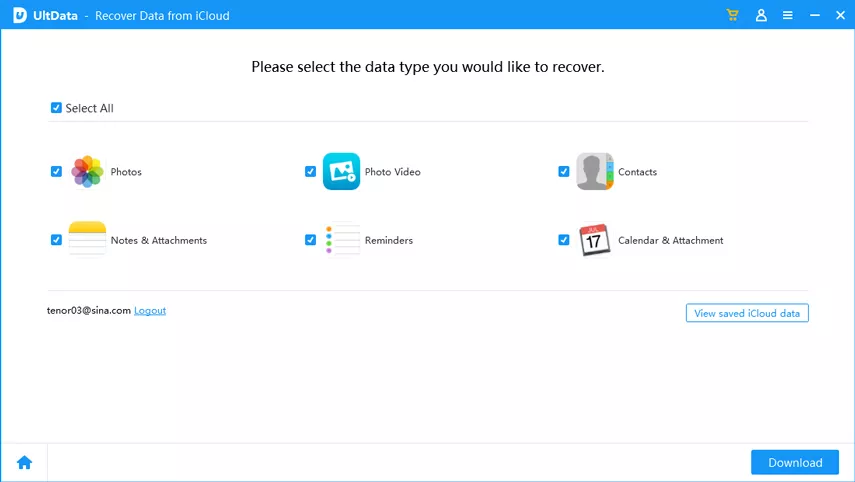
Step 4: Select File Types to Recover
Choose specific data types you need—photos, messages, contacts, WhatsApp chats, or any of the 35+ supported formats. This selective approach saves time compared to downloading entire backups.
Step 5: Scan and Preview Recoverable Data
UltData's industry-leading scan engine will analyze your iCloud backup. Preview all recoverable files before restoration to ensure you're getting exactly what you need.
Step 6: Recover iCloud Data to Your Device or Computer
Select the files you want to recover and choose your destination. Messages, contacts, and notes can be restored directly to your iPhone or iPad, while photos, videos, and other files can be saved to your computer.
Key Features That Make UltData #1 for iCloud Data Recovery
Password-Protected Backup Access: Extract data even from encrypted iCloud backups secured with passwords
Lightning-Fast Scan Speed: Industry-leading performance with selective preview and direct printing capabilities
35+ Data Types Supported: Recover photos, videos, messages, contacts, call history, Safari bookmarks, notes, calendars, reminders, voice memos, app data, and WhatsApp chat history
Direct Device Restoration: Messages, contacts, and notes can be restored directly to your iPhone or iPad without data loss
Universal iOS Compatibility: Works flawlessly with all iOS devices including iPhone 17, iPhone 15, iPhone 14, iPhone 13, iPhone 12, iPhone 11, iPhone X, and earlier models, supporting up to iOS 27
No Device Connection Required: Access and restore iCloud data without connecting your iPhone, preventing potential data overwriting
Beginner-Friendly Interface: Clear instructions and intuitive guidance screens ensure even first-time users can navigate effortlessly
Why Choose Tenorshare UltData?
When you need to restore iPhone from iCloud backup after accidental deletion, system crashes, or device upgrades, UltData provides a reliable recovery solution. Its advanced iCloud backup recovery feature helps you find lost photos from years ago, retrieve deleted text messages, and extract specific WhatsApp conversations without restoring your entire device.
Ready to recover your lost iCloud data? Click the download button below to get started with Tenorshare UltData's free trial. Experience professional-grade iCloud data recovery with the most trusted name in iOS data solutions.
Best 2. PhoneRescue - Intuitive iCloud Data Extraction Tool
PhoneRescue - iOS Data Recovery is a professional solution designed for users seeking straightforward iCloud data recovery. This tool excels at recovering deleted photos, messages, and other critical data from iOS devices while offering seamless extraction from iCloud storage files.
How to Use PhoneRescue for iCloud Backup Recovery
Step 1: Install PhoneRescue
Download and install PhoneRescue on your Windows PC or Mac computer.
Step 2: Select iCloud Recovery Mode
Launch the software and choose "Recover from iCloud" from the available recovery options.
Step 3: Log into Your iCloud Account
Enter your Apple ID and password to authenticate and access your iCloud backup files.
Step 4: Download Your iCloud Backup
Select the iCloud backup file you want to recover data from and let PhoneRescue download it to your computer.
Step 5: Preview and Select Data
Browse through the 18 supported data types and preview file contents before recovery. Select only the specific files you need to migrate.
Step 6: Restore Selected Data
Choose your recovery destination and complete the process. PhoneRescue will extract your selected files from the iCloud backup.
PhoneRescue Key Features
18 iOS Backup Data Types: Supports comprehensive data recovery including photos, videos, messages, contacts, call logs, notes, and more
Selective Data Migration: Preview file contents before recovery and restore only the necessary data, saving time and storage space
Latest iOS Support: Fully compatible with iOS 27 and iPhone 17 Pro Max, ensuring you can recover data from the newest devices
User-Friendly Design: Intuitive interface makes the recovery process accessible even for beginners without technical expertise
PhoneRescue offers a solid alternative for users who prioritize ease of use when performing iPhone iCloud restore operations. Its preview functionality helps ensure you're recovering exactly what you need from your iCloud backup.
Best 3. FonePaw iPhone Data Recovery - Versatile iCloud & iTunes Recovery
FonePaw iPhone Data Recovery delivers professional-grade iCloud data recovery software capabilities, restoring up to 18 data types including photos, videos, messages, contacts, and Safari browsing history. This versatile tool addresses multiple recovery scenarios beyond simple accidental deletions.
How to Recover Data from iCloud with FonePaw
Step 1: Launch FonePaw iPhone Data Recovery
Open the software on your computer and select the "Recover from iCloud Backup File" mode.
Step 2: Sign in to iCloud
Enter your Apple ID credentials to access your iCloud account and view available backup files.
Step 3: Select and Download Backup
Choose the relevant iCloud backup from the list and download it to your computer.
Step 4: Scan the Backup File
Let FonePaw scan the downloaded backup to identify all recoverable data types.
Step 5: Preview and Select Files
Browse through the 18+ data categories and select the specific items you want to recover.
Step 6: Complete the Recovery
Click "Recover" to save your selected data to your computer or restore it directly to your iPhone or iPad.
FonePaw Key Features
18+ Data Type Recovery: Comprehensive support for contacts, text messages, call history, photos, videos, notes, Safari bookmarks and history, WhatsApp messages, and more
Encrypted Backup Support: Works with password-protected iTunes backup files, providing flexibility across different backup sources
Multiple Recovery Scenarios: Addresses accidental deletions, system crashes, iOS update failures, water damage, and device loss situations
Dual Recovery Sources: Download and restore data from both iCloud and iTunes backups for maximum flexibility
FonePaw provides a reliable solution for users needing recover from iCloud backup functionality alongside iTunes backup support. Its ability to handle encrypted backups adds an extra layer of versatility for security-conscious users.
Comparison Table: Best iCloud Recovery Software 2026
Feature
Tenorshare UltData
PhoneRescue
FonePaw
Supported Data Types
35+
18
18+
Direct Device Restore
✅ Yes
❌ No
✅ Yes
Encrypted Backup Support
✅ Yes
❌ Limited
✅ Yes
Latest iOS Compatibility
iOS 27
iOS 27
iOS 18
Preview Before Recovery
✅ Yes
✅ Yes
✅ Yes
Scan Speed
Industry-Leading
Standard
Standard
User Interface
Beginner-Friendly
Intuitive
Moderate
Best For
Comprehensive recovery needs
Simple recovery tasks
iTunes + iCloud users
Frequently Asked Questions About iCloud Data Recovery
Q: Can I recover deleted photos from iCloud after years?
Yes, professional tools like Tenorshare UltData can recover deleted photos from iCloud backups created years ago, as long as the backup file still exists in your iCloud account.
Q: Do I need to connect my iPhone to recover iCloud data?
No, iCloud data recovery software works by accessing your iCloud backup remotely through your Apple ID credentials. No device connection is required, which prevents potential data overwriting.
Q: How long does iCloud backup recovery take?
Recovery time depends on your backup size and internet speed. With UltData's selective recovery feature, you can choose specific data types to speed up the process significantly—often completing recovery in just minutes.
Q: Is it safe to use third-party iCloud recovery software?
Reputable software like Tenorshare UltData, PhoneRescue, and FonePaw use secure authentication and don't store your Apple ID credentials. Always download from official websites to ensure safety.
Q: What if my iCloud backup is incomplete or corrupted?
Professional recovery tools can often extract partial data from incomplete or corrupted backups. UltData's advanced scanning technology maximizes data retrieval even from damaged backup files.
Conclusion: Choose the Best iCloud Data Recovery Solution for Your Needs
Recovering data from iCloud doesn't have to be complicated or stressful. Whether you're dealing with system crashes, accidental deletions, device upgrades, or failed native restore attempts, having reliable iCloud data recovery software makes all the difference.
We've reviewed the top 3 iCloud recovery tools for 2026>:
Tenorshare UltData - The most comprehensive solution with 35+ data types, industry-leading speed, and direct device restoration
PhoneRescue - User-friendly option with intuitive design and 18 data type support
FonePaw iPhone Data Recovery - Versatile tool supporting both iCloud and encrypted iTunes backups
For users seeking the most powerful and reliable Phone data recovery from iCloud, Tenorshare UltData stands as the clear winner. Its extensive data type support, password-protected backup access, and ability to restore content directly to your device provide unmatched versatility for any recovery scenario.
Don't risk losing precious memories, important messages, or critical contacts. Download Tenorshare UltData today using the buttons below and experience professional-grade iCloud data recovery with a user-friendly interface designed for both beginners and advanced users. With support for the latest iOS 26 and all iPhone models, you're covered no matter what device you use.
Start your iCloud backup recovery journey now and get your valuable data back in minutes, not hours. No more frustrating restore failures or incomplete backups—just smooth, secure, and efficient data recovery at your fingertips.








 iOS Tips & Latest Updates
 Bug Fixes, Unlock Guides
 Giveaways & Freebies






By Jenefey Aaron
2026-09-24 / iOS Data Recovery