You know that sinking feeling. One second, the canvas is there, the next it's
not, and you're staring at your Gallery wondering where three hours of shading
just went. Accidentally deleting Procreate artwork happens more often than
people admit: a swipe that deletes instead of duplicates, an app uninstall
done too fast, an iPad reset before you thought to check your files.
It's frustrating, but it's rarely as final as it feels in the moment. What
actually determines whether that drawing comes back has less to do with luck
and more to do with what was happening in the background before it
disappeared.
Here's the part most people don't realize until it's too late: Procreate
keeps everything locally on your iPad. It's not quietly backing up to the
cloud the way your camera roll does. So if you uninstall the app and nothing
was backed up first, yes, that local data usually goes with it.
Which brings up the question everyone eventually types into Google: if you
delete Procreate, do you lose everything? Mostly, yes, unless an iCloud
Backup already had a copy tucked inside it, or you'd exported something
beforehand. Procreate files and
iCloud Photos
aren't the same thing, and it trips up a lot of people. Nothing gets
uploaded automatically unless you tell it to.
Where Are Procreate Drawings Stored on iPad?
Knowing where your art resides helps you locate missing files faster
1. Procreate Gallery
This is home base. Every canvas lives here by default, sorted the way you
left it.
2. iCloud Backup
A full-device iCloud Backup can grab app data too, procreate included, but
only if that backup happened before things went sideways. And restoring it
means restoring the whole iPad, not just pulling one drawing out.
3. Exported Procreate Files
If you've ever hit export, there's a decent chance a copy already exists
somewhere outside the app, worth checking before you assume the worst.
.procreate project files
PSD files
PNG/JPEG exports
How to Restore Procreate Drawings from iCloud Backup (Official Method)
If
iCloud Backup
was on before the artwork vanished, this is Apple's built-in fix:
Open Settings > General > Transfer or Reset iPad > Erase All
Content and Settings.
When setup starts back up, pick Restore from iCloud Backup.
Log in with your Apple ID and choose the backup from before you lost the
file.
Wait for it to restore, then go check Procreate's Gallery.
The catch, and it's a big one, is that this wipes your iPad back to that
earlier point. Anything newer than the backup, photos, apps, and other
artwork goes too. And if no qualifying backup exists, this route's a dead
end from the start.
How to Recover Deleted Procreate Artwork Without iCloud Backup
No backup? That's not the end of the road.
Method 1: Check Exported Procreate Files
Before assuming it's gone for good, dig through the places a copy might be
hiding:
The Files app
iCloud Drive
Any external storage you've plugged in before
A computer you've exported to previously
Old .procreate or PSD exports are buried in another folder
More often than people expect, an earlier version turns up somewhere they
forgot about.
Method 2: Recover Deleted Procreate Files from iPad Directly
When there's genuinely no backup and no export sitting around, a dedicated
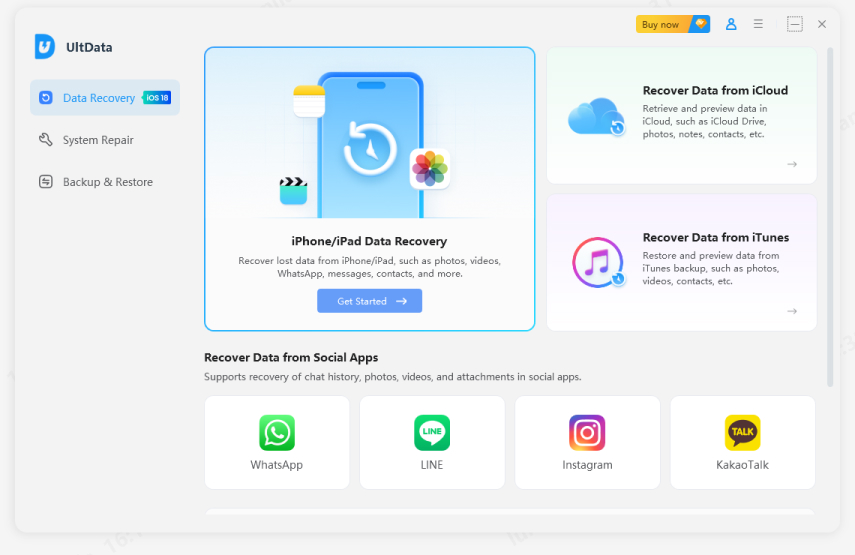
recovery tool is the next move. Tenorshare UltData (iPhone Data Recovery) was built for this exact situation it digs through your iPad's storage,
iTunes backups, and iCloud backups looking for traces of files that a
standard restore just can't find, including leftover app data from apps
you've already uninstalled.
Tenorshare UltData -- iPhone Data Recovery
A few reasons it tends to be the go-to for artists in this spot
specifically.
1. You don't have to erase your iPad first
Unlike Apple's official restore, it scans without wiping the device, so
you're not gambling your current files just to look for old ones.
2. It checks more than one place at once
Device storage, iTunes backups, iCloud backups, all in a single scan, so
you're not guessing which source might still have your work.
3. You get to preview before recovering
Instead of dumping an entire backup onto your device, you pick only the
files you want.
4. It's not built for tech experts
The scan-and-recover flow is straightforward enough to follow when you're
already stressed about losing hours of work, which, let's be honest, is
exactly the state most people are in when they open this kind of tool.
How to Recover Deleted iOS Data
Step 1: Download and launch Tenorshare UltData on your
Mac or PC. Connect your iPad to the computer using a USB cable.
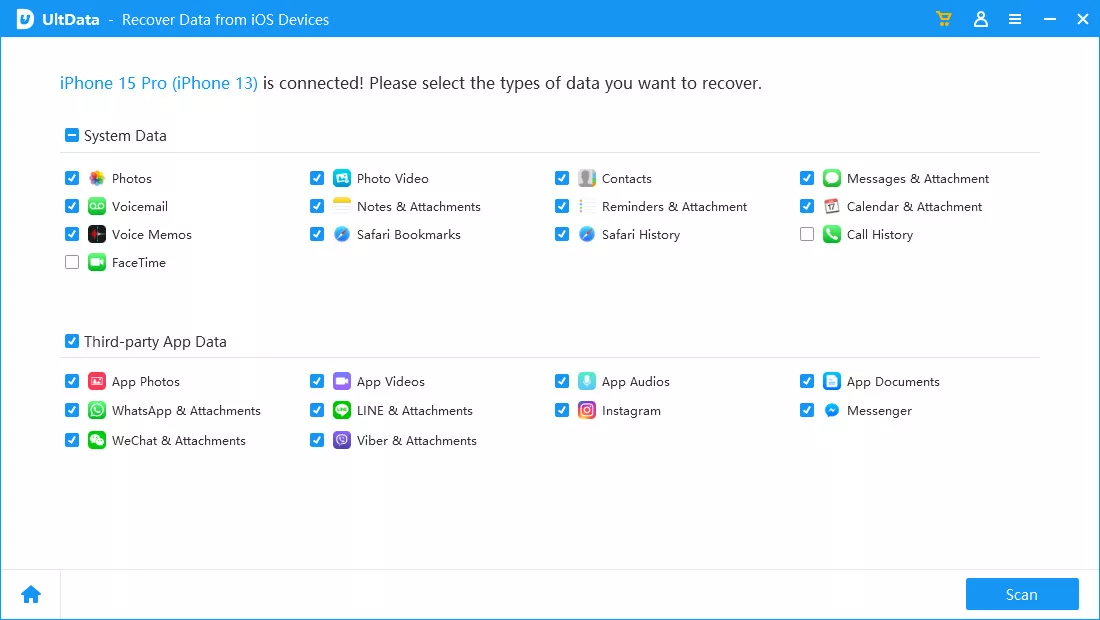
Select the Recover Data from iOS Devices option on the main screen. Choose
the data types you wish to scan such as App Photos, App Videos, Documents,
or Photos and click Scan.
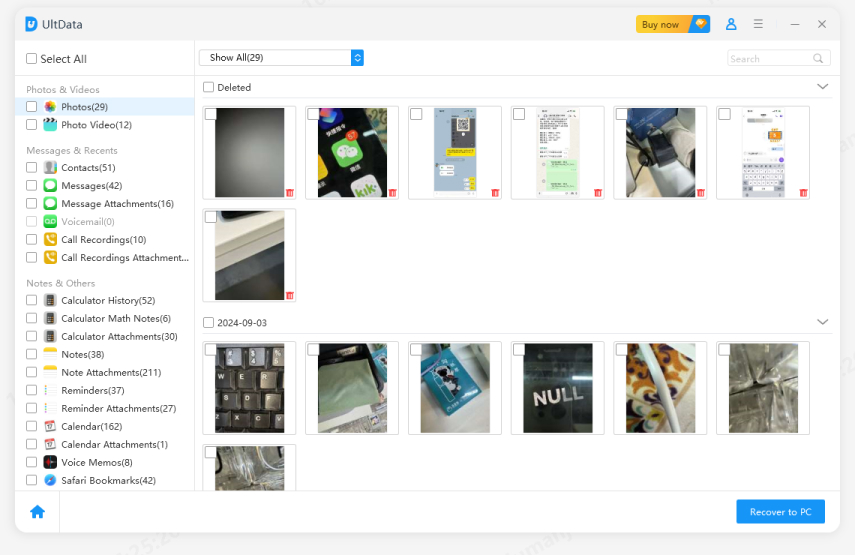
Once the scan completes, preview the recoverable files. Select your
Procreate artwork or exported media files and click Recover to PC to save
them safely.
How to Prevent Losing Procreate Artwork Again
Once you've got what you can back, it's worth spending five minutes fixing
the habits that got you here.
1. Enable iCloud Backup
Just leave automatic iPad backups on. It's a one-time setting, which means
there's always a semi-recent snapshot of your device available if something
breaks again.
2. Regularly Export Procreate Files
Make exporting a habit, not an afterthought. Save Procreate files or PSD
copies as you go, and drop them into iCloud Drive or a computer instead of
leaving everything trapped inside the app.
3. Create Multiple Backups
One backup is one point of failure. Spread copies across iCloud, a computer,
and maybe an external drive too, so a reset, an accidental deletion, or even
iCloud issues after downgrading don't take everything down with them at
once.
Final Words
Losing hours of creative work can feel overwhelming, but retrieving your
lost canvases is entirely possible. Whether you are dealing with unexpected
software glitches or complex iCloud issues after downgrading your system
software, acting quickly gives you the highest chance of success.
While reverting to an older iCloud backup works, it wipes your device. Using
Tenorshare UltData offers a much safer, more practical way to scan your iPad
directly and restore accidentally deleted Procreate artwork without losing
other
important files. Always make exporting layered procreate backups a habit to keep your
artistic portfolio secure.








 iOS Tips & Latest Updates
 Bug Fixes, Unlock Guides
 Giveaways & Freebies






By Jenefey Aaron
2026-10-20 / iOS Data Recovery