


 iOS Tips & Latest Updates
 Bug Fixes, Unlock Guides
 Giveaways & Freebies


4uKey - One-Click Easy iPhone/iPad Unlocker
Unlock Screen Lock/Apple ID/MDM/Screen Time Passcode Instantly
Easy iPhone/iPad Unlocker
Unlock iPhone Passcode Instantly
FRPFile iCloud Bypass is commonly searched by iPhone and iPad users who want to know whether the FRPFile bypass tool works, where to download it, and whether it is safe. The main issue is that FRPFile-related files are distributed through different third-party pages, while version numbers and compatibility claims are often inconsistent.
This updated review explains what the tool is, how the FRPFile Ramdisk Tool differs from older iCloud bypass releases, what to check before downloading, and which official or guided alternatives are available. Only use unlocking software on a device you own or have permission to service.
4uKey provides guided solutions for supported Activation Lock, Apple ID, screen passcode, MDM, and Screen Time cases. Check compatibility before use.
FRPFile iCloud Bypass is a name used for third-party utilities that claim to help users get past the iCloud Activation Lock or Hello screen on certain iPhone and iPad models. It is not an Apple product, and different releases may use different workflows, device requirements, or server-based services.
The tool is most often associated with older Apple devices and older iOS versions. However, search results may mix older free releases, paid services, ramdisk tools, and unrelated Android FRP downloads. This is why users should verify the exact file and supported device list before installing anything.
The names are often used interchangeably, but they do not always refer to the same program:
Before searching for a FRPFile Ramdisk Tool download, check whether the page clearly lists the developer, release date, supported models, iOS range, system requirements, and file checksum. A version number alone is not enough to prove that a download is current or genuine.
FRPFile compatibility varies significantly between builds. The following overview reflects the limitations users should confirm rather than a guaranteed support list.
 Please swipe to view
Note: Do not assume that a file supports your device simply because it is described as the “latest version.” Confirm the exact model, chip, iOS version, and lock status first.
Pros:
Cons:
Searches such as frpfile com icloud bypass, download frpfile icloud bypass tool, or frpfile/bypass may lead to old pages, mirrors, paid services, or unrelated files. Because the available pages do not provide a single, clearly verified release history, avoid treating every file labeled “latest version” as official.
Some older guides also redirect users through sideloading apps such as Scarlet or Misaka. That process is different from downloading a desktop FRPFile Ramdisk build and can add extra permissions, certificates, or installation steps.


Complete these checks before opening any FRPFile bypass tool package:
The exact process depends on the build. A typical FRPFile or ramdisk workflow may include the following general stages:
Important: A bypass does not always remove the device from the original owner’s Apple Account. Activation Lock may return after an erase, restore, or system update. Never use this process on a lost, stolen, or unauthorized device.
Before using a third-party FRPFile iCloud bypass method, try the official recovery options:
For a second-hand device, do not complete the purchase until the previous owner has removed it from their Apple Account.
If an unverified FRPFile Ramdisk Tool download does not support your device or raises security concerns, Tenorshare 4uKey provides a more clearly documented and guided alternative for supported iPhone and iPad unlocking scenarios.
Unlike random mirror downloads, 4uKey provides official Windows and Mac installers, current user guides, and customer support. Compatibility still depends on the device model, iOS version, and lock type, so check the current requirements before purchasing or starting the process.
Please swipe to view




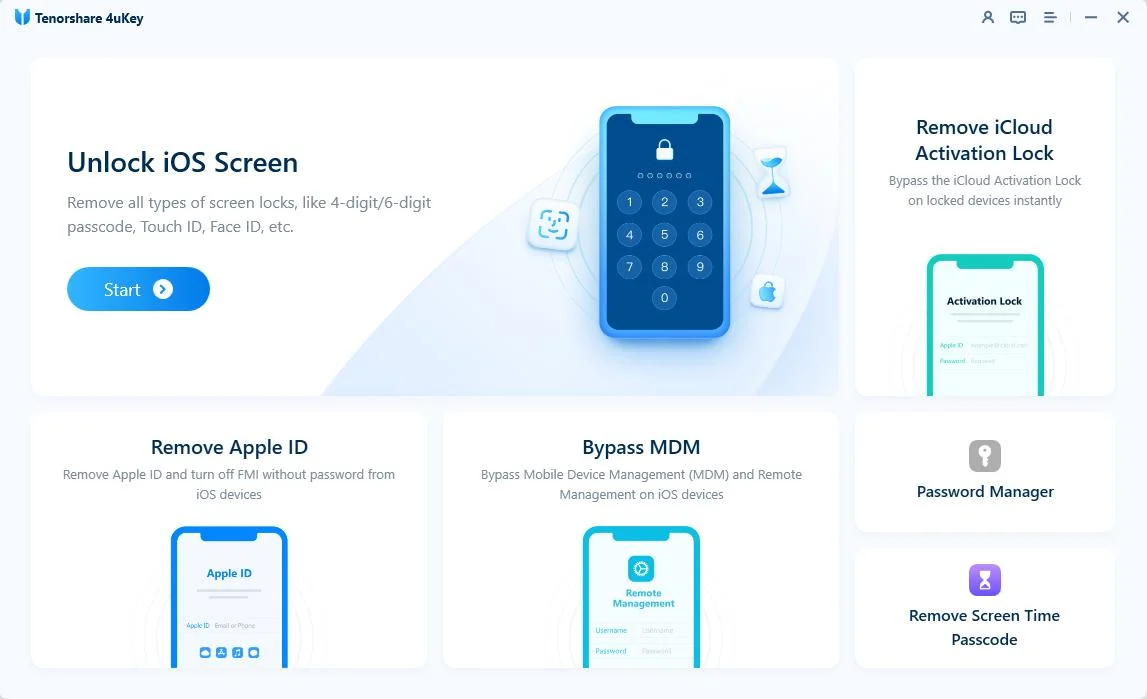


Note: Results and available features depend on the device model, iOS version, and lock status. Review the latest compatibility and data-loss information before proceeding.
Some older FRPFile iCloud Bypass releases are described as free, while other websites list paid ramdisk services or registration fees. Check the exact build and avoid paying an unknown seller without clear refund and support information.
There is no single, clearly verified release history across the available FRPFile download pages. Different websites list different version numbers, so this article does not label one build as the confirmed latest version. Verify the developer, release date, supported models, and file signature before downloading.
Not always. The FRPFile Ramdisk Tool usually refers to a ramdisk-based utility, while FRPFile iCloud Bypass may refer to older Activation Lock tools or services. Some websites use both names for the same download, which creates confusion.
Do not assume that it does. Older FRPFile releases are mainly associated with selected older devices and iOS versions. Any newer compatibility claim should be checked against the exact model, chip, build number, and release documentation.
These are common search phrases used to find FRPFile pages or download instructions. They may lead to different domains, mirrors, archived pages, or unrelated tools, so the phrase itself does not confirm that a page is official or safe.
Only use an unlocking tool on a device you own or have explicit permission to service. For a used device, ask the previous owner to remove it from their Apple Account. When you have proof of purchase, Apple Support is the safest place to request Activation Lock assistance.
FRPFile iCloud Bypass may be considered for a confirmed compatible older iPhone or iPad, but unclear version information, third-party download sources, security risks, and possible feature limitations make it difficult to recommend without careful verification.
Try Apple’s official recovery options first. For users who need a more clearly documented workflow on a supported device, Tenorshare 4uKey offers official installers, current guides, and a simpler process than an unverified FRPFile bypass tool.


Tenorshare 4uKey - Best iPhone Unlocker






then write your review
Leave a Comment
Create your review for Tenorshare articles
Easily Unlock iPhone passcode/Apple ID/iCloud Activation Lock/MDM
100% successful unlockShare this post


4uKey - One-Click Easy iPhone/iPad Unlocker
Unlock Screen Lock/Apple ID/MDM/Screen Time Passcode Instantly
Easy iPhone/iPad Unlocker
Unlock iPhone Passcode Instantly
By Jenefey Aaron
2026-09-28 / Unlock iPhone