

 iOS Tips & Latest Updates
 Bug Fixes, Unlock Guides
 Giveaways & Freebies


4uKey - One-Click Easy iPhone/iPad Unlocker
Unlock Screen Lock/Apple ID/MDM/Screen Time Passcode Instantly
Easy iPhone/iPad Unlocker
Unlock iPhone Passcode Instantly
Trying to open Instagram at school only to find that the website won't load? Schools may restrict social media through Wi-Fi filters, managed computer settings, or device-level controls. The right approach depends on what's preventing access. Before trying different tools, identify whether the problem comes from the school network, your device, or Instagram itself.

 Please swipe to view
Schools may limit access to Instagram to reduce distractions, manage bandwidth, or enforce acceptable-use policies. However, a blocked website doesn't always mean the school has deliberately restricted it.
There are three common possibilities.
Your device and network are separate things. For example, a personal iPhone may work normally on mobile data but fail to load Instagram on school Wi-Fi. In that case, the network is a likely place to start investigating.
The best way to get Instagram unblocked at school depends on what's causing the restriction. Start by checking your device settings, then determine whether the school network or computer policies are blocking access. The following methods can help you identify the issue and explore practical options.
If Instagram won't open on your personal iPhone or iPad, the problem may be related to Screen Time settings, device management, or your internet connection. Check the device-level restrictions first to narrow down the cause.
Check Screen Time settings

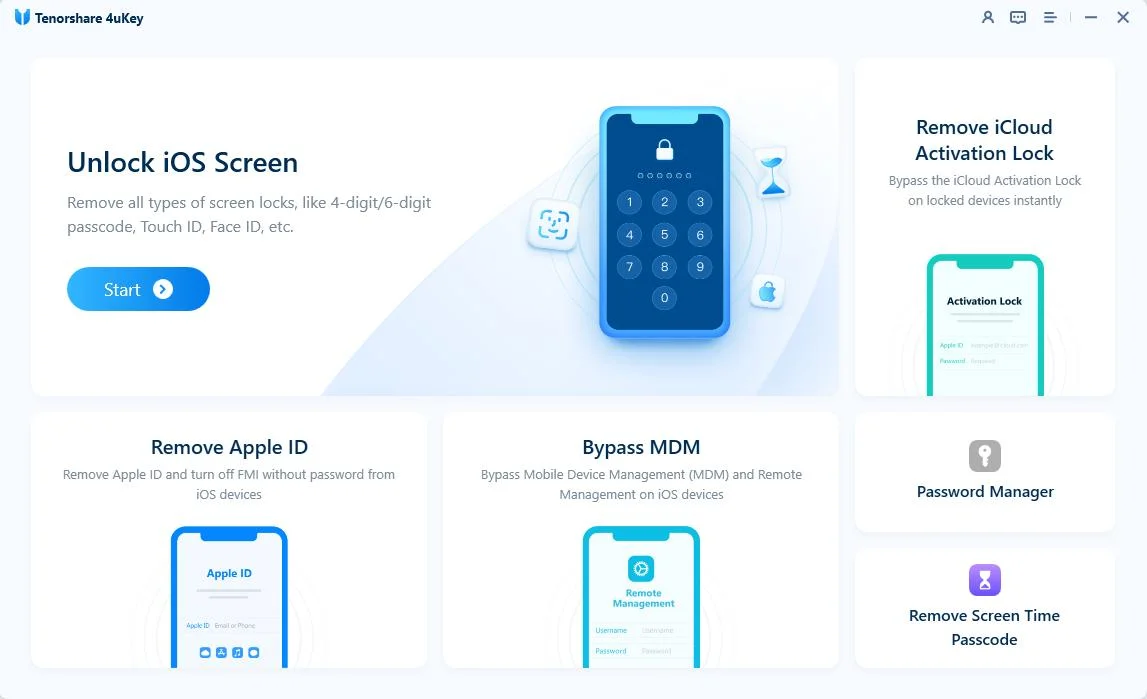
If you forgot your Screen Time passcode and can't change the relevant settings, Tenorshare 4uKey offers a Remove Screen Time Passcode feature for supported devices. See the 4uKey Screen Time guide for compatibility details and instructions. If a parent or administrator manages these settings, ask them to review the restrictions before attempting to change them.




Check for MDM restrictions
Your iPhone or iPad may also be managed through Mobile Device Management (MDM), which allows an organization to apply device restrictions. If you suspect MDM is preventing access to Instagram, check with the device administrator to confirm the policy.
Tenorshare 4uKey also offers an MDM-related feature for supported scenarios. For details, see the 4uKey MDM guide. If the device belongs to your school or another organization, contact the administrator before changing or removing any management settings.


4uKey is not a general Instagram unblocking tool. Its Screen Time and MDM features address specific device-level restrictions; they do not remove blocks imposed by school Wi-Fi or network firewalls. If Instagram remains inaccessible after you check your device settings, the restriction may be coming from the network instead.
If Instagram works at home but not at school, the school's network may be filtering access.
To narrow down the cause:
If Instagram works on a permitted alternative connection but not on school Wi-Fi, that suggests a network-specific restriction. It doesn't prove exactly which filter or rule is responsible.
If the website remains inaccessible across different connections, check your device, browser, and Instagram account before concluding that the school is blocking it.
If the school network intentionally restricts Instagram, contact school IT staff if you need access for a legitimate educational purpose.
Sometimes the simplest way to identify the problem is to compare connections.
For example, if you have permission to use your personal mobile data, open Instagram with Wi-Fi turned off. If it loads normally, the difference may point to a school network restriction rather than a problem with your phone.
Keep in mind that this test has limitations:
If your school permits personal mobile data use, this can be a useful diagnostic step. Follow your school's device and network policies.
If Instagram is blocked on a school computer, first determine whether you're dealing with a browser issue or an administrator-controlled restriction.
Try these basic checks:
If Instagram fails only in one browser, a browser-specific issue may be involved. If the page displays an administrator block message, the device or network may be managed by the school.

Installing a browser extension or changing computer settings may be prohibited on school-managed devices. If you don't have permission to change those settings, ask the administrator instead.
VPNs and proxies can route internet traffic differently, which may affect whether a website is reachable on some networks. However, neither option guarantees that Instagram will work at school.
A VPN typically creates an encrypted connection through a VPN server. A proxy forwards certain traffic through another server, depending on how it is configured.
Before considering either option, understand their limitations:
Avoid entering your Instagram password on unofficial proxy pages or websites that imitate Instagram. Use the official Instagram website or app for sign-in.
If your school prohibits VPNs or proxies, don't attempt to bypass that policy. If you need Instagram for an approved activity, ask the school administrator about permitted access.
Schools may use network filters or firewall rules that restrict social media websites. Your home network may not have the same restrictions. If Instagram works on another permitted connection, the school network may be responsible.
It depends on the Chromebook's configuration and the school's network policies. You can check for browser errors and confirm whether other websites work. If an administrator has restricted Instagram, you may need their help to obtain authorized access.
No. A VPN may change how your traffic reaches a website, but school networks can block VPN connections, and managed devices may restrict VPN software. Its use may also be against school policy.
The problem may involve Screen Time, device management, browser settings, account access, or a temporary service issue. Check these possibilities instead of assuming every access problem is caused by school Wi-Fi.
No. 4uKey does not remove restrictions imposed by a school's Wi-Fi, firewall, or network administrator. Its Screen Time or MDM-related functionality applies only to specific supported device-management scenarios. Check compatibility and authorization before considering any device-level changes.
When Instagram is blocked at school, start by identifying where the restriction occurs. Compare permitted network connections, check browser errors, and review the settings on your personal device. VPNs and proxies may not work and may be prohibited by school policy, while device-level restrictions require a different approach from network filtering.
Understanding the cause first can save time and help you choose a practical, appropriate next step.


4uKey iTunes Backup - Best iPhone Backup Unlocker


then write your review
Leave a Comment
Create your review for Tenorshare articles
Easily Unlock iPhone passcode/Apple ID/iCloud Activation Lock/MDM
100% successful unlockShare this post


4uKey - One-Click Easy iPhone/iPad Unlocker
Unlock Screen Lock/Apple ID/MDM/Screen Time Passcode Instantly
Easy iPhone/iPad Unlocker
Unlock iPhone Passcode Instantly
By Jenefey Aaron
2026-11-03 / Unlock iPhone