

 iOS Tips & Latest Updates
 Bug Fixes, Unlock Guides
 Giveaways & Freebies


UltData - Best iPhone Data Recovery Tool
Recover Deleted & Lost Data from iOS Devices Easily, No Backup Needed!
UltData: Best iPhone Recovery Tool
Recover Lost iPhone Data without Backup
If your Logic Pro X tracks disappeared while editing or after reopening a project, your recordings may still be recoverable. Tracks can go missing because they are hidden, a Track Stack is collapsed, the project has changed, or associated audio files are missing or deleted.
Missing tracks are not always permanently lost. This guide moves forward with two goals. First, we will identify why the tracks disappeared. Second, we will learn how to find missing tracks and recover deleted audio.

Several issues can make tracks disappear from a Logic Pro project. Identifying the cause helps you choose the right recovery method.
Logic Pro lets you hide tracks to keep large projects organized. Hidden tracks remain in the project but disappear from the Tracks area. Similarly, collapsing a Track Stack hides its individual subtracks beneath the main track. Either one can make content look missing while everything remains in the project.
An audio or software instrument track may have been deleted during editing. If you saved afterward, the track no longer appears in the current project.
Logic Pro supports project alternatives that let you maintain different versions of the same project. Opening an older alternative or a different project copy can make recently recorded tracks appear to have disappeared. Saving over a project also makes the earlier state harder to restore when no backup exists.
Logic Pro may be unable to locate audio files if they were moved, renamed, deleted, or stored on a disconnected external drive. Missing source media is different from a deleted track, as the project may still contain the track while its audio is unavailable.
The right fix for Logic Pro X tracks disappeared depends on whether the track is hidden, recently deleted, missing from the current project version, or disconnected from its source audio.
Start by checking whether they are hidden. If they are genuinely missing, try the remaining methods in order.
Hidden tracks are among the easiest problems to fix because their contents remain in the project.
You can also use the Toggle Hide View button above the track headers to show hidden tracks temporarily.

Remember that this method restores track visibility without changing the original recordings or recovering deleted data.
If the track was deleted moments ago, choose Edit > Undo or press Command + Z on Mac. Undo is most useful while the deletion remains in the undo history.

If the project has been closed or the relevant undo history is unavailable, move on to project backups or alternatives.
If your search is related to how to recover deleted tracks in Logic Pro X after saving a project, you should check its built-in backups and project alternatives.
Recover using project backups:

Logic Pro maintains up to ten saved backups per project alternative, subject to availability.
Recover using project alternatives:

Alternatives store different project states but share the project's underlying assets. They may restore deleted track arrangements even when separate audio files have become unavailable.
If the entire project disappeared, check Trash in Finder. You can also restore an older project copy from Time Machine if a suitable backup exists.
Remember: Reverting to an older version can remove edits made afterward. Keep your current project copy safe before restoring anything.
Sometimes, Logic Pro still contains a track but cannot locate the recording associated with it. The Project Audio Browser helps you check which recordings remain available.
Check any external drive where you previously stored the recordings. If Logic Pro displays a missing-file dialog, use its available search or locate controls.

You can also use the All Files Browser to search connected storage locations. When you have found the recordings, reconnect or import them into Logic Pro.

Recovering a source recording may help rebuild a track, although its original effects or arrangement may still need to be recreated.
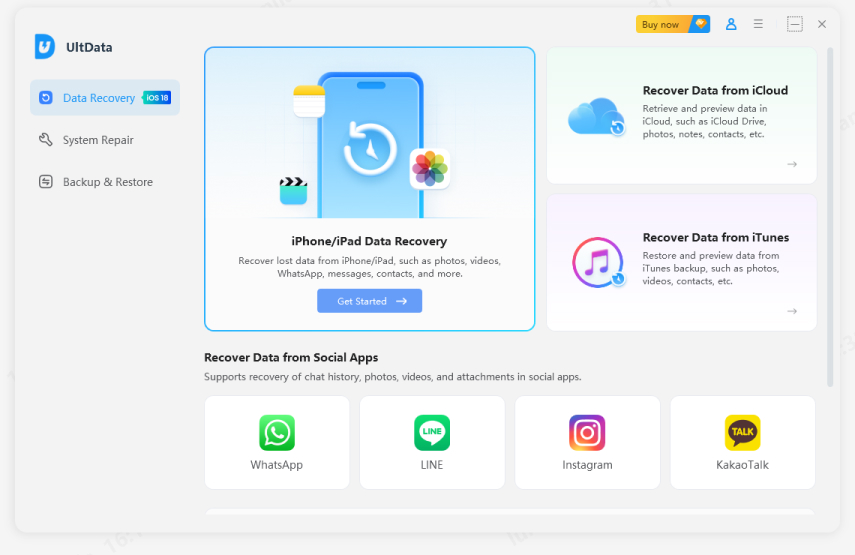
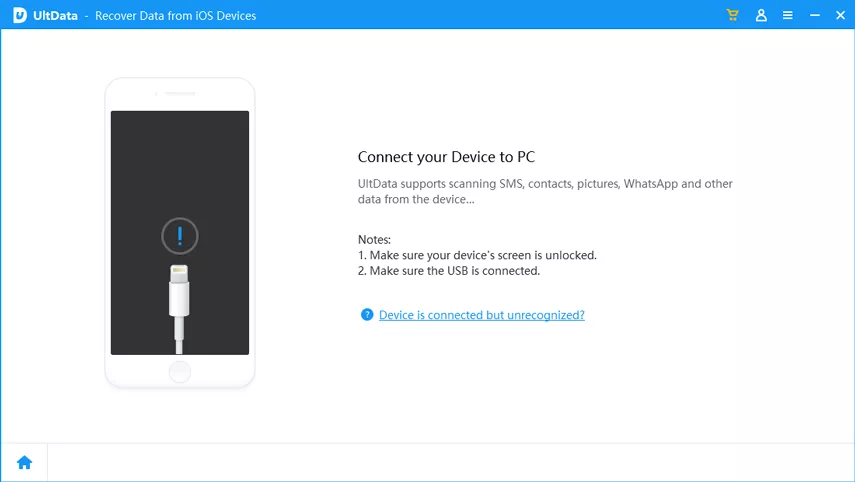
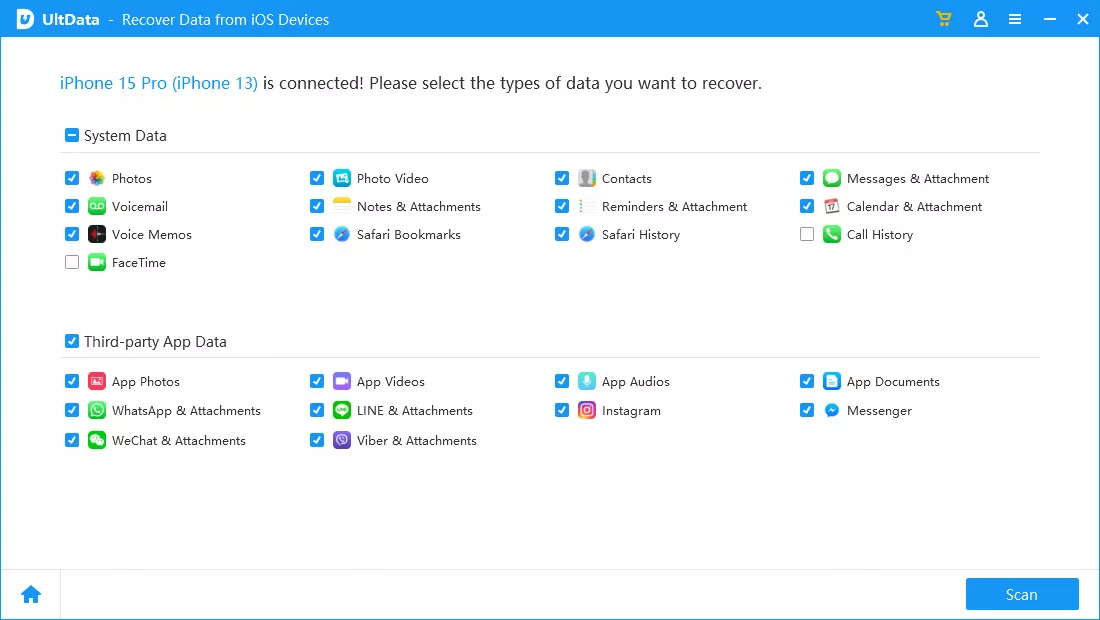
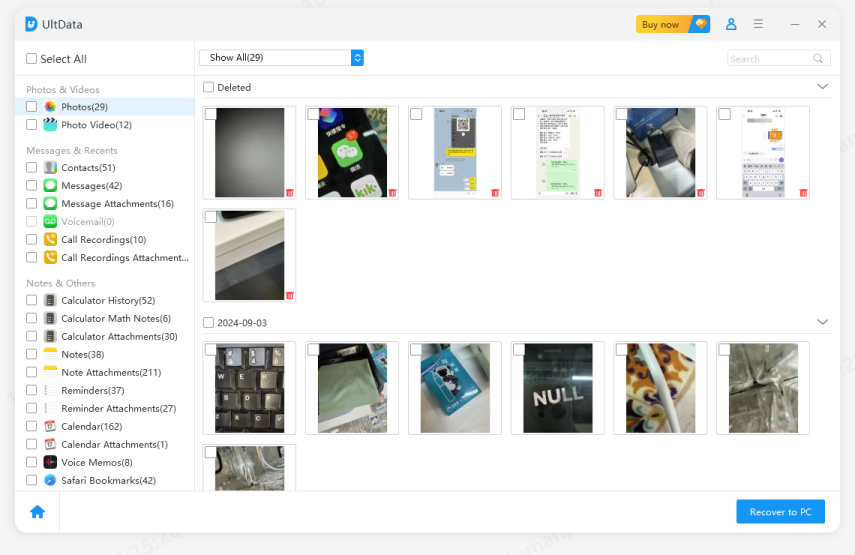
If your missing recordings were originally stored on an iPhone or iPad, Tenorshare UltData is worth considering. This powerful iOS data recovery tool helps you scan your iPhone or iPad for lost or deleted data, including supported audio files, voice memos, photos, videos, and other important content.


It also supports recovery from compatible iTunes and iCloud backups, giving you more ways to find files that may no longer appear on your device. With its preview feature, you can check detected files before recovery and selectively restore the ones you need to your computer without having to restore an entire backup. This makes it easier to retrieve important original recordings that you may want to reuse in your Logic Pro projects.
Follow these steps from the UltData iOS Recovery Guide to check your phone for missing data:
You can avoid Logic Pro X tracks disappeared situation in the future if you consider a few precautions:
Saving alone does not normally delete tracks. They may be hidden, absent from the active project alternative, or removed during editing. Check track visibility, project alternatives, backups, and missing audio files.
Try Undo if the deletion was recent. You should also check the Project Audio Browser for existing recordings. If the original audio files were deleted, compatible recovery software may help retrieve supported files.
The original Undo history may no longer be available after closing the project. Look at File > Revert to, project alternatives, and any Time Machine copy, and confirm that the original media is still available.
If the source audio files still exist elsewhere, locating and reconnecting them may solve the problem. If the files were deleted, you may need to restore them from a backup or consider compatible data recovery software.
When Logic Pro X tracks disappeared because the original audio recordings were deleted from your Mac, Tenorshare UltData for Mac can be another option worth considering. It helps scan your Mac for lost or deleted files and provides a chance to recover important recordings that are no longer accessible through Finder.
Whether you accidentally deleted audio files or lost recordings during file management, you can check for recoverable data and restore supported files to your computer. Recovering the original audio files may also help you bring missing recordings back into your Logic Pro projects and continue your music production.


UltData - Best iPhone Data Recovery Software




then write your review
Leave a Comment
Create your review for Tenorshare articles

Share this post


UltData - Best iPhone Data Recovery Tool
Recover Deleted & Lost Data from iOS Devices Easily, No Backup Needed!
UltData: Best iPhone Recovery Tool
Recover Lost iPhone Data without Backup
By Jenefey Aaron
2026-11-13 / iOS Data Recovery