Upgrading to the new Google Pixel offers powerful AI features and provides a
brilliant Android experience. But transferring the photos, contacts, messages,
and personal files to the new brand device, or retrieving them if they are
suddenly removed, might feel difficult. If you are setting up your device for
the first time or are willing to recover deleted data without any backup, this
post will cover everything to help you to restore deleted data on Google
Pixel.
What Data Can You Transfer to the Google Pixel 11?
When switching to a Google Pixel 11, Android's built-in migration tools
allow you to transfer a wide range of personal information directly from an
older Android device or an iPhone.
Contacts and
Call Logs: Standard phonebook contacts, SIM contacts, and recent call histories.
Messages: SMS, MMS, and supported third-party chat attachments.
Photos & Videos: Local media stored on device storage or synced via
cloud services.
Apps and App Data: Free and purchased applications installed via Google
Play, along with compatible local app settings.
Music & Documents: PDFs,
audio files, downloads, and local device folders.
How to Transfer Data to Pixel 11 (Official Methods)
Google provides streamlined options during initial setup to migrate content
directly via a cable or wireless connection or via cloud backups.
Transfer Data During Pixel 11 Setup
The standard setup wizard is the fastest way to move data from your old
Android or iOS device directly to your new handset.
Turn on your Google Pixel 11 and tap Get Started. Select your language and
connect to a Wi-Fi network.
When prompted to "Copy apps & data," tap Next. Use a Quick Switch
Adapter (or a C-to-C / Lightning-to-C cable) to physically connect your
old phone to the Pixel.
Confirm the connection prompt on your old phone screen. On the Pixel
display, select the checkboxes for Contacts, Photos, Apps, Messages, and
Settings.
Tap Copy and allow the transfer process to complete. Keep both devices
connected until the screen indicates that setup is finished.
Restore Data from Google Backup
If your old phone is no longer physically accessible, you can restore your
content directly from a Google Cloud backup.
Turn on your phone and proceed through the initial setup screens until you
reach the Copy apps & data screen.
Tap Can't use other phone? and log into the Google Account associated with
your previous backup.
Select the most recent backup entry from the available list.
Choose the specific data categories you wish to restore (e.g., Device
Settings, Call History, Contacts) and tap Restore.
What to Do If Data Is Missing After Moving to Pixel 11?
Despite automated setup procedures, data migration does not always run
perfectly. Several standard edge cases can prevent files from migrating
successfully:
1. Pixel 11 setup finished, but photos are missing
Media saved in hidden, encrypted, or third-party folders often bypasses
automated local cable transfers.
2. Some contacts failed to transfer
Contacts saved locally on a SIM card or a secondary account may not sync
properly without manually selecting the account.
3. WhatsApp chat history disappeared
Switching operating systems or skipping local cloud chat backups can prevent
message history
from populating automatically.
4. The old phone got damaged before the data transfer
If your previous phone suffered a broken screen or motherboard failure prior
to migration, direct cable transfer becomes impossible.
5. No Google backup available
Cloud synchronization was either disabled or insufficient cloud storage
space prevented auto-backups from running.
Recover Lost Data on Google Pixel 11 Without Backup
When official setup transfers fail, cloud backups are missing, or files are
accidentally deleted, dedicated software provides a reliable solution.
If you are looking for an effective solution without relying on pre-existing
cloud backups,
Tenorshare UltData
for Android stands out as an industry-leading data recovery tool. Unlike
basic cloud restores, UltData directly scans your device storage to locate
and extract lost content without requiring phone rooting for standard
recoveries.
Why Choose Tenorshare UltData for Android?
Deep Scanning Technology
Recovers photos, videos, WhatsApp messages, contacts, call logs, and
documents directly from internal storage.
No Root Required
Deep scan and recover lost photos and WhatsApp data without voiding your
device warranty or risking system instability.
Selective Preview
Preview items before restoring them, allowing you to selectively retrieve
specific deleted files rather than performing a full system overwrite.
High Success Rate
Compatible with over 6,000 Android models, ensuring full compatibility with
newly released devices.
WhatsApp Data Recovery
Specialized recovery engine capable of retrieving lost
WhatsApp messages, attachments, and photos without a prior Google Drive backup.
How to recover missing files using Tenorshare UltData for Android?
Download and install Tenorshare UltData on your computer. Open the
software and select Recover Lost Data from the main dashboard. Connect
your Google Pixel 11 to the computer using a reliable USB-C cable.
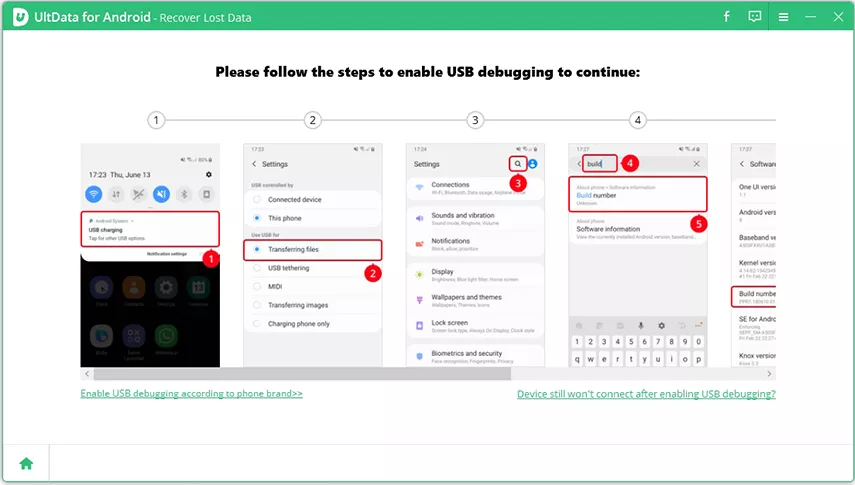
Follow the on-screen prompts on your Pixel to turn on USB Debugging.
Navigate to Settings > About Phone, tap Build Number 7 times to enable
Developer Options, then enable USB Debugging inside Developer Options.
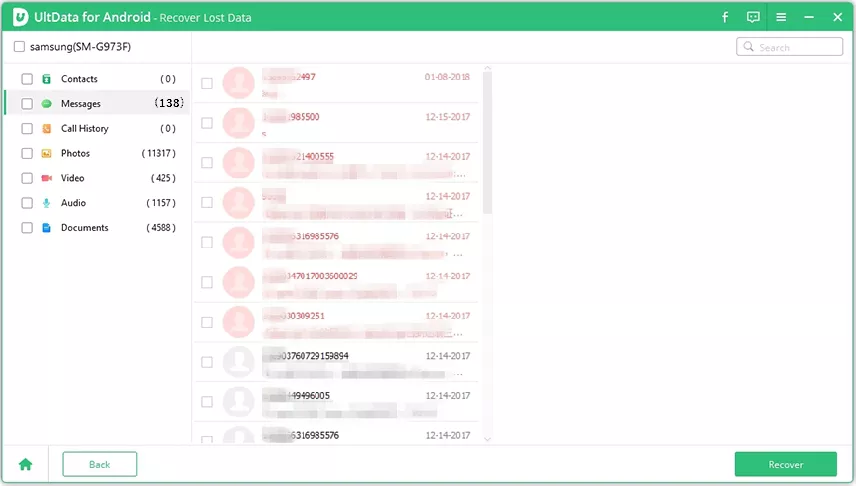
Once the device is recognized, select the file categories you wish to
recover (e.g., Photos, Contacts, Messages, WhatsApp Data) and click Start
to initiate the system scan. After the scan completes, browse through the
category list to preview recoverable files. Select the missing items you
wish to retrieve and click Recover to save them directly to your computer.
Conclusion
Migrating to the Google Pixel 11 is simple using official transfer methods
or cloud backups. However, if files disappear, setup steps fail, or you lack
a recent backup, Tenorshare UltData for Android offers a powerful,
user-friendly solution to scan your device directly and recover your
valuable photos, contacts, and messages safely in just a few clicks.









 iOS Tips & Latest Updates
 Bug Fixes, Unlock Guides
 Giveaways & Freebies





By Jenefey Aaron
2026-10-14 / Android Recovery