Memory shortages can cause application crashes, slow multitasking, and system
instability, even on modern computers. Swap file is used to
extend available memory by temporarily moving inactive data to storage. The
article below explains what is a swap file, swapping
behavior, sizing recommendations, management methods, and optimization
techniques.
Swap files serve as an extension of physical RAM when memory resources
become limited.
Operating systems use swap storage to prevent crashes, maintain multitasking
performance, and provide virtual memory for running applications.
What Is a Swap File or Swap Space?
What is a swap file or swap space? A swap file is a reserved area on a
storage device used as virtual memory when physical RAM becomes full.
Common operating system terminology includes:
Please swipe to view
Operating System
Swap Technology
Linux
Swap File / Swap Partition
Windows
Pagefile.sys
macOS
Swapfiles
Android
ZRAM / Swap
ChromeOS
Compressed Swap
A simple definition:
When RAM runs out, the operating system temporarily stores inactive memory
pages on disk storage and retrieves them when needed.
Different Types of Swap & Which One Should You Choose?
Several terms often describe similar concepts.
Different Types of Swap
Understanding the differences helps users configure memory management
correctly.
Swap File
A regular file stored on a filesystem.
Advantages:
Easy creation
Easy resizing
No partition modification required
Swap Partition
A dedicated storage partition reserved exclusively for swapping.
Advantages:
Slightly lower overhead
Traditional Linux approach
Swap Memory
A general term referring to virtual memory resources used when RAM is
exhausted.
Swap Space
The total storage allocated for swapping, including swap files and swap
partitions. Many users searching for swapfile information are actually
referring to swap space in general.
Which Should You Choose?
Modern Linux distributions generally recommend swap files because they
provide flexibility, easier management, and comparable performance on SSDs.
What Does a Swap File Do?
Swap files prevent memory exhaustion and allow applications to continue
operating when available RAM becomes insufficient. (See:
How to Fix Not Enough Disk Space on Mac)
Operating systems move inactive memory pages to storage so active
applications can continue using RAM efficiently.
Pros
Prevents out-of-memory crashes
Improves multitasking stability
Supports hibernation
Helps memory-intensive workloads
Extends usable memory capacity
Cons
Much slower than RAM
Excessive swapping reduces performance
Heavy disk activity may occur on HDDs
Large swap usage often indicates insufficient RAM
According to Linux kernel documentation, swap provides memory management
flexibility rather than replacing physical memory.
How Does a Swap File Work?
Virtual memory systems constantly balance RAM usage and storage resources.
Understanding the mechanics explains why swapping sometimes improves
stability while reducing speed.
Understanding Virtual Memory
Virtual memory creates the illusion of having more memory than is physically
installed.
Applications receive virtual memory addresses while the operating system
maps those addresses to:
Physical RAM
Swap storage
Memory-mapped files
Microsoft and Linux kernel documentation both describe virtual memory as a
core operating system mechanism for memory management.
The Swapping Process (Swapping Out vs Swapping In)
Memory pages continuously move between RAM and storage based on demand.
Swapping Out
Inactive memory pages move from RAM to swap storage. This process frees
physical memory for active workloads.
Swapping In
Previously, swapped data returns from storage to RAM when applications need
access again.
What Triggers Swapping? (Swappiness Explained)
Linux systems use a kernel parameter called swappiness.
Swappiness determines how aggressively memory pages move to swap.
Common values:
Please swipe to view
Swappiness Value
Behavior
10
Prefer RAM
30
Light swapping
60
Default behavior
80+
Aggressive swapping
Lower values generally improve desktop responsiveness. Higher values may
benefit servers with large caches.
Modern NVMe SSDs reduce swap penalties dramatically compared to traditional
hard drives.
However, RAM remains thousands of times faster than storage-based virtual
memory.
Swap File vs Swap Partition vs Pagefile.sys
Swap technologies solve similar problems but differ in flexibility,
management, and operating system implementation.
Selecting the correct approach depends on hardware, operating system, and
workload requirements.
Comparison Table
Please swipe to view
Feature
Swap File
Swap Partition
Pagefile.sys
Operating System
Linux
Linux
Windows
Easy to Create
Automatic
Easy to Resize
Requires Partitioning
Flexibility
Excellent
Limited
Excellent
Performance
Very Good
Slightly Better
Very Good
Best for Modern Systems
Sometimes
This comparison addresses the common question about swapfile vs swap
partition configurations.
Which Option Should You Use?
Choose a Swap File when:
Using modern Linux distributions
Flexibility matters
Storage layouts change frequently
Choose a Swap Partition when:
Using legacy systems
Dedicated swap storage is preferred
Hibernation reliability is critical
Choose Pagefile.sys when:
Running Windows
Automatic management is preferred
Do You Need a Swap File? Is a Swap File Needed?
Swap requirements vary based on RAM capacity, workload intensity, and
operating system design.
Modern systems with large RAM capacities still benefit from swap in specific
scenarios.
Recommended Swap Size by RAM (2026 Table)
Please swipe to view
Installed RAM
Recommended Swap
4GB
4GB–8GB
8GB
2GB–8GB
16GB
2GB–4GB
32GB
2GB
64GB+
0–2GB
These recommendations align with guidance from major Linux distributions,
including Ubuntu and Red Hat. The optimal size of swap space is
1.5 times
the size of your RAM, but it varies depending on the application.
When You Definitely Need a Swap?
Swap remains highly recommended under these conditions.
Monitoring memory consumption remains important before disabling swap.
ZRAM vs Traditional Swap File – Which is Better?
ZRAM compresses memory pages directly in RAM.
Traditional swap stores pages on storage devices.
Please swipe to view
Feature
ZRAM
Traditional Swap
Speed
Faster
Slower
Compression
Storage Usage
None
Uses Disk Space
Best For
Laptops & Mobile Devices
General Systems
Most modern Linux desktops benefit from combining ZRAM with a small
traditional swap file.
How to Create, Manage, Check, Resize, and Delete a Swap File?
The methods below cover the most common administrative tasks, including
creating, checking, resizing, and deleting swap files. Proper swap
management improves system stability and ensures virtual memory resources to
match workload demands.
1. How to Create a Swap File
Creating a swap file provides additional virtual memory without modifying
disk partitions.
Linux administrators commonly use this approach because it is flexible and
easy to maintain.
Open Terminal and create a 1GB swap file by running the command: “sudo
fallocate -l 1G /swapfile”
Set secure permissions so only the root user can read and write the swap
file with the command: "sudo chmod 600 /swapfile”
Format the file: “sudo mkswap /swapfile”
Enable swap: “sudo swapon /swapfile”
Verify activation: “swapon --show” and “sudo free –h"
2. How to Check a Swap File
Checking swap usage reveals whether the system actively relies on virtual
memory.
Open Terminal and run: “swapon --show” and “sudo free –h"
Analyze current utilization and identify excessive swap consumption.
3. How to Resize or Disable a Swap File
Resizing adjusts virtual memory capacity while disabling removes swap
entirely.
Resizing the swap file allows using the same swap file for increased or
decreased requirements without creating new ones.
Open Terminal and disable the Swap file process with the command: “sudo
swapoff -a”
Now resize the old swap file and create your desired size: “sudo fallocate
-l 4G /swapfile”
Now ensure permission for the swap file: “sudo chmod 600 /swapfile”
Format for swap and prepare the file system: “sudo mkswap /swapfile”
Now, finally, enable the swap file: “sudo swapon /swapfile”
4. How to Delete a Swap File
Removing a swap file permanently frees storage space.
Administrators commonly perform this task after RAM upgrades.
Open Terminal and disable swap: “sudo swapoff /swapfile”
Delete the swap file: “sudo rm /swapfile”
Edit fstab: “sudo nano /etc/fstab”
Remove swapfile entries and save changes, then reboot the system.
Many users searching for how to delete swap files Vim are actually referring
to Vim recovery swap files (.swp files). Those files can typically be
removed after closing Vim and verifying no editing session remains active.
5. Optimize Swap File Performance on Mac with Tenorshare Cleamio
Excessive cache files, junk data, and storage fragmentation can reduce
overall virtual memory efficiency on macOS. Maintaining available storage
helps macOS manage swap files more effectively.
Why Use Tenorshare Cleamio?
Tenorshare Cleamio
helps optimize Mac storage by
removing unnecessary files
and reclaiming disk space. It brings smart junk file cleanup with management
for large files as well as duplicates. Cleamio detects useless cache and
helps with storage optimization, along with performance improvement.
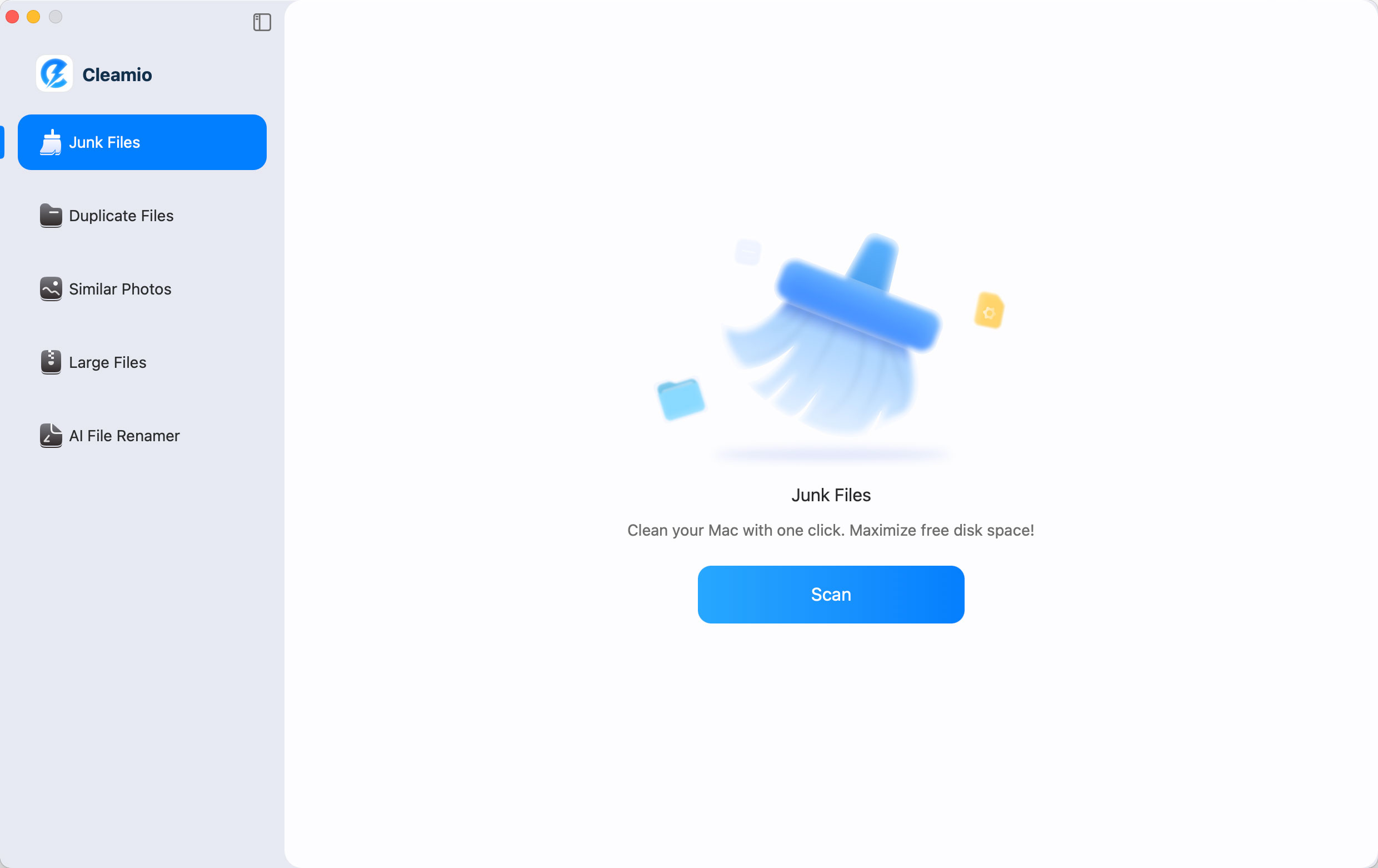
Download and install Tenorshare Cleamio on Mac and launch it. Select the
"Junk Files" feature from the left side and click "Scan" to begin scanning
your Mac.
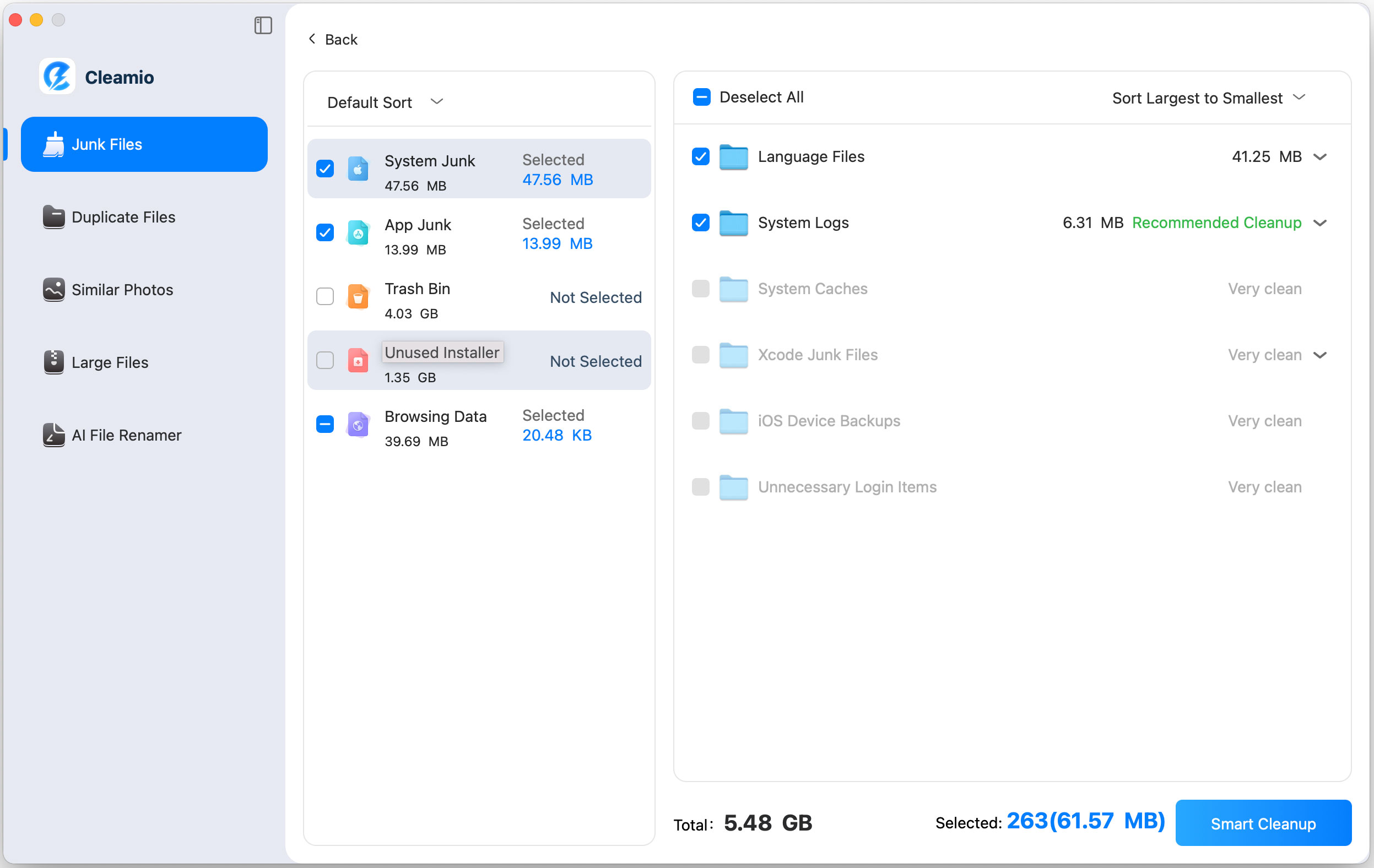
When the scan is complete, choose the detected file types and their files
that you want to delete, then click "Smart Cleanup" to optimize swap file
performance on Mac.
Once the cleanup is complete, click "OK," and your Swap file performance
on Mac will be optimized.
Maintaining sufficient free storage allows macOS swap mechanisms to operate
more efficiently during memory-intensive workloads.
People Also Ask about Swap File
Q1: Is swapfile the same as pagefile?
Not exactly. A swap file and Windows pagefile.sys serve the same purpose,
providing virtual memory when physical RAM becomes limited, but they are
implemented differently by their respective operating systems. Linux
commonly uses swap files or swap partitions, while Windows automatically
manages virtual memory through pagefile.sys.
Q2: Does a swap file damage an SSD?
Normal swap usage does not significantly damage modern SSDs. Today’s SSDs
are designed with wear-leveling technology and endurance ratings that can
handle years of typical swap activity. Excessive swapping may increase write
operations, but insufficient RAM is usually a bigger performance concern
than SSD wear.
Q3: Is a swap file needed for all computers?
No, but most systems benefit from having at least a small amount of swap
space available. Even computers with large amounts of RAM can use swap for
memory management, crash recovery, and hibernation features. Systems with
limited RAM rely much more heavily on swap to maintain stability during
heavy workloads.
Q4: Can a swap file improve system performance?
A swap file primarily improves system stability rather than raw performance.
It prevents applications from crashing when RAM becomes full by providing
additional virtual memory. However, because storage devices are much slower
than RAM, heavy reliance on swap can actually reduce system responsiveness.
Q5: Which is better, ZRAM or swap?
ZRAM is generally faster because it compresses memory pages and stores them
in RAM instead of writing them to a storage device. Traditional swap
provides additional capacity beyond physical memory but operates at storage
speeds. Many Linux distributions achieve the best balance by combining ZRAM
for speed with a small swap file for overflow memory management.
Conclusion
Understanding what a swap file is helps optimize virtual
memory, improve system stability, and prevent memory-related crashes. Swap
files extend RAM through storage-based virtual memory, while ZRAM and modern
SSDs further enhance efficiency.
For Mac users, Tenorshare Cleamio provides an effective way
to maintain storage health and support smoother swap file performance during
demanding workloads.




 iOS Tips & Latest Updates
 Bug Fixes, Unlock Guides
 Giveaways & Freebies






By Jenefey Aaron
2026-09-28 / Mac Cleanup