

 iOS Tips & Latest Updates
 Bug Fixes, Unlock Guides
 Giveaways & Freebies


iCareFone Transfer - No.1 Solution for WhatsApp Transfer
Transfer, Backup & Restore WhatsApp without Reset in Clicks
Transfe WhatsApp without Reset
Easily Transfer WhatsApp without Reset
A virtual number for WhatsApp lets you use WhatsApp without a physical SIM card. It works through internet-based services and is useful for privacy, business accounts, or managing multiple profiles on one device.
In 2026, many free and paid options make it easier than ever to get started. Whether you want extra privacy or a separate business line, a virtual number gives you flexibility and control. In this guide, you will learn the best ways to get a virtual number for WhatsApp quickly and safely.
Yes, you can use a virtual number for WhatsApp very easily. It is a number that works without a SIM card and runs through the internet. You can use it to create a WhatsApp account just like a normal number.
WhatsApp allows virtual numbers as long as you can receive the verification code. That means you don't need your personal SIM to sign up. Many people use it for privacy, business accounts, or to keep work and personal chats separate.
Picking the best virtual number for WhatsApp can save you time and frustration. Free services can work at first, but paid ones often have better verification success.
Google Voice is a well-known service that provides a US-based number through your Google account. It is often used as a free virtual number for WhatsApp business by users who need a second number for calls and messages.

Pros
Cons
Pricing: Personal use is free. Business plans start around $10 per user/month
TextNow is a popular app that provides a free virtual number for WhatsApp business or personal use. It offers US and Canadian numbers that can work over Wi-Fi, making it useful for people who want a second number without paying at the start.

Pros
Cons
Pricing: Free basic plan. Premium plans usually start around $4.99/month
Talkatone is another free app that gives users a secondary number for calls and messages. It can sometimes work as a virtual number for WhatsApp free online without verification, especially for short-term use.

Pros
Cons
Pricing: Free basic version, with optional in-app purchases
TextPlus offers a free second number that can be used for texting and calling through the internet. Some users try it as a cheapest virtual number for WhatsApp option because there is no upfront cost.

Pros
Cons
Pricing: Free with ads. Paid options usually start around $2.99/month
Hushed is a premium service that offers private numbers for users who need better reliability. It is often chosen by people looking for a usa virtual number for whatsapp or a more secure business number.

Pros
Cons
Pricing: Starts around $4.99--$7/month, depending on country
Burner is designed for people who want temporary private numbers. It is commonly used when someone needs a separate number for short-term messaging without exposing their personal phone number.

Pros
Cons
Pricing: Starts around $4.99/month
KrispCall is a professional phone system built for businesses that need an international virtual number for WhatsApp. It is more advanced than standard apps and works well for teams managing customer communication.

Pros
Cons
Pricing: Starts around $15/user/month
Wabi is made especially for WhatsApp users and focuses on helping businesses create separate WhatsApp accounts more easily. Many small businesses prefer it because it is built around WhatsApp itself.

Pros
Cons
Pricing: Starts around $4/month
Using a virtual number for WhatsApp is easier than many people think. Once you choose a service that supports WhatsApp verification, the setup only takes a few minutes. The virtual number must support SMS or voice calls, as WhatsApp sends a verification code to activate the account.
First, choose a trusted app that gives a virtual number.
Examples:

Open the app and create an account.
Then:
Install and open:
Tap: Agree and Continue
Type the virtual number you received. Check the country code carefully before moving forward.

WhatsApp will send a code.
You can receive it by:
or
Open your virtual number app and check the code.

Copy the verification code. Then enter it in WhatsApp to confirm the account.
After verification, add:
Now your WhatsApp account is ready.
After setting up a virtual number for WhatsApp, many users worry about losing chats when switching phones or changing numbers. This is where a tool like iCareFone WhatsApp Transfer becomes very useful. It helps you move, back up, and restore WhatsApp data easily without complicated steps.




This tool is especially helpful if you are using WhatsApp for business or managing multiple accounts. iCareFone WhatsApp Transfer is a data management tool that lets you transfer WhatsApp chats, media, and contacts.
Key Features
How to Use iCareFone WhatsApp Transfer for backup and restore:
Download and install iCareFone Transfer on your PC / Mac. Connect your device with a USB after you launch the software.
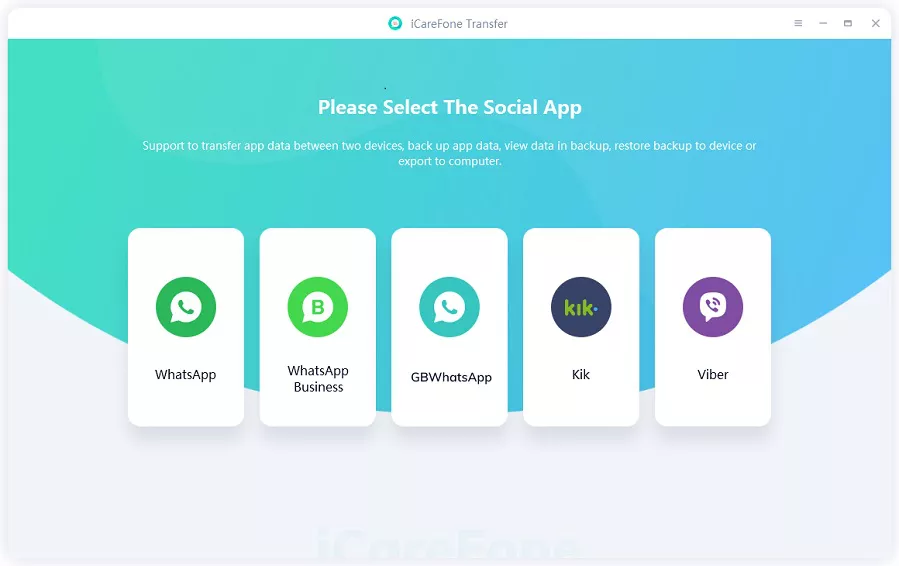
Choose Backup from the left menu and click on Back Up Now button.
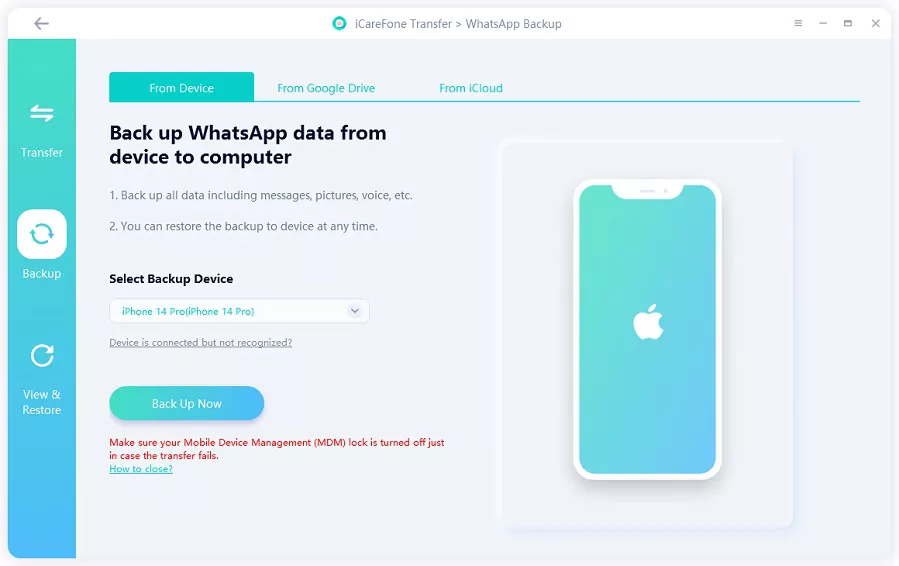
iCareFone Transfer will start backing up of WhatsApp data. Make sure your iPhone is not disconnected during the back up process.

The following screen indicates backup was successful.

Click on View and Restore to see the backed-up WhatsApp data, including the video.

From there, you can export them to any location on your Computer.

Yes, it is safe and legal to use a virtual number for WhatsApp if you use it properly. Many people use it for privacy or business. Just make sure you choose a trusted provider.
Yes, free options like Google Voice, TextNow, Talkatone, and TextPlus exist. But they are not always reliable for WhatsApp verification.
A virtual number may fail on WhatsApp if it is already used, blocked, or not supported for verification. Free numbers often have this issue because they are shared or recycled. In some cases, WhatsApp simply does not send the code to certain VoIP numbers.
A virtual number for WhatsApp is a practical way to manage privacy, run business chats, or handle multiple accounts without sharing your personal SIM. To keep your WhatsApp data safe when changing numbers or devices, iCareFone WhatsApp Transfer is a reliable solution. It lets you easily back up, transfer, and restore chats without losing important messages or media.


iCareFone Transfer - WhatsApp Transfer, Backup & Restore






then write your review
Leave a Comment
Create your review for Tenorshare articles
No.1 Solution for WhatsApp Transfer, Backup & Restore
Fast & Secure TransferShare this post


iCareFone Transfer - No.1 Solution for WhatsApp Transfer
Transfer, Backup & Restore WhatsApp without Reset in Clicks
Transfe WhatsApp without Reset
Easily Transfer WhatsApp without Reset
By Jenefey Aaron
2026-09-24 / Transfer