Getting an iPhone is meant to make things easier, but a major iOS update can
sometimes cause unexpected problems. If you open the Messages app and find
that your messages have disappeared after the iOS 27 update, don't panic.
You may notice missing chats, older text messages, or entire conversations
suddenly disappearing without warning. In many cases, these messages may still
be available on your iPhone or synced with iCloud. Before turning to iPhone
data recovery tools, there are several ways you can check and restore your
missing messages.
In this guide, we'll walk you through the most effective methods to find and
recover messages that disappeared after the iOS 27 update.
Before diving into fixes, it helps to clear up a common source of confusion:
the difference between your app and the services running inside it.
Please swipe to view
Feature
Messages App
iMessage Service
SMS/MMS Service
What It Is
The app icon you tap on your home screen
Apple's internet messaging network
Traditional carrier text messaging
Bubble Color
Houses both blue and green conversations
Blue chat bubbles
Green chat bubbles
Connection
Local software interface
Needs Wi-Fi or cellular data
Uses your regular mobile network
Where It's Saved
Stored locally and backed up to iCloud
Tied to your Apple Account
Tied to your phone number & SIM
Why does this matter? Because when messages disappeared after the iOS 27
update, the glitch might only affect cloud-synced iMessages, while your
standard green
text messages
remain completely fine (or vice versa).
Why Did My Messages Disappear After iOS 27 Update?
Why are my text messages missing after I updated my iPhone? Big updates
shake things up under the hood. Here are the most common reasons why texts
go missing.
1. Background Indexing
Your iPhone is still organizing files after the update, so some chats may
take a while to appear.
2. iCloud Sync Paused
The update might have logged you out or turned off "Messages in iCloud."
3. Apple Account Glitch
Your phone might be confused about which Apple ID profile to pull data from.
4. Low Storage Space
If your phone or iCloud storage is packed, iOS struggles to unpack old
database files.
5. Temporary Software Bug
A quick glitch occurred during installation, temporarily hiding conversation
threads.
What Kind of Messages Are Missing?
Take a second to see what actually vanished, as this helps point to the
right fix:
A specific contact's thread is gone, but everyone else is still there.
Older messages inside a thread disappeared, leaving only recent texts.
Your whole inbox looks completely empty.
Blue iMessage threads disappeared while green SMS texts stayed put.
Identifying what is missing helps you decide whether you just need a
simple settings tweak or full-scale iPhone data recovery.
How to Find Missing Messages After iOS 27 Update?
Try these quick, risk-free steps on your iPhone first.
1. Check the Messages App and Filters
Open your Messages app.
Tap Filters (or Edit) in the top-left corner.
Select All Messages to make sure you aren't stuck in a filtered folder
like Unknown Senders.
Use the search bar at the top to search for a specific name or word from
the missing text.
2. Check Recently Deleted Messages
Inside Messages, tap Filters > Recently Deleted.
See if your missing texts ended up here by mistake (iOS keeps deleted
messages here for up to 30 days).
Tap the threads you want and hit Recover.
3. Check Messages in iCloud
Give your cloud settings a quick nudge to force a resync:
Open Settings > tap \Your Name\ > iCloud.
Under Saved to iCloud, tap See All and choose Messages.
Check that Use on this iPhone is switched ON. If it's already on, turn it
off, wait about 30 seconds, and turn it back on.
Make sure you're on Wi-Fi and tap Sync Now.
4. Check Storage Space
Device Storage
Head to Settings > General > iPhone Storage. Try to keep at least a
few gigabytes free so iOS can operate smoothly.
iCloud Storage
Head to Settings > tap \Your Name\ > iCloud. If your cloud storage is
maxed out, syncing pauses until you free up space.
5. Restart Your iPhone
Restarting forces iOS to clear out cached errors and re-index your
conversations:
Press Volume Up, press Volume Down, then press and hold the Side Power
Button until you see the Apple logo.
How to Restore Missing Messages After an iOS 27 Update?
If checking your settings didn't bring them back, try these restoration
options.
1. Recover Messages from Recently Deleted
If your missing texts were deleted recently around the update time, open the
Recently Deleted section inside your Messages app, select what you need, and
restore them with a single tap.
2. Check Another Apple Device
If you have an iPad or Mac signed into the same Apple Account, open Messages
on that device immediately. If your phone glitched during the update, your
iPad or Mac might still have the original messages stored locally before any
cloud changes synced over.
3. Restore Messages from an iPhone Backup
You can roll your device back to the way it looked right before you updated.
Go to Settings > General > Transfer or Reset iPhone > Erase All
Content and Settings.
Set up your phone, then choose Restore from
iCloud Backup
(or plug it into a computer using Finder/iTunes).
Pick a backup date from right before you installed iOS 27.
Keep in mind
Restoring an old backup replaces everything currently on your phone with
what was saved on that backup date.
4. Recover Missing Messages with Tenorshare UltData
If you don't have a recent backup or really don't want to wipe your entire
phone just to get some texts back, using dedicated
iPhone data recovery software
is easily the smartest shortcut. Tenorshare UltData is designed to scan your
device and recover lost files without wiping your current data.
Why Choose Tenorshare UltData?
Selective Recovery
You can preview missing texts, attachments, and contacts first, so you
recover only what you actually want.
No Factory Reset Needed
It scans deep into your iPhone's internal database to recover hidden files
while leaving everything else on your phone untouched.
Safe & Simple
Works smoothly across new iOS updates and solves tricky database bugs.
Multiple Recovery Paths
Pull missing messages directly off your iPhone, out of iTunes backups, or
from unreadable iCloud files.
How to Use Tenorshare UltData to Recover Missing Messages?
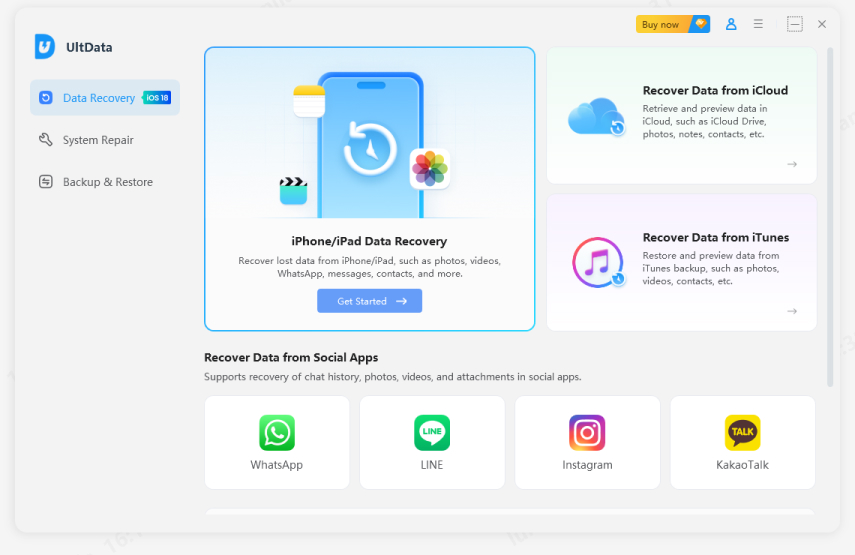
Download and open Tenorshare UltData on your computer.
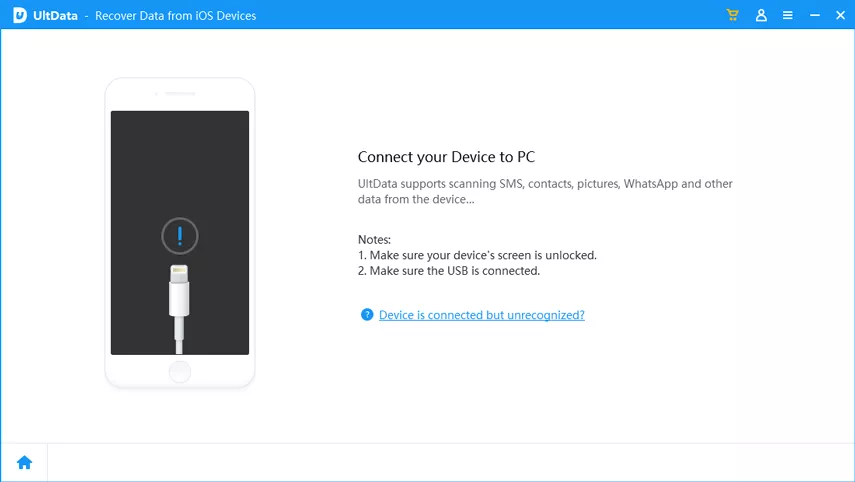
Connect your iPhone with a USB cable and choose Recover Data from
iPhone/iPad Data Recovery.
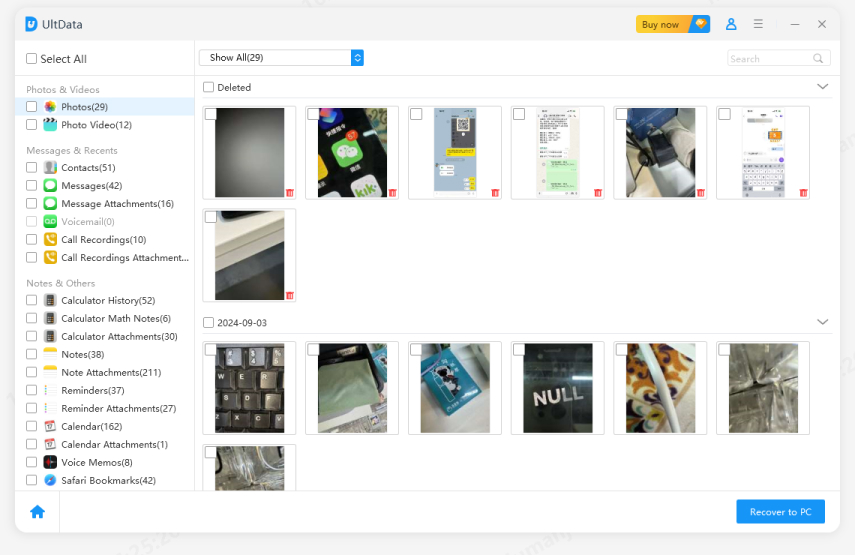
Check Messages & Attachments and click Scan. Review the found
conversations, select the ones you need, then hit Recover to PC or Recover
to Device.
FAQs About Messages Disappeared After iOS 27 Update
1. Why are my text messages missing after I updated my iPhone?
Why are my text messages missing after I updated my iPhone? It usually comes
down to slow background indexing, an iCloud sync option that turned off, low
storage space, or a minor display glitch caused by the update.
2. Why did my iPhone messages just disappear?
Why did my iPhone messages just disappear? Messages generally vanish because
cloud sync was interrupted, they were accidentally deleted, or your
retention settings automatically delete old messages after 30 days.
3. How do I get my messages back after updating to iOS 27?
Start by checking your message filters, looking in Recently Deleted, and
cycling your iCloud Messages setting off and on. If those don't work,
restore a pre-update backup or scan your device with Tenorshare UltData.
4. Why are my old text messages missing on my iPhone?
Older messages usually hide when local storage runs low or when iCloud sync
pauses to save battery. Double-check your message settings under Settings
> Messages > Keep Messages.
5. Can I recover deleted text messages after an iOS 27 update?
Yes! You can grab them from Recently Deleted within 30 days, restore a
pre-update backup, or use
iPhone data recovery software
to scan your phone's memory directly.
6. Can I recover messages without an iCloud backup?
Yes. You can check for cached copies on another Apple device (like an iPad
or Mac), restore from a computer backup, or run a scan using Tenorshare
UltData without needing a backup file.
7. Are iMessage and text messages the same thing?
No. iMessages are blue bubbles sent over Wi-Fi or data through Apple's
network. Text messages (SMS/MMS) are green bubbles sent through your mobile
carrier.
Conclusion
Seeing your messages disappear after the iOS 27 update can give you a heart
attack at first, but it is rarely permanent. Running through basic checks
like verifying filters, re-syncing iCloud, or giving your phone a quick
restart usually brings everything right back. And if standard iOS options
fall short, software like Tenorshare UltData gives you a reliable way to
recover your texts safely without wiping your phone.








 iOS Tips & Latest Updates
 Bug Fixes, Unlock Guides
 Giveaways & Freebies






By Jenefey Aaron
2026-10-20 / iOS Data Recovery