

 iOS Tips & Latest Updates
 Bug Fixes, Unlock Guides
 Giveaways & Freebies

Cleamio: All-in-One Mac Cleaner & Optimizer
Clean junk files, free up space, and boost Mac performance
No.1 Mac Cleaner & Optimizer
Clean, speed up, and optimize your Mac
Managing files on macOS is usually smooth, but many users eventually outgrow Finder’s limitations. If you’ve been searching for Mac Finder alternatives, you’re likely looking for better organization, faster navigation, or advanced features. In this guide, we’ll explore powerful Finder replacements and tools that can significantly improve your file management experience.

Finder is reliable for basic tasks, but it lacks advanced features that many users need for productivity. Whether you’re a developer, creative professional, or power user, there are situations where switching to a better file manager for Mac becomes essential.
Here are some real-world scenarios where Finder falls short and what tools can help:
 Please swipe to view
If you often struggle with file transfers, managing large directories, or multitasking, exploring a Finder replacement can significantly boost your workflow.
Instead of a one-size-fits-all solution, the best file explorer for Mac depends on your needs. Below are the top tools categorized by use case.
If you are looking for Finder alternatives that look like Windows’ File Explorer, here are our top 3 picks:

Commander One is a powerful dual-pane file manager designed for users who prefer a Windows-style layout. It simplifies file navigation and allows you to manage multiple directories simultaneously.
Why is it a Finder Alternative: Compared to Finder, it provides a more structured workflow with side-by-side file views and faster operations.
Key Strengths:
Best For: Users transitioning from Windows or managing multiple folders at once.

ForkLift is a professional-grade file manager that combines dual-pane navigation with advanced file transfer capabilities. It’s especially popular among developers and system administrators.
Why is it a Finder Alternative: Unlike Finder, it supports remote server access, making it a strong Finder replacement.
Key Strengths:
Best For: Developers and users handling remote servers.

QSpace introduces a modern multi-pane interface that goes beyond traditional dual-pane layouts. It allows you to open multiple folders in one window and manage files more efficiently.
Why is it a Finder Alternative: Compared to Finder, QSpace offers better multitasking and visual organization.
Key Strengths:
Best For: Users who want flexible layouts and visual file control.
Some users demand customizations to their Finder alternative and want in-depth control, and this section is all about that.

Path Finder is one of the most advanced Mac Finder alternatives, offering deep system access and customization options. It gives users complete control over file management, far beyond what Finder allows.
Why is it a Finder Alternative: It stands out as a true power-user tool with features like file comparison, permissions editing, and terminal integration.
Key Strengths:
Best For: Power users and professionals who need full control.
If you want the experience like the built-in Finder but want slight improvements, then here is the tool you need:

TotalFinder enhances the existing Finder instead of replacing it completely. It adds tabs, dual-pane mode, and improved navigation while keeping the familiar macOS interface.
Why is it a Finder Alternative: It’s ideal for users who want improvements without switching to a completely new system.
Key Strengths:
Best For: Users who want a simple Finder upgrade.
Many users are looking for Finder replacement options that are free and open-source, and here are our top picks:

Nimble Commander is a fast, lightweight, and open-source file manager designed for efficiency. It focuses on keyboard-driven workflows and performance.
Why is it a Finder Alternative: Compared to Finder, it offers more advanced navigation and productivity features without cost.
Key Strengths:
Best For: Users looking for a Finder alternative open-source solution.

muCommander is a lightweight, open-source file manager that offers a classic dual-pane interface similar to traditional file explorers. It serves as a practical Finder alternative by providing better navigation, archive support, and cross-platform compatibility. It’s best for users who want a simple, free tool with familiar functionality and no learning curve.

Marta is a modern, keyboard-driven file manager designed for speed and customization. Unlike Finder, it focuses on efficiency through hotkeys and a plugin-based system, making it highly flexible for advanced workflows. It’s best for users who prefer fast navigation and a minimal interface tailored to power usage.
Finder lacks a lot of useful features, and this section discusses the tools that complement your Finder replacement.
While not a traditional file manager, Tenorshare Cleamio complements Finder and its alternatives by solving one of their biggest limitations, file clutter. Finder lacks built-in tools for identifying duplicate files, large files, and system junk, which can slow down your workflow over time.
Why is it a Finder Alternative?
Tenorshare Cleamio enhances file management by scanning your Mac and organizing unnecessary data intelligently. It helps users clean up duplicate files, remove junk data, and free up storage without manual searching. This makes it a valuable addition to any better file manager for Mac setup.
Key Strengths:
Best For: Users who want cleaner, more organized storage.




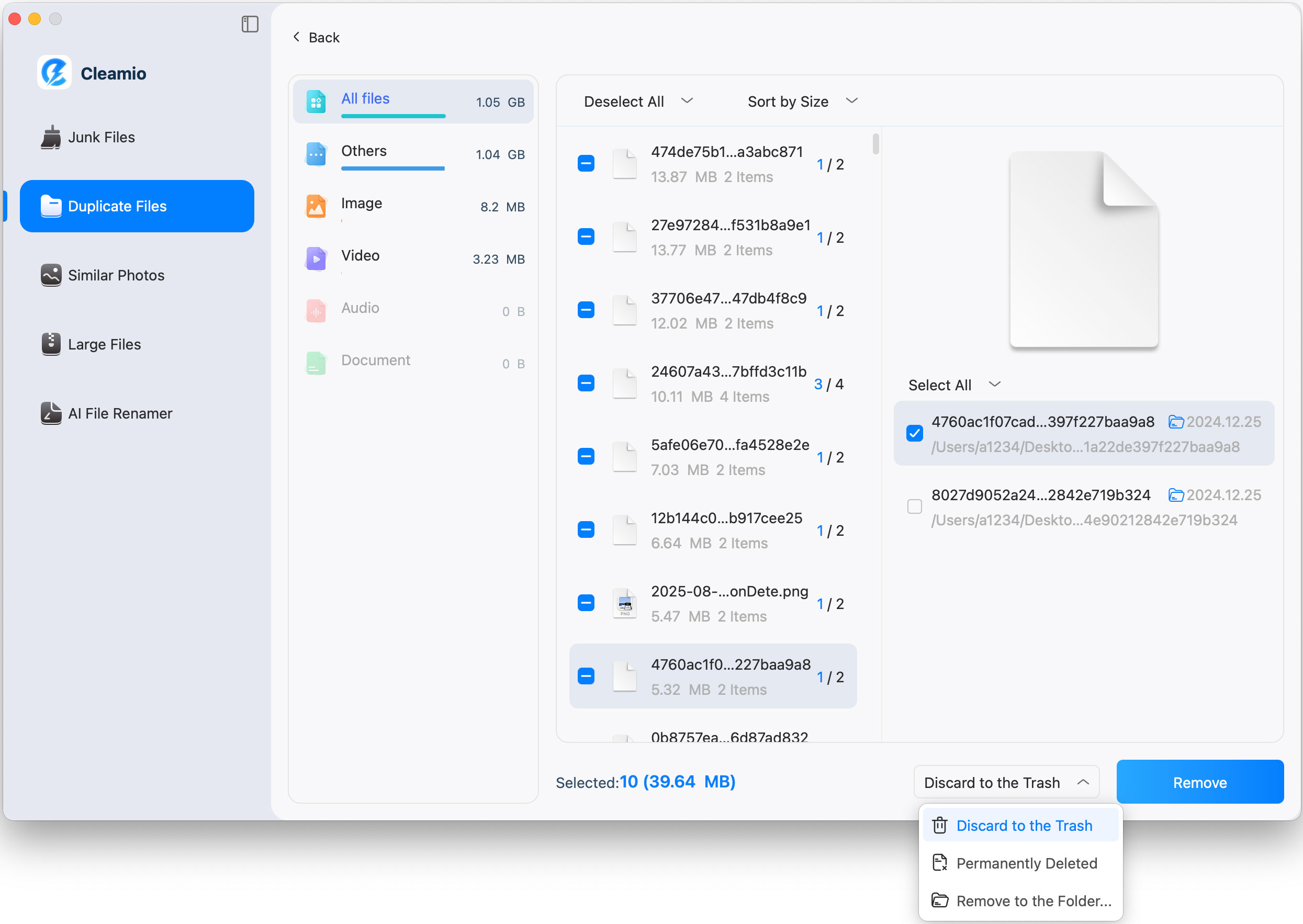
Steps to Remove Duplicate Files with Cleamio
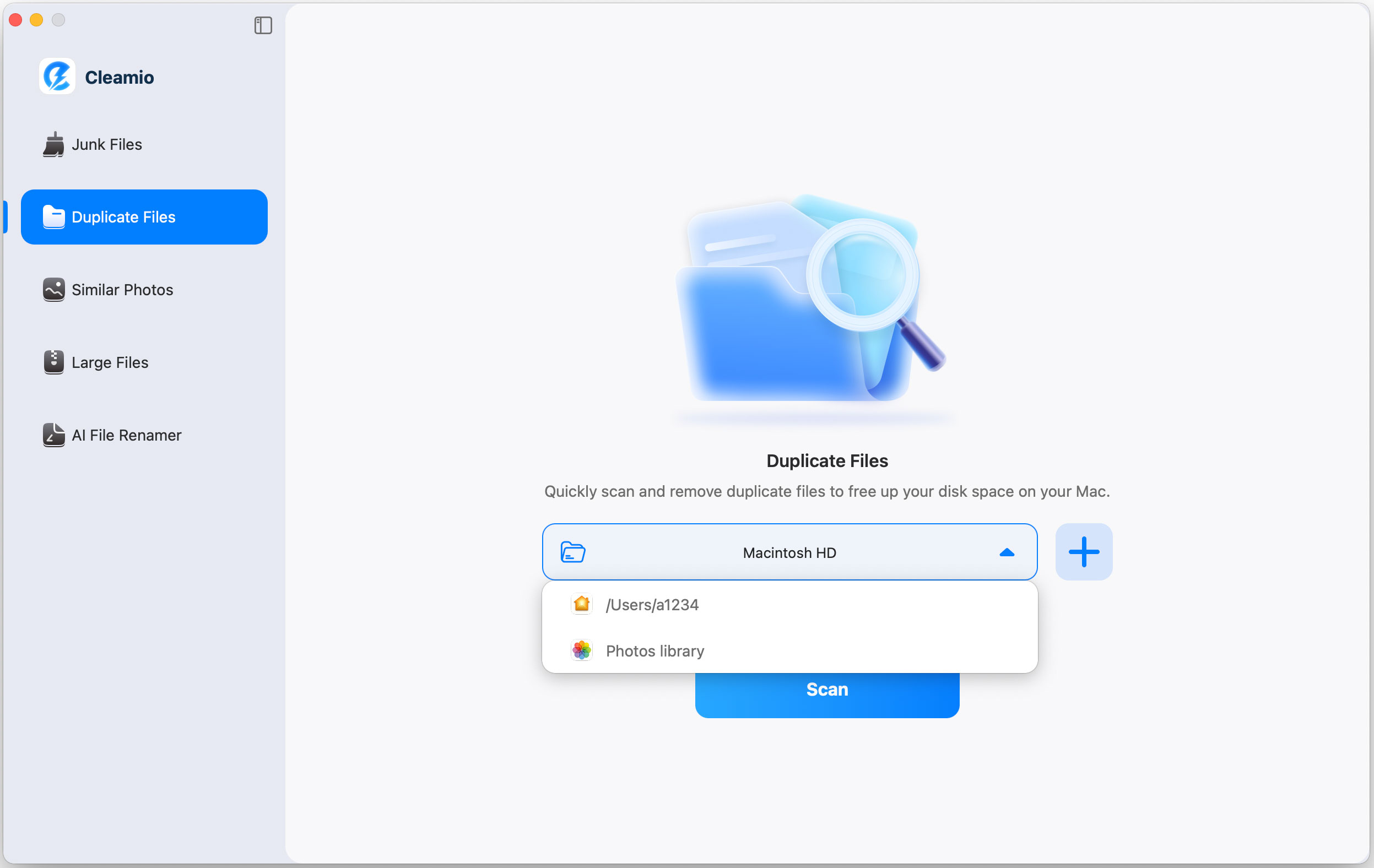

You can go to Preferences of Cleamio to customize the duplicate scanning settings.

If you want to fully switch from Finder to a new tool, you’ll need to adjust your workflow slightly. While macOS doesn’t allow you to completely uninstall Finder, you can minimize its use and rely on your preferred alternative. This approach helps you transition smoothly while maintaining system stability.

Choosing the right tool depends on your workflow and experience level. Here are the key factors to consider:
If you need simplicity, go for lightweight tools. If you need power, choose advanced managers like Path Finder or ForkLift.
The best Finder alternative depends on your workflow and needs. Tools like ForkLift are excellent for developers managing remote servers, while Path Finder suits power users needing advanced control, customization, and deeper system-level file management features.
You cannot fully replace Finder because it is a core macOS system component required for essential operations. However, you can minimize its usage by relying on third-party file managers for everyday file navigation, transfers, and organization tasks.
Yes, there are several free Finder alternatives available for macOS. Tools like Nimble Commander, Marta, and muCommander provide advanced file management features, including dual-pane navigation and keyboard shortcuts, without requiring any paid subscription or license.
Commander One is widely considered the closest equivalent to Windows File Explorer on Mac. Its dual-pane interface, familiar layout, and intuitive navigation system make it especially suitable for users switching from Windows environments.
Exploring Mac Finder alternatives can significantly improve how you manage files, especially if Finder feels limiting. Whether you need advanced features or a simple upgrade, there’s a tool for every user. Pairing your file manager with Tenorshare Cleamio ensures a cleaner, faster system for optimal productivity.


then write your review
Leave a Comment
Create your review for Tenorshare articles
 Cleamio
All-in-One Mac Cleaner & Optimizer
Share this post


Cleamio: All-in-One Mac Cleaner & Optimizer
Clean junk files, free up space, and boost Mac performance
No.1 Mac Cleaner & Optimizer
Clean, speed up, and optimize your Mac
By Jenefey Aaron
2026-09-28 / File Tips