Videos take up more storage space than almost any other file type, and over time, duplicate clips quietly pile up on your Mac. Downloads, backups, AirDrop transfers, and editing exports often create hidden copies. A duplicate video finder for Mac helps you quickly detect and remove redundant videos without risking data loss.
This article explores the best duplicate video finders for Mac in 2026, including free and paid options, to help you clean up your storage efficiently.
Part 1. Comparable Table: Which Is the Best Duplicate Video Finder for Mac?
Choosing the right app to delete duplicate videos depends on accuracy, speed, safety, and smart removal. Below is a comparison of the top duplicate media finder tools from multiple aspects.
Part 2. Best Duplicate Video Finder for Mac in 2026: Latest 7 Picks
Finding duplicate or similar videos manually on Mac can be time-consuming and risky. That’s why using a reliable app to delete duplicate videos is the smartest way to handle video deduplication in 2026. Here are the best duplicate video finder tools:
Tenorshare Cleamio is the best duplicate video finder for Mac in 2026, designed for speed, accuracy, and safety. It intelligently scans similar photos, duplicate videos, audio, documents, packages, and other file types using content-based algorithms instead of filenames. With one-click smart removal and Apple Silicon optimization, Cleamio stands out as a powerful duplicate video remover for both beginners and professionals.
Best For: Users looking for the best duplicate video finder with high accuracy and ease of use.
Main Features
AI powered duplicate file and video detection with MD5 precision
Finds duplicate videos, similar photos, and large files
One-click duplicate video removal with smart auto-selection
100% Free junk cleanup included
AI batch rename for photos, videos, and documents
Complete app uninstaller with leftover cleanup
Real-time Mac performance monitoring
Fully notarized by Apple for security and privacy
Pros
Combines duplicate file finder, junk cleaner, and performance optimizer
Very accurate duplicate detection using MD5 technology
Support batch duplicate file removal
One-click cleanup saves time
Free features available
Clean interface and beginner-friendly
Cons
The free version has usage limits
2. CZKawka – Free AI-Powered Duplicate Finder
CZKawka is a free, open-source duplicate media finder built for speed, privacy, and flexibility. Designed in Rust, it uses multiple comparison algorithms to detect duplicate files, similar images, large videos, and broken files across macOS, Windows, and Linux. It’s an excellent AI duplicate video finder free option for users who want full control without paid restrictions.
Best For: Advanced users who want a free duplicate video finder solution.
Rating: 4.2 / 5
Main Features
Duplicate video and file detection using multiple algorithms
Finds similar images and videos regardless of name or format
Large file locator for storage-heavy videos
Detects empty folders and broken files
Custom filters by size, extension, and folder
Works fully offline with no telemetry
Cross-platform support
Pros
Completely free & open source
Very fast scanning thanks to Rust and multithreading
No ads, no tracking, no background services
Highly customizable duplicate video search parameters
Supports large media libraries
Cons
Interface is less beginner-friendly than paid tools
No smart auto-selection for safe deletion
Duplicate video detection is less visual than AI-focused tools
Lacks one-click video deduplication workflow
3. dupeGuru – The Classic Open-Source Duplicate Video Finder Free
dupeGuru is a free, open-source duplicate file finder that works on macOS, Windows, and Linux. It scans files by filename or content and uses fuzzy matching to detect similar files. While its interface is basic, dupeGuru is reliable, customizable, and safe, making it a popular choice for users who want a free duplicate video and file finder.
Best For: Users who want a free, open-source solution with flexible scan options.
Rating: 3.5 / 5
Main Features
Free and open-source duplicate file finder
Supports macOS (10.12+), Windows, and Linux
Scan duplicates by filename or file content
Fuzzy matching to find similar filenames
Picture Edition for similar image detection
Music Edition for audio tag scanning
Customizable scan settings and filters
Safe reference folder system to avoid wrong deletions
Pros
Completely free with no ads
Open-source and transparent
Customizable scanning engine
Safe deletion system
Cons
Slower scans for large video files
Limited smart automation
4. Video Duplicate Finder – Open-Source Similar Video Finder
Video Duplicate Finder is a free, open-source duplicate video finder that detects duplicate and similar videos based on visual similarity rather than file name or size. It can identify videos with different resolutions, frame rates, or watermarks. While powerful, it requires setting up FFmpeg, making it more suitable for advanced users.
Best For: Users with large video collections needing content-based duplicate detection.
Rating: 4.0 / 5
Main Features
Open-source (AGPLv3) and completely free
Cross-platform support: Windows, macOS, and Linux
Finds duplicate videos and images based on similarity
Fast scanning and ultra-fast re-scan
Optional native FFmpeg binding for higher speed
GUI available for all supported platforms
Pros
Very accurate similarity-based video detection
Free and open-source
Works across multiple operating systems
Handles edited or watermarked videos well
Cons
Requires FFmpeg and manual configuration
Not beginner-friendly
5. MacPaw Gemini 2 – Best Paid Duplicate Finder for Mac
Gemini 2 by MacPaw is a premium duplicate file and media finder for Mac known for its speed, accuracy, and beautiful design. It intelligently finds duplicate and similar files across your entire disk and uses Smart Select to safely choose what to delete. It’s ideal for users who want a polished, hassle-free duplicate cleaning experience.
Best For: Mac users who want a premium, user-friendly duplicate finder.
Rating: 4.5 / 5
Main Features
Detects duplicate files and similar files accurately
Smart Select automatically chooses safe duplicates to delete
Learns from user decisions to improve future scans
Real-time Duplicates Monitor alerts you to new copies
Easy file recovery from Trash
Award-winning, user-friendly interface
Pros
Very fast scanning speed
Smart Select reduces manual work
Excellent UI design (Red Dot Award winner)
Safe deletion with easy recovery
Cons
No fully free version
More expensive than many alternatives
Focused only on duplicates (no system cleanup tools)
6. Cisdem Duplicate Finder – Accurate Duplicate Video Remover
Cisdem Duplicate Finder is a reliable duplicate file and duplicate video finder that detects files with identical content regardless of name. It provides 100% accuracy and smart auto-selection, allowing users to keep the best version of each file. Support for external drives and cloud storage helps reclaim disk space safely and efficiently.
Best For: Users who want accurate content-based duplicate detection across many file types.
Rating: 4.2 / 5
Main Features
Find and delete exact duplicate files by content
Smart search for similar images with slight differences
Supports external hard drives, cloud drives, and network volumes
Scan files by type or size for faster results
Group duplicates by category, size, or file type
Auto-select duplicates with custom rules
Safely remove duplicates to Trash, a custom folder, or permanently
Pros
Very accurate duplicate detection
Supports many file types and storage locations
Smart auto-selection reduces mistakes
Clean and easy-to-understand results report
Cons
Similar image detection only (no AI video similarity)
Interface is functional but not modern
Free version has limitations
7. Duplicate Files Fixer – Efficient File and Video Cleaner
Duplicate Files Fixer is a popular duplicate file and video cleaner trusted by millions of users worldwide. It helps find and delete duplicate files, photos, videos, music, and documents from internal drives, external storage, and cloud services. With one-click scanning and auto-marking, it makes duplicate cleanup fast, safe, and beginner-friendly.
Best For: Users wanting an easy general duplicate scanning tool with good preview features.
Rating: 4.0 / 5
Main Features
Find and delete duplicate files, photos, videos, music, and documents
One-click duplicate file and video cleaner
Auto-mark duplicates while keeping one copy safe
Scan internal drives, external storage, and USB devices
Scan Google Drive and Dropbox directly
Drag-and-drop folders for quick scanning
Group duplicate results for easy review
Preview files before deletion
Exclude folders you don’t want to scan
Pros
Very easy to use, beginner-friendly
Supports cloud storage scanning
Auto-mark feature saves time
Wide support for file types
Cons
Free trial removes only a limited number of duplicates
Interface looks slightly outdated
Detection accuracy for similar videos is basic
Part 3. How to Find and Delete Duplicate Videos on Mac in One Click Fastly (Step-by-Step)
Duplicate videos often hide deep in your Mac and silently eat up storage, leading to clutter and even out-of-memory issues. The good news is that you don’t need to search and delete them manually.
Here, show you how to delete duplicate videos on Mac quickly and safely using Tenorshare Cleamio, an all-in-one cleanup tool with a built-in duplicate file finder. It helps you remove duplicate video files in just one click, without risking important data.
Steps to Find and Delete Duplicate Videos on Mac (One Click)
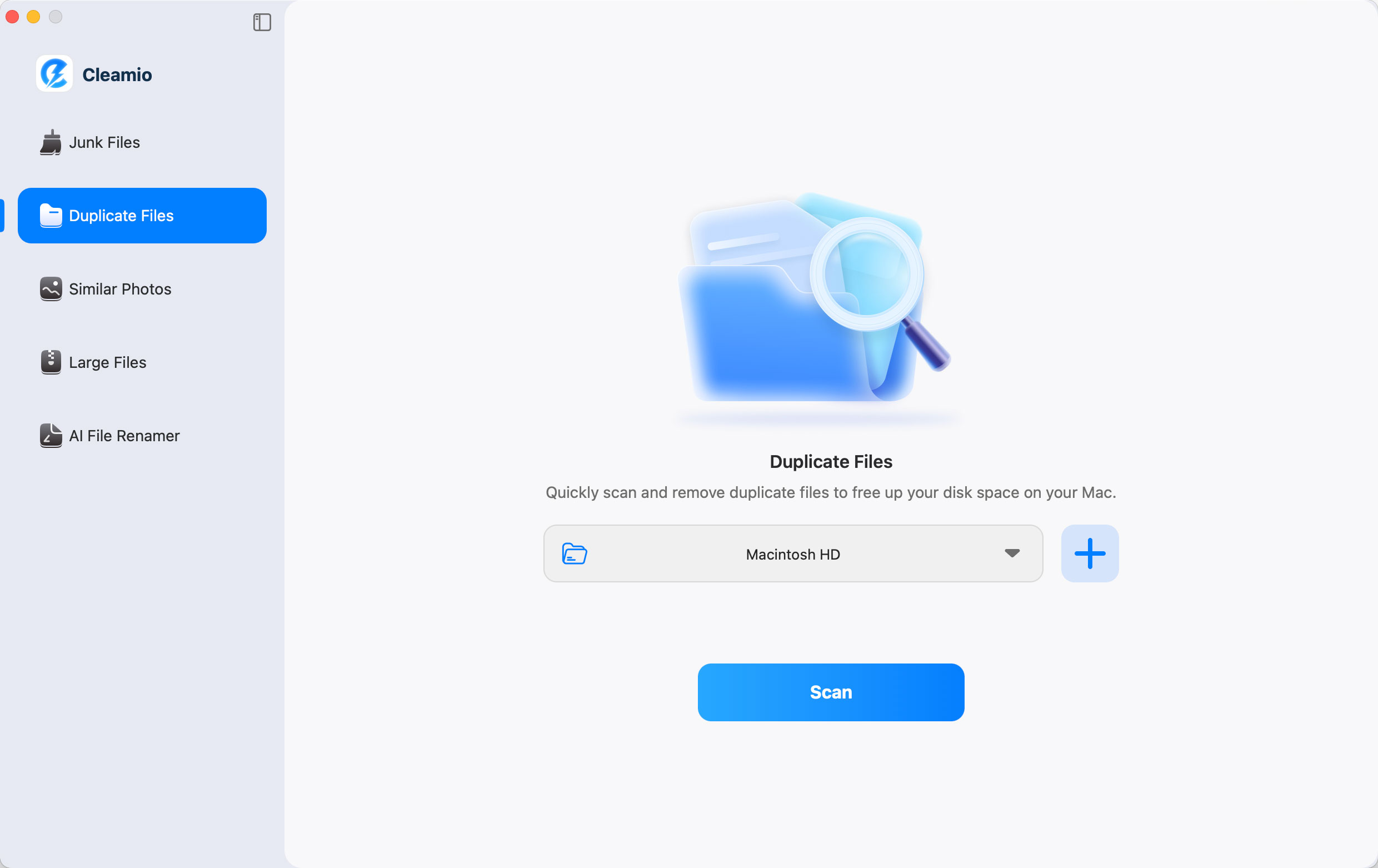
Download, install, and open Tenorshare Cleamio on your Mac and select "Duplicate Files" from the left sidebar.
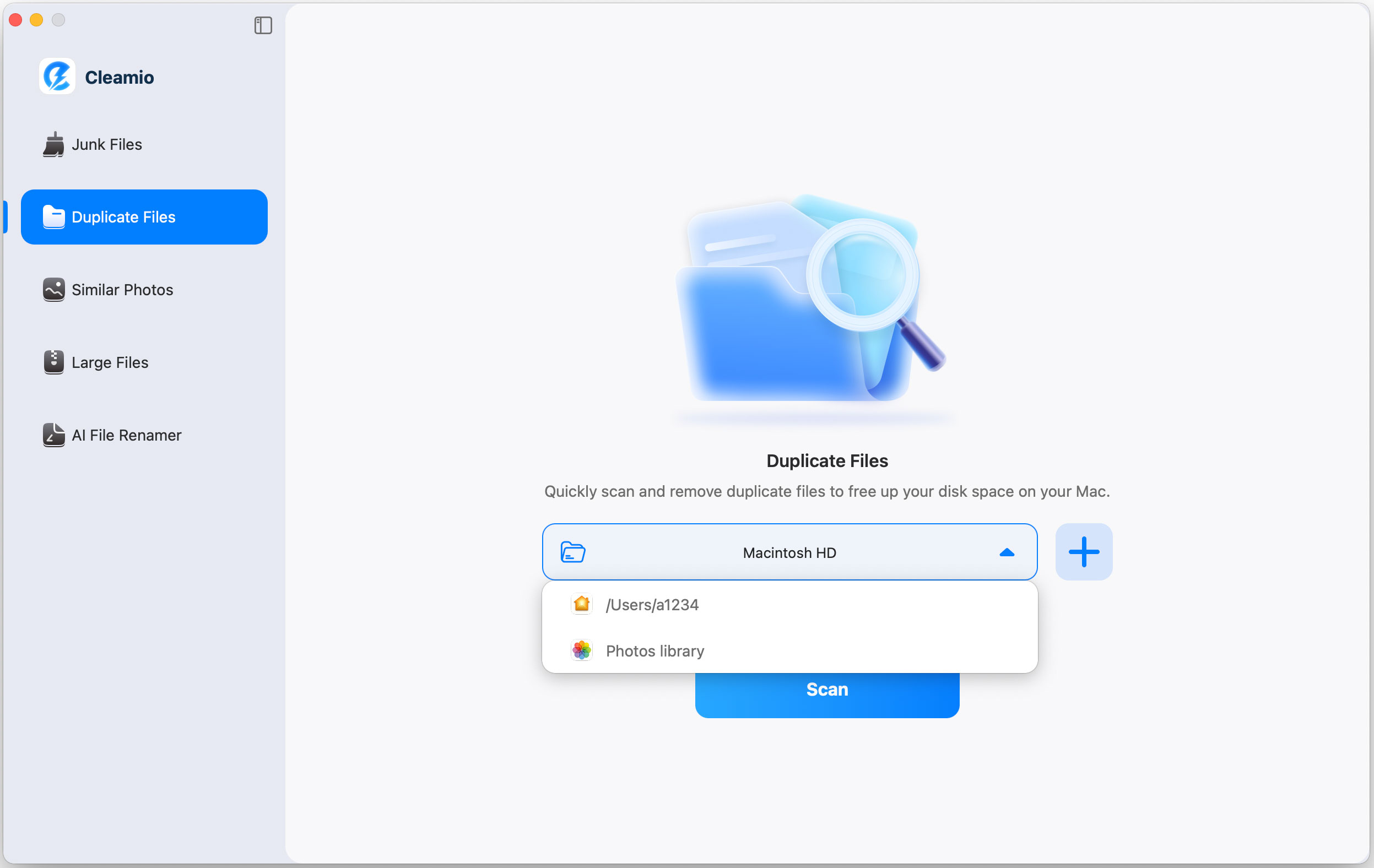
Select folders to scan. Choose from common directories in the dropdown or click "+" to add custom locations.
(Optional) Before scanning, you may open "Cleamio," then "Preferences" to customize scanning settings, such as selecting video files only or excluding certain folders.
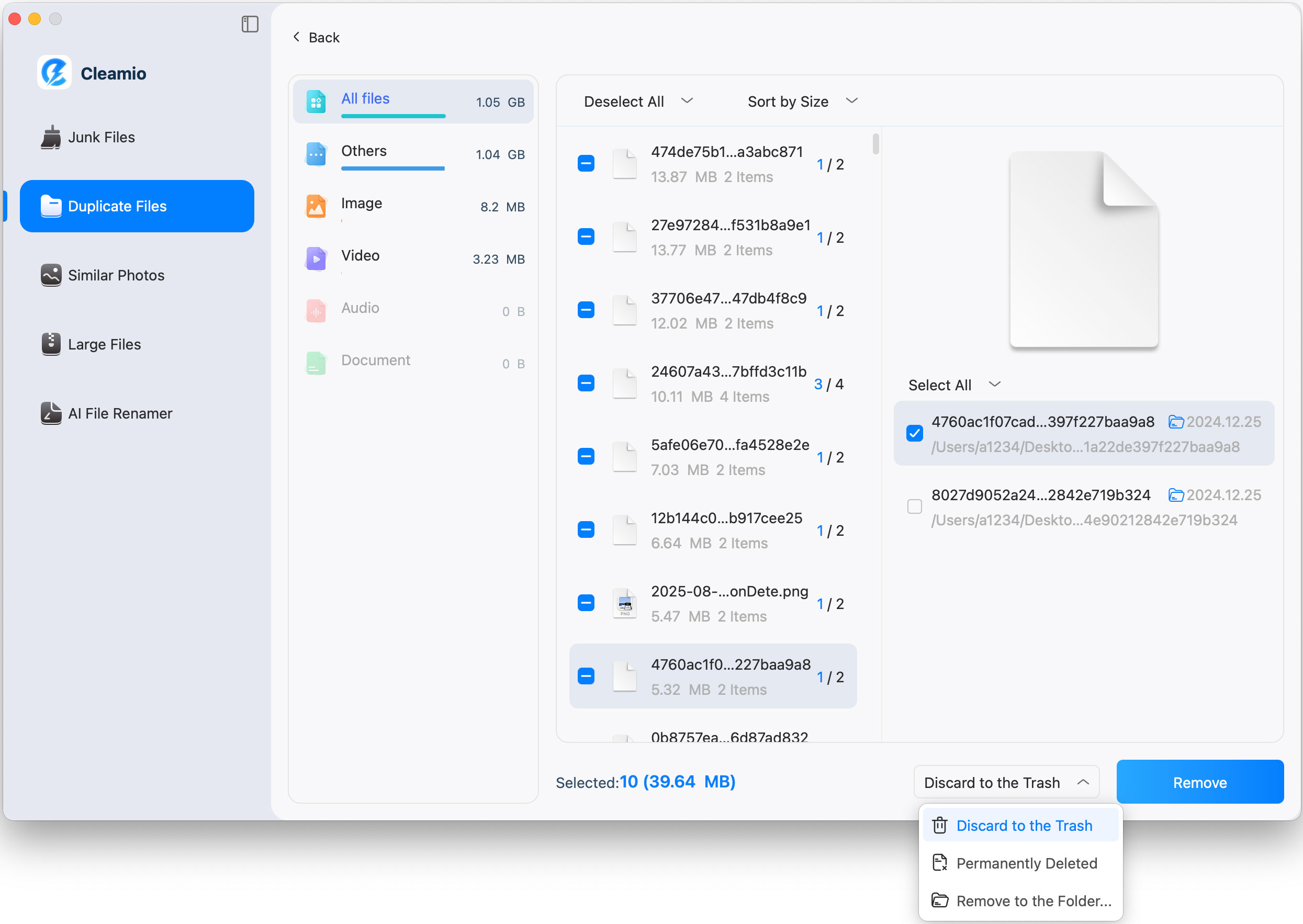
Click "Scan" to detect duplicate videos. Review results sorted by size, date, or duplicate count.
Select duplicates to remove. Use manual selection or auto-select to keep the best version, then click "Remove" to free up storage. Once done, click “Completed”.
That’s it. Using Tenorshare Cleamio is the easiest way to remove duplicate video files on Mac in one click while keeping your system clean, organized, and running smoothly.
Part 4. Why Duplicate Video Files Are a Problem on Mac? How to Avoid Duplicate Videos in the Future?
Duplicate video files may seem harmless, but over time, they can cause several problems on your Mac. Understanding the reasons and knowing how to prevent them can help keep your system clean and fast.
Why Are Duplicate Videos a Problem?
They take up a lot of storage space. Video files are large, and duplicate copies can quickly fill your Mac’s storage.
They slow down system performance. Low free space can affect macOS's speed and cause apps to run more slowly.
They create file clutter. Too many copies make it hard to find the correct video when you need it.
They increase the risk of data loss. Cleaning up duplicates manually can lead to deleting the wrong or important video.
How to Prevent Duplicate Videos?
Use a duplicate video finder for Mac regularly to scan and clean your videos.
Avoid importing videos multiple times from the same device or folder.
Organize videos into clear folders to reduce accidental duplicates.
Turn off repeated sync sources like overlapping iCloud or external drive folders.
Use a smart duplicate video remover that keeps only the best-quality version.
People Also Ask About Mac Video Deduplication
Q1: How do I delete duplicate videos on my MacBook?
Use a reliable app to delete duplicate videos like Tenorshare Cleamio. It scans and removes duplicates safely with smart selection.
Q2: How to install the video duplicate finder?
Download the software from its official website, drag it to Applications, and grant file access permissions.
Q3: Does Apple Photos detect duplicate videos?
Apple Photos can detect duplicate photos but has limited duplicate video detection, making third-party tools necessary.
Conclusion
Managing duplicate videos manually is inefficient and risky. A professional duplicate video finder for Mac ensures accurate detection, fast cleanup, and zero data loss. Among all tools tested, Tenorshare Cleamio stands out as the best duplicate video finder in 2026, combining AI accuracy, speed, and smart removal. If you want a safe, fast, and accurate solution, Cleamio is the best choice for effortless video deduplication.








 iOS Tips & Latest Updates
 Bug Fixes, Unlock Guides
 Giveaways & Freebies






By Jenefey Aaron
2026-09-28 / File Tips