
 iOS Tips & Latest Updates
 Bug Fixes, Unlock Guides
 Giveaways & Freebies


UltData - No.1 Android Data Recovery Tool
Recover Lost Data Without Root or Backup for Any Android Devices!
UltData: No.1 Android Recovery Tool
Restore Lost Android Data Without Root

Got accidentally deleted files on your Android phone? You're not alone. Many users face data loss every day—whether it's photos erased by mistake, messages lost after an update, or files disappearing due to a system crash. A popular Reddit discussion recently asked which third-party tools actually work for Android data recovery, mentioning names like Recuva, FoneLab, and Tenorshare. The problem is simple: there are too many options, and not all of them do what they claim.
If you're searching for a reliable solution, free Android file recovery software can help you recover lost photos , videos, contacts, and messages—at least to some extent. Among the available tools, Tenorshare UltData stands out for its balance of usability, recovery capability, and realistic "free" features. Let's take a closer look at what free Android file recovery can really do in 2026 and how to choose the right tool.
The short answer is: yes, but with limits. Many people searching for free Android file recovery expect a tool that restores everything at no cost. In reality, most free Android file recovery software allows you to scan your device and preview recoverable files for free, while full recovery may require an upgrade.

That doesn't mean free tools are useless. In fact, a good Android file recovery software free download can help you quickly check whether your deleted files are still recoverable. This is especially important because Android storage gets overwritten easily. If the data is still intact, tools like Tenorshare UltData can detect it before it's permanently lost.
Understanding these limits helps set the right expectations—and prevents wasting time on tools that aren't designed for real Android recovery.
Not all tools claiming to offer file recovery for Android free download are built the same. Some focus only on photos, some require root access, and others aren't truly designed for Android phones at all.
Below is a comparison of the most commonly mentioned options:
As the comparison reveals, Tenorshare UltData stands out with comprehensive Android and iOS support, offering 35+ data types and full free preview functionality without requiring root access. FoneLab provides solid multi-platform recovery with 20+ data types support, though it may require root access in certain scenarios and offers limited preview capabilities. Recuva, while beginner-friendly and rated highly for PC recovery tasks, focuses primarily on computer storage and SD cards rather than direct mobile device recovery, supporting 10+ data types but lacking mobile-specific features like free preview.
Once you decide to try a reliable file recovery software for Android free download, ease of use becomes critical. Tenorshare UltData keeps the process simple, even for first-time users.
Getting started with Tenorshare UltData for Android is straightforward. Follow these four simple steps to begin recovering your deleted files:




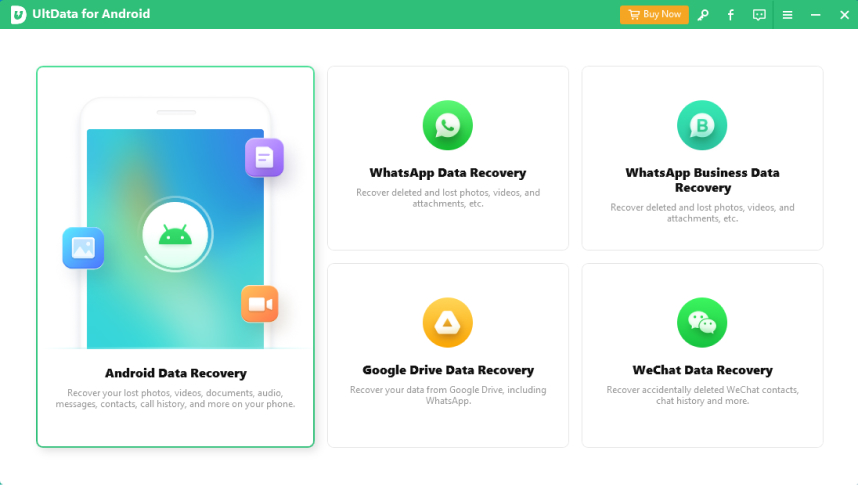
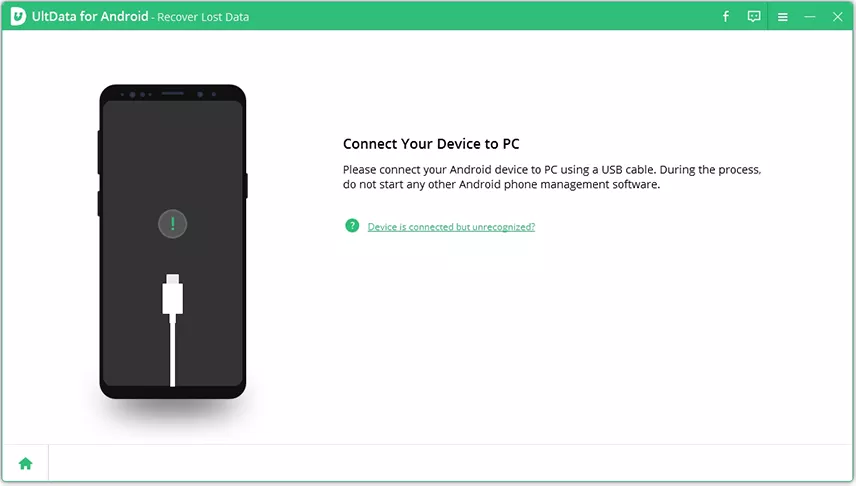
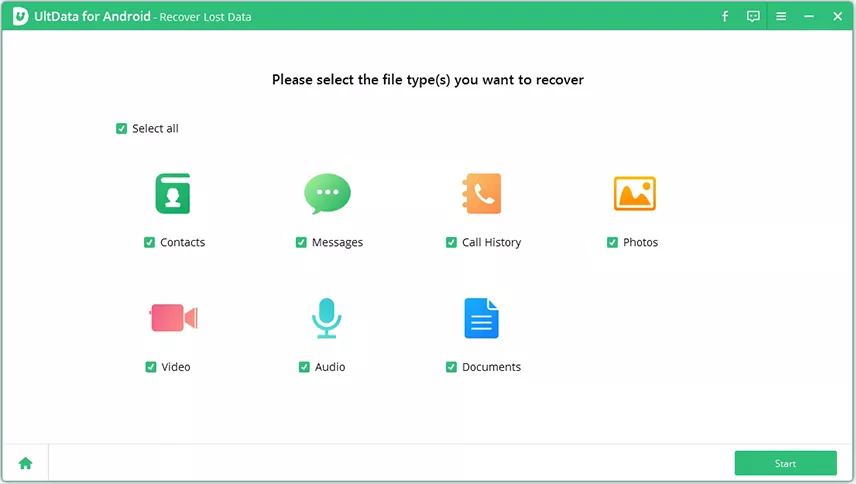
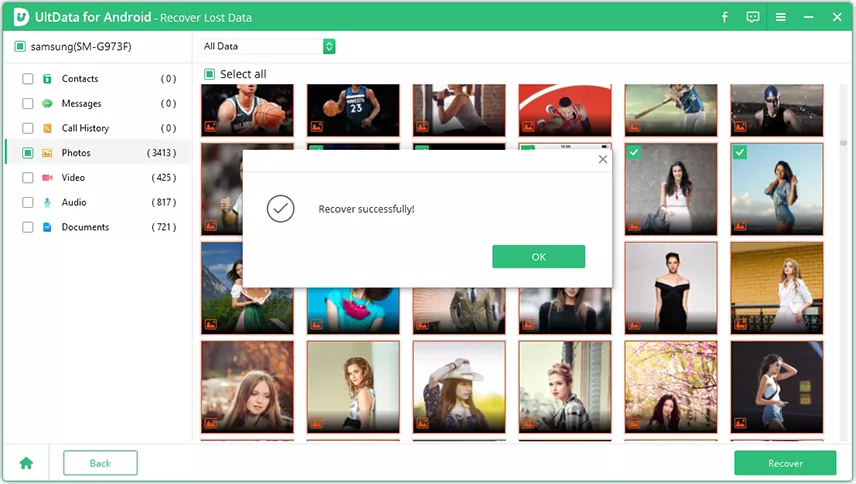
This free scan and preview feature helps you decide whether recovery is worth continuing, without any commitment or payment required upfront.
UltData supports a wide range of file types, including photos , videos, contacts, messages, call logs, and app data such as WhatsApp. You can preview these files for free before restoring them, which is a key advantage compared to many "free" tools that show no results until payment.

This balance between transparency and capability is why UltData is often considered one of the best free Android file recovery options available.
Even the best tools can't recover data that's already overwritten. To improve your chances, stop using your phone immediately after data loss. Avoid installing new apps, recording videos, or updating the system, as these actions may overwrite deleted files.
Also, act quickly. The sooner you run a scan with a trusted free Android file recovery software, the higher your recovery success rate will be. If free scanning shows your files are still available, you can then decide whether a full recovery is worth it.

Stop using your Android device immediately after discovering data loss. The more you use your phone, the higher the chance of permanently overwriting deleted files. Connect your device to a computer and run recovery software as soon as possible for the best results.
To sum it up, free Android file recovery is absolutely possible in 2026—as long as you understand its limits and choose the right tool. Free scans and previews are often enough to confirm whether your data can be recovered, saving time and frustration.
Among the available options, Tenorshare UltData offers one of the most reliable and user-friendly experiences for Android users. It combines free preview features with strong recovery capabilities, making it a smart first choice for anyone dealing with lost Android files.


UltData - No. 1 Android Data Recovery Tool





Losing data is stressful—but with the right free Android file recovery software, getting it back doesn't have to be. Whether you choose Tenorshare UltData or another trusted tool, the key is to act quickly and avoid overwriting your deleted files. With the right approach and a reliable recovery solution, you can restore your precious photos, messages, and documents with confidence.


then write your review
Leave a Comment
Create your review for Tenorshare articles
Best Android Data Recovery Software
Highest Data Recovery RateShare this post


UltData - No.1 Android Data Recovery Tool
Recover Lost Data Without Root or Backup for Any Android Devices!
UltData: No.1 Android Recovery Tool
Restore Lost Android Data Without Root
By Jenefey Aaron
2026-09-24 / Android Recovery