
 iOS Tips & Latest Updates
 Bug Fixes, Unlock Guides
 Giveaways & Freebies
then write your review


ReiBoot - No.1 Free iOS System Repair Software
Fix 150+ iOS Issues without Data Loss & Safely iOS 27 Upgrade/Downgrade
ReiBoot: No.1 iOS Repair Tool
Fix 150+ iOS Issues, No Data Loss
If you have recently updated your iPhone to iOS 27 and are looking for a way to restore or downgrade your device, you may have come across IPSW.me. It is widely used to find IPSW firmware files for iPhone and iPad models. But one question often comes up: Is IPSW.me safe to use? This question is understandable. An IPSW file contains the software used to update or restore an Apple device, so downloading the wrong file—or using a file from an untrusted source—can create unnecessary problems.
In this guide, we'll explain what IPSW.me is, where its firmware links lead, what Apple's signing system means, and what you should check before using an IPSW file. We'll also explain how these factors affect iOS 27 upgrades and downgrades.

IPSW.me, also known as IPSW Downloads, is a third-party website that indexes Apple firmware releases and helps users find IPSW files for different Apple devices.
It is important to understand that IPSW.me is not an official Apple website.
According to IPSW.me's own About page, the website does not mirror Apple's firmware files. When users click an Apple software link, they are redirected to an Apple server. IPSW.me also states that it is not affiliated with Apple.
This distinction matters because users sometimes assume that downloading an IPSW through IPSW.me means the firmware itself is hosted by IPSW.me. According to the site's own explanation, that is not how its Apple software links work.
The short answer is: IPSW.me can be a useful way to find Apple firmware, but you should still verify the firmware and your device before using it.
There are several different questions hidden inside the word "safe".
No.IPSW.me is a third-party website and is not affiliated with Apple. Its role is to organize information about Apple firmware and provide links to software downloads.
IPSW.me says that Apple software links redirect users to Apple's servers rather than being hosted or mirrored by IPSW.me. This is an important distinction when evaluating a firmware download source.
No.Downloading an IPSW and installing an IPSW are two different things.A firmware file must match your specific device model, and Apple's signing status also matters. A firmware version may be listed online but no longer be accepted for installation.

This is especially important when you are trying to downgrade from a newer version such as iOS 27.
When Apple signs an iOS version, Apple's servers authorize that version for installation on supported devices.This is why you cannot simply download any old iOS version and install it whenever you want.
For example, suppose your iPhone is currently running iOS 27 and you want to return to iOS 26. Finding an iOS 26 IPSW is only one part of the process. You also need to check whether Apple is still signing the specific iOS 26 version for your device.
The key point is that "available to download" does not necessarily mean "available to install."
In simple terms:
 Please swipe to view
iOS 27 makes the IPSW question particularly relevant for users who want to return to an earlier version of iOS. For example, some users may install an iOS 27 beta and later decide that they want to return to a stable release. Others may update to iOS 27 and discover that an app, workflow, or feature they depend on does not work as expected.
In these situations, users may search for an earlier IPSW and ask whether it can still be installed. The answer depends largely on Apple's current signing status.
Apple only allows installation of iOS versions that are still being signed, and that a traditional iTunes/Finder downgrade will no longer work once Apple stops signing the target version.
If you are downloading an IPSW for an iPhone or iPad, don't simply choose the newest file you see. Check the following information first.
Different iPhone and iPad models can require different IPSW files. For example, an IPSW intended for an iPhone 17 Pro Max should not be treated as interchangeable with one intended for an iPhone 17 Pro. Before downloading firmware, check your exact device model.
Decide exactly which version you need. For example:Decide exactly which version you need.
Current version: iOS 27
Target version: iOS 26
Do not assume that every version listed on an IPSW website can still be installed.
Look for the signing status of the firmware. If Apple is no longer signing the target version, a normal restore or downgrade may not be possible.
Before restoring or downgrading, back up important data. A traditional restore process can erase the device.
Once you have confirmed the device model, firmware version, and signing status, you can choose how to perform the restore or downgrade.
Yes, if the target firmware is compatible with your device and Apple is still signing that version.
A traditional computer-based workflow generally looks like this:
Find the correct IPSW → Download the IPSW → Connect the iPhone → Enter Recovery Mode → Open Finder/iTunes or Apple Devices → Select the IPSW → Restore
However, this method requires users to manually handle several technical steps.
You need to:
For experienced users, this may be manageable. For beginners, the process can be more complicated.
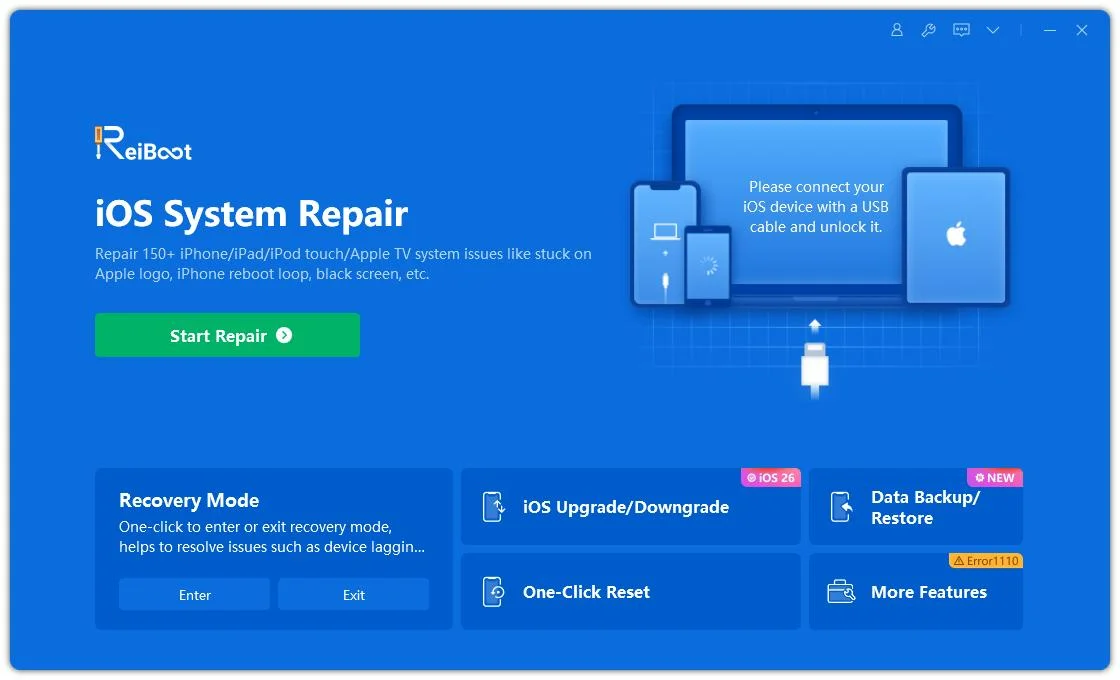
If you prefer a guided workflow instead of manually selecting and restoring an IPSW file, Tenorshare ReiBoot provides an iOS Upgrade/Downgrade feature. The process is divided into five simple steps, from connecting your iPhone to completing the downgrade.
Launch ReiBoot on your computer and connect your iPhone. Once the device is detected, click iOS Upgrade/Downgrade to access the downgrade options.
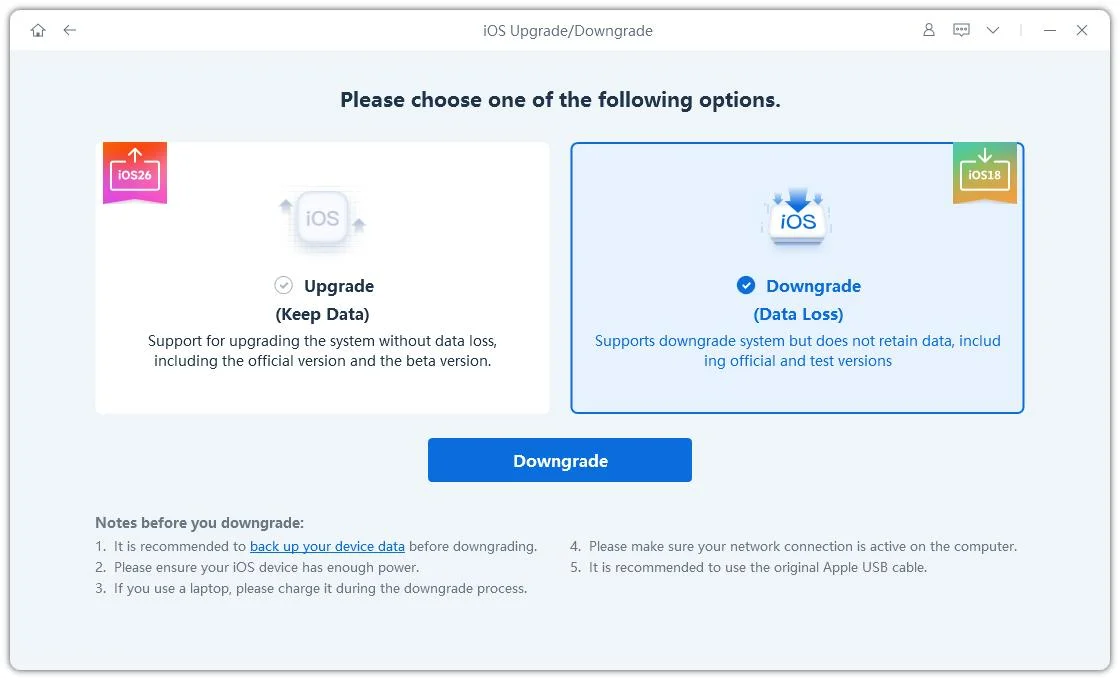
Select Downgrade to enter the iOS downgrade workflow. ReiBoot will then prepare the available firmware options for your device.
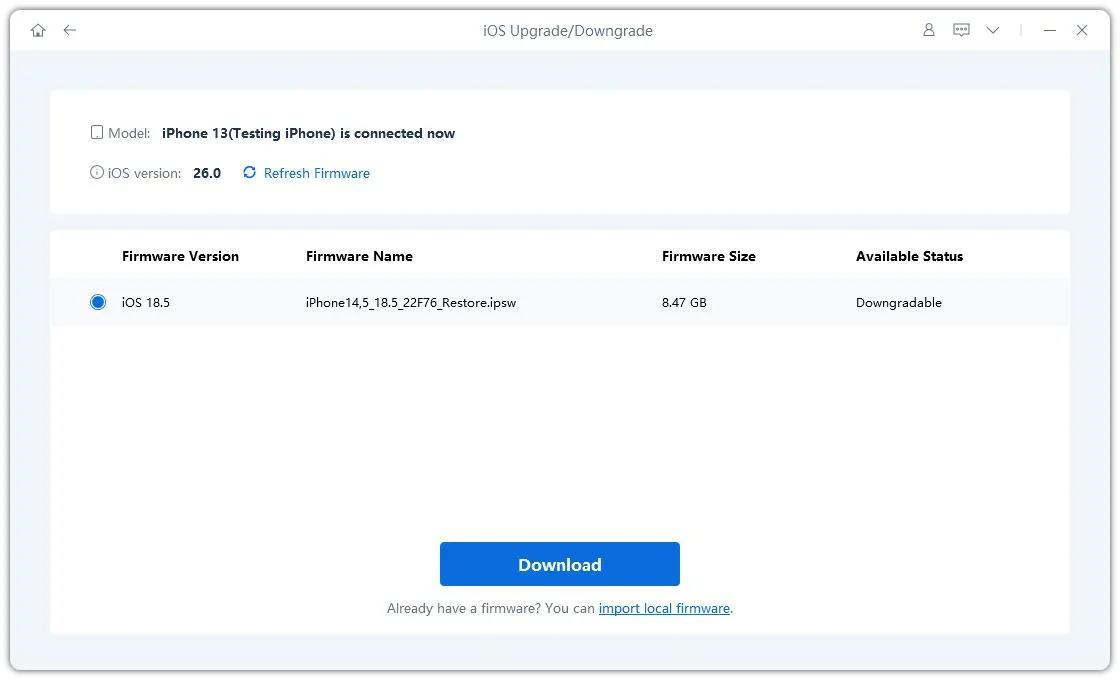
ReiBoot automatically detects your current iOS version and displays the available downgrade firmware. Click Download to download the required firmware package.
Once the firmware package has been downloaded, click Initiating Downgrade to start the downgrade process. Before continuing, make sure you have backed up any important data because the downgrade will erase the device.

ReiBoot will begin installing the selected firmware and downgrading your iPhone. Keep the device connected throughout the process and do not disconnect it until the downgrade is complete.
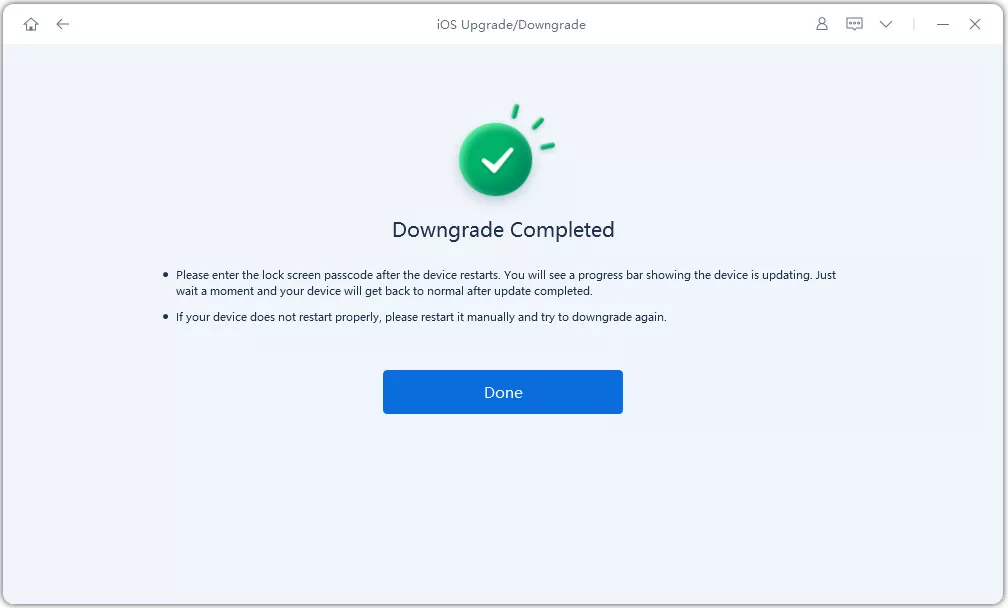




This approach can reduce the amount of manual firmware handling required from the user.
However, you should still back up important data before starting a downgrade and confirm the target version and device compatibility.
The situation can be slightly different if you are running an iOS 27 beta.
Users who install beta software may later want to return to a stable version. A computer-based restore using a compatible IPSW is one traditional way to do this, provided the target version is still signed by Apple.
The important thing to remember is that removing a beta is not simply a matter of finding an older IPSW. You still need to consider:
IPSW.me and ReiBoot serve different purposes.
IPSW.me is useful when you want to find Apple firmware information and download links.
ReiBoot is designed to provide a guided workflow for iOS system repair, upgrade, downgrade, and recovery.
If you are comfortable manually selecting an IPSW and restoring your device through Apple's tools, you may prefer the traditional method.
If you would rather have the firmware selection and downgrade process presented inside a dedicated interface, ReiBoot provides an alternative workflow.
The choice depends on how much manual control you want over the process.
So, is IPSW.me safe to use?
IPSW.me is a third-party firmware information and download-link website, not an Apple-owned service. According to IPSW.me, Apple software links redirect to Apple's servers rather than being mirrored by IPSW.me.
The more important question when working with an IPSW is whether you have selected the correct firmware for your exact device and whether Apple is still signing that version.
This becomes especially important when trying to downgrade from iOS 27 to an earlier version.
If you are comfortable with manual firmware restoration, you can use IPSW information to find the appropriate IPSW and restore it through Apple's tools. If you prefer a guided workflow, Tenorshare ReiBoot provides an iOS Upgrade/Downgrade process that handles firmware detection and downloading within the application.
Before starting any downgrade or restore, always verify compatibility and back up your important data.


then write your review
Leave a Comment
Create your review for Tenorshare articles
Share this post


ReiBoot - No.1 Free iOS System Repair Software
Fix 150+ iOS Issues without Data Loss & Safely iOS 27 Upgrade/Downgrade
ReiBoot: No.1 iOS Repair Tool
Fix 150+ iOS Issues, No Data Loss
By Jenefey Aaron
2026-09-24 / iOS 27