


 iOS Tips & Latest Updates
 Bug Fixes, Unlock Guides
 Giveaways & Freebies


ReiBoot - No.1 Free iOS System Repair Software
Fix 150+ iOS Issues without Data Loss & Safely iOS 27 Upgrade/Downgrade
ReiBoot: No.1 iOS Repair Tool
Fix 150+ iOS Issues, No Data Loss
Camera issues can make a new smartphone hard to use, especially when the camera is black, freezes unexpectedly, or does not recognize your face. Iphone Duo Face ID not working is one of the trending issues, and it is very annoying. But there is nothing to worry about, because solutions are always available. So in this article, we will discuss the major reasons causing this issue, and then we will move to the solutions for how we can get them resolved smoothly without much trouble.

There are several ways an iPhone Duo camera glitch can show up, whether it's the camera app, iOS software, camera parts, or the Face ID system. The very first step you should take is to identify the actual cause. This will help you get to the solution quickly.

A black preview screen when opening the Camera app is a very typical iPhone Duo camera error. The app may open, of course, but the viewfinder shows nothing, and you can't take photos or record videos.
This could be caused by a temporary software glitch, a camera service that has stopped responding, or a camera hardware issue. You can simply switch between cameras to identify the issue more deeply.

The camera app can open but freeze when you switch modes, zoom in, record a video, or press the shutter button. Sometimes the app will randomly quit, or take a few seconds to process a photo.
Possible causes include a temporary iOS bug, using an app/ background process that is in conflict, not enough storage left, or camera components that are damaged. If you are still seeing the issue periodically across camera modes, you may need to do some more troubleshooting.
The front camera and Face ID are important for the person to selfie, video calls, and the secure device authentication. If your front camera stops working or Face ID no longer recognises your face, you may run into trouble with both of those functions.
Still, the technical aspects of these two functions cannot be identical. Having a working selfie camera does not guarantee that Face ID will work properly in the future. The TrueDepth camera system may need more investigation if you are getting errors with Face ID or you cannot set it up.

An iPhone message saying "iPhone Duo camera unknown" means the phone may be unable to recognize or confirm one of its camera parts. On certain models, you can view parts and repair details in Settings, where camera-related alerts may also appear.
It might point out a replaced, damaged, or non-functional camera component. However, its exact meaning depends on your iPhone and the alert it is showing. For a temporary software glitch, you might want to restart, but keep an eye on a persistent warning.
You can read the discussion on Reddit to get more on this.

Another potential indication of a camera problem is the presence of unusual discoloration, flickering, blurry images, visual artifacts, or distorted video footage. These problems appear only in certain modes or in some lighting conditions.
Prior to assuming that the camera is faulty, clean the camera lenses, remove any accessories coming in front of the camera, and test different lighting conditions. If the distortion is persistent in multiple camera modes and apps, it may need to be evaluated by a professional.
Basic troubleshooting should be attempted before advanced repairs. These steps can troubleshoot common software-related camera issues without jumping straight to a phone wipe or expensive repair cost.

Start by force-closing the camera app if it becomes frozen with a black screen or stops taking photos. It can close an app that has briefly become unresponsive, forcing it to start all over again.
Here are the steps to follow:


If the camera still does not work, restart your iPhone and test it again. Moreover, remove any case, magnetic accessory, or lens attachment that might affect your photo results.
Your camera may work normally in Apple's Camera app but fail in another app, such as WhatsApp, Instagram, or a video-calling service. This often points to an access setting, not a broken camera.
To review camera permissions:

Then reopen the app and try the camera again.
If the issue affects only one third-party app, make sure the app is up to date, then close and reopen it. Also check the app's own settings for anything that might block camera access.
If the camera fails in every app, including Apple's Camera app, the cause may be related to iOS or the camera hardware. Continue to the next troubleshooting steps.
Settings issues or changes in configuration profiles could be the cause of some camera or Face ID issues. Rather than starting with a comprehensive factory reset, use the less destructive options first.
Check for updates in iOS first:

If the problem persists, you may consider restoring all settings:

If the basic fixes don't work, an iOS system problem may be the cause of the iPhone Duo camera glitch. The Camera app can crash again and again, the phone may freeze, or system functionality may be otherwise unusual.
The only solution that can save your time is to utilize an advanced third-party repair tool. Make sure to choose the one with high ratings and positive reviews on social platforms also. Also consider a cost-effective and reliable tool. The one that perfectly meets these requirements is Tenorshare ReiBoot.
What is Tenorshare ReiBoot?
It is a Mac and Windows iOS system recovery and repair tool by the well-known company Tenorshare. It provides solutions to various iOS system errors, freezes, and black-screen problems. It is an effective solution to consider when it seems that all the common troubleshooting methods have failed.
ReiBoot Top Features
How to Use ReiBoot for iOS Troubleshooting
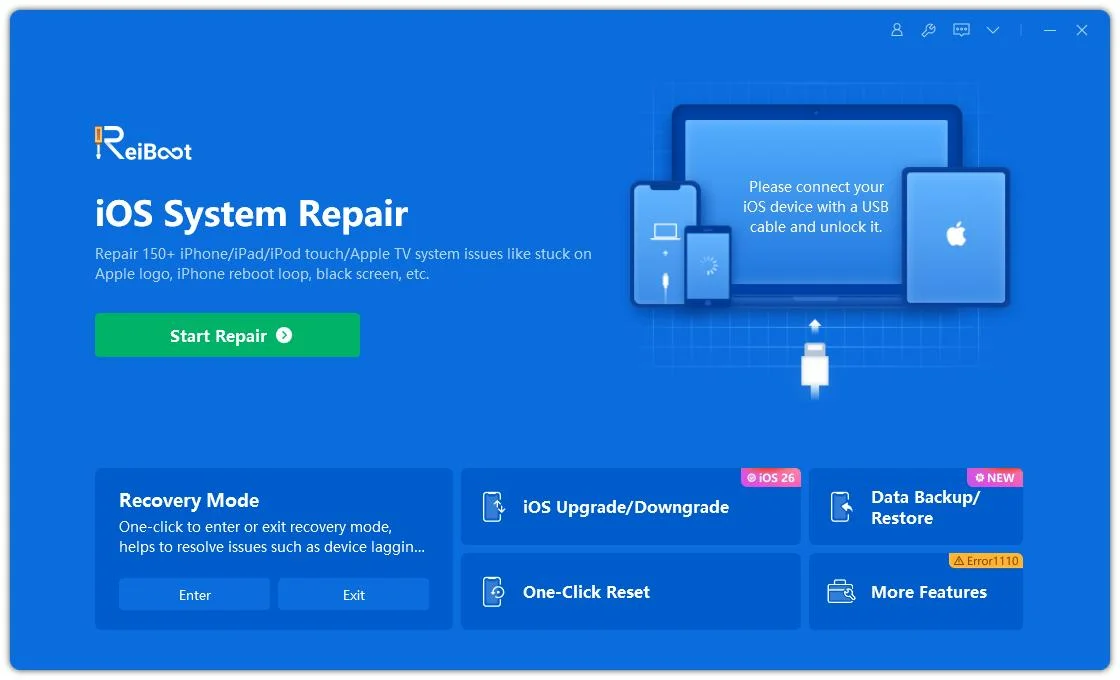
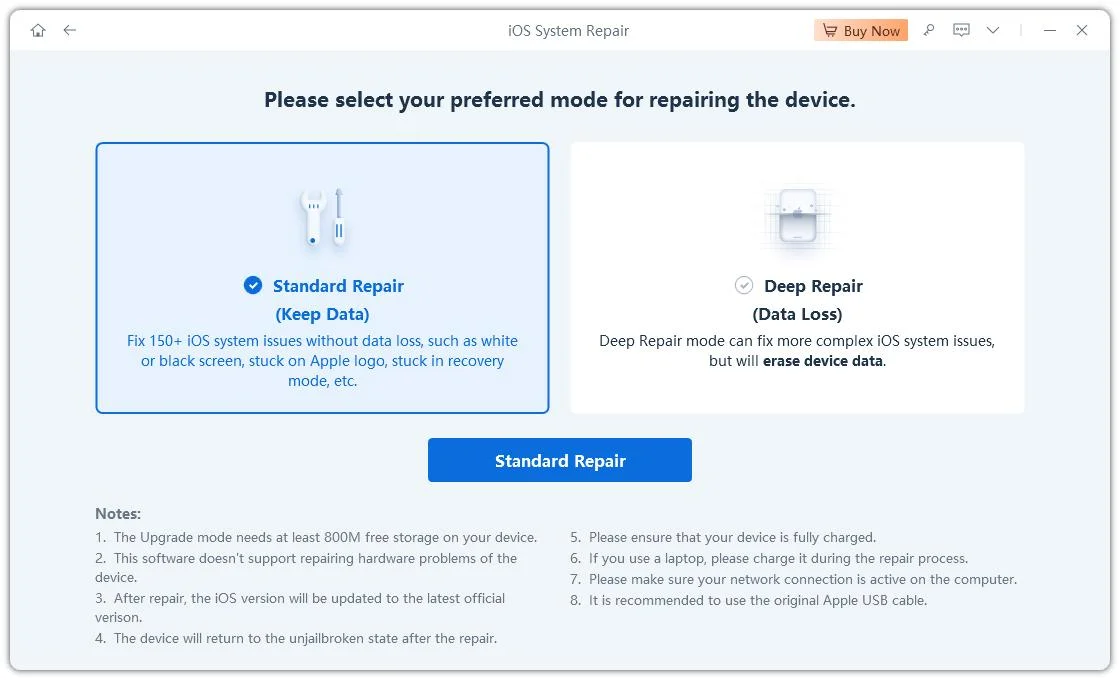
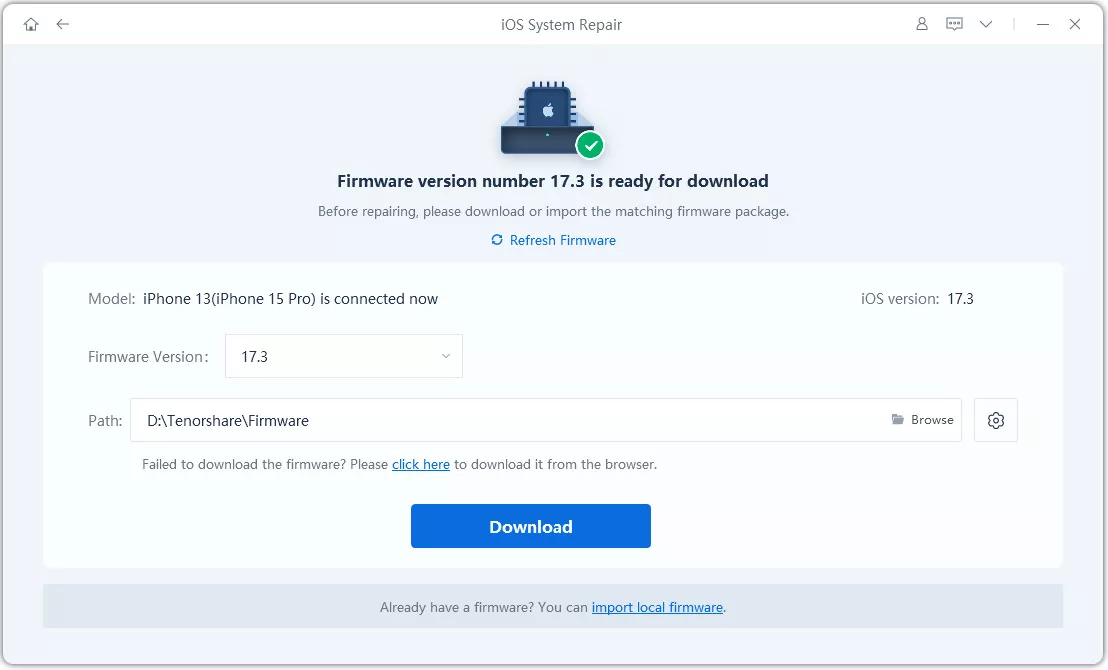
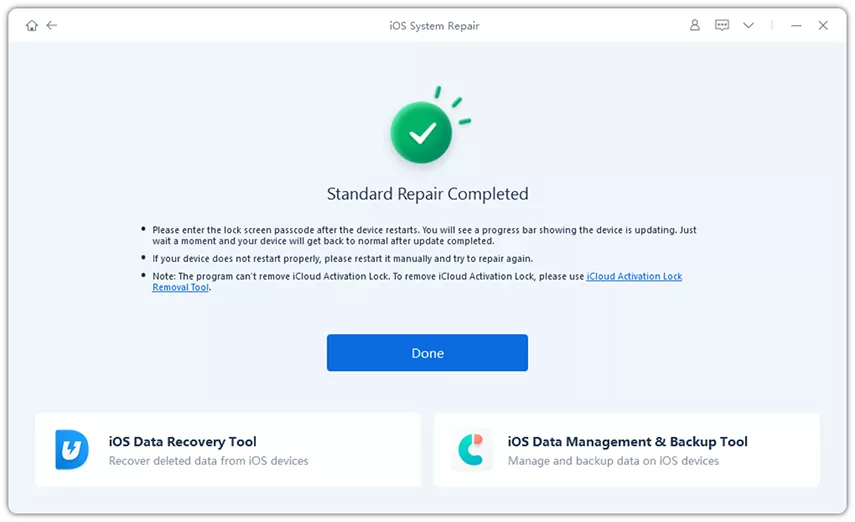
If your iPhone Duo Face ID is not working, start by checking if the TrueDepth camera area is clean and free of obstructions (May Smudge, Screen Protector, or Case Can Block The Sensors).

Try these steps:
If the previous methods all failed, the camera problem may be hardware related. Use your phone in the case it has ever suffered impact damage, liquid exposure, or an unsuccessful camera replacement.
You may wish to contact Apple Support or an authorized service provider in the following instances:
It could be due to a bug in iOS, an app glitch, wrong permissions, or a hardware defect. Turn your iPhone off and check for updates.
Force close and reopen the Camera app, reboot your phone, and patch iOS if necessary to restore iPhone Duo camera black screen. If the problem continues, try out third-party tools like Tenorshare ReiBoot.
This warning should be ignored unless you suspect that there is an untrustworthy, incorrectly integrated, or defective camera component. Navigate to Settings to view Parts and Service History.
Indeed, either a recall or a software update can sometimes cause compatibility issues between apps and other code. Try restarting your iPhone and installing any updates that are available.
If your device encounters continued camera issues, Face ID problems, or camera issues after a fall or damage, it could indicate hardware damage. Contact a qualified technician.


then write your review
Leave a Comment
Create your review for Tenorshare articles
Share this post


ReiBoot - No.1 Free iOS System Repair Software
Fix 150+ iOS Issues without Data Loss & Safely iOS 27 Upgrade/Downgrade
ReiBoot: No.1 iOS Repair Tool
Fix 150+ iOS Issues, No Data Loss
By Jenefey Aaron
2026-11-03 / iOS 27