

 iOS Tips & Latest Updates
 Bug Fixes, Unlock Guides
 Giveaways & Freebies


ReiBoot - No.1 Free iOS System Repair Software
Fix 150+ iOS Issues without Data Loss & Safely iOS 27 Upgrade/Downgrade
ReiBoot: No.1 iOS Repair Tool
Fix 150+ iOS Issues, No Data Loss
Apple's new iOS generation is packed with new features, UI tweaks, performance enhancements, and improved Apple Intelligence. While considering an upgrade, an iOS 27 vs iOS 26.7 comparison is essential to check whether the new experience is really worth switching to. iOS 27 is all about introducing new concepts and intelligent features, whereas iOS 26.7 is a more polished and familiar software experience for those who value stability the most.

In this guide, we will go through the most important iOS 27 vs iOS 26 changes across the design, functionalities, Apple Intelligence, performance, battery consumption, security, and compatibility. We will also tell you which version is best for your iPhone and the type of use.
 Please swipe to view
The main thing in this iOS 27 vs iOS 26 is that these releases have different focus areas. iOS 27 brings new experiences and deeper integration with Apple Intelligence, while iOS 26.7 will likely target those who would like to hold off on the big upgrade. You can also read out conversations on community platforms to understand the basic differences.

One of the most prominent iOS 27 vs iOS 26 comparison features is the smoothing of Apple's Liquid Glass design language. Instead of just replacing the UI, iOS 27 makes the UI easier to read and adds contrasts and personalization features.

More uniform refraction and contrast are introduced, as well as a slider that adjusts the level of tint of liquid glass from clear to dark, Apple representatives said. App icons are crisper and more detailed.
For those who are already fans of the iOS 26 interface, these modifications are likely to be more at the evolutionary end rather than the revolutionary end. But they also help make iOS 27 feel more polished and iOS 27 feel more flexible.
The best thing about iOS 27 is its slew of new features. Apple has brought more intelligence to applications, added a home Siri experience, revamped Photos, updated Safari, and introduced new communication and productivity tools.

Apple also touts faster AirDrop transfers, better Mail search, better switching between cellular and Wi-Fi networks, and faster app launch times. As such, users wondering what the iOS 27 vs iOS 26 changes in 2026 are will find that this new OS is more than just a facelift. It takes what the iPhone can do and makes it do more.
Apple Intelligence is arguably the "star player" in the iOS 27 vs iOS 26 performance game.
The New Siri AI Experience in iOS 27 Much More Powerful. Users can naturally engage with Siri, ask follow-up questions, get answers from personal context, and take action on supported apps. Apple is also bringing a dedicated Siri app to conversations.

Apple Intelligence wins additional enhancements in Photos, Safari, Image Playground, Passwords, and elsewhere in the OS. Developers can use Apple's Foundation Models framework to create apps that leverage on-device intelligence.
iOS 27 is a further step in Apple's general direction of making controls in the system more customizable and easier to understand. Controls are easier to read thanks to design tweaks, and the new Liquid Glass look can be customised to suit users.

Comparatively, iOS 26.7 is expected to offer a more comforting place for those who have already tailored their iPhone to their needs under iOS 26.
Messages is still a key portion of Apple's intelligence collection. iOS 27 broadens the interaction possibilities of Apple Intelligence with data and apps. Siri AI can access personal context from supported apps (like Messages and Mail), so you can ask about your information or take actions more naturally.
Apple details new features that help you communicate and write better. If you're one of the iPhone users whose primary role with the iPhone is communication, these enhancements might just give you enough of a boost to make upgrading worthwhile.
Photos has multiple AI enhancements in iOS 27. Apple also highlights features including Spatial Reframing and an enhanced Clean Up tool, making it easier for users to edit and enhance photos.

Under its iOS 27 performance enhancements, Apple says the Photos library can also load new photos up to 70 percent faster. These tweaks certainly make Photos one of the louder iOS 27 vs iOS 26 differences.
Security is important no matter which generation of iOS you are running. With iOS 27, Apple is introducing new child-safety features that are designed to give parents more control over content, communication, and device usage while maintaining privacy.
Nevertheless, users should not expect that a more recent major release is always the better option. New versions may be buggy or incompatible. If you depend on your iPhone for work, banking, communication, or basically anything else important, it can be wise to wait out those early patches.
Apple's official list of supported iPhones for this release includes all iPhones from the iPhone X series and later, as well as some older models - the iPhone 8 and iPhone 8 Plus. Nonetheless, not all iOS 27 features will come to all compatible iPhones.
Specifically, Apple Intelligence and Siri AI need new hardware. Apple also states that Apple Intelligence on iOS 27 can be used only on iPhone 16 models and above, also on the iPhone 15 Pro and iPhone 15 Pro Max, based on language and regional availability.
Hence, your specific iPhone model should be considered before updating just for AI features.
Performance is a critical element in the iOS 27 vs iOS 26 performance discussion. Apple states that iOS 27 is heavily optimized, with apps opening up to 30% faster, new content in Photos loading up to 70% faster, and AirDrop transfers speeding up to 80%. These are Apple's quoted numbers rather than independent benchmark results, so real world performance will vary by device and usage.
Please swipe to view

Performance and results may vary depending on your iPhone model, battery condition, storage availability, background processes, and whether you use a beta or stable version.
That's why users shouldn't judge the iOS 27 vs iOS 26 battery life on just the first few hours after the upgrade. Big updates may do background indexing and other things that can have a temporary impact on battery drain.
The answer really depends on what you value most. Here are the possible concerns that you should focus on to decide what to do:
Upgrade to iOS 27 if:
Stay on iOS 26.7 if:
If you update to iOS 27 and later on decide it isn't for you, downgrading may become an option while Apple is still signing the appropriate older firmware. But downgrading has to be performed with caution, as you can only install those firmware versions that are struck with Apple's revocable signing status.
Precautionary Measures: Make sure to perform a full backup before attempting any downgrades, and understand that some backups made on newer iOS versions may not be restorable to an older release.
For people who want to perform a simplified system-repair/downgrade procedure, Tenorshare ReiBoot would be the best recommendation. The reason I recommend it is that it is fully secure, trusted, and most importantly, I have tried it multiple times.
ReiBoot includes support for iOS system repair and recovery tasks for iOS downgrades.
It helps to troubleshoot more than 150 iOS issues without taking it to the Apple store, saving time and money. It also resolves various iTunes errors.




Here are the basic steps you need to know for better results:
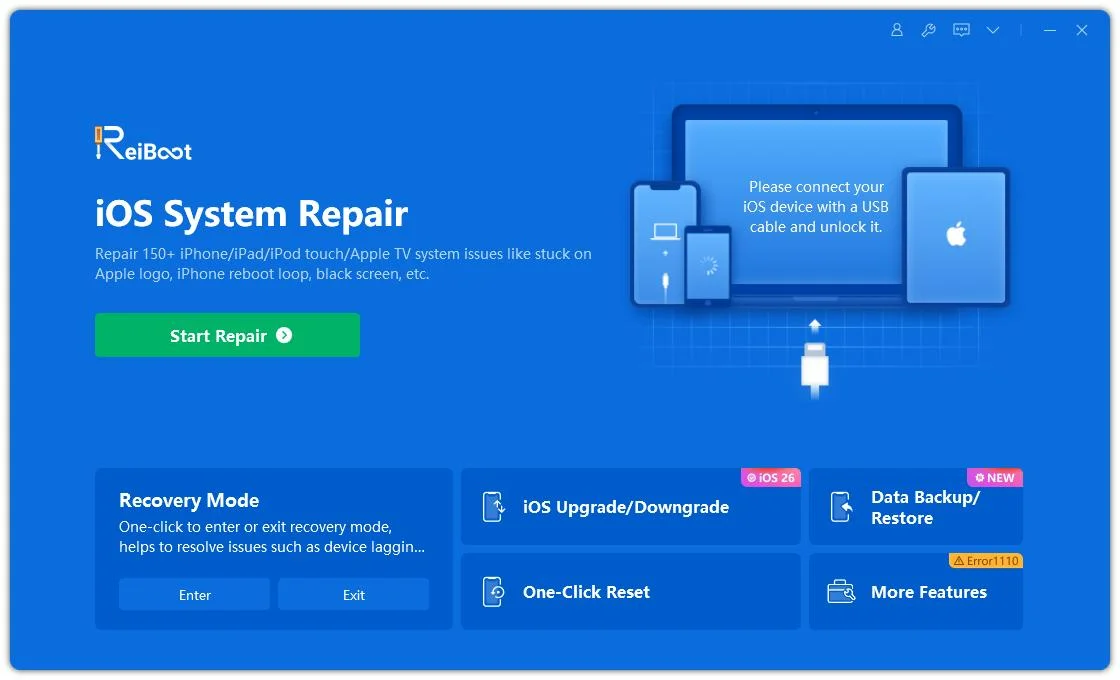
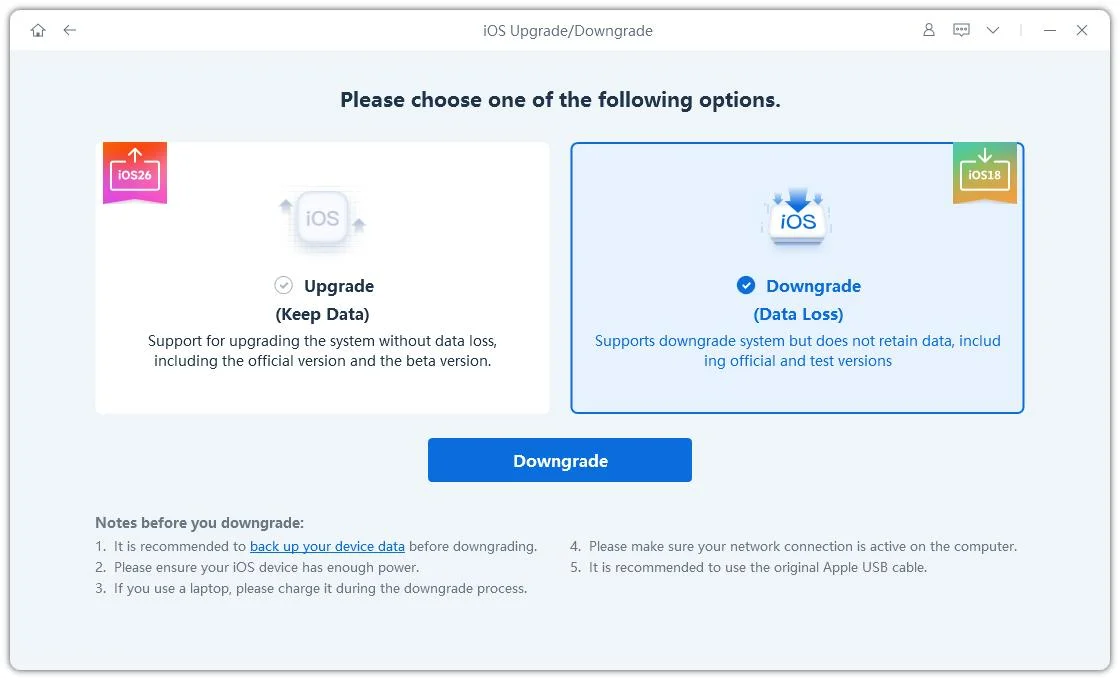
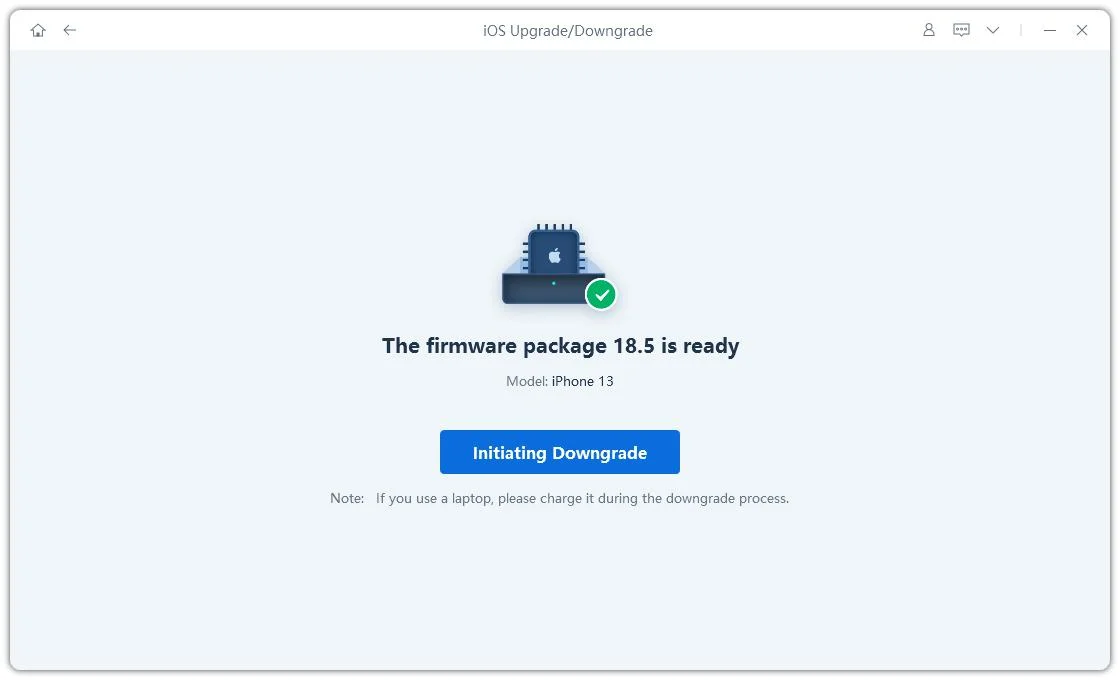
On completion, a message will display on the screen: "Downgrade Completed".
Nope. Your battery life varies depending on what model iPhone you have, your battery health, how you use it, and what version of iOS you're running. Beta releases may also temporarily drain more battery.
As iOS 26.7 is a mature iOS 26 release, it should be more stable at first. As Apple provides updates, iOS 27 is expected to get better.
More stable at the beginning? As iOS 26.7 is a mature iOS 26 release, it should be more stable at first. As Apple provides updates, iOS 27 is expected to get better.
New in iOS 27: more recent capabilities, Apple Intelligence, and cobalt enhancements, but for users who want reliability, iOS 26.7 might be a better choice.
The choice of iOS 27 vs iOS 26.7 ultimately comes down to what you value most. If you're interested in the most recent features, enhanced Apple Intelligence, a redesigned interface, and performance improvements, you may want to try upgrading to iOS 27 and see whether it fits your needs. But if you suffer from battery drain, compatibility issues, performance lags, or simply like iOS 26 better, you can roll back to iOS 26 with Tenorshare ReiBoot. Its useful iOS system utilities can make the downgrading much easier. Get Tenorshare ReiBoot now and go back to iOS 26 if needed.


then write your review
Leave a Comment
Create your review for Tenorshare articles
Share this post


ReiBoot - No.1 Free iOS System Repair Software
Fix 150+ iOS Issues without Data Loss & Safely iOS 27 Upgrade/Downgrade
ReiBoot: No.1 iOS Repair Tool
Fix 150+ iOS Issues, No Data Loss
By Jenefey Aaron
2026-10-14 / iOS 27