

 iOS Tips & Latest Updates
 Bug Fixes, Unlock Guides
 Giveaways & Freebies


ReiBoot - No.1 Free iOS System Repair Software
Fix 150+ iOS Issues without Data Loss & Safely iOS 27 Upgrade/Downgrade
ReiBoot: No.1 iOS Repair Tool
Fix 150+ iOS Issues, No Data Loss
What if Gmail search doesn’t work when you urgently need to locate a document? Or worse, what if Gmail doesn't find a mobile email right before a critical meeting? While participating in Apple's Beta program always carries the risk of software instability, you do not have to tolerate a broken inbox.
In this guide, we have compiled the most effective, community-tested solutions to professional system downgrades—to get your search function back up and running immediately.

Many Apple users who recently updated to the iOS 27 are asking the same frustrating question: What is going on with Gmail on iPhone? If you have opened your app only to discover that you cannot search for important messages, you have encountered the latest iOS Gmail bug.
Based on recent reports from beta testers, this glitch manifests in several highly disruptive ways:


Don't panic! This is a known software glitch specific to the iOS 27 system, not a problem with your personal data. It is simply the inherent risk that comes with installing Beta versions, and your emails are perfectly safe. Keep reading, as we will walk you through exactly how to bypass this frustrating bug and permanently fix the issue so you can get back to managing your inbox seamlessly.


If you are experiencing gmail search not working on android, similar fixes regarding app updates and cache clearing usually apply.
Sometimes, a clean slate is all you need to clear out corrupted app data.
Since this is a known beta conflict, developers are actively pushing patches. According to Google Support experts, waiting for and updating to the latest version of the Gmail App (such as Version 6.0.260727) usually solves this compatibility issue. Keep an eye on the App Store for the newest release.


Good news! It has been confirmed by users that downloading the latest version of the Gmail app (Version 6.0.260727) successfully resolves this search issue. Head to the App Store immediately to ensure your app is fully up to date.


Users have discovered that the new AI interface integration is causing a software conflict with the traditional search engine. Fortunately, you can use this to your advantage:

What if gmail doesn’t find a mobile email even after trying the tricks above? You don't have to stop working.


Why is Gmail search not working on iPhone? While app updates and quick tricks can act as a temporary band-aid, the real culprit is the unstable nature of the iOS 27 system. Beta versions are experimental and are notorious for creating deep system-level conflicts that break core app features.
If you are completely exhausted by the constant search failures, missing notifications, and other annoying bugs, it is time to return to a stable environment. The safest and most effective way to do this is by using Tenorshare ReiBoot .






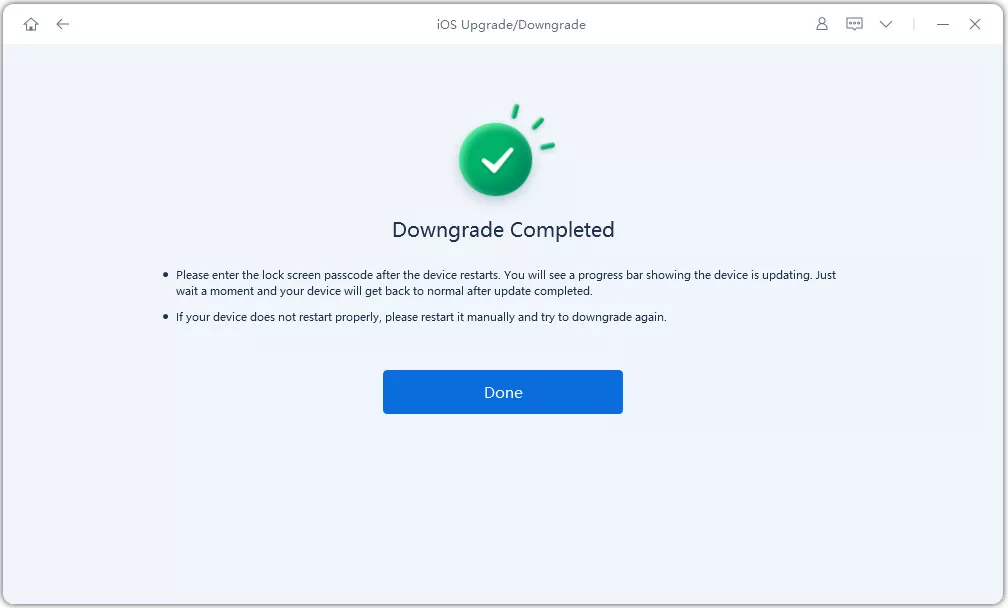
If none of the methods above work for you, your last resort is to report the error directly to the official developers and patiently wait for an official fix. The more users flag the Gmail search not working issue, the faster Google and Apple will respond and release a patch.
Here is how you can submit your bug reports quickly:


Dealing with the Gmail search bug on iOS 27 can be frustrating, but you have multiple workarounds at your disposal. While we highly recommend heading to the App Store to download the latest version of Gmail to see if the recent patch resolves your issue, beta systems are inherently unpredictable.
If you want a permanent fix and wish to escape the constant app crashes and system glitches, we strongly recommend using Tenorshare ReiBoot . It is the safest and easiest way to downgrade your iOS system and restore your iPhone to its smooth, reliable, and bug-free state without losing any data.
1.Does the "Gmail search not working" bug mean my emails are deleted?
No, your emails are perfectly safe. This bug is strictly a user interface (UI) and API conflict between the Gmail app and the iOS 27. Your actual messages are securely stored on Google's cloud servers. Once the app is updated or your iOS is downgraded, all your emails will be visible and searchable again.
2.If the filter chips are missing, can I still type search operators (like "from:" or "has:attachment")?
Unfortunately, no. In this specific iOS 27 glitch, the search bar itself becomes completely unresponsive and refuses to execute any query, including manual text operators. To use advanced search filters, you will need to log into the Gmail web version via Safari.
3.Is this iOS Gmail bug affecting all my linked accounts (Workspace, School, Personal)?
Yes. Because this is an app-level incompatibility with the iPhone's operating system, it affects the entire Gmail application. Whether you are using a personal "@gmail.com" address or a professional Google Workspace account, the search function will be broken for all profiles logged into that app.
4.Why is my Gmail search not showing recent emails on my iPhone?
If your search bar is working but it simply isn't displaying the latest emails, you are likely facing a syncing issue, not the iOS 27 bug. To fix this, check your iPhone's "Background App Refresh" settings, ensure your internet connection is stable, or verify that your Google Drive storage is not full.
5. I am experiencing Gmail search not working on Android. Is it the same beta bug?
No. Maybe this is the bug of Gmail itself. Specifically, downloading Version 6.0.260727 (the newest) has been confirmed by users to completely restore the search bar and filter functionalities.


then write your review
Leave a Comment
Create your review for Tenorshare articles
Share this post


ReiBoot - No.1 Free iOS System Repair Software
Fix 150+ iOS Issues without Data Loss & Safely iOS 27 Upgrade/Downgrade
ReiBoot: No.1 iOS Repair Tool
Fix 150+ iOS Issues, No Data Loss
By Jenefey Aaron
2026-09-24 / iOS 27