


4uKey - One-Click Easy iPhone/iPad Unlocker
Unlock Screen Lock/Apple ID/MDM/Screen Time Passcode Instantly
Easy iPhone/iPad Unlocker
Unlock iPhone Passcode Instantly
Looking for an iCloud unlock service that actually works? Whether you forgot your Apple ID or bought a second-hand iPhone locked to its previous owner, this guide compares the best iCloud unlock services in 2026, including paid tools, official options, and iCloud unlock free online methods.
Before you start, remember that Activation Lock is designed to protect lost or stolen devices. Only remove it from a device you legally own. If you bought a used iPhone, contact the seller or previous owner first.
Short on time? Start here. The best iCloud unlock service depends on your device, proof of ownership, and whether you want a free or paid option.
The table below summarizes the main iCloud unlock services compared in this guide, so you can match a method to your device and situation before reading the full reviews.
 Please swipe to view
Real iCloud unlock tools and official Apple routes do exist, but no single service can unlock every device in every situation. Genuine solutions depend on your device model, iOS version, and lock status — and on whether you legally own the device.
Treat any service that shows these warning signs with caution:
The safest starting point is Apple's official process or a reputable desktop tool, used only on a device that belongs to you. Lost or stolen devices should never be unlocked — report or return them instead.
Each service in this guide was assessed against the factors that matter most to real users:
These criteria shape the ranking and the recommendations below.
The tools and official routes below are the main options for removing iCloud Activation Lock, compared by compatibility, safety, and best use.

Tenorshare 4uKey is a guided desktop iCloud unlock service for users who do not want to submit their IMEI or serial number to an unknown website. It can help remove Activation Lock or Apple ID on supported iPhone and iPad models.
It is best for users who legally own the device, want a step-by-step desktop workflow, and prefer a trusted iCloud removal service over risky online tools. Before starting, check your device model and iOS compatibility.
Best for: Supported iPhone and iPad models
Free or paid: Free download + paid unlock features
Needs computer: Yes
Mobile tip: Check compatibility before downloading

Key Features Of Tenorshare 4uKey




How to Use 4uKey for iCloud Unlock
Install 4uKey on the computer and choose "Remove iCloud Activation Lock" to bypass iPhone Activation Lock. Then connect your iPhone to your computer.
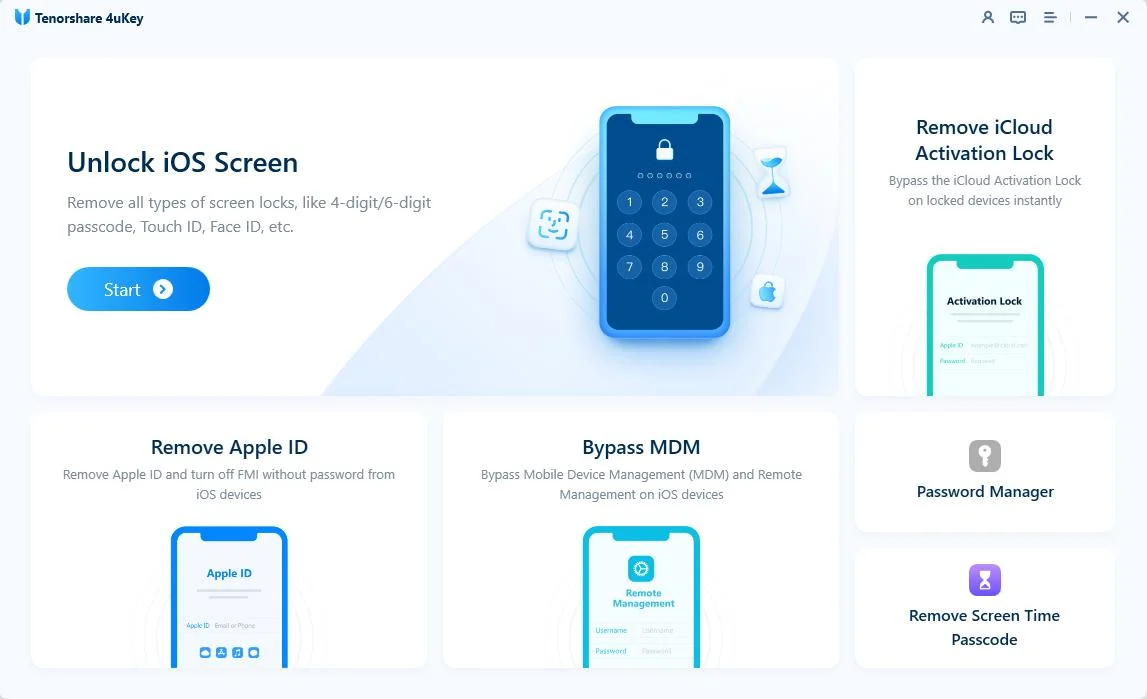
Choose “Next” to remove iCloud Activation Lock. To prevent file system damage, your iPhone will first enter recovery mode.


When done, your iPhone will begin the jailbreaking process. Please wait patiently.

When your iPhone is jailbroken successfully, the 4uKey iCloud unlocker tool will automatically remove the iCloud activation lock.

Soon you can see that your iPhone has removed the iCloud activation lock successfully, with the trusted iCloud unlocker tool: 4uKey.

How to Reset iPhone iPad without iCloud Password
Apple Activation Lock Support is the safest official option for owners who can prove the device belongs to them, and it carries no third-party risk. You can start an Activation Lock support request with valid proof of purchase, such as an original receipt or invoice that matches the device serial number.
Apple may remove Activation Lock from the device once your documentation is approved. For a second-hand device, contact the seller or previous owner first and ask them to remove it from their account, since Apple usually verifies original ownership before approving a request.
Pros and Cons of Apple Activation Lock Support
Pros
Cons
iRemove Tools is an iCloud removal service mainly used by advanced users, technicians, and repair shops. It offers several unlocking-related features, including Activation Lock removal, MDM bypass, SIM unlock options, and Apple ID-related tools.

Pros and Cons of iRemove Tools
Pros
Cons

Checkm8 is another iCloud removal service, best suited for iPads. This online tool lets you unlock your iPad's iCloud by downloading it on your PC or Mac.

Pros and Cons of the Checkm8 iCloud Removal Service
Pros
Cons
UnlockMaker is often searched as an unlockmaker free icloud unlock service for users who want a no-download online method. However, because it asks for device identifiers and its success rate is difficult to verify, it should be treated as a limited online option rather than a guaranteed unlock solution.

Pros And Cons of UnlockMaker
Pros
Cons
This method uses DNS to bypass the iCloud activation lock. You can change the DNS setting to gain limited access. It is free and easy to reach, but the result is partial rather than a full unlock.

Pros and Cons of iCloud DNS Bypass
Pros
Cons
DoctorUnlock is an unlock program mainly based on the IMEI of iPhones and iPads. It aims to bypass the activation lock and provide a prompt iCloud unlock service. IMEI-based services depend on device status, and some only support clean-IMEI devices, so confirm terms and privacy before submitting your number.

What do you need to know? With DoctorUnlock, you can bypass the activation lock of iPhones, iPads, iPods, and Apple Watches. It states support for iPhone 4 to iPhone 14, though compatibility should always be verified for your model.
DoulCi Activator is another free iCloud unlock service. It is easy to use and is often suggested for second-hand iPhone buyers, though it is best suited to older devices.

Pros and Cons of DoulCi Activator
Pros
Cons
iCloudin is a free iCloud unlock tool that aims to bypass the activation lock on a range of iOS devices. It is most useful for older hardware rather than the latest models.

Pros and Cons of iCloudin
Pros
Cons
Many users look for an iCloud unlock free online solution because it sounds fast, simple, and cost-free. These services usually run in a browser and ask for your IMEI, serial number, or basic device information instead of a software download.
The trade-offs are real. Most free online tools only provide a free check, while the actual unlock may require payment, support a narrow range of devices, or fail to deliver a permanent result. Some also raise privacy concerns because they collect device identifiers.
Review the service's privacy policy, refund terms, and supported models before entering any device details. For a device you legally own, compare free online services with Apple's official support and a trusted desktop tool such as Tenorshare 4uKey first.
Verdict: An iCloud unlock free online tool may be useful for checking options, but it is rarely the safest or most reliable solution.
Use it for: A quick online check only.
Avoid it when: The site asks for sensitive information, guarantees instant unlock, or has no refund policy.
Start with Apple ID account recovery to regain access the official way. A guided desktop tool like 4uKey becomes an option for a supported device that belongs to you.
Contact the seller or previous owner and ask them to remove the device from their account remotely. Unable to reach them? Request a refund or dispute the purchase. Apple's support request becomes an option once you have proof of purchase. See our guide on an iPhone locked to owner for more.
Free methods such as DNS bypass or older online tools can work in limited cases, but they are often temporary, partial, or risky. Weigh the convenience against unclear success rates and privacy concerns.
Newer models have stronger security, and many free or older tools no longer support them. Check each tool's stated compatibility honestly, and treat "works on any iPhone" claims with skepticism.
Online and cracked unlocking tools come with risks worth understanding before you commit:
A reputable desktop tool or Apple's official process keeps these risks to a minimum.
Yes, real tools and official routes do exist, but no iCloud unlock service can unlock every device in every situation. Results depend on your device model, iOS version, lock status, and whether you legally own the device.
Some websites advertise an iCloud unlock free online option, but many only provide a free check and may charge for the actual unlock. Before entering your IMEI or serial number, check the service's privacy policy, refund terms, and supported devices.
UnlockMaker is often searched as an unlockmaker free icloud unlock service because it offers a no-install online option. However, it should be treated as a limited free iCloud unlock service, since its success rate and privacy protection are hard to verify.
The cost depends on the method. Apple's official Activation Lock support request is free if you have valid proof of purchase, while desktop tools and online iCloud removal service options may require payment. Always check for hidden fees before paying.
Yes. Apple may remove Activation Lock if you can provide valid proof of purchase that matches the device. For a second-hand iPhone, contact the seller or previous owner first and ask them to remove the device from their Apple Account.
Tenorshare 4uKey is a trusted iCloud removal service for users who prefer a guided desktop tool instead of submitting their IMEI to unknown websites. It works on supported iPhone and iPad models, so you should check compatibility before starting.
This guide compared the best iCloud unlock services in 2026 across free, paid, and official options. For a device you legally own, Tenorshare 4uKey is the most recommended all-around tool, while Apple's official Activation Lock support is the safest route when you have proof of purchase. Check compatibility first, and avoid services that promise an instant or universal unlock.


Tenorshare 4uKey - Best iPhone Unlocker




then write your review
Leave a Comment
Create your review for Tenorshare articles
Easily Unlock iPhone passcode/Apple ID/iCloud Activation Lock/MDM
100% successful unlockShare this post


4uKey - One-Click Easy iPhone/iPad Unlocker
Unlock Screen Lock/Apple ID/MDM/Screen Time Passcode Instantly
Easy iPhone/iPad Unlocker
Unlock iPhone Passcode Instantly
By Jenefey Aaron
2026-09-15 / Unlock iPhone