If you're considering the iPhone Duo, one of the biggest questions is whether 256GB is enough or if you should pay more for 512GB, 1TB, or even 2TB. The right choice depends less on the phone itself and more on how you use it—especially how many photos, videos, apps, games, and offline files you keep locally.
The good news is that 256GB can be enough for many users. But if you regularly shoot high-resolution photos and videos, keep a large media library, or download lots of content for offline use, you may need more room—or a better way to manage the storage you already have. In this case, a storage management tool like Tenorshare iCareFone can help you organize your data, clean up unnecessary files, and make better use of the space you already have.
For many everyday users, 256GB can be enough for iPhone Duo. If you mainly use your phone for messaging, social media, browsing, streaming, everyday photography, and a reasonable number of apps, you may not need to pay extra for a larger capacity.
Who Can Get By with 256GB?
256GB is more likely to work well if you mostly stream music and video, take photos regularly but don't record large amounts of video, don't keep a huge collection of games, periodically remove unnecessary files and apps, use cloud storage or a computer to keep older files, and prefer managing your storage rather than paying for the largest capacity.
Who Should Consider 512GB or More?
A larger capacity becomes more relevant for iPhone Duo users if you record a lot of high-resolution video, keep years of photos and videos locally, download large amounts of content for offline use, install many large games, use your iPhone as a portable media or file library, or don't want to regularly review and clean up storage.
256GB vs. 512GB vs. 1TB vs. 2TB
Apple currently offers iPhone Duo in 256GB, 512GB, 1TB, and 2TB configurations. In the U.S., the starting prices listed by Apple are $1,999 for 256GB, $2,199 for 512GB, $2,599 for 1TB, and $3,199 for 2TB.
The important point is that more storage gives you more flexibility, not automatically a better everyday experience. For example, if you primarily stream Netflix, Apple Music, and other services instead of downloading large libraries to your iPhone, you may not benefit much from moving from 256GB to 1TB.
On the other hand, if your iPhone doubles as your primary camera, video recorder, entertainment device, and portable file storage, a larger capacity can reduce how often you need to manage your storage.
Part 2. What Takes Up the Most Storage on iPhone Duo?
Choosing the right iPhone Duo capacity starts with understanding what actually consumes your storage.
Photos and Videos
Photos and videos can become one of the largest categories on iPhone Duo over time. This is especially relevant if you frequently record high-resolution photos and videos. Photos and videos stored on the device in their original high-resolution versions can use a significant amount of iPhone storage.
Apps and Games
Apps themselves may not always be huge, but their associated data can grow. Large games, downloaded resources, offline content, and cached files can gradually increase an app's storage usage. Apple lets you check individual app storage usage under Settings > General > iPhone Storage.
Offline Downloads
Streaming saves local storage because the content does not need to remain permanently downloaded. But downloading movies, TV shows, music playlists, podcasts, maps, or other content for offline use changes that equation.
Messages and Attachments
Messages can also accumulate storage over time, especially when conversations contain photos, videos, GIFs, documents, and other attachments. Apple includes Messages and its attachments as a separate storage category.
Part 3. How to Make 256GB Last Longer?
Choosing 256GB for iPhone Duo doesn't mean you have to constantly worry about running out of space. The key is to avoid treating your iPhone as the permanent home for every file you've ever created.
1.Clean Up Large Photos and Videos
Start with your Photos library. Look for long videos you no longer need on your phone, duplicate photos, screenshots, screen recordings, old exported videos, and large files that you have already backed up elsewhere. You don't necessarily need to delete your memories. Instead, consider moving older photos and videos to another storage location before removing them from the device.
2.Remove Apps and Games You No Longer Use
Start with Settings > General > iPhone Storage. There you can see how much space individual apps are using. Apple also provides an Offload Unused Apps option, which can remove an unused app while keeping its documents and data so the app can be reinstalled later.
3.Use Cloud Storage Strategically
iCloud Photos can help reduce the amount of local storage used by your photo and video library. With Optimize iPhone Storage, full-resolution photos and videos can be stored in iCloud while space-saving versions remain on your device. However, your iPhone Duo's physical storage capacity does not increase when you purchase more iCloud storage.
4.Move Older Files to a Computer
Keep recent photos and videos on your iPhone Duo, back up older content to your computer, remove files you no longer need locally, and keep a separate backup of important data. This approach can be useful for people who want to keep a 256GB iPhone for several years without constantly upgrading their storage capacity.
Part 4. Use iCareFone to Export iPhone Data to Your Computer
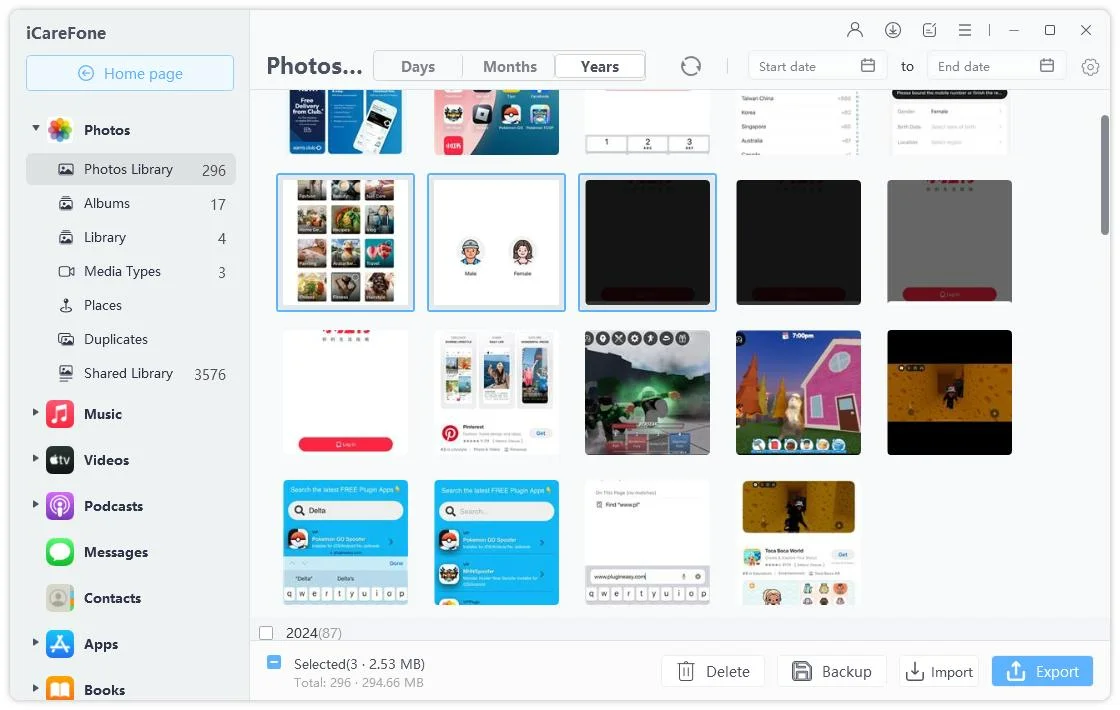
When your iPhone Duo is running low on storage, Tenorshare iCareFone helps you manage and move supported iPhone data to your computer. Manage iOS Data supports multiple types of content, including Photos & Videos, Music & Video Apps Library, Contacts, iPhone Files Manager, and Messages/Books & Bookmarks. Depending on the data type, you can manage, import, or export content through iCareFone.
For users who mainly need to free up space taken by photos, One-click Export Photos to PC provides a quicker way to move photos to a computer.
iCareFone also provides a storage-cleaning tool that can scan for unnecessary cache and log files and help clear them from your iPhone or iPad.
1.Manage iOS Data
Connect your iPhone to iCareFone and select the type of data you want to export.
Select the files you need and click Export to save them to your computer.
2.One-click Export Photos to PC
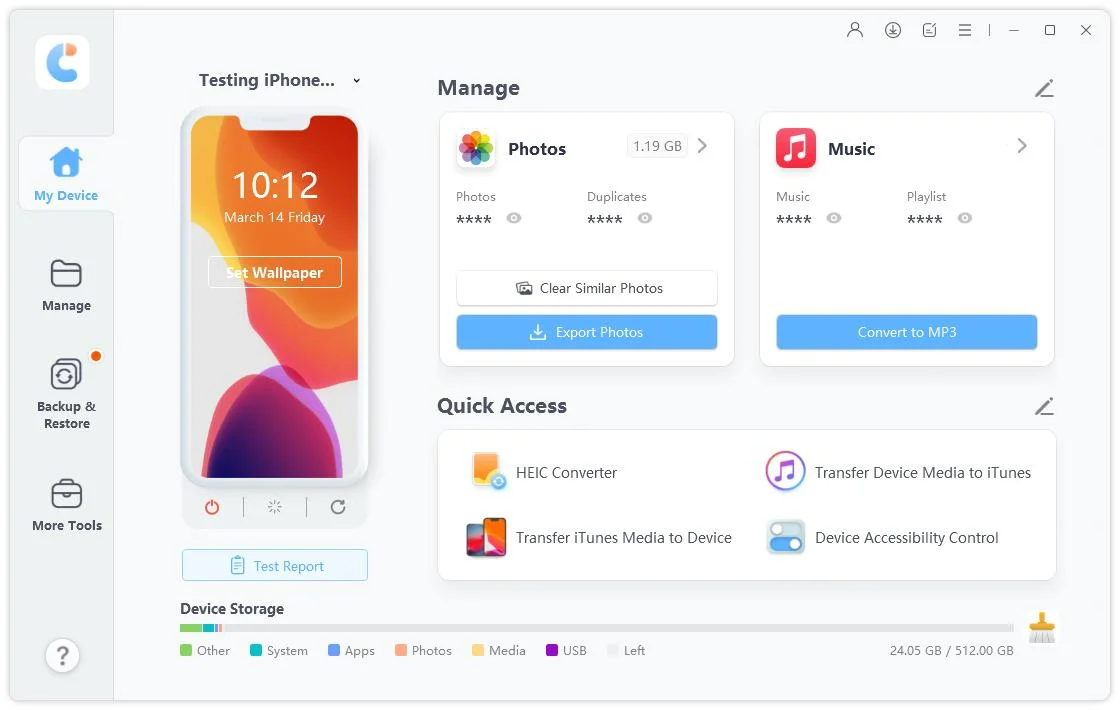
Connect your iPhone to iCareFone and select Export Photos from the main interface.
Follow the on-screen instructions to export your iPhone photos to your computer.
3.Clear System Cache
Click on the broom icon located next to the storage bar at the bottom.
iCareFone will scan your device for cache and log files, and you'll see how much space can be freed up. Just click the "Clean" button to proceed.
Part 5.FAQs About iPhone Duo Storage
Can I upgrade iPhone Duo storage after buying it?
No. The built-in storage capacity is fixed when you purchase the device. If you buy the 256GB model, you cannot later upgrade its internal storage to 512GB or 1TB.
Does iPhone Duo support a microSD card?
No. iPhone Duo does not provide a microSD card slot for expanding its built-in storage. If you need additional space outside the device, you need to use alternatives such as cloud storage or external storage connected through supported methods.
What happens if my iPhone Duo storage becomes full?
When storage is nearly full, you may see storage warnings and have difficulty downloading new apps, taking photos, installing updates, or saving new files. iOS provides storage recommendations and tools for removing or offloading content when space is limited.
Conclusion
For many users, 256GB can be enough for iPhone Duo if storage is managed thoughtfully. The right capacity depends on how much content you create, download, and keep locally—not simply on the number of apps you install.
If you choose 256GB for iPhone Duo, regular storage management can help you make the most of it. Cleaning up large files, removing unused apps, using cloud storage strategically, moving older data to a computer, and clearing unnecessary system cache can all reduce pressure on your device. For users who want a more convenient way to move supported iPhone data to a computer, iCareFone can be part of that workflow.











 iOS Tips & Latest Updates
 Bug Fixes, Unlock Guides
 Giveaways & Freebies





By Jenefey Aaron
2026-09-28 / iPhone 18