

 iOS Tips & Latest Updates
 Bug Fixes, Unlock Guides
 Giveaways & Freebies


iCareFone - Free iOS Backup tool & Easy Data Manager
Backup/Transfer/Restore/Manage iOS Data with Simple Clicks
Backup/Manage iOS Data Easily
Backup/Manage iOS Data in Clicks
The fastest way to transfer data from an old iPhone to iPhone Duo is Quick Start during setup. Keep both iPhones close and plugged in, turn on Wi-Fi and Bluetooth on the old one, and choose Transfer from iPhone. If the Duo is already set up, Apple's built-in methods make you erase it first. To avoid that, sync through iCloud or use a computer-based selective tool such as iCareFone. Whichever route you take, Touch ID, Apple Pay cards and your eSIM line need separate setup on the Duo.

There are six practical ways to move data from an old iPhone to an iPhone Duo. Which one fits depends on two things: whether the Duo is still on its setup screen, and whether you want to copy everything or only some items. The table compares all six.
 Please swipe to view
For most people with both phones in hand, Quick Start is the right default. An iCloud or computer backup covers the cases where the old iPhone isn't available or the library is too big for wireless transfer. The last three rows are for a Duo you've already set up and don't want to erase. Before you pick a method, run through the checks in Part 2.
Spend ten minutes on these seven checks before you turn the Duo on. Most failed or half-finished transfers trace back to one of them, and three are specific to this phone: its 256GB minimum storage, its eSIM-only design and its Touch ID.

Quick Start, an iCloud backup and a Mac or PC backup all run during the Duo's first-time setup, and each one copies the whole old iPhone rather than selected items. Use Quick Start if you have both phones, an iCloud backup if you don't, and a computer backup if the library is large or your connection is slow.
Quick Start needs iOS 11 or later on the old iPhone, and it occupies both phones until it finishes, so pick a time when you won't need the old one.

Apple does not publish a fixed duration because speed depends on data volume and network conditions.

Apple also supports a cable transfer. The cable you need depends on the ports on each phone. The Duo is USB-C, but an iPhone 14 or earlier still has Lightning, so check Apple's wired-migration page before buying a cable.
This works when the old iPhone isn't nearby. On the old iPhone, go to Settings > General > Transfer or Reset iPhone > Prepare for New iPhone and let the backup finish. Then, on the Duo's Transfer Your Apps & Data screen, choose From iCloud Backup and sign in.

If your backup is bigger than your iCloud plan, Apple offers eligible customers temporary iCloud storage when moving to a new iPhone. You get 21 days to restore it, with an option to ask for another 21.
Expect the setup itself to finish quickly while photos, apps and media keep downloading afterward. Keep the Duo on Wi-Fi and power until that settles.
Use this for large libraries or when your Wi-Fi is slow. On a Mac, open Finder, select the iPhone, and choose Back Up Now under the General tab. On Windows, use the Apple Devices app (iTunes still works on supported systems). Turn on encryption before you back up.
During Duo setup, choose From a Mac or PC, connect the Duo to the same computer, then pick Restore from This Backup. Wait for the progress to finish before unplugging, because the Duo may restart once or twice.

This is the situation the official methods handle worst. Quick Start, iCloud restore and computer restore all begin at the setup screen, so a configured Duo has to be erased first. If you've already installed apps and signed in to accounts, that is a lot to redo. There are three ways around it.
Tenorshare iCareFone is a Windows and Mac program that backs up an iPhone to your computer and then restores only the items you tick onto another iPhone. It does this without iCloud or iTunes. Its published description says a backup can be previewed before restoring and restored to a new device without overwriting what is already there.




Execute iCareFone on your computer. Then, connect the iDevice to the same computer whose backup you wish to create and then restore it on your iPhone Duo. Choose “Backup & Restore” on iCareFone. Then, select the data you want to back up. Hit “Backup.”
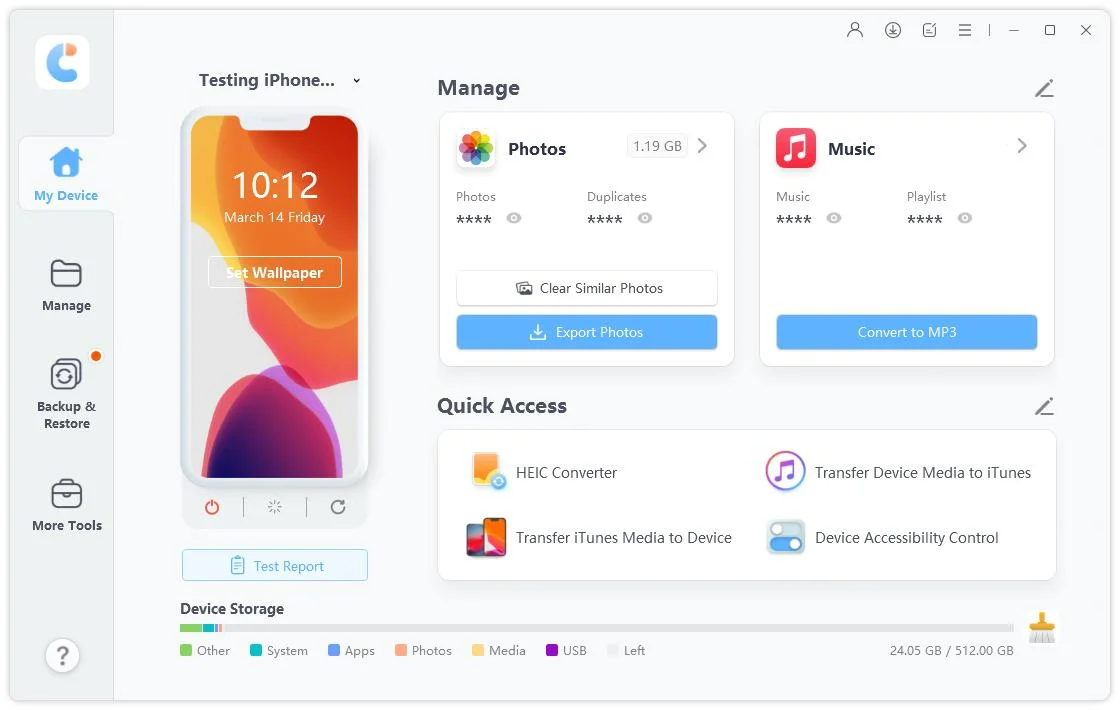
Select “Backup & Restore” on iCareFone again. Then, choose the latest backup file you created.

Once you have selected the files, click Backup and wait for the process to end to backup iPhone to PC computer.

If both iPhones use the same Apple Account, go to Settings > \your name\ > iCloud > See All on the Duo and switch on the apps you want. Photos, contacts, calendars, notes and reminders then stay in step across both phones. This is syncing, not copying. If you delete something on the Duo, it disappears from the old phone too.

For a few files, upload from the old iPhone to iCloud Drive, Google Drive, OneDrive or Dropbox, then sign in on the Duo and download. It is slow for large libraries and moves nothing but files

A finished transfer does not mean the Duo is ready. Some things are tied to the hardware, your carrier or your bank, so no method in this guide moves them. Work through this part before you erase or sell the old iPhone.
The Duo has no SIM tray, so your number has to live on an eSIM. If your carrier supports Apple's eSIM Quick Transfer, the line can move from a nearby iPhone without a call to the carrier. Other carriers activate it through a QR code or their own app. Quick Start may also ask you to activate cellular service during setup, which is the easiest moment to do it.
Two things catch people out. Once the line activates on the Duo, it stops working on the old iPhone, so any bank code sent by SMS reaches the Duo from then on. And although iOS 27 adds iPhone Handoff for switching a number between two iPhones, at launch it works only with T-Mobile in the U.S. and Telekom in Germany.

Fingerprints never leave the device they were enrolled on, so add yours again on the Duo. Touch ID sits in the side button and works whether the phone is open or closed, and Apple also lets you unlock the Duo with a paired Apple Watch.
Apple Pay cards usually need to be re-added or re-verified in Wallet, and some banks send a code. Banking apps may ask you to sign in again and approve the Duo as a new device. Authenticator apps are the risky ones: some keep their tokens only on the phone, so use each app's own export or recovery option before you wipe anything.
Apple includes an Apple Watch backup in the paired iPhone's backup. During setup you may be offered the chance to use your Watch with the new iPhone. If that prompt doesn't appear, open the Watch app on the Duo and follow the pairing steps.
Health data and saved passwords come across only through iCloud or an encrypted computer backup. If you restored from an unencrypted Mac or PC backup and they are missing, make a new encrypted backup of the old iPhone and restore again.

Expect the Duo to look different even if every file arrived. When it is open, it shows two Home Screen pages with a Today View of widgets on the left, and the Dock and app controls move to the side. The Dynamic Island is redesigned to sit vertically along the side of both displays, and StandBy runs on either display even when the phone is not charging.
Apps need developer updates to use the larger screen. Apple names Netflix, Zoom and Slack as already adapted, so others may not use the extra space until they are updated.
Ten minutes now is cheaper than finding a gap a month from now.
Most transfer problems come down to the connection, storage, account or setup state. Find your symptom in the table and start with the fix in the right-hand column.
Please swipe to view
Yes, but not with Quick Start or a backup restore unless you erase the Duo first. iCloud sync and selective tools such as iCareFone work on a configured phone.
No. Apple says it uses Touch ID built into the side button, and you can also unlock it with an Apple Watch.
No. The Duo is eSIM-only, so your carrier needs to convert the line.
Apps and app data come across with Quick Start and full backup restores, though some apps will ask you to sign in again. For saved passwords and Wi-Fi settings from a computer backup, the backup has to be encrypted.
It backs up to your own computer rather than through iCloud, but you are still giving a program access to your phone. Download it from the vendor's official site, check what it asks to access, and keep a normal Apple backup as well.
Apple gives no fixed time. It depends on how much data you move and how fast your Wi-Fi or cable is.
To transfer data from your old iPhone to iPhone Duo, Quick Start is the right call when the Duo is still on the setup screen and the old iPhone is within reach. An iCloud backup is the fallback when the old phone is gone, and an encrypted Mac or PC backup suits large libraries or slow Wi-Fi.
Once the Duo is set up, those three all need an erase. Syncing through iCloud or using a selective tool such as iCareFone lets you move data to iPhone Duo without starting over. Whichever route you choose, plan to re-enroll Touch ID, re-verify your Apple Pay cards and move your eSIM line yourself, and keep the old iPhone untouched until the checklist in Part 5 comes back clean.


then write your review
Leave a Comment
Create your review for Tenorshare articles
Best Free iPhone Transfer & iOS Backup Tool
Easily, without iTunesShare this post


iCareFone - Free iOS Backup tool & Easy Data Manager
Backup/Transfer/Restore/Manage iOS Data with Simple Clicks
Backup/Manage iOS Data Easily
Backup/Manage iOS Data in Clicks
By Jenefey Aaron
2026-10-14 / iPhone 18