

 iOS Tips & Latest Updates
 Bug Fixes, Unlock Guides
 Giveaways & Freebies


4uKey - One-Click Easy iPhone/iPad Unlocker
Unlock Screen Lock/Apple ID/MDM/Screen Time Passcode Instantly
Easy iPhone/iPad Unlocker
Unlock iPhone Passcode Instantly
Apple is introducing a new way to unlock the iPhone Duo with the iOS 27.3 beta 2 update. The Unlock with Front Camera feature uses the front-facing camera to recognize your face when the device is folded, offering a convenient alternative to Touch ID for Lock Screen access. However, it isn't the same as traditional Face ID and still has limitations when it comes to security and authentication. In this guide, we'll explain how iPhone Duo face unlock works, how to enable it, and what to do if you can't access your device.

The new iPhone Duo face unlock feature, called Unlock with Front Camera, allows you to unlock your folded device by looking at its front-facing camera. It was introduced in iOS 27.3 beta 2 as an additional way to access the Lock Screen without using the Touch ID sensor.
Unlike Face ID, this feature relies on the standard front camera rather than Apple's TrueDepth camera system. It is designed for convenience, but it doesn't support every authentication task that Touch ID or Face ID can handle.
After enabling the feature and completing the face setup, your iPhone Duo can recognize your face through the front camera when the device is closed. During setup, you'll be asked to position your face within the camera frame and slowly turn your head in different directions so the device can capture your face from multiple angles.

Once setup is complete, you can look at the front camera to unlock the Lock Screen, provided you've recently authenticated with Touch ID or your passcode.
No. iPhone Duo front camera unlocking is not the same as Face ID. Face ID uses Apple's TrueDepth camera system to perform more advanced facial authentication, while the new feature uses the standard front-facing camera.
Here's how the three unlocking methods compare:
 Please swipe to view
The main difference is that front camera unlocking is limited to accessing the Lock Screen. You'll still need Touch ID or your passcode for other protected actions.
If your iPhone Duo is running a compatible version of iOS 27.3, you can enable front camera unlocking from the Settings app. You'll need to complete the face setup before using it.
Follow these steps to enable the feature:
Open the Settings app on your iPhone Duo.
Tap Touch ID & Passcode.
Enter your device passcode when prompted.
Find Unlock with Front Camera and turn it on.
Follow the on-screen instructions to position your face and complete the recognition setup.
Once setup is complete, the feature is ready to use when your iPhone Duo is folded.

After enabling the feature, follow these steps:
Fold your iPhone Duo.
Wake the Lock Screen.
Look toward the front-facing camera.
Wait for the camera to recognize your face and unlock the device.
If face recognition doesn't work, you can still unlock your iPhone Duo with Touch ID or your passcode.
Although front camera unlocking makes it easier to access your iPhone Duo, it doesn't replace Touch ID or provide the same capabilities as Face ID. Before relying on this feature, it's important to understand its limitations.

The feature is designed specifically for unlocking the iPhone Duo when it's closed. If you unfold the device, you'll need to use Touch ID or your passcode to unlock it.
This means front camera unlocking is mainly useful when you want to quickly check your phone or access the Lock Screen without opening the device.
Although front camera unlocking provides another way to access the Lock Screen, some protected actions still require Touch ID authentication:
Therefore, front camera unlocking is an additional convenience feature rather than a complete replacement for Touch ID.
For security reasons, iPhone Duo requires a recent Touch ID or passcode authentication before front camera unlocking can be used. After approximately 45 minutes without unlocking the device, you'll need to authenticate with Touch ID or your passcode again before using face recognition.
This additional requirement helps limit how long the device can rely on front camera recognition alone.
Apple indicates that front camera unlocking is less secure than Touch ID or Face ID. Since it uses a standard front-facing camera rather than the TrueDepth system, it should be treated as a more limited unlocking option.
There are three important points to understand:
For sensitive actions, continue using the authentication method requested by your iPhone.
Even with front camera unlocking enabled, you may sometimes be unable to access your iPhone Duo. The right solution depends on what's preventing you from unlocking the device.
Please swipe to view
If you forget your iPhone Duo passcode, front camera unlocking cannot replace passcode authentication when iOS requires it. You can try one of the following recovery methods to regain access to your device.
If your iPhone supports this option, you can reset it directly from the Lock Screen:

This method generally requires Find My to have been enabled, an active internet connection, and your Apple Account credentials.
If the Lock Screen reset option isn't available, you can use a Mac or Windows PC to restore your iPhone through recovery mode:

Both methods erase your iPhone data. You can restore your information afterward if you have an iCloud or computer backup.
If your iPhone displays iPhone Unavailable or Security Lockout after too many incorrect passcode attempts, you may need to erase and reset the device before using it again. If your iPhone remains stuck on the unavailable screen, see our guide on how to fix the iPhone Unavailable screen for more troubleshooting methods.
Check whether the Forgot Passcodeoption is available on the Lock Screen. If it isn't, use a computer to restore your iPhone through recovery mode. Both methods remove the existing data, so you'll need a backup to recover your information afterward.
If biometric unlocking stops working, first check whether the issue is related to the sensor, camera, or feature settings.
If Touch ID isn't working:
If your iPhone Duo also has trouble recognizing your fingerprint, check out our guide on how to fix Touch ID not working on iPhone Duo for more troubleshooting steps.
If front camera unlocking isn't working:
If the problem continues, check for available iOS updates or contact Apple Support. A passcode removal tool cannot repair a faulty camera or Touch ID sensor.
If you've forgotten your screen passcode or your iPhone is disabled, Tenorshare 4uKey may provide another way to remove the screen lock, provided your device model and iOS version are supported.


4uKey offers screen passcode removal for supported iPhone models and can help in situations such as:
How to Remove Your iPhone Screen Passcode with 4uKey
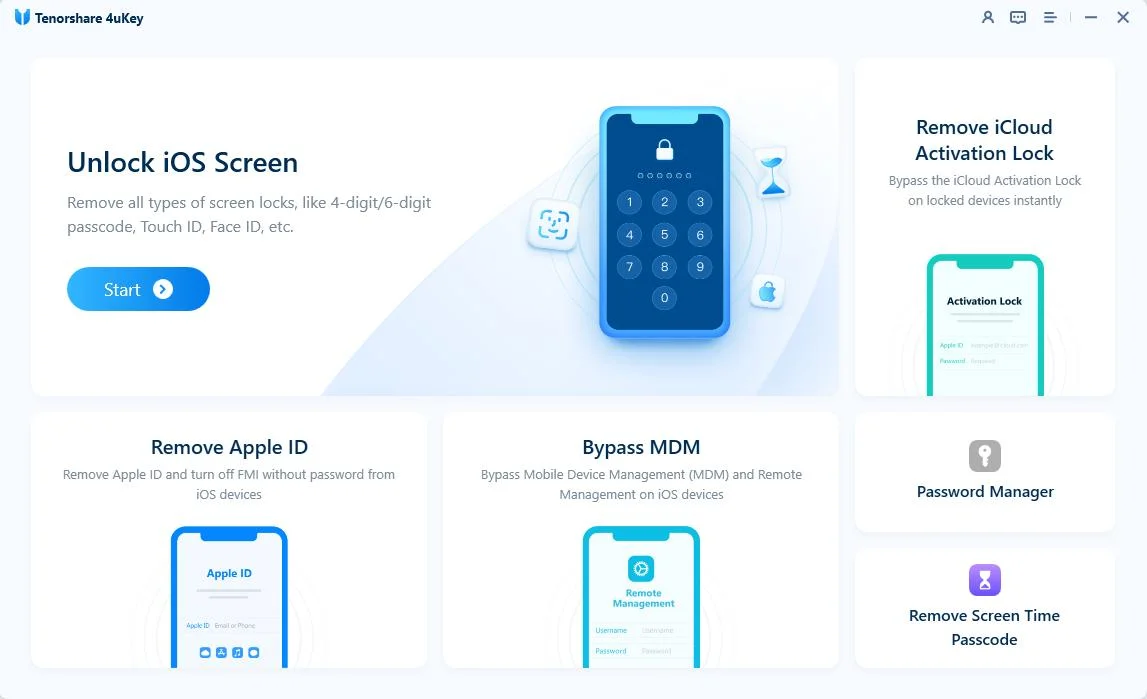


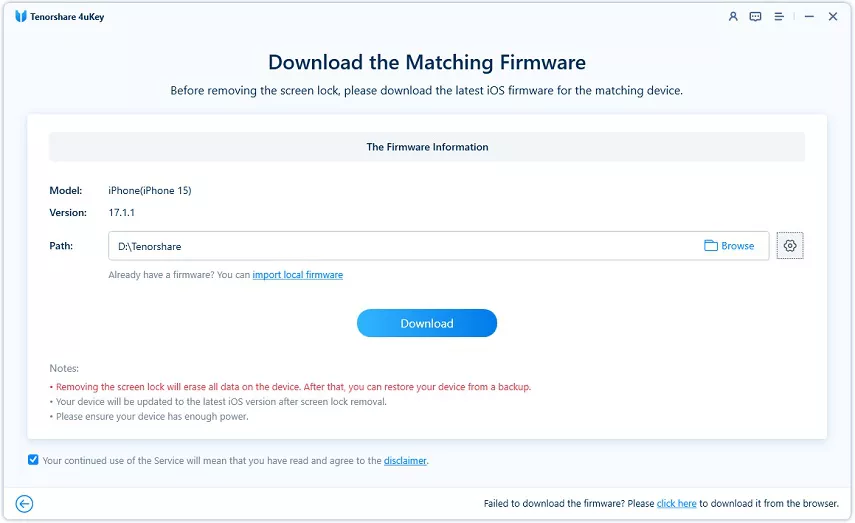
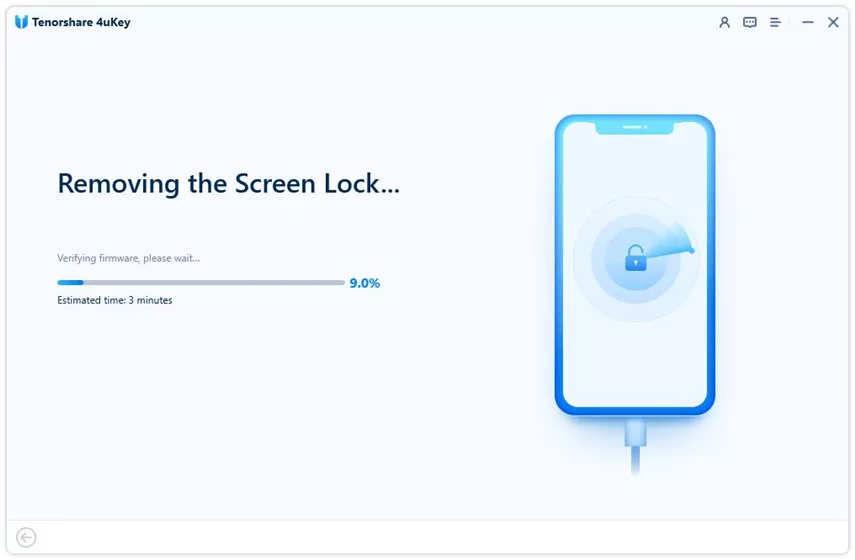
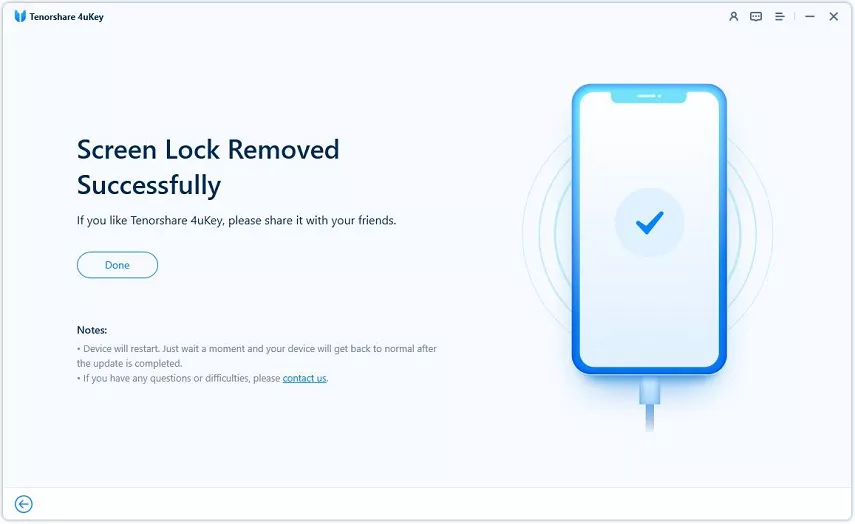
Removing the screen passcode erases your device data. You may also need your Apple Account credentials to complete activation if Activation Lock is enabled. 4uKey does not repair Touch ID or front camera hardware, or enable front camera recognition.
Apple describes the feature as front camera face recognition and warns that it is less secure than Touch ID or Face ID. However, that warning alone doesn't establish whether a printed photo or displayed image can fool the system in every situation. For sensitive actions, continue using Touch ID or your passcode.
No. iPhone Duo does not have the TrueDepth camera system required for Face ID. Its Unlock with Front Camera feature uses the standard front-facing camera and provides a more limited way to unlock the Lock Screen.
Yes, you can use front camera unlocking to access the Lock Screen when your iPhone Duo is folded and the feature is enabled. However, you'll still need Touch ID or your passcode for Apple Pay, saved passwords, and other actions that require additional authentication.
If you forget your passcode, front camera unlocking won't bypass the passcode requirement. You'll need to erase and reset your iPhone using the Lock Screen reset option, if available, or restore it through recovery mode on a computer. These methods erase your device data.
Tenorshare 4uKey can remove the screen passcode on supported iPhone models and iOS versions, including certain disabled-device scenarios. Check the current compatibility information before using it. The process erases device data, and Activation Lock may still require your Apple Account credentials.


4uKey iTunes Backup - Best iPhone Backup Unlocker




then write your review
Leave a Comment
Create your review for Tenorshare articles
Easily Unlock iPhone passcode/Apple ID/iCloud Activation Lock/MDM
100% successful unlockShare this post


4uKey - One-Click Easy iPhone/iPad Unlocker
Unlock Screen Lock/Apple ID/MDM/Screen Time Passcode Instantly
Easy iPhone/iPad Unlocker
Unlock iPhone Passcode Instantly
By Jenefey Aaron
2026-11-17 / iPhone 18