


 iOS Tips & Latest Updates
 Bug Fixes, Unlock Guides
 Giveaways & Freebies


UltData - Best iPhone Data Recovery Tool
Recover Deleted & Lost Data from iOS Devices Easily, No Backup Needed!
UltData: Best iPhone Recovery Tool
Recover Lost iPhone Data without Backup
Lost your iPhone contacts after a restore or accidental deletion? Don't panic. Whether you've just upgraded to a new iPhone, performed a factory reset, or accidentally deleted important contacts, iCloud provides multiple ways to recover your valuable contact information. In this comprehensive guide, we'll walk you through 5 proven methods to restore contacts from iCloud to iPhone, including the fastest one-click solution that works even with iOS 26.
Looking for the quickest way to recover your iPhone contacts from iCloud? Tenorshare UltData offers the most efficient solution with just a few clicks. Unlike traditional methods that require resetting your device or manually syncing, UltData allows you to selectively restore contacts from iCloud backup without affecting other data on your iPhone.






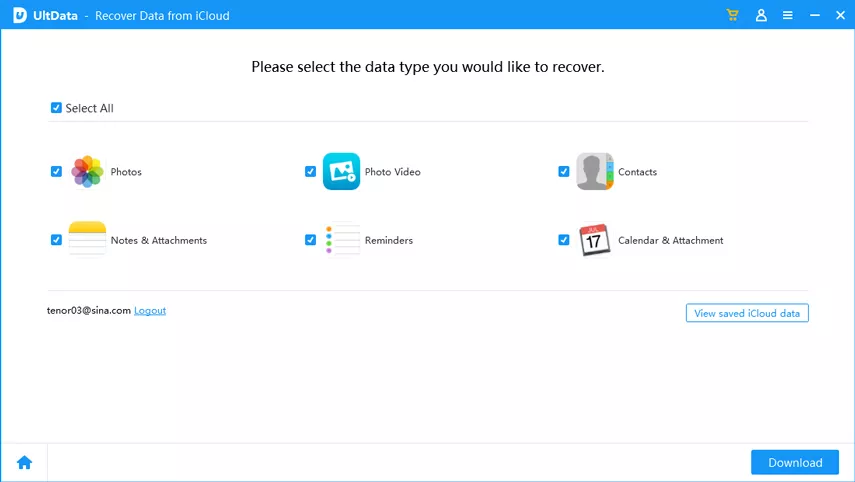


Besides recovering from iCloud, UltData also supports recovering deleted contacts directly from iPhone (even without backup) and from iTunes backup files. This makes it the most versatile contact recovery solution available.
UltData - No.1 iCloud data recovery software
The fastest and safest way to recover lost contacts, messages, photos, and more from iCloud.
While UltData offers the fastest solution, Apple also provides several built-in methods to restore contacts from iCloud. Let's explore each method in detail, along with their advantages and limitations.
This method works best when your contacts are stored in iCloud but not showing up on your iPhone. It's a simple toggle-off-and-on trick that forces iCloud to sync your contacts.

If this method doesn't work on the first try, sign out of your iCloud account completely, restart your iPhone, sign back in, and repeat the toggle process. Make sure you have a stable internet connection throughout the process.
This method is ideal if you want to restore your entire iPhone to a previous state, including contacts, photos, apps, and settings. However, it requires erasing your current iPhone data.


Did you know that iCloud automatically archives your contacts periodically? If you accidentally deleted some contacts, you can restore an earlier version from iCloud's archive. This method works even if you don't have a full iCloud backup.

Restoring from an archive replaces ALL your current contacts with the archived version. Any contacts added after the archive date will be lost. iCloud keeps archived versions for up to 30 days, so act quickly if you need to recover recently deleted contacts.
This method is useful if you want to download your contacts from iCloud and manually import them to your iPhone. It's particularly helpful if you've turned off iCloud Contacts but want to retrieve contacts that are still stored in iCloud.

Each method has its own advantages and limitations. Here's a comprehensive comparison to help you decide which method best suits your needs.
Yes, you can restore contacts without resetting your iPhone using the iCloud Sync Toggle method, iCloud Archive feature, or Tenorshare UltData which allows selective recovery without affecting any other data on your device.
iCloud automatically archives your contacts and keeps them for up to 30 days, after which the archived versions are permanently deleted, so it's important to act quickly when recovering deleted contacts.
Contact syncing issues are usually caused by poor internet connection, iCloud Contacts being turned off in settings, full iCloud storage, software glitches, or incorrect date and time settings on your device.
Yes, if you had iCloud Contacts enabled before, your contacts are automatically stored in iCloud even without a full backup, and UltData can also recover deleted contacts directly from your iPhone without any backup using advanced recovery technology.
iCloud Contacts continuously syncs your contacts in real-time across all devices, while iCloud Backup creates periodic snapshots of your entire iPhone including contacts, photos, messages, and app data when connected to Wi-Fi and charging.
Losing contacts on your iPhone can be stressful, but fortunately, there are multiple ways to restore them from iCloud. While Apple's built-in methods like iCloud Sync, iCloud Backup restore, and Archive recovery can be effective, they each have limitations such as requiring device resets, replacing all contacts, or having time constraints.
For the fastest, safest, and most flexible solution, Tenorshare UltData stands out as the best choice. It allows you to preview and selectively restore contacts from iCloud without resetting your iPhone or losing any current data. Whether you need to recover a few accidentally deleted contacts or restore hundreds of contacts from an old backup, UltData provides a professional solution that's both user-friendly and reliable.



then write your review
Leave a Comment
Create your review for Tenorshare articles

Share this post


UltData - Best iPhone Data Recovery Tool
Recover Deleted & Lost Data from iOS Devices Easily, No Backup Needed!
UltData: Best iPhone Recovery Tool
Recover Lost iPhone Data without Backup
By Anna Sherry
2026-10-20 / iOS Data Recovery