

 iOS Tips & Latest Updates
 Bug Fixes, Unlock Guides
 Giveaways & Freebies


4uKey for Android - No.1 Android Unlocker & FRP Tool
Unlock Android Screen Lock & Remove FRP without Password
Android Unlocker & FRP Tool
Unlock Android Screen Lock & Remove FRP
The ZeroKnox Removal Tool is still widely used by Samsung owners dealing with FRP, KG Lock, or Knox-related restrictions. The catch is that most ZeroKnox guides were written for older Samsung firmware, so v1.6 does not work the same way on every device.
This guide covers the ZeroKnox v1.6 download, what the tool can do, common problems, and its limits on newer Samsung phones. It also shows when a more guided option may make more sense to unlock a Samsung phone or remove Google account verification.
Use the official Windows or Mac installer to check your device and follow a guided FRP removal process for supported Samsung, Xiaomi, Redmi, Vivo, Huawei, OPPO, Realme, OnePlus, and Motorola phones.
ZeroKnox Removal Tool, sometimes written as Zero Knox Removal Tool, is an unofficial Windows utility used mainly with Samsung phones and tablets. It is commonly described as a Samsung Knox unlock tool because it includes Knox/KG-related options, but it also has functions aimed at Google Factory Reset Protection (FRP), ADB, factory reset, and Download Mode.
One thing worth clearing up first: Knox and FRP are not the same lock. After a factory reset, Android may ask for the Google Account previously used on the phone, as explained in Google's official factory reset guidance. Samsung Knox, on the other hand, is a broader security and enterprise-management platform.
Depending on the version, Samsung model, Android build, and security patch, ZeroKnox may show options such as:
You may see searches for a zeroknox removal apk, but the commonly shared ZeroKnox v1.6 package is a Windows utility, not a regular Android app that you install directly on the locked phone. Be careful with sites offering an APK under the ZeroKnox name, especially when they do not explain who created the file or which version it contains.
Most current third-party pages still list ZeroKnox Removal Tool v1.6 as the commonly available build. There is no clearly verified official ZeroKnox release page to check against, so it is better to treat labels such as “latest version” as third-party claims rather than an official release announcement.
A lot of ZeroKnox download pages still carry a 2024 date, even though they point to the same v1.6-era build. Instead of treating “2024” or “latest version” as a separate release, check the actual version, download source, Samsung model, and security patch before you use the tool.

 Please swipe to view
For a zero knox removal tool v1.6 download, the mirror details above are the same options retained from the original page, and they are third-party mirrors rather than Tenorshare-hosted files. Before you download ZeroKnox Removal Tool, scan the archive with your security software and be wary of any page that tells you to turn off Windows protection just to run it. A free tool is only useful when you know what you are opening.

The steps below describe the workflow used by the v1.6 interface shown in the existing screenshots. Use the tool only on a phone you own or are authorized to service. If the device belongs to a company or school, check with the administrator instead of trying to remove management on your own.


This third-party 2023 walkthrough shows the ZeroKnox v1.6 interface and the ADB options mentioned above. Use it as a visual reference rather than proof of current compatibility, because newer Samsung firmware may behave differently.
A failed attempt does not always mean you did something wrong. New Samsung security patches can close the diagnostic or ADB route used by older ZeroKnox builds, so start by checking the USB driver and cable when the phone is not detected. When ADB still cannot be enabled or the FRP reset option does nothing, the firmware may simply be outside the tool's working range.
Other approaches are also worth checking before you retry the same method. These Samsung FRP removal methods without a computer cover a few alternatives, while Part 5 looks at a guided PC-based option.
ZeroKnox can still be useful on some Samsung devices that match the older methods it was built around, but it is not a universal Samsung Knox remove tool. In 2026, the two biggest questions are where the file came from and whether the phone's firmware still allows the method the tool depends on.
This is where many ZeroKnox articles get confusing. A request for the Google Account previously synced after a reset points to FRP, while a device enrolled in Knox Manage by an employer or organization should normally be handled through administrator unenrollment. Samsung's official Knox Manage documentation explains how admins can unenroll connected and disconnected devices.
A Samsung phone locked by Google FRP can be frustrating when ZeroKnox cannot detect the device, enable ADB, or support the current patch. In that situation, Tenorshare Samsung FRP Tool (4uKey for Android) offers a guided FRP workflow instead of relying on an older third-party ZeroKnox build.
It is designed for FRP and Android screen-lock scenarios across multiple brands, including Samsung, Xiaomi, Redmi, Vivo, Huawei, OPPO, Realme, and OnePlus. Tenorshare currently lists Android 4-16 support on its Samsung FRP page. It is also a more straightforward choice than hunting through random free FRP bypass APKs when you are not sure which file matches your phone.
Download and install Tenorshare Samsung FRP Tool on your Windows PC or Mac, then connect the Samsung phone with a USB cable.




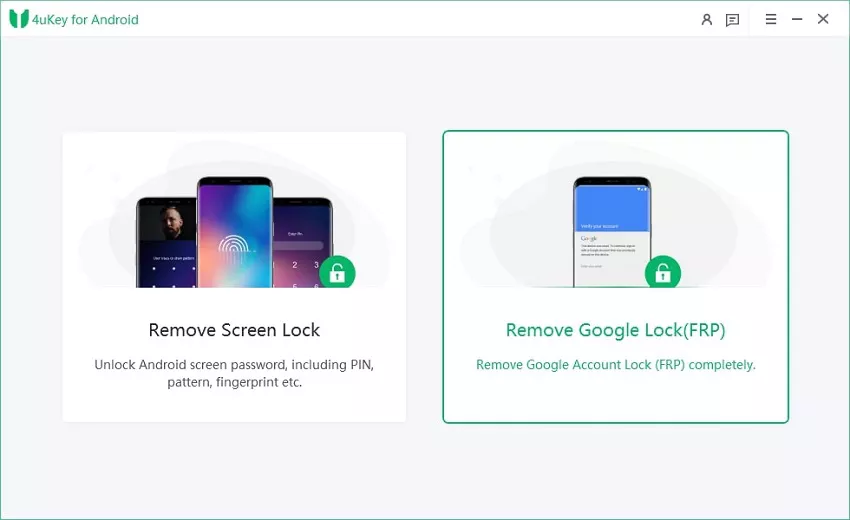
Open the program and choose Remove Google Lock (FRP). Select Samsung and the Android/OS option that matches your device, then click Start.
Follow the on-screen instructions for the selected device and Android version. The exact prompts can vary, so use the steps shown in the software rather than an old generic tutorial.

Let the program run the FRP removal process. Keep the USB cable connected while it is working.
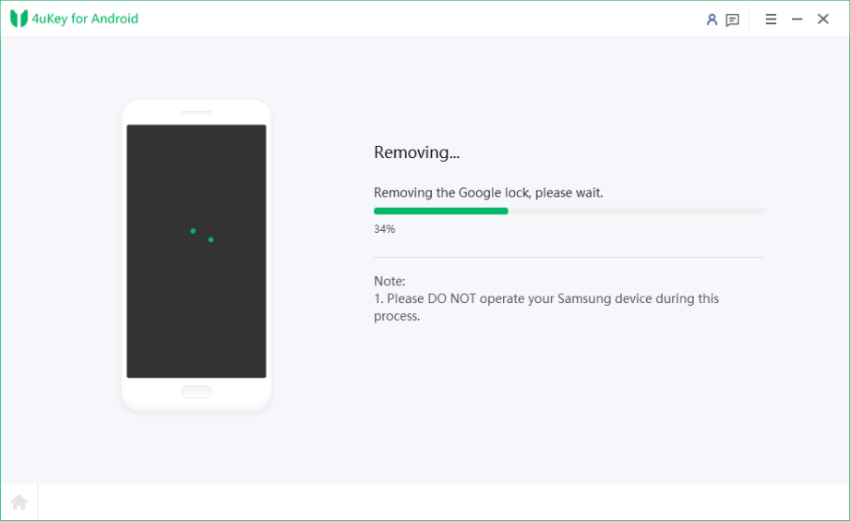
When the software reports that the process is complete, click Done and continue with the phone setup.
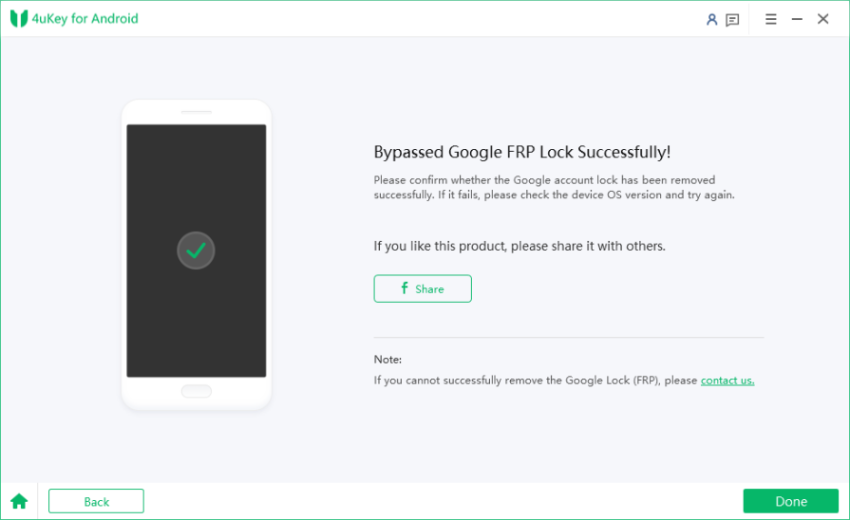
Prefer to see the process before starting? Tenorshare's official 2025 walkthrough shows the basic 4uKey for Android FRP flow from connecting the phone to completing the removal.
ZeroKnox v1.6 is still the version most commonly listed by established third-party download pages. Because there is no clearly verified official ZeroKnox release page, be cautious with a site claiming a brand-new version without showing where it came from.
Yes, ZeroKnox is generally shared as a free utility. The bigger issue is not the price but the source. If you use a third-party mirror, check the file carefully before you run it.
The commonly shared ZeroKnox package is a Windows program, not a standard Android APK. A page advertising a zeroknox removal apk should be treated separately unless it can clearly verify the developer and package.
Many older ZeroKnox pages were written or updated around 2024, so those phrases still appear in search results. They usually point to the same v1.6-era tool rather than a special 2024-only build.
First identify the lock. For an organization-managed Knox device, contact the administrator and use Samsung's official unenrollment process. For Google FRP on a phone you own, a current, guided FRP solution such as Tenorshare Samsung FRP Tool can be easier to follow than an older ADB-based utility.
The ZeroKnox Removal Tool still gets plenty of searches because it is free and v1.6 remains easy to find. That does not mean it will work on every modern Samsung phone. The sensible approach is to check the actual lock type, verify the download source, and match the method to the phone's firmware instead of trusting a “latest version” label alone.
ZeroKnox may be enough when the phone and firmware match the methods it supports. When it does not work, repeatedly forcing old ADB methods on newer firmware usually gets you nowhere. For Samsung FRP, 4uKey for Android gives you a more guided option without relying on an older ZeroKnox workflow.


4uKey for Android - No.1 Android Unlocker & Samsung FRP Tool




then write your review
Leave a Comment
Create your review for Tenorshare articles
Share this post


4uKey for Android - No.1 Android Unlocker & FRP Tool
Unlock Android Screen Lock & Remove FRP without Password
Android Unlocker & FRP Tool
Unlock Android Screen Lock & Remove FRP
By Jenefey Aaron
2026-09-28 / Unlock Android