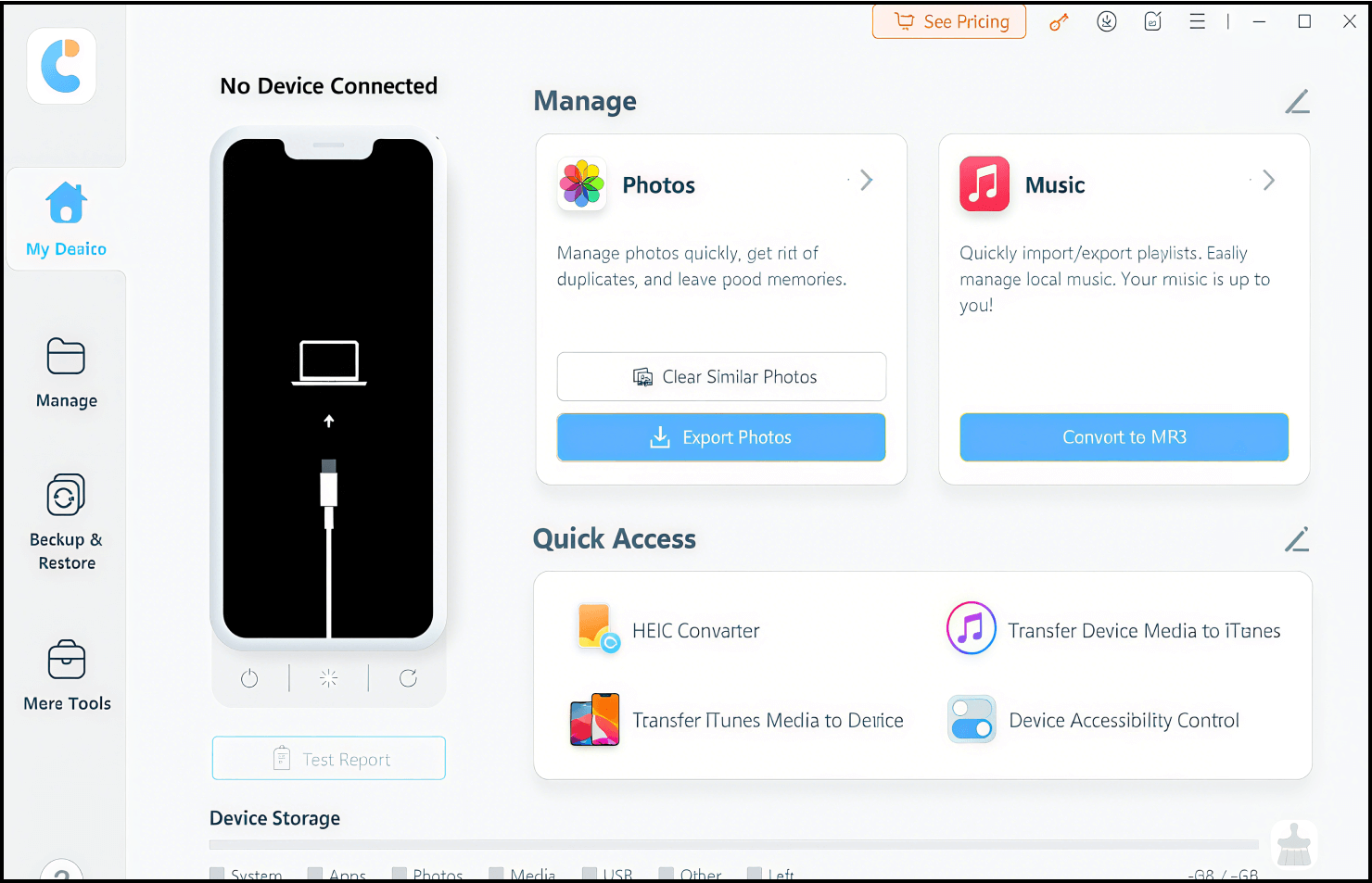
Launch iCareFone Transfer on your computer and connect your phone.
Home >
Tenorshare iCareFone > iPhone Backup Software
Tenorshare iPhone Backup Software
iOS 26 Supported
Free iPhone Backup Software One-Click Backup & Restore
- Back up your iPhone directly to PC, Mac, or external drives without iTunes or iCloud.
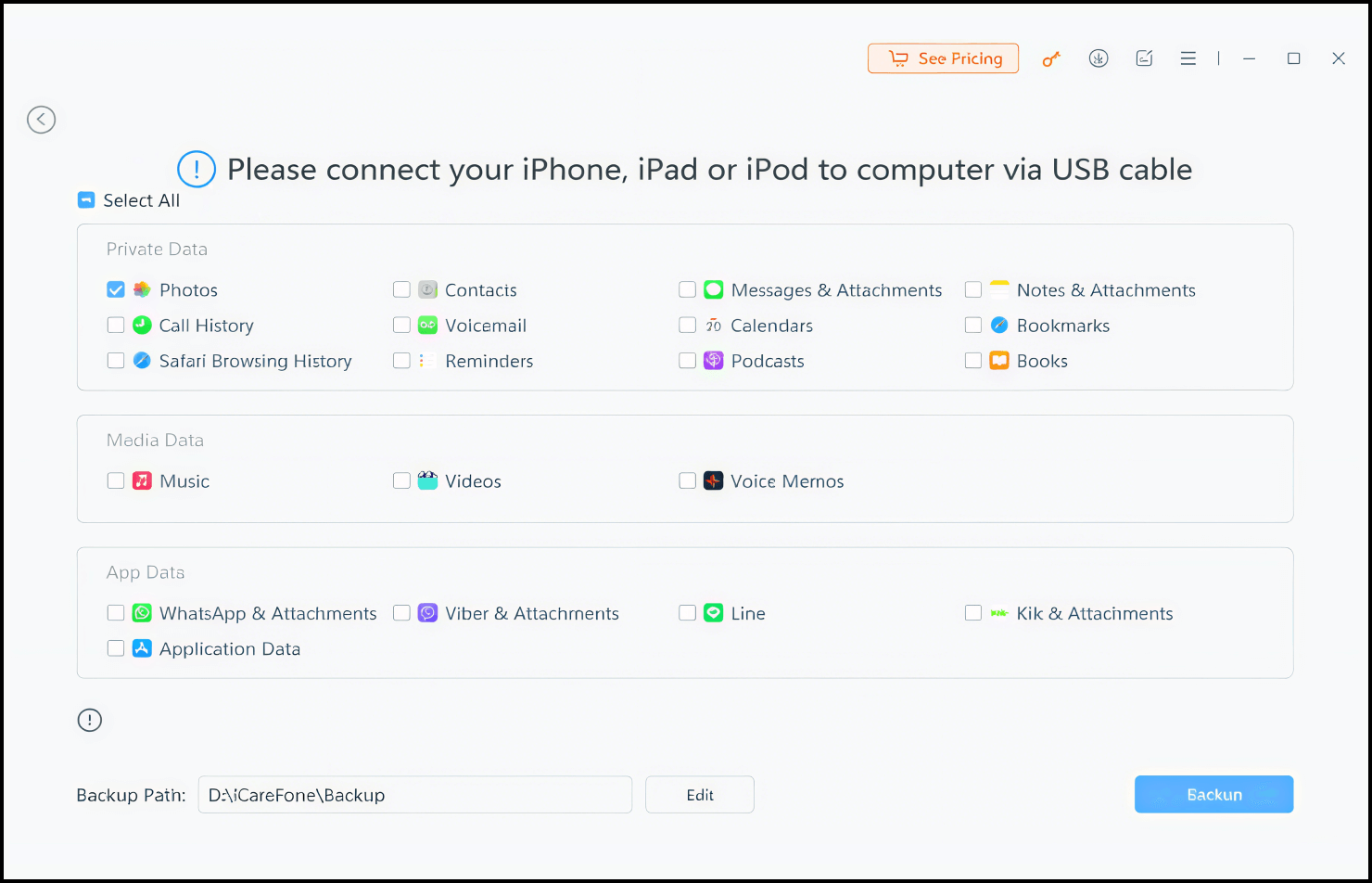
- Back up 20+ data types, including photos, messages, videos, contacts, and more.
- Choose exactly what to back up or restore instead of backing up everything.
- Keep backups local with optional encryption for added privacy and security.
- Fully compatible with the latest iOS 26 and iPhone 17 models.
Free Download
win
11/10/8.1/8/7
For Win & Mac | 100% Clean & Secure
Buy Now
30 Days Money Back Guarantee
Free Download
macOS 26 and
below
For Win & Mac | 100% Clean & Secure
Buy Now
30 Days Money Back Guarantee

Do You Have Any of These Backup Problems?

Tired of waiting hours for iTunes or iCloud backups? You just want a faster way to back up your iPhone.

The free 5GB iCloud storage fills up too fast. And you don’t want to keep paying for more space.

Traditional backups don’t let you choose what to back up. You need a more flexible backup and restore option.
Want to back up your iPhone to an external drive? iTunes and iCloud don’t give you that option.

Can’t preview or browse your backup data. iTunes backups give you no visibility before or after backup.
 iTunes |
 iCloud |
||
| Backup & Restore Speed |

|
|
|
| Selective Backup & Restore |  |
 |
|
| Preview & Browse Backup Data | |
|
|
| Restore Without Overwriting Existing Data | |
|
|
| Flexible Restore Across Devices | |
Limited Compatibility | Limited Compatibility |
Most Popular
 iCareFone
Backup Software

Everything on Your iPhone, Backed Up Properly
It includes everything stored on your iPhone, from Photos Library and Albums to Messages, Contacts, Music, Videos, Apps, Notes, Calendars, and more. You can back up all these data types to your computer or external drive, keep them organized, and restore exactly what you need without relying on iCloud or iTunes.

A Smarter Way to Back Up Your iPhone
Unlike traditional backup methods, iCareFone iPhone backup software lets you choose how and where your data is backed up. No forced sync. No unnecessary steps. Just backup your iPhone the way you want.
- Simple and flexible backup: Back up your iPhone to a computer or external drive in just a few clicks.
- No data overwritten: Existing photos and files stay untouched during backup.
- Selective and organized: Choose what to back up and manage imported data in custom albums.
- Multiple device support: Works with iPhone, external hard drives, and USB storage.

Restore Your iPhone from Backup Instantly
Restore your iPhone data from backup in just one click. Preview your backup first, then choose exactly what to restore—no need to overwrite your entire device.
Selective restore: Preview backup contents and restore specific data only, not everything at once.
No data overwritten: Restore to your current or new iPhone without affecting existing files.
Why Choose iCareFone iPhone Backup Software
Fast Backup, No Waiting
Back up large amounts of iPhone data in minutes, not hours. Much faster than iTunes or iCloud, even with thousands of contacts and media files.
100% Secure
All backups are saved locally to your computer or external drive. No cloud upload, no internet transfer, with optional encryption for extra protection.
Reliable Backup Every Time
Designed to reduce backup failures caused by system errors or interruptions, so your data gets backed up smoothly and consistently.
Back Up Wherever You Want
Choose exactly where to store your backups—computer folders, external drives, or USB devices — making data management easier and more flexible.
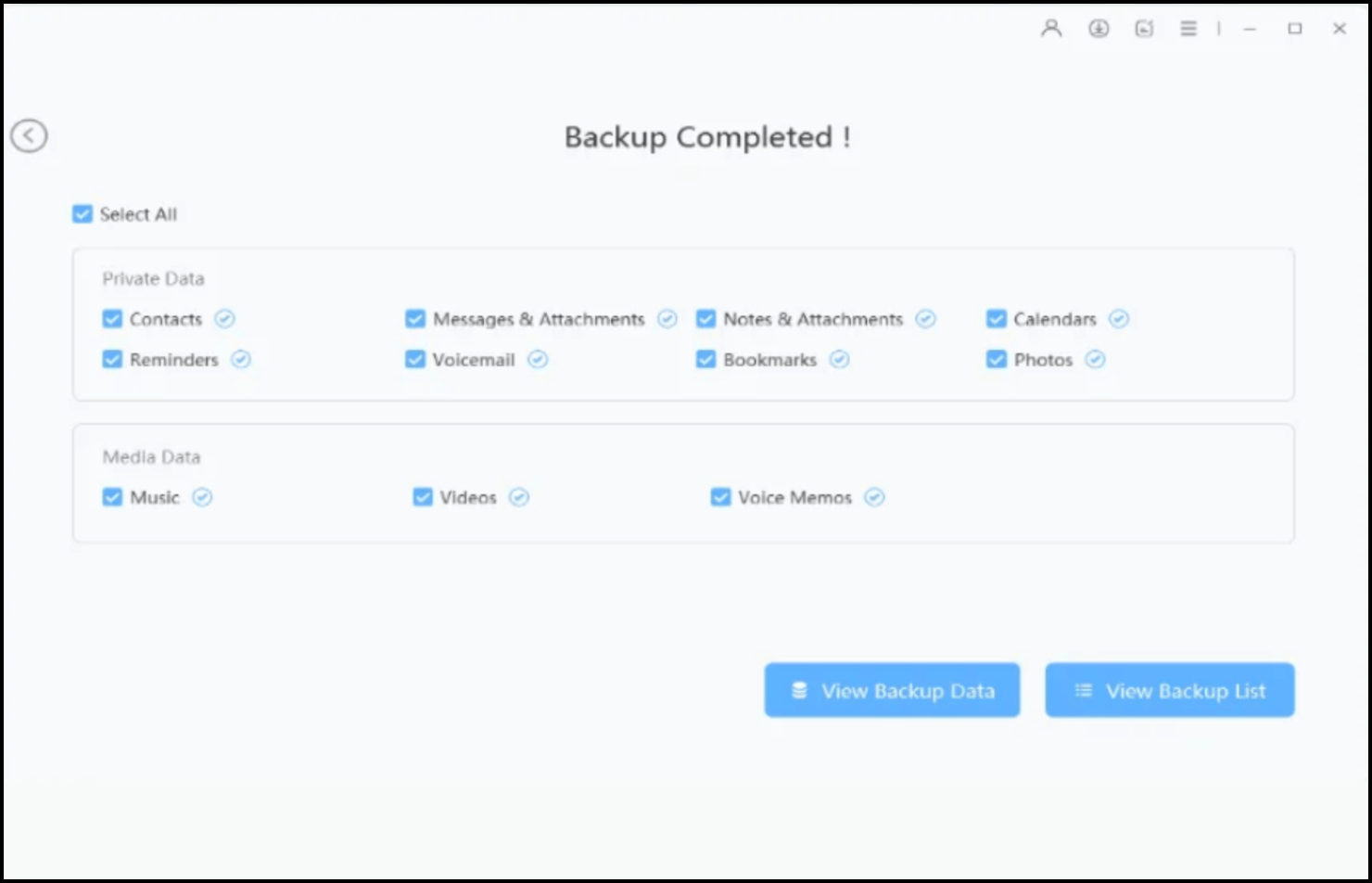
Back Up iPhone Data in 3 Simple Steps
Ready to Try iCareFone?
3,478,558 users are using iCareFone to manage iPhone/iPad data!
100% Secure
Purchase via 256-bit SSL
30 Days
Money Back Guarantee
Free
Technical Support
100,745,268
YouTube Total Views
85,482,249
Satisfied Customers
150,686,764
Downloads Worldwide
FAQs and Hot Topics by iCareFone
iCareFone simultaneously offers both free and paid features, with most paid features providing a certain number of free trials.
Free feature:
1. iOS backup.
2. Developer mode option.
3. Device accessibility control.
4. Block iOS updates.
5. iPhone Test
Paid features with free trials:
1. One-click to export photos to computer: 10 files.
2. Transfer media data between device and computer: 10 files.
4. Manage photos, audio and contacts: 10 files for each.
To see more, please check the comparison table above.
As an iOS file manager, iCareFone offers a competitive pricing structure compared to alternative options. In terms of cost-effectiveness, we highly recommend the 1-month license, priced at only $29.95. For information on other available licenses, please refer to our pricing page.
Yes, iCareFone can be downloaded and installed on Windows 11/10/8.1/8/7
and macOS 26/15/14/13/12/11.5/10.15/10.14/10.13
/10.12/10.11/10.10.
Yes, the latest iPhone 17/Air/17 Pro/ 17 Pro Max is supported.
Supported iPhone: iPhone 17/Air/17 Pro/ 17 Pro Max, iPhone 16/16e/16 Plus/16 Pro/ 16 Pro Max, iPhone 15, iPhone 15 Plus, iPhone 15 Pro, iPhone 15 Pro Max, iPhone 14, iPhone 14 Plus, iPhone 14 Pro, iPhone 14 Pro Max, iPhone 13 Mini, iPhone 13, iPhone 13 Pro(Max), iPhone 12 Mini, iPhone 12, iPhone 12 Pro(Max), iPhone 11, iPhone 11 Pro/Pro Max, iPhone XS/XS Max, iPhone XR, iPhone X, iPhone 8 Plus, iPhone 8, iPhone 7 Plus, iPhone 7, iPhone SE, iPhone SE(2nd), iPhone SE(3rd), iPhone 6s Plus, iPhone 6s, iPhone 6 Plus, iPhone 6, iPhone 5s, iPhone 4s, iPhone 4.
iPad: iPad, iPad 2, iPad 3, iPad 4, iPad 9.7in (2017), iPad 9.7in (2018), iPad 10.2in (2019).
iPad Mini: iPad mini, iPad mini 2 with Retina display, iPad mini 3, iPad mini 4, iPad mini (2019).
iPad Air: iPad Air 5, iPad Air(4th), iPad Air(3rd), iPad Air 2, iPad Air(1st).
iPad Pro: iPad Pro 12.9-inch, iPad Pro 11-inch, iPad Pro 10.5-inch, iPad Pro 9.7 -inch.
iPod Touch: iPod touch 7, iPod touch 6, iPod touch 5, iPod touch 4, iPod touch 3, iPod touch 2, iPod touch 1.
iCareFone is an iOS device data management software, while APK is an Android system program package format. iCareFone does not have APK.
Nevertheless, within the iCareFone series, there is another product designed for WhatsApp data transfer called iCareFone Transfer to iPhone, which is an Android APK. You can get it from Google Play.
Using iTunes to restore from backup will overwrite your current data. In contrast, iCareFone ensures that none of your device data will be overwritten.
Since iCloud files are stored on Apple's servers, neither iCareFone nor any similar software in the market can delete files from iCloud.
View More FAQs