


iCareFone - Free iOS Backup tool & Easy Data Manager
Backup/Transfer/Restore/Manage iOS Data with Simple Clicks
Backup/Manage iOS Data Easily
Backup/Manage iOS Data in Clicks

With iOS 27 now available to Apple Developer Program members following WWDC 2026, developers and enthusiasts are eager to test Apple's next-generation OS. However, many users report a frustrating issue: developer mode not showing on iPhone after updating.
This commonly occurs due to incomplete configurations, software glitches, or missing developer profiles. In this guide, we'll walk you through the most effective methods to fix iOS 27 developer mode not showing, help you iOS 27 enable developer mode successfully,
Before jumping into fixes, it helps to understand why iOS 27 developer mode missing happens in the first place. Here are the most common causes:
Developer Mode on iPhone is a protected toggle that only appears after your device has been recognized by Xcode or Apple Configurator 2 on a Mac. Without this verification step, the option simply won't show up in Settings.
The iOS 27 is still pre-release software. If the installation was interrupted, or the device restarted unexpectedly during the update process, it can leave system files in an inconsistent state, causing features like developer mode iOS 27 not showing.
Enrolling in the Developer Beta program requires a valid profile. A corrupted or missing profile is a frequent reason why iPhone developer mode not showing iOS 27 occurs.
Beta software is inherently unstable. A firmware-level bug can sometimes hide the Developer Mode toggle entirely, even after completing all the correct steps.
After installing the iOS 27 developer beta profile and enrolling in beta updates, a full device restart is often required before the option becomes visible.
Try these standard troubleshooting steps first. They resolve the majority of cases where developer mode not showing iOS 27 is the issue.
It sounds simple, but a restart clears minor system glitches and is often all it takes when developer mode not showing on iPhone after a beta install.
This is the most reliable fix for iPhone developer mode not showing iOS 27. Apple designed Developer Mode to require a Xcode handshake before the toggle appears. Here's how:
Don't want to install the full Xcode (12 GB)? Use Apple Configurator 2 instead it's free, much smaller, and triggers the same recognition process.
Some users report that iOS 27 enable developer mode becomes possible simply by re-enrolling through Settings:
This doesn't work for everyone, but it's worth trying before more advanced steps.
A missing or corrupted profile is a frequent culprit when iOS 27 developer mode missing.

If you have updated to iOS 27 but cannot find Developer Mode in Settings, you are not alone. Many users may meet the ios 27 beta developer mode missing issue, where the Developer Mode option does not appear under Settings > Privacy & Security. This can also happen when your iphone developer mode not showing ios 27 after installing the beta profile or updating the system.
In this case, Tenorshare iCareFone offers a simple 1-click way to open the hidden Developer Mode entry. Instead of using Xcode or complex developer tools, iCareFone helps you access Developer Mode quickly and then finish the setup directly on your iPhone.
Download and install Tenorshare iCareFone on your computer. Then connect your iPhone to the computer with a USB cable.




After your iPhone is connected, open iCareFone and click the edit button, represented by a pen icon, next to the Quick Access section on the home page. Then add the Developer Mode tool to Quick Access.

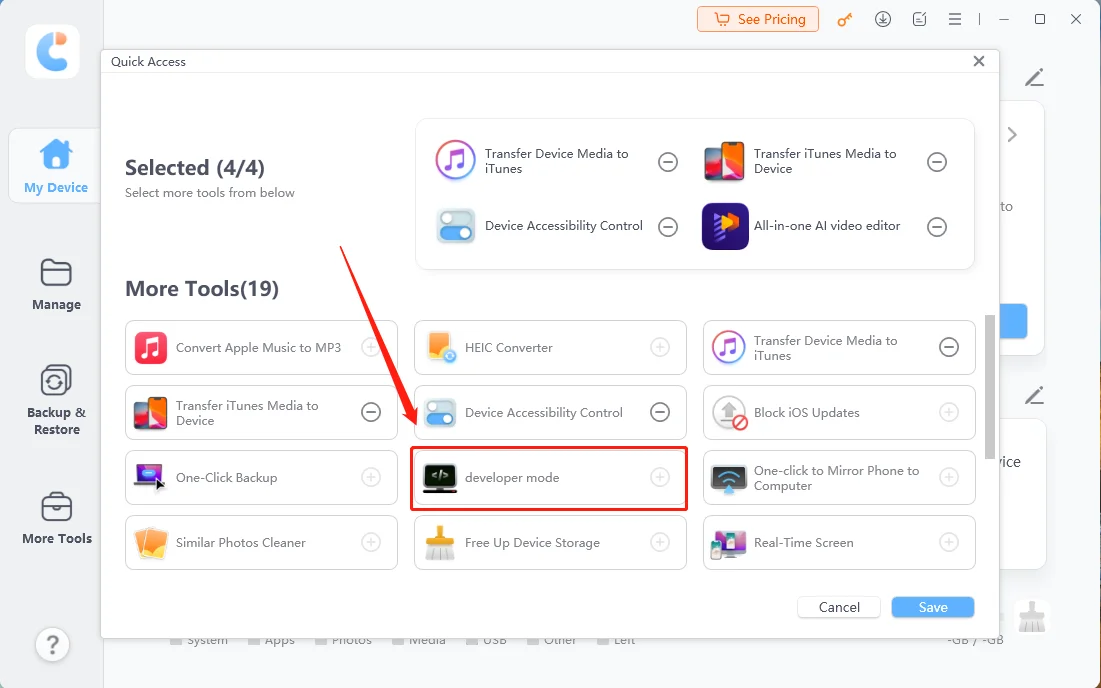
Click the Developer Mode tool in iCareFone to open the hidden Developer Mode entry. This is helpful when your iphone developer mode not showing ios 27 in Settings.
On your iPhone, open the Settings app and go to Privacy & Security.

Tap Developer Mode, turn it on, and restart your iPhone when prompted.

After restart, tap Turn On again and enter your passcode to confirm. Once done, Developer Mode will be enabled on your iOS 27 device.

If you are facing ios 27 beta developer mode missing or iphone developer mode not showing ios 27, iCareFone is a faster and easier solution to make Developer Mode appear without complicated setup.
Running beta software always carries some risk. Here are a few best practices to minimize problems, including developer mode iOS 27 not showing and other update-related glitches:
Developer Mode only appears after your iPhone has been connected to Xcode or Apple Configurator 2 on a Mac. If you haven't done this step, the toggle won't appear in Settings. Additionally, incomplete beta installations or corrupted profiles can cause iOS 27 developer mode missing.
Some users report that Developer Mode is reset after updating to a new beta build, requiring the toggle to be re-enabled. Connect to Xcode again if the option disappears after a beta update.
This is a known risk with beta software. If your iPhone is stuck on the Apple logo, caught in a boot loop, or won't respond after the update, use Tenorshare ReiBoot's Standard Repair to fix the iOS system without losing your data. Download it from tenorshare.com.
Yes. Tenorshare ReiBoot supports iOS 27 and is regularly updated to support the latest firmware, making it a reliable choice for fixing issues across the entire iOS 27 testing cycle.


iCareFone for LINE - Easy LINE Data Transfer




then write your review
Leave a Comment
Create your review for Tenorshare articles
Best Free iPhone Transfer & iOS Backup Tool
Easily, without iTunesShare this post


iCareFone - Free iOS Backup tool & Easy Data Manager
Backup/Transfer/Restore/Manage iOS Data with Simple Clicks
Backup/Manage iOS Data Easily
Backup/Manage iOS Data in Clicks
By Jenefey Aaron
2026-09-10 / iOS 27