

 iOS Tips & Latest Updates
 Bug Fixes, Unlock Guides
 Giveaways & Freebies
then write your review


ReiBoot - No.1 Free iOS System Repair Software
Fix 150+ iOS Issues without Data Loss & Safely iOS 27 Upgrade/Downgrade
ReiBoot: No.1 iOS Repair Tool
Fix 150+ iOS Issues, No Data Loss
The excitement of new Apple software always comes with anxiety, especially when you see: Unable to install update. An error occurred installing iOS 27. If you're among early adopters trying the iOS 27, you're not alone in facing update failures, stuck screens, or boot loops.
Expected to debut at WWDC 2026 on June 8, iOS 27 promises a revamped AI-powered Siri and major performance improvements, but beta software is inherently unstable. This guide covers common software update failed iphone, their causes, and the most effective fixes.

Pre-release software is inherently experimental. When you attempt to install an iOS 27, your device is running code that Apple hasn't fully optimized. Common reasons why iOS 27 software update failed errors occur include:
When an iPhone update failed, your iPhone typically displays one of a handful of error messages. Here's what each one means:
This is the most frequently reported error message for iOS 27 failures. It usually means the installation process started, but couldn't be completed. This can happen due to a network dropout, a software conflict, or a corrupted download package.

This message typically appears when your iPhone can't establish a reliable connection to Apple's update servers, or when the downloaded update package fails its integrity check. It often resolves with a simple retry after a few minutes but persistent occurrences suggest a deeper issue.

If you are trying again and again but the iOS update keeps failing / Cant Update to iOS 27, the issue is likely tied to insufficient storage, an incompatible device profile, or a corrupted system file that prevents the update from initializing properly.
Unable to check for updates iPhone installation failed mid-process, likely due to a network dropout, software conflict, or corrupted download. Device rollback may get stuck.

Because this error usually triggers after the download completes but fails during installation, a corrupted package or a software conflict is the likely culprit.
This error is strongly tied to network stability and server handshakes. If Apple's servers are slammed or your connection drops for a split second, the update fails its security integrity check.
Persistent failures that completely block the initialization process point directly to structural issues, either a lack of physical breathing room on the hardware or a glitched developer/public beta profile configuration.
When your device completely loses the ability to even communicate with the update server or gets stuck mid-process, the device's internal network stack or update daemon is likely locked up.
When you run into an error al actualizar el software iPhone, Tenorshare ReiBoot is one of the smartest fixes for the iOS 27 software update failed error. Update failures often stem from corrupted firmware, software glitches, insufficient storage, or system conflicts, and ReiBoot is built to tackle all of these at the root level. Powered by advanced repair technology, it resolves 150+ iOS system problems without any technical expertise. Whether your update keeps failing, your device gets stuck mid-update, or you see a "software update failed" message, ReiBoot restores your system smoothly. Best of all, it works without data loss and requires no iTunes or complex manual steps.
Download, install, and launch ReiBoot on your PC or Mac, then plug your iPhone into the computer using a USB cable. Once the connection is established, click "iOS Upgrade/Downgrade" in the bottom-left corner of the main panel.
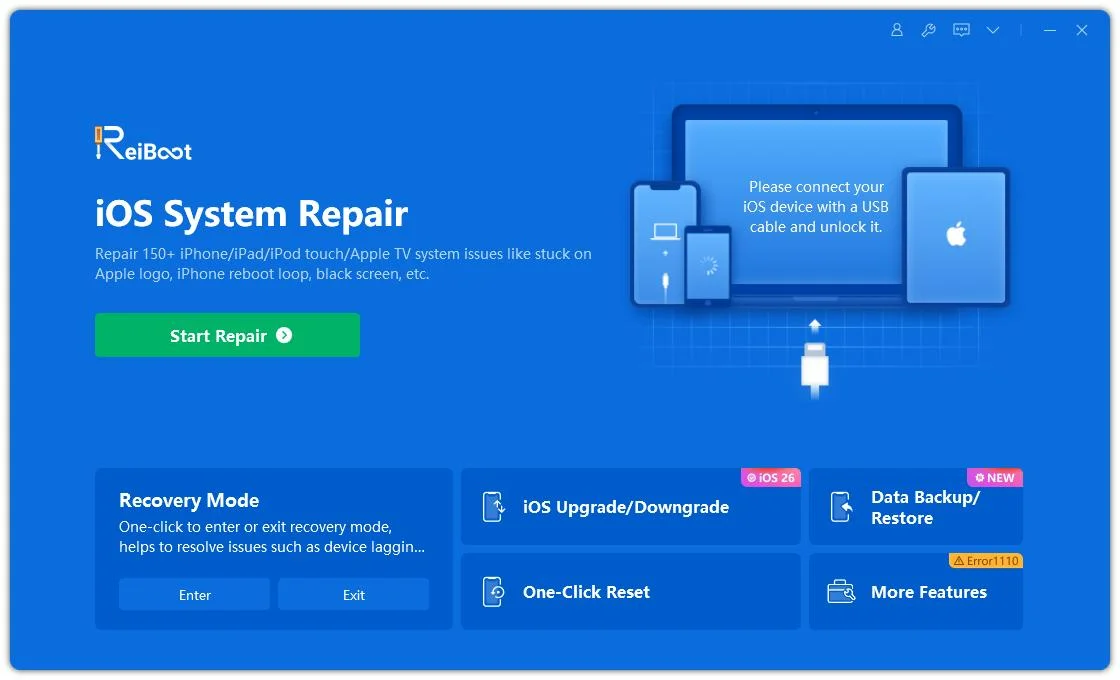




Whether you're on a beta or final version, select "Upgrade" mode and click the button below to proceed.
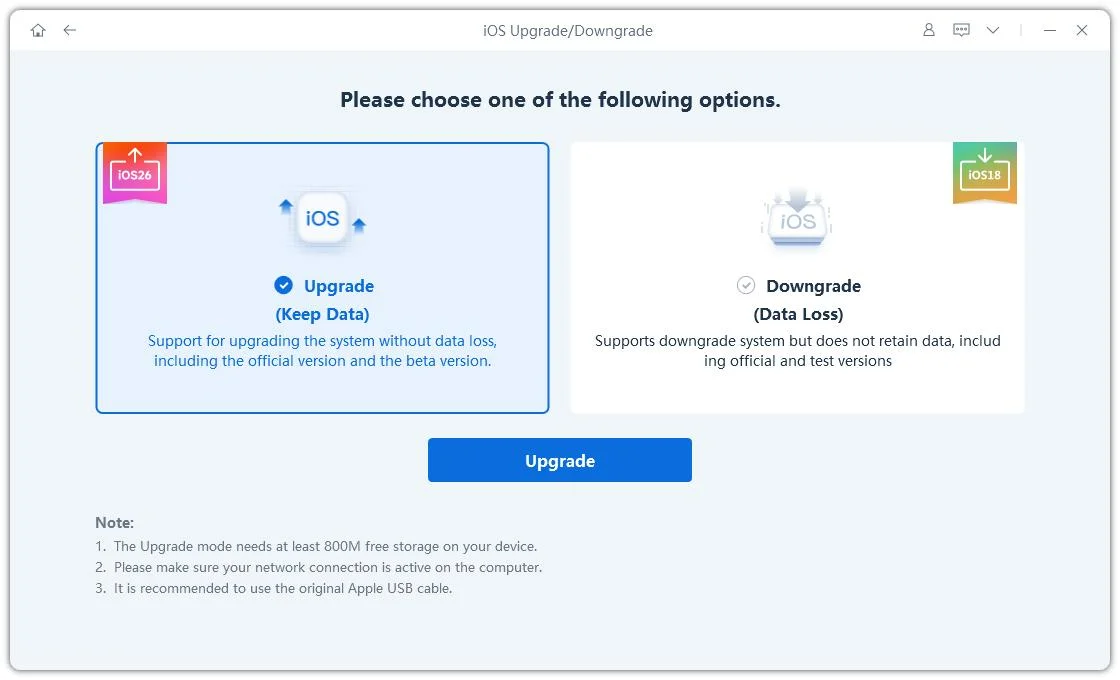
Once ReiBoot identifies your device, it will automatically recognize your current iOS version and show you the available firmware update. Hit the Download button to begin fetching the package.

Once the firmware file has been saved to your computer, click 'Initiating Upgrade' to begin the iOS update process.

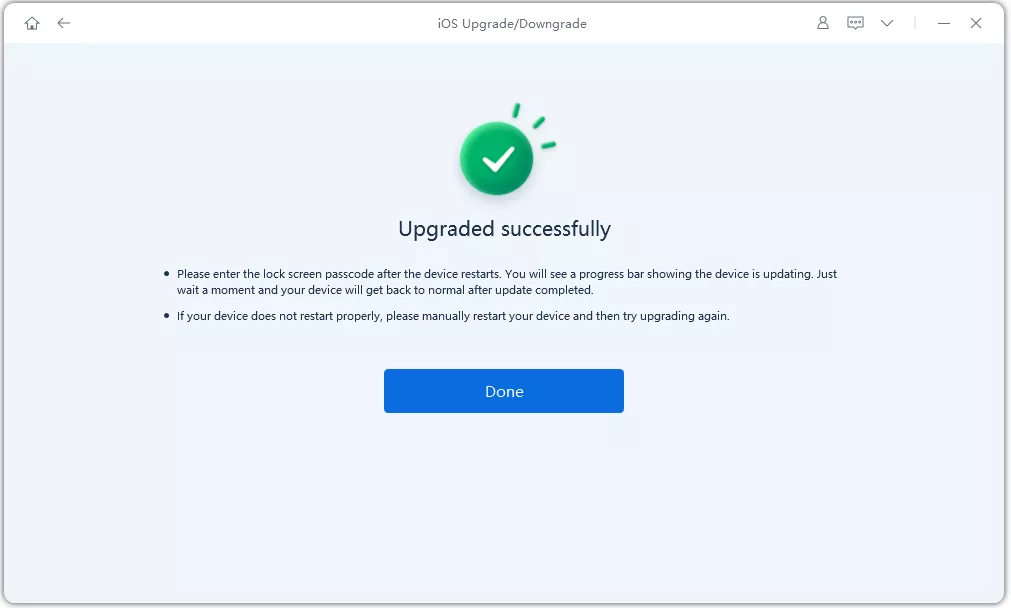
Once the upgrade finishes, a confirmation page will appear, and your devices will be running the latest version.
Won't update to ios 27 beta? the best fix for iOS 27 update errors is preventing them in the first place. Follow these preparation steps before installing any iOS 27 build:
This is the single most important step. Create a full backup using iCloud (Settings > \Your Name\ > iCloud > iCloud Backup > Back Up Now) or via Finder/iTunes on your computer. Beta software can introduce unexpected issues, and having a recent backup ensures you can restore your data if something goes wrong.
As noted earlier, aim for at least 5--10 GB of free space before attempting any major iOS update. Beta builds can be larger than their final release counterparts.
Battery failure during an iOS update is a known cause of boot loops and corrupted installations. Plug your iPhone in during the update, or ensure it has sufficient charge to last the entire process.
To access iOS 27 developer betas, you'll need to enroll your device in the Apple Developer Program (or use the free Apple Beta Software Program once the public beta). Installing an unofficial beta profile from third-party sources significantly increases the risk of update failure and system instability.
A: Based on Apple's established release patterns, the final public version of iOS 27 is expected in September 2026, likely around September 14, 2026, alongside the iPhone 18 series announcement. The first developer beta became available on June 8, 2026, following the WWDC keynote, with a public beta expected in mid-July 2026.
A: If your phone says unable to install update an error occurred installing iOS 27, This typically means the installation process started but failed to complete. Common causes include interrupted downloads, insufficient storage space, network connectivity issues, or software conflicts. Try the methods outlined in Part 3, starting with freeing up storage and retrying the update on a stable Wi-Fi connection.
A: Yes. The safest approach is using Tenorshare ReiBoot's Standard Repair mode, which resolves most iOS system issues while preserving all your data. Other methods like Recovery Mode restore through iTunes/Finder will erase your device, so always back up first.
A: First, try a force restart (Volume Up > Volume Down > hold Side button). If the device remains stuck, connect it to a computer and use Tenorshare ReiBoot's Standard Repair to resolve the boot issue without data loss. If that doesn't work, Recovery Mode is the next option but ensure you have a backup before proceeding.
A: Not necessarily. Repeated update failures are common during beta phases, especially in the first few days after a new beta build is released, when Apple's servers experience heavy traffic. Try again after a few hours, free up storage, and ensure a stable Wi-Fi connection. If the iOS update keeps failing, Tenorshare ReiBoot can diagnose and repair the underlying system problem.


then write your review
Leave a Comment
Create your review for Tenorshare articles

Share this post


ReiBoot - No.1 Free iOS System Repair Software
Fix 150+ iOS Issues without Data Loss & Safely iOS 27 Upgrade/Downgrade
ReiBoot: No.1 iOS Repair Tool
Fix 150+ iOS Issues, No Data Loss
By Jenefey Aaron
2026-10-19 / iOS 27