

 iOS Tips & Latest Updates
 Bug Fixes, Unlock Guides
 Giveaways & Freebies


ReiBoot - No.1 Free iOS System Repair Software
Fix 150+ iOS Issues without Data Loss & Safely iOS 27 Upgrade/Downgrade
ReiBoot: No.1 iOS Repair Tool
Fix 150+ iOS Issues, No Data Loss
If you have installed iPadOS 27 beta and are encountering bugs, app compatibility problems, battery drain, or system stability issues, you may want to know how to downgrade iPadOS 27 to 26. Luckily, downgrading could be an option yet as of now Apple is still signing a compatible iPadOS 26 for your iPad model. The thing, however, is that you need to make some preparations.

Apple's routine restore process can wipes your iPad clean, so you must know how to backup before downgrade. In this tutorial, you will be able to learn how to downgrade iPadOS 27 to 26, how to Check if iPadOS 26 is still Signed, how to downgrade iPadOS using IPSW, and can you really downgrade iPadOS without a PC.
Yes, you may be able to downgrade iPadOS 27 to 26 if Apple is still signing an iPadOS 26 build that's compatible with your iPad.
Apple enforces a signing system to verify the firmware. When an IPSW has been signed, the firmware is usually restorable to a compatible device. When Apple 'stops signing' a version, having its IPSW file on hand is not sufficient to install it.
For instance, IPSW Downloads currently shows iPadOS 26.6.1 signed for many compatible iPad models and the previous iPadOS 26 versions (26.5.2 and 26.5) as unsigned.
When Apple signs an iPadOS build, it's a signal to the servers to allow that build to be installed on your iPad. This signing window is one of the major elements that decides if you can downgrade.
To view the current status of signing:

IPSW Downloads states signed IPSW files can be restored via Finder, Apple Devices, iTunes, or other similar restoration tools, and these days unsigned IPSW files are not restorable by any methods at the present time.
The status of signing may change, so always check it right before you start to downgrade.
Whatever tool you are considering to use for iPadOS 27 downgrade, you should get your iPad ready. The list below will help you avoid files that you need the most.
See if iPadOS 26 is still signed.
This is the number one and most important step. Locate your precise iPad model and see if there is a signed iPadOS 26 IPSW available.
Do not overwhelm yourself by thinking all iPadOS 26 options are there for every iPad. Each has a different firmware file.
Such as right at the time of writing, iPadOS 26.6.1 is listed as signed for many devices such as iPad Pro (3rd generation), iPad Air (3rd generation), iPad (7th generation), and iPad mini (5th generation).
If you want a safe way to be able to downgrade after a backup, take a fresh backup right before changing iOS.
You can back up using iCloud, or to your computer. Apple advises you to back up your iPad so that you can restore your information if the device is erased, replaced, damaged, or if you need to restore it for any other reason.
For a computer backup:

Apple also points out that some sensitive information requires encrypted local backups (rather than iCloud backups), and that the encryption password must be remembered, as Apple can't retrieve it if it's forgotten.
Check your exact model before you download an IPSW. Don't just go by the product name.
For instance, an iPad Air Wi-Fi model and the iPad Air with Wi-Fi + Cellular sharing different identifiers and firmware files. Using the wrong IPSW might cause the restore to fail.
Go to Settings > General > About and write down the model one you have before you continue.

An IPSW is the Apple firmware file format utilized for installing or restoring the iOS-based operating system on iOS and iPadOS devices.
While downgrading iPadOS with an IPSW, be sure the file:

If it's data preservation you care about most, a third-party system tool can offer a more convenient path than manually restoring an IPSW.
One such tool that I recommend to all iOS users for downgrading the iOS version is Tenorshare ReiBoot. Tenorshare's contemporary documentation states ReiBoot is iPadOS 27/26 supported and offers a downgrade workflow via a computer. Check the details on the Reddit forum for more clarity.
Here are the steps for how to downgrade the iPad version to the previous one:





Use a good quality USB cable to connect your iPad to the computer.
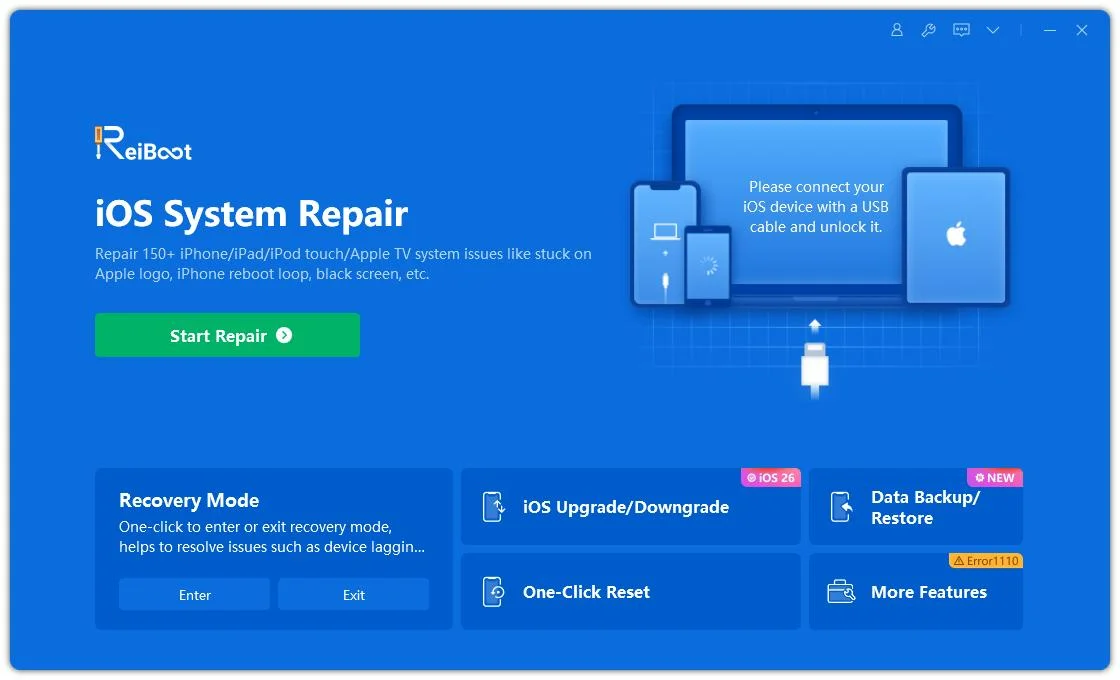
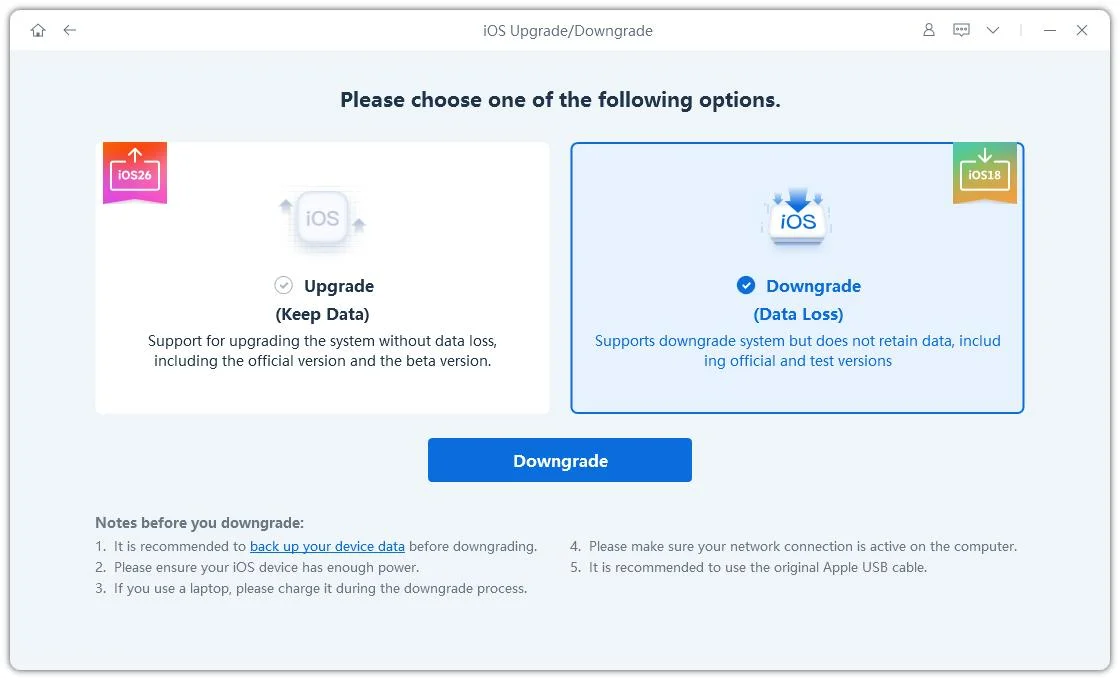
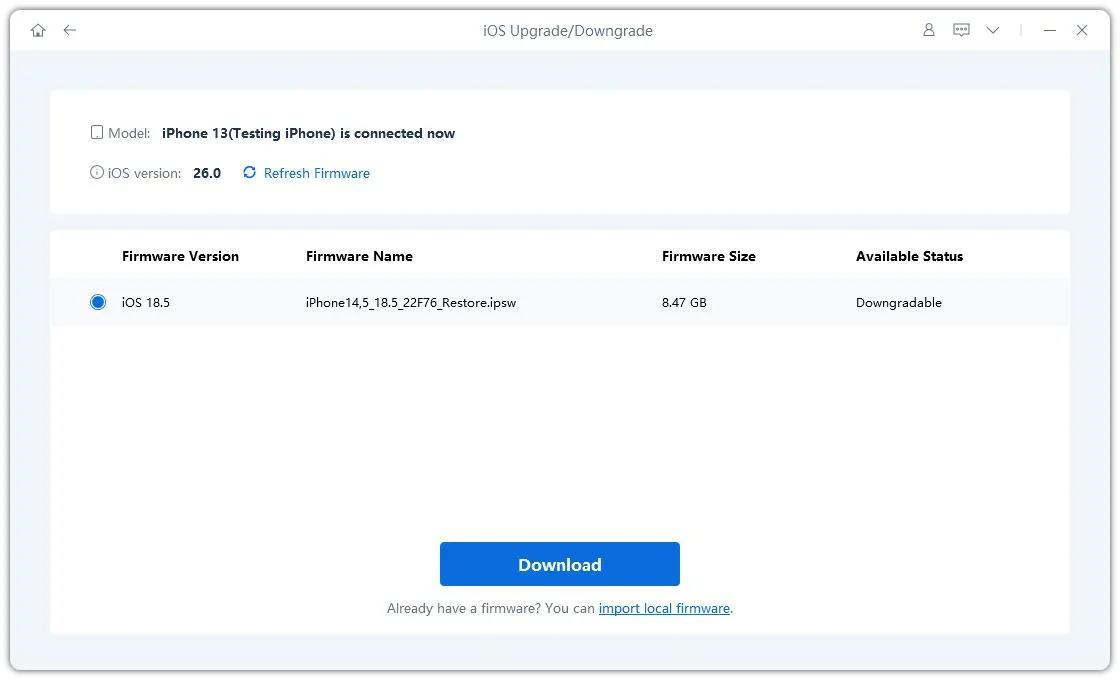
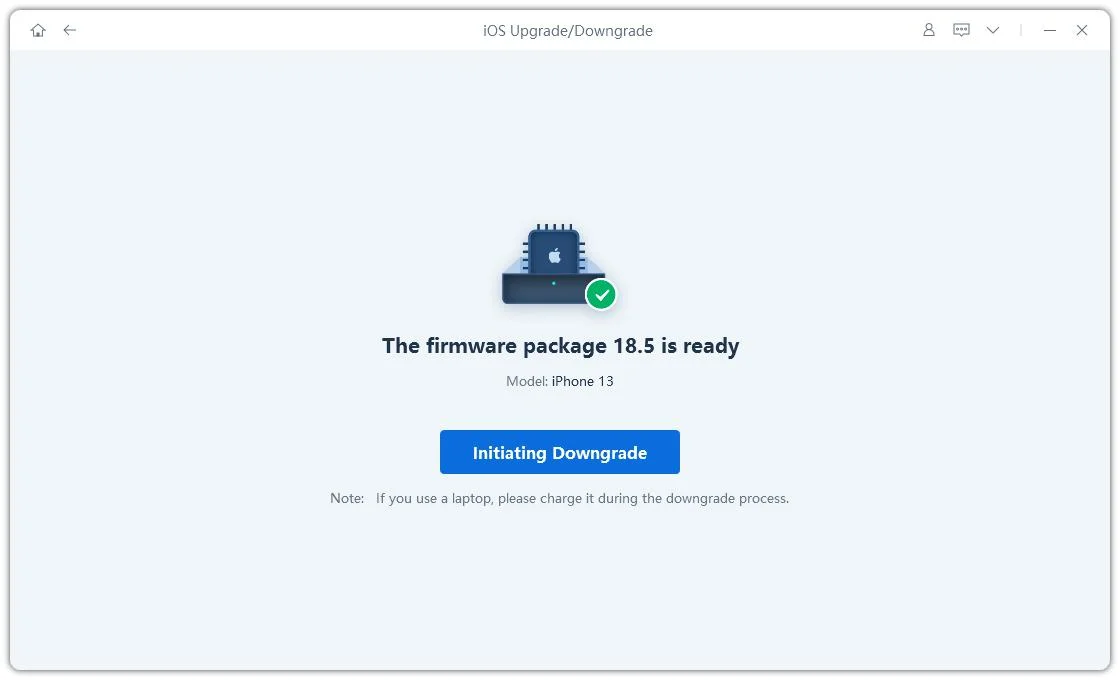
Downgrading this way will lead to data loss. So, you need to first create a backup or try ReiBoot's other method.

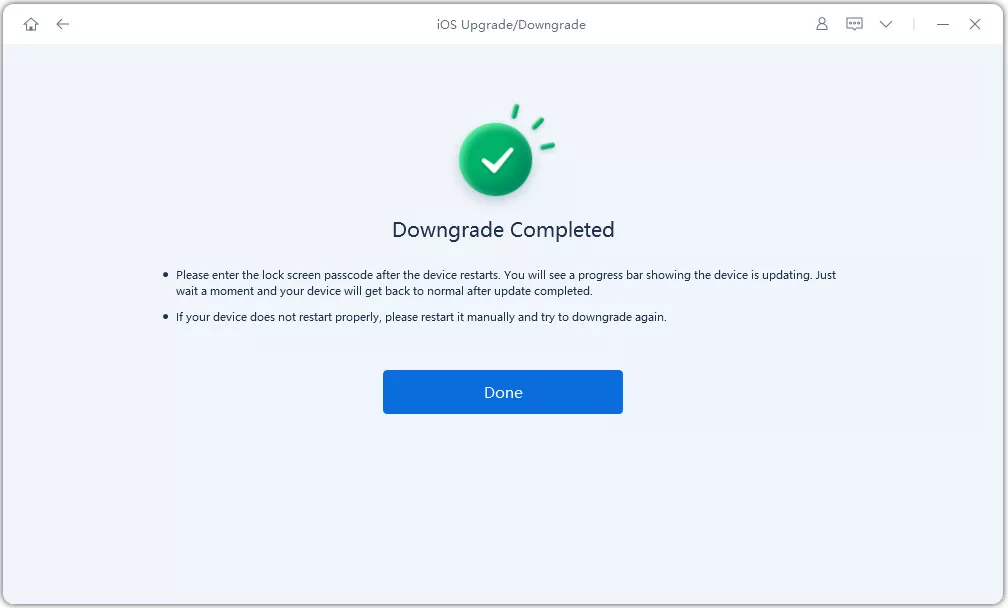
Once completed, you will get a notification on the ReiBoot app: "Downgrade Completed".

With ReiBoot, you can resolve several other iPhone, iPad, iPod, or Mac issues. These primarily include:
You can also perform Apple's traditional computer-based recovery process using the suitable IPSW.
On a Mac, use Finder. On Windows, Apple now recommends using the Apple Devices app (a new app for Windows users). iTunes can still be used on systems where Apple Devices are not available.
The basic process is:


The problem is that Apple's Restore process is intended to wipe the device and then reinstall iPadOS. Apple clearly says "Restore in recovery mode deletes everything."
Downgrading iPadOS without a computer is almost impossible. You can't just go into Settings and roll back to an older version of iPadOS, according to Apple. A traditional downgrade with an IPSW requires you to have a Mac or Windows PC. Beware of sites that tell you how to downgrade iPadOS without a computer by installing a profile or shortcut, or configuration file, as these methods cannot be used to install older versions of firmware.
If you want to downgrade, Tenorshare ReiBoot may make the process a little easier with a guided interface instead of having you manually deal with the IPSW and restore steps. Yet again, you will need to have either a Mac or Windows PC to perform the downgrade, but this time it's through ReiBoot.
It can. The life of the battery varies by iPhone model, battery health, settings, and usage. Early beta builds may also consume more battery due to bugs and background activity.
Generally, the answer is no. iOS 26.7 is a stable release, and the iOS 27 beta versions could have bugs, crashes, and other issues. Stability will get better with Apple updates.
Not necessarily. Battery life depends on the device and software build. If battery life is your priority, then the final stable release of iOS 26 could offer a more predictable experience.
When you have issues with bugs or app compatibility after installing iPadOS 27 beta, or you just want to jump back to the latest public version of iPadOS 26, you can downgrade iPadOS 27 to 26 while Apple is still signing a compatible firmware. Back up your iPad, check your model, and check the IPSW signing status to avoid losing data before you begin.
If you want a more straightforward way to downgrade, get Tenorshare ReiBoot, which operates as a guided computer solution for all compatible iPadOS versions. It may help you streamline the downgrading process and reduce manual tasks. But always backup first, as no downgrade method is completely safe


then write your review
Leave a Comment
Create your review for Tenorshare articles
Share this post


ReiBoot - No.1 Free iOS System Repair Software
Fix 150+ iOS Issues without Data Loss & Safely iOS 27 Upgrade/Downgrade
ReiBoot: No.1 iOS Repair Tool
Fix 150+ iOS Issues, No Data Loss
By Jenefey Aaron
2026-10-14 / iOS 27