

 iOS Tips & Latest Updates
 Bug Fixes, Unlock Guides
 Giveaways & Freebies
then write your review


ReiBoot - No.1 Free iOS System Repair Software
Fix 150+ iOS Issues without Data Loss & Safely iOS 27 Upgrade/Downgrade
ReiBoot: No.1 iOS Repair Tool
Fix 150+ iOS Issues, No Data Loss
Apple's upcoming iOS 27 is expected to bring big under-the-hood improvements, especially in performance and battery life. However, like all Beta software, iOS 27 is still in development, so users might want to know, "Does iOS 27 drain battery?"
The answer is yes, iOS 27 battery drain is still likely in the early versions. But worry not. This article explains the frequent reasons why the iOS 27 may deplete your battery and 7 ways to fix the issue based on your situation.
If you've noticed iOS 27 draining battery fast after installation, you must know this is the most popular complaint among Beta testers. But iOS 27 Beta is actually designed to improve battery life. So why are you now thinking, "Why is iOS 27 draining my battery?" The answer is in the following reasons:
Try these 7 iOS 27 battery drain solutions, starting from the simplest and proceeding to the most advanced:
Restarting your iPhone is a simple but effective fix. It clears temporary glitches, stops stuck background processes, and can fix unusual battery drain that happens after charging or heavy use. This should be your first step because it only takes a few seconds and often solves battery issues when no specific app is causing the problem. Here's how to restart and force-reboot your iPhone:


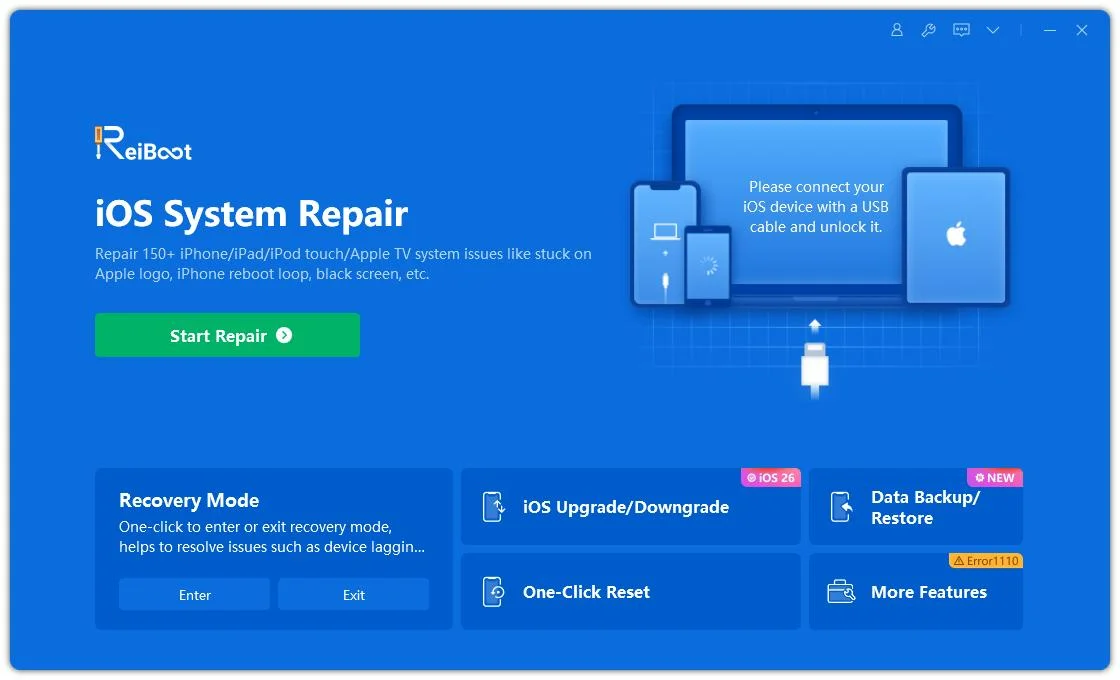
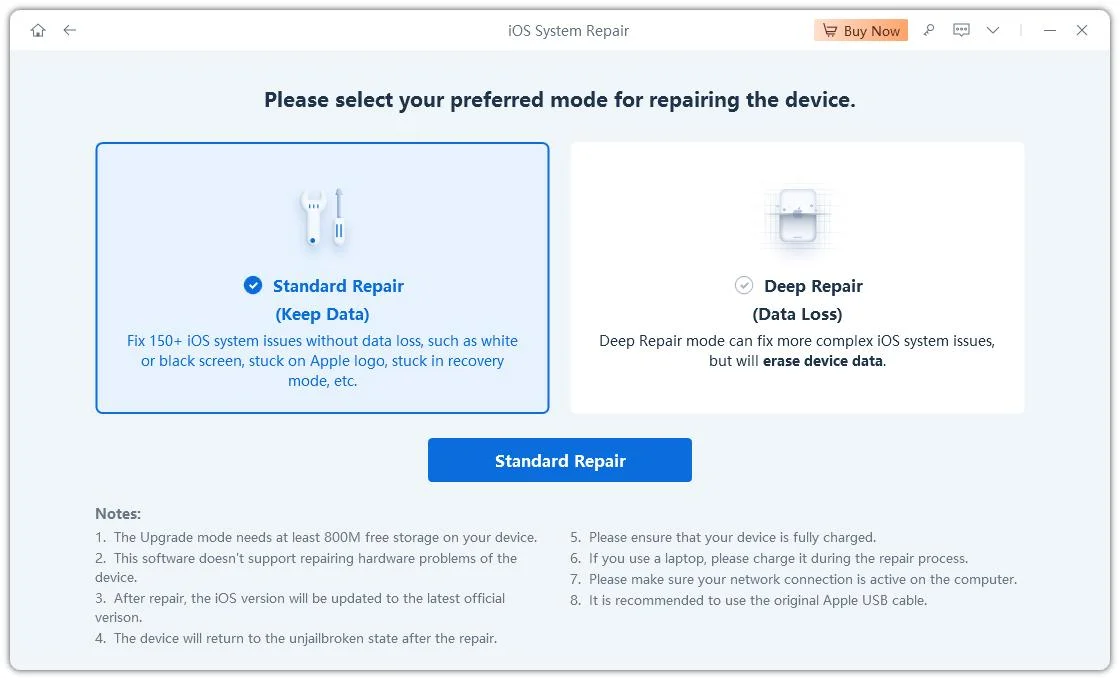
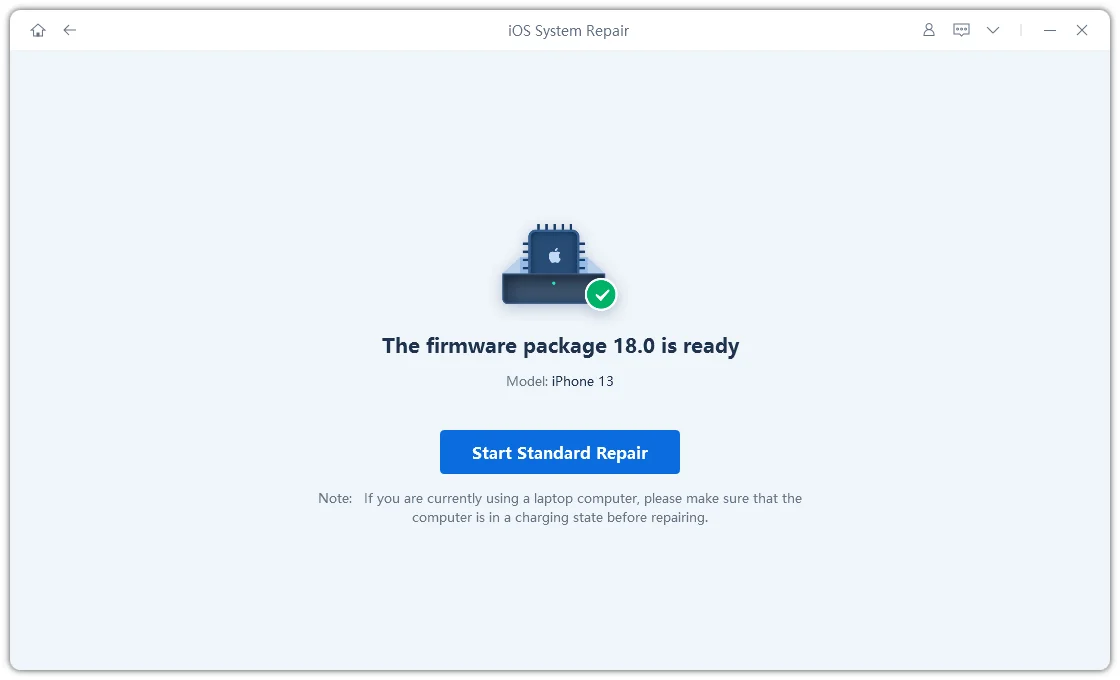
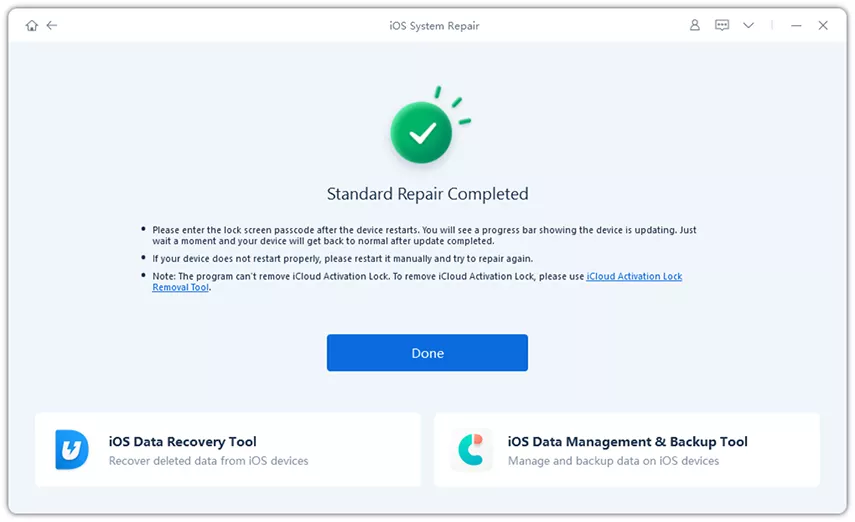
If Apple's iOS 27 update is causing battery drain issues for more than 5--7 days, or your phone also starts freezing, the problem may be deeper. In such a case, you can use a repair tool like Tenorshare ReiBoot to fix deeper iOS issues without deleting your data. It helps resolve battery drain caused by system bugs, corrupted files, or failed updates. Here's what more ReiBoot offers:




Here's how to fix the iOS 27 battery drain bug with ReiBoot:
Background App Refresh lets apps update in the background even when you're not using them. In Beta versions, some apps can get stuck repeatedly refreshing, which keeps your phone active and drains battery faster. You should see certain non-essential apps using a lot of battery, and then disable Background Refresh for them. To do so:


Your iPhone screen uses the most battery. The longer it stays on, the faster your iPhone battery drain on iOS 27. Setting a shorter "Auto-Lock" time and turning off motion-based wake features can quickly improve battery life. This is especially helpful if your phone often stays on by accident or wakes up in your pocket or bag. Follow the steps beneath to reduce "Auto-Lock" and disable "Raise to Wake":


Always-On Display keeps your lock screen slightly visible all the time to show time and notifications. It uses extra battery since the screen never fully turns off, and in iOS 27, it may drain even more for some users.
Turning it off can help improve battery life. This is especially true if you don't need quick lock screen access or use your phone heavily for gaming or other demanding tasks. Here's how to turn off "Always-On Display":

You can reset all system settings to default without deleting your personal data. This will also fix battery drain caused by wrong settings, beta bugs, or corrupted preferences. Use it if earlier solutions didn't do the job after several days or if you're also facing other issues like Wi-Fi, Bluetooth, or notification problems.
Keep in mind, resetting all settings will remove saved Wi-Fi passwords, Bluetooth connections, wallpapers, and other system settings from your iPhone. Follow the steps beneath to reset all settings on your iPhone:

Beta software changes quickly, and Apple often releases updates every 1--2 weeks with bug fixes and improvements. The battery drain you're seeing may already be fixed in a newer Beta version. So, always make sure your Beta is updated before trying other fixes. Here's how to install the latest iOS 27 Beta update on your iPhone:


When your new iOS is draining battery, or you've fixed the issue and now want to avoid it in the future, here's what not to do to worsen the situation:
Yes, but only for a short time. In the first 2--3 days after installing iOS 27 Beta, the battery may drain faster than usual. This is because the system is busy doing background tasks like indexing, scanning photos, and setting up AI features. After this setup period, battery life should return to normal or even improve compared to iOS 26.
Beta software is released for testing only and comes with no guarantees. Apple doesn't cover issues like battery drain caused by Beta versions. If the battery life is too poor, your options are to downgrade back to iOS 26 using a computer (which may erase data) or wait for the next Beta update.
Usually 2--3 days. Apple says battery drain after an update is normal for this period. If you have a large photo or message library, it may take up to 5--7 days because of background setup tasks. But if the drain lasts longer than a week, it could be caused by a bug or a specific app.
Not recommended. The iPhone 11 uses the older A13 chip, which isn't as efficient at managing iOS 27's AI and background tasks. On top of that, most iPhone 11 batteries have already worn down to around 80--85% health. Due to this mix of older hardware and weaker battery health, battery drain on the iPhone 11 can be much worse than on newer iPhones.
iOS 27 battery drain is real, but it's usually temporary. The heavy battery use happens because your iPhone is working in the background to set up, organize data, and optimize the system, not because something is seriously broken.
Start with basic steps. If the problem continues for more than 5 days, try other advanced fixes. In case your battery is draining due to a deeper system issue and no solution works, employ Tenorshare ReiBoot. It can resolve iOS issues without data loss and without resetting your iDevice.


then write your review
Leave a Comment
Create your review for Tenorshare articles

Share this post


ReiBoot - No.1 Free iOS System Repair Software
Fix 150+ iOS Issues without Data Loss & Safely iOS 27 Upgrade/Downgrade
ReiBoot: No.1 iOS Repair Tool
Fix 150+ iOS Issues, No Data Loss
By Jenefey Aaron
2026-10-14 / iOS 27