
 iOS Tips & Latest Updates
 Bug Fixes, Unlock Guides
 Giveaways & Freebies
then write your review
Why do I Look so Ugly in Pictures? Mirror Lied… or Camera?
Have you ever looked at a photo of yourself and wondered, “why do I look so ugly in pictures?” You might feel confident and happy with how you appear in the mirror, yet photos often make you look like a completely different person. Your face can seem rounder, your smile awkward, and you may look far worse in photos than you do in your daily reflection. The truth is that photos easily distort reality, affected by camera lenses, lighting, angles, and your facial expression at that moment. Understanding this can explain why you look better in the mirror and help you improve your photos with simple edits.
- 1. Fix Lens & Distance Issues
- 2. Master Lighting Like a Pro
- 3. Practice Expressions & Mindset Shift
- 4. Use Natural Light & Avoid Flash
- 5. Find Your Best Side & Asymmetry Fix
- 6. Body Posing for Slimmer Look
- 7. Camera Height & Eye-Level Shooting
- 8. Warm-Up Before Shooting
- 9. Use Props or Environment for Flattering Shots
- 10. Use Self-Timer & Burst Mode for Natural Moments
Show More
Part 1. Why You Think You Look Ugly in Pictures (But You’re Not)
When looking at the pictures of themselves, many people feel uneasy. The good thing is that the causes of this emotion are often technical or mental rather than the fact that you are actually unattractive.
1. Mirror vs Camera Flip – Mere-Exposure Effect
You might wonder why do I look so much uglier in pictures, because the mirror shows an inverted version of your face, which is the version you are most familiar with. Cameras will reveal how other people will view your face, and that strange image will give your characteristics a strange feeling, even though they did not change.
2. Wide-Angle Lens Distortion
Wide angle lenses are commonly used by smartphone cameras, particularly in selfies. A camera that is too close to the face exaggerates your nose or forehead, etc. It can make a person feel like I look bad in photos and even wonder, why do I look so fat and ugly in pictures, when in reality it is simply a lens distortion effect.
3. Bad Lighting & Harsh Shadows
Low-quality lighting may form deep shadows to show dark spots or unequal skin. This is the reason why some of the pictures of ugly faces are just but a product of bad lighting and not necessarily what they look like.
4. Unflattering Angles
The appearance of your face can change with a turn of an angel. When a photo is taken from below or an awkward angle, you might start wondering, "Why do I look so ugly in other people's pictures?" When in reality, the angle is the real problem.
5. Frozen Expression & Tension
Photos only capture one point of time and there is time your face is tensed. This may cause your smile to appear rigid than the natural faces that people might observe in real life.
Being beautiful in photos is not about transforming your appearances, it is about knowing how to operate cameras. Minor lighting, angle, and posture adjustments will go a long way in ensuring that you look better in the photos.
Change in distance between you and the camera is one of the simplest methods of enhancement of your photos. The camera should not be too near because the distortion of the wide-angle can enhance your facial expression. Instead, aim to have the photographer stand further back and zoom the camera instead of it being closer.
Lighting has the power of making an ordinary photograph great. The best lighting is generally soft natural light, such as from a window. Looking into the light can even out the color tone on your face and minimally casts the severe shadows that cause your face to appear clumpy or weary.
Natural smiles are better than involuntary ones. Rather than attempting to strike a pose, make your face relax and think about something which truly makes you happy. You can also practice your smile in the mirror and find out what you look like smiling naturally in the camera.
Flash photography has the ability to make faces flat and provide glittering highlights or dark shadows. Use the natural light as much as you can outdoors or in spaces that are close to windows. Warmer and flattering photos are normally achieved with soft daylight.
The majority of faces are slightly asymmetrical and that is quite natural. You can see that one side of your face takes better photographs than the other. Test the angles to find the best angle and use it more than others when posing.
The position you hold in the photo influences whether you look thin or fat. Rather than facing the camera head on, turn your body on its side with your face towards the camera. Such an easy change could help to make the figure more flattering.
The position of the camera has a significant effect on the appearance of your face. Lower shots may make your chin and jawline look big. The camera should be maintained a little higher than the eye level to give a more favorable look.
The reason why many people appear stiff in photographs is that they go directly to posing. You can take some test shots and relax your face which indeed helps you to loosen up and look more natural. Even professional models warm up prior to photoshoots.
Photos can be more natural and less staged by the use of props or surroundings. Holding something, leaning against something or simply playing with your surroundings will indulge you into more relaxed postures and end up being photographed better.
Rather than using one photo, burst mode or a self-timer can be used to captivate several photos. This enhances the possibility of capturing a natural expression as opposed to a stiff and awkward expression.
Despite the most desirable angles and lighting, not all photographs are going to come out the way you want. AI portrait improvement tools could assist in that.
Tenorshare PixPretty is an application that properly enhances a portrait image to make it appear more professional and natural.
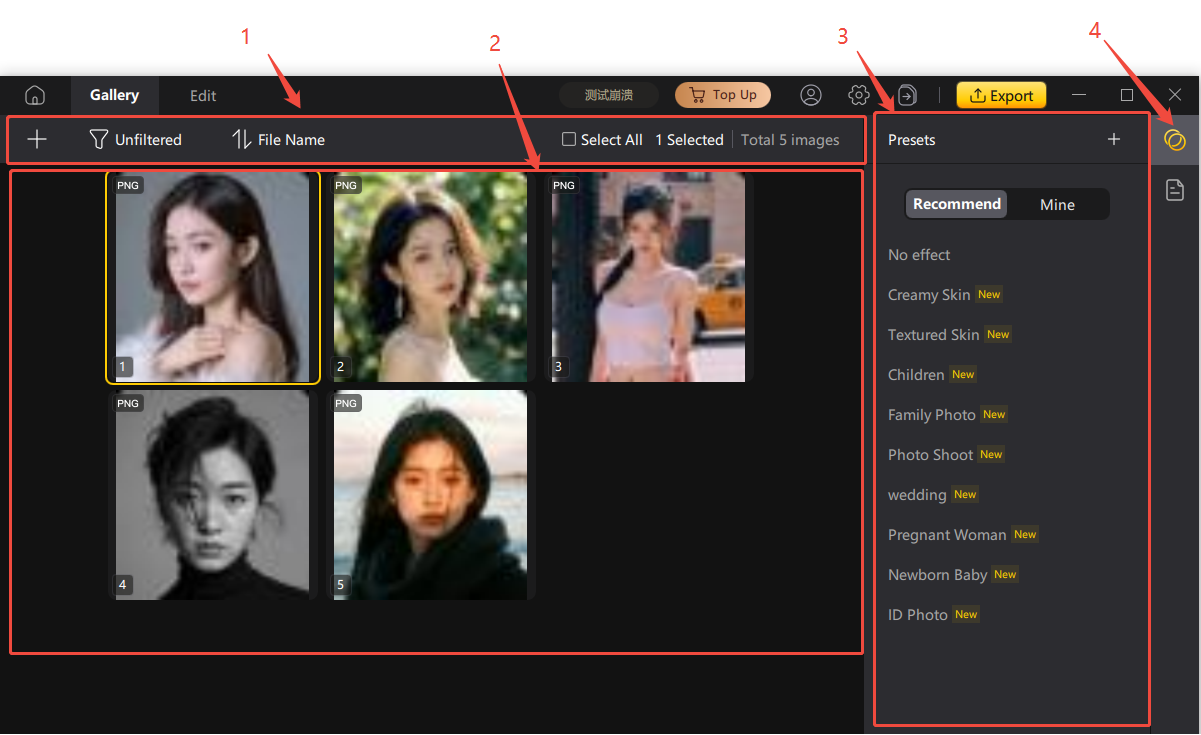
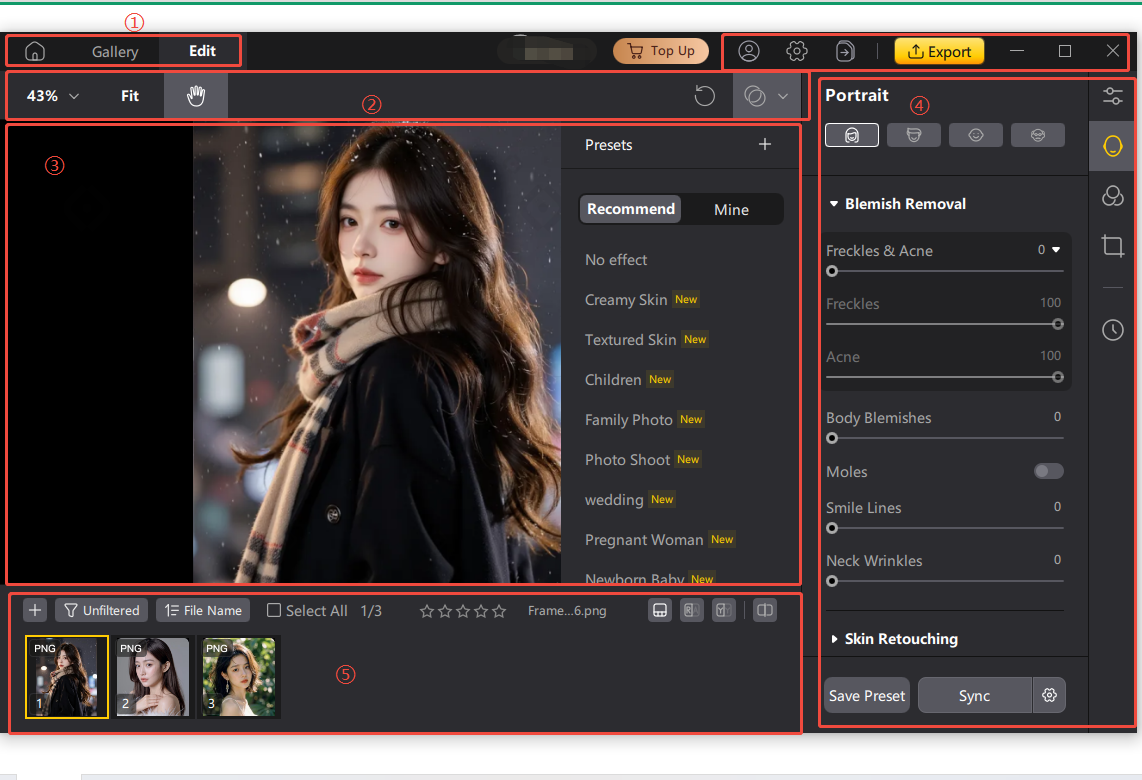
Step 1: Go to the login and project management interface of Tenorshare PixPretty. You can log in to your account securely and create custom projects to keep your photo editing work organized and efficient. Step 2: Manage all your photos easily in the gallery. Select multiple images and apply professional AI presets with just one click to quickly improve your portraits. Step 3: Use PixPretty’s intuitive core editing interface to preview your portraits in real time. You can fine-tune details such as skin texture and blemish removal, and create stunning retouching effects effortlessly.
1. Does my camera show my true face? Not exactly. Cameras, lighting, and angles may misrepresent the face proportions, i.e., the photos may not be a true reflection of how you really are in the real world. 2. Should I trust the camera or mirror? Both have limitations. Mirrors will reflect an inverted image whereas the camera will have distortion based on the lens and distance. 3. Is the photo version of me how everyone else actually sees me? No. Instead, people view you as you move about with natural expressions and changing lighting that frequently appear to be a lot more natural than one fixed photograph. 4. Can PixPretty really fix my photos to look like how I see myself in the mirror? Yes. The AI enhancement features of
PixPretty allow you to correct your lighting or symmetry and skin tone to make your photos look more like you see yourself in real life.
Have you have ever wondered why do I look so ugly in pictures, you should remember that there are numerous technical reasons why photos are so. These factors can very simply misrepresent the appearance of your features and give you a look they are not what you would be like in normal life.
You can enhance your photos by changing the distance of the camera, lighting, and engaging natural expression to enhance your photograph dramatically. And even when photo is not looking right, you can quickly improve portraits and get your best appearance with a single click with such tools as
Tenorshare PixPretty.
Leave a Comment Create your review for Tenorshare articles
Part 2. Ways to Look Better in Pictures - Practical Fixes
1. Fix Lens & Distance Issues

2. Master Lighting Like a Pro

3. Practice Expressions & Mindset Shift

4. Use Natural Light & Avoid Flash

5. Find Your Best Side & Asymmetry Fix

6. Body Posing for Slimmer Look

7.Camera Height & Eye-Level Shooting

8. Warm-Up Before Shooting

9. Use Props or Environment for Flattering Shots

10.Use Self-Timer & Burst Mode for Natural Moments

How to Fix Your Imperfect Portraits with AI in One-Click




How to Use PixPretty

FAQs about Why do I Look So Ugly in Pictures
Conclusion
 Hey! 👋
Welcome to Apple tech Hub!
Need help
iPhone setup guide?
New Guide
iOS 27 Tips & Tricks 🎉
Hey! 👋
Welcome to Apple tech Hub!
Need help
iPhone setup guide?
New Guide
iOS 27 Tips & Tricks 🎉

Speak Your Mind
Registrer/ Login
Speak Your Mind
Related articles
All topics
Share this post



By Jenefey Aaron
2026-09-24 / AI Insights