

 iOS Tips & Latest Updates
 Bug Fixes, Unlock Guides
 Giveaways & Freebies
then write your review


ReiBoot - No.1 Free iOS System Repair Software
Fix 150+ iOS Issues without Data Loss & Safely iOS 27 Upgrade/Downgrade
ReiBoot: No.1 iOS Repair Tool
Fix 150+ iOS Issues, No Data Loss
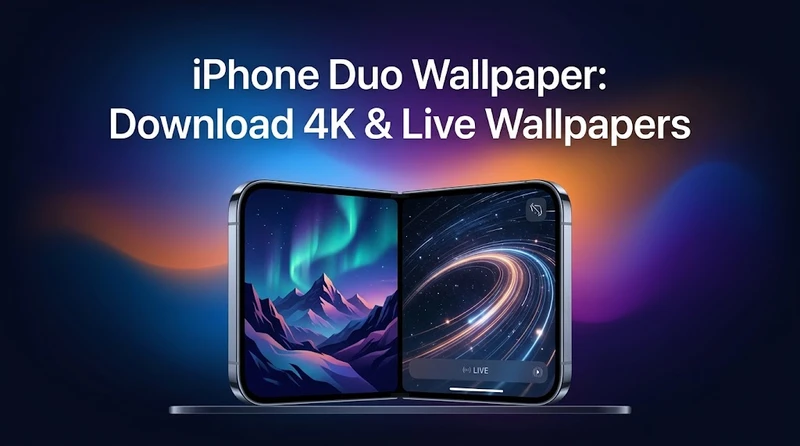
Looking for an iPhone Duo wallpaper? Here you can download the latest official iPhone Duo wallpapers, including light and dark versions for the outer and inner displays. We also explain how iPhone Duo wallpapers differ from regular iPhone wallpapers, whether the phone supports Live Wallpapers, how to set them up, and how to fix common wallpaper problems.
The biggest difference is the display format.
Unlike a traditional iPhone with a single fixed-size screen, iPhone Duo has a foldable design with an outer display and a larger inner display. Apple describes Duo as a new foldable iPhone built around two display states, which means a wallpaper needs to look good whether the phone is closed or opened.

This makes an iPhone Duo wallpaper different from a standard iPhone wallpaper in several ways:
For the currently available official wallpaper files, the outer-display JPGs are 1398 × 2034 pixels, while the inner-display JPGs are 2670 × 1878 pixels.
This means that simply downloading a regular iPhone wallpaper and stretching it across the Duo display may result in unwanted cropping or reduced image quality.
alt: Stretching iPhone wallpaper on Duo degrades
Apple's first iPhone Duo wallpaper collection uses a desert landscape featuring sweeping sand dunes and rugged mountain formations.
There are currently four official wallpaper files:


The light design features warm desert tones, sand dunes, mountains, and a pale blue sky. The dark version changes the scene into a nighttime landscape with darker mountains and a star-filled sky.
 Please swipe to view
If you're looking for an iPhone Duo wallpaper 4K, keep in mind that "4K" is often used loosely by third-party wallpaper sites. The currently documented official JPG files have the resolutions listed above, so it is better to verify the actual pixel dimensions rather than relying only on a "4K" label.
alt: Check actual pixel dimensions for 4K
Yes. iPhone supports Live Photo wallpapers, and Apple's current instructions allow a Live Photo to be selected as a Lock Screen wallpaper on iOS 17 or later.
However, there is an important distinction between an iPhone Duo live wallpaper and the official Duo still wallpapers.
The official iPhone Duo wallpaper files currently available for download are JPG images. They are static images and do not automatically switch between light and dark scenes or include Apple's animated wallpaper effects.
So if you download an official Duo JPG, you get a high-quality static wallpaper rather than a Live Photo.
If you want a live or animated wallpaper, you can use a Live Photo wallpaper app or create a Live Photo from your own video or photo content.
For example, some iPhone wallpaper apps provide Live Photo creation and 4K wallpaper features. The App Store currently lists apps that can create Live Wallpapers from photos or videos and export them for use on an iPhone Lock Screen.
When choosing an iPhone Duo live wallpaper, look for:
A Live Photo designed for a normal iPhone may still require cropping before it looks right on the Duo's different screens.
Apple's current Live Photo wallpaper workflow is straightforward:


Apple confirms that a Live Photo can play when you wake the device, provided the Live Photo playback option is enabled.
For the best result, choose a Live Photo whose main subject remains near the center of the composition. This gives you more flexibility when the image is cropped for different display layouts.
If your iPhone Duo live wallpaper isn't working, try these steps first.
Make sure the image is actually a Live Photo rather than a normal JPG or PNG.
A standard JPG downloaded from an iPhone Duo wallpaper page cannot become animated simply because it is selected as a wallpaper.
Go back to the wallpaper customization screen and make sure Live Photo playback is enabled.
A simple restart can resolve temporary iOS wallpaper or Lock Screen glitches.
Check Settings > General > Software Update and install the latest compatible version if one is available.
If the original Live Photo was converted from a video, try creating it again with a different Live Photo-compatible app.
If Live Photos, the Lock Screen, or other system functions continue to malfunction after restarting and updating, a dedicated iOS system repair utility can be another troubleshooting option.
Tenorshare says ReiBoot is designed to diagnose and repair a range of iOS system issues, including freezes, boot loops, black screens, and other software-related problems. It should be considered a system troubleshooting tool rather than a wallpaper-specific application.




Before performing any system repair, back up important data and follow Apple's own troubleshooting guidance where applicable.
alt: Back up data per Apple guidance
A higher-resolution wallpaper can provide more detail, but 4K does not automatically mean better.
The most important factor is whether the image has enough resolution for the display you're using and whether its aspect ratio matches the screen.
For the currently documented official iPhone Duo wallpapers, the outer versions are 1398 × 2034 pixels and the inner versions are 2670 × 1878 pixels.
If a third-party site labels an image as "iPhone Duo wallpaper 4K," check its actual pixel dimensions before downloading it.
A correctly sized high-quality wallpaper will usually look better than an oversized image that has been heavily compressed or incorrectly cropped.
Yes, you can use regular iPhone wallpapers on iPhone Duo, but they may not fit perfectly.
The main problem is the difference in aspect ratio between the outer and inner displays. A standard portrait iPhone wallpaper may need to be zoomed or cropped, potentially cutting off important parts of the image.
For the best result, use a wallpaper specifically created for the iPhone Duo's display dimensions.
There are several possible reasons:
For the clearest result, download the original full-resolution image instead of taking a screenshot or downloading a compressed social-media preview.
You can use the same design, but it may not be the best choice.
The official iPhone Duo wallpaper collection provides separate versions for the outer and inner displays because the two screens have different proportions. The current official set includes two outer-display files and two inner-display files.
For the best visual result, use the outer-display version for the outer screen and the inner-display version for the larger inner screen.
You can also use the same general artwork on both displays while choosing different crops or resolutions.
alt: Same artwork two displays different crops
The iPhone Duo wallpaper collection gives Apple's new foldable iPhone a distinctive visual identity, with light and dark desert landscapes designed for both the outer and inner displays.
If you are looking for an iPhone Duo wallpaper download, the safest approach is to use the original full-resolution files and choose the version that matches your display. If you want a more dynamic look, a compatible Live Photo can also be used as a Lock Screen wallpaper.
For users searching for iPhone Duo wallpaper 2026 download, iPhone Duo wallpaper 4K, or iPhone Duo live wallpaper, the key is to check the actual file format, resolution, aspect ratio, and Live Photo support rather than relying only on the name of the download.
Bookmark this page for future updates as higher-resolution and additional iPhone Duo wallpaper versions become available.


then write your review
Leave a Comment
Create your review for Tenorshare articles
Share this post


ReiBoot - No.1 Free iOS System Repair Software
Fix 150+ iOS Issues without Data Loss & Safely iOS 27 Upgrade/Downgrade
ReiBoot: No.1 iOS Repair Tool
Fix 150+ iOS Issues, No Data Loss
By Jenefey Aaron
2026-10-26 / iOS 27