

 iOS Tips & Latest Updates
 Bug Fixes, Unlock Guides
 Giveaways & Freebies


ReiBoot - No.1 Free iOS System Repair Software
Fix 150+ iOS Issues without Data Loss & Safely iOS 27 Upgrade/Downgrade
ReiBoot: No.1 iOS Repair Tool
Fix 150+ iOS Issues, No Data Loss
Apple has officially released the new iPhone 17e, introducing a refreshed design and updated color themes. Along with the device, the iPhone 17e wallpaper brings a clean, modern look that many users want to download in full resolution. Here, you can get the latest iPhone 17e wallpaper in 4K and HD, plus quick setup tips.
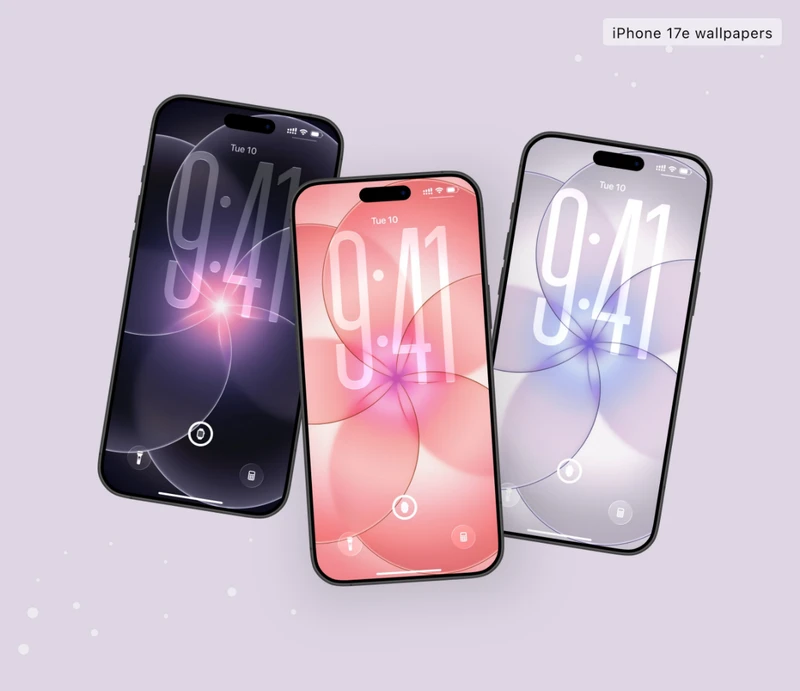
The iPhone 17e wallpapers are designed with smooth gradients, refined color layers, and a clean Apple-style finish. Whether you prefer bold tones or softer shades, there are multiple options available.
iPhone 17e - Soft Pink Wallpaper

iPhone 17e - Black Wallpaper

iPhone 17e - White Wallpaper

For the best results, always download the original or 4K version. This prevents blur, pixelation, and over-cropping when applied to your screen.

After downloading your preferred wallpaper iPhone 17e version, follow these steps:
Open Settings.
Tap Wallpaper.
Choose your downloaded image from Photos.
Adjust position and scale.
Tap Set as Wallpaper Pair or customize Lock Screen and Home Screen separately.

Finding high-quality images is just as important as choosing the design.
Here are four reliable websites to find high-quality iPhone 17e wallpaper downloads:
When choosing a source, always check:
Sometimes the issue isn't the image --- it's the system.

If the issue keeps happening, the problem may be related to the iOS system itself.
You can resolve repeated wallpaper setting failures by using a professional system repair tool. Tenorshare ReiBoot is designed to fix common iOS system issues without requiring complicated manual steps.
Install Tenorshare ReiBoot on your computer.




Connect your iPhone 17e.

Select Standard Repair mode.

Follow on-screen instructions to repair the system.

Once complete, reset your wallpaper normally.

Standard Repair is designed to fix system-level issues while keeping your data intact in most cases.
If basic troubleshooting fails, this is often the most efficient solution.
The iPhone 17e wallpaper comes in three color versions: Black, White, and Soft Pink, matching the new iPhone 17e finishes.
Yes. Official-resolution versions are optimized for the screen layout, including the notch area. Avoid cropped or resized versions to maintain alignment.
This usually happens due to:
Always download the original or 4K file for the sharpest result.
For optimal clarity, use at least full native resolution or a 4K version. Higher resolution images scale better and reduce visible pixelation.
Choosing the right iPhone 17e wallpaper is about more than just aesthetics --- it's about quality, compatibility, and smooth system performance. By downloading original-resolution files, applying them correctly, and fixing any system-related issues with tools like Tenorshare ReiBoot when necessary, you can enjoy the full visual experience without frustration.
Whether you prefer the official gradient style or custom high-resolution versions, the right iPhone 17e wallpaper will instantly refresh your screen and give your device a clean, modern look.


then write your review
Leave a Comment
Create your review for Tenorshare articles

Share this post


ReiBoot - No.1 Free iOS System Repair Software
Fix 150+ iOS Issues without Data Loss & Safely iOS 27 Upgrade/Downgrade
ReiBoot: No.1 iOS Repair Tool
Fix 150+ iOS Issues, No Data Loss
By Anna Sherry
2026-10-20 / iPhone 17