Since WhatsApp is a widely used messaging platform, it's common for users to store important conversations, photos, and other attachments in their chats. However, you might accidentally delete important WhatsApp messages while clearing unnecessary conversations on your iPhone or Android device.
The good news is that deleted WhatsApp messages may be recoverable in some situations. In this guide, we'll compare the best software to recover deleted WhatsApp messages and explore different WhatsApp message recovery software options for iPhone and Android, including solutions that may work when no backup is available.
Part 1: Best Software to Recover Deleted WhatsApp Messages on iPhone and Android
If you're looking for the best software for recovering deleted WhatsApp messages, it's worth comparing the available tools based on device compatibility, supported data types, recovery options, and ease of use. Below are five options to consider for recovering deleted WhatsApp messages on iPhone or Android.
1. UltData WhatsApp Recovery (iOS& Android)
UltData WhatsApp Recovery is a WhatsApp message recovery software designed to help iPhone and Android users recover deleted WhatsApp messages, photos, videos, and attachments. It's one of the best software options for recovering lost WhatsApp data, with a user-friendly interface and simple recovery process.
The software lets users scan for recoverable data and preview available results before recovery, helping them select the files they need.
Pros
Compatible with Android and iOS devices
Offers a simple user interface
Brings in the highest recovery rate
Offers stunning data preview features
Cons
Limited free version
User Reviews: Users praise its reliability and effectiveness, particularly for recovering lost messages on iOS and Android devices.
2. iSkysoft WhatsApp Data Recovery (iOS)
If you want to explore some more tools to access the best software to recover deleted WhatsApp messages, you can aim at the iSkysoft WhatsApp Data Recovery. This tool offers a simple user interface and fast scanning speed, ensuring that you can recover the deleted data quickly.
Pros
Compatible with multiple data types including the WhatsApp messages
Supports all iOS version
Offers advanced scanning options
Cons
Doesn't support Android users
User Reviews: Most iOS users commend its simplicity and efficiency in recovering deleted messages. Some note that the software's full potential is unlocked only in the paid version.
3. Stellar Data Recovery for iPhone
Steller Data Recovery for iPhone is a brilliant recovery tool that is community with WhatsApp message recovery, including various other data types. It is well known for its excellent data recovery services.
Pros
Compatible with a variety of data types including WhatsApp messages
Offers a simple user interface
Fast scanning speed
Cons
The premium package could be a bit costly.
User Reviews: Users appreciate its professional-grade recovery capabilities but mention the premium price as a drawback.
4. MiniTool Mobile Recovery for iOS
Another software to recover deleted WhatsApp messages iPhone is through MiniTool Mobile Recovery for iOS. It is a trusted data recovery software to get back lost WhatsApp messages and it is best for people looking for an affordable data recovery tool.
Pros
Brings in the budget-friendly option
Simple user interface
Compatible with the various recovery modes
Cons
Limited advanced options
User Reviews: Users find it helpful for basic recovery needs but recommend advanced tools for more complex recovery scenarios.
5. Jihosoft Android Phone Recovery (Android)
Jihosoft Android Phone Recovery purely focuses on the Android device and it offers a fast scanning speed along with the ability to preview the lost data. It offers a good recovery rate, and you don't have to spend much to acquire the subscription.
Pros
Supports all the Android devices
Allows you to recover the videos, photos and messages
Brings in the fast data recovery process
Cons
Doesn't support iOS devices
User Reviews: Android users appreciate its simplicity and effectiveness, though some report minor issues with compatibility on older Android devices.
Part 2: How to Recover Deleted WhatsApp Messages without Backup
UltData WhatsApp Recovery is a WhatsApp message recovery software for users who want to recover deleted WhatsApp messages on iPhone or Android. For users comparing software to recover deleted WhatsApp messages on phone, it offers a way to scan a connected iOS device for available recoverable WhatsApp data. It also supports Android devices and can help users check for supported WhatsApp attachments, photos, videos, and messages.
You can preview the available scan results and select the items you want to recover. Actual recovery results depend on the device, data-loss circumstances, and whether the deleted data remains recoverable.
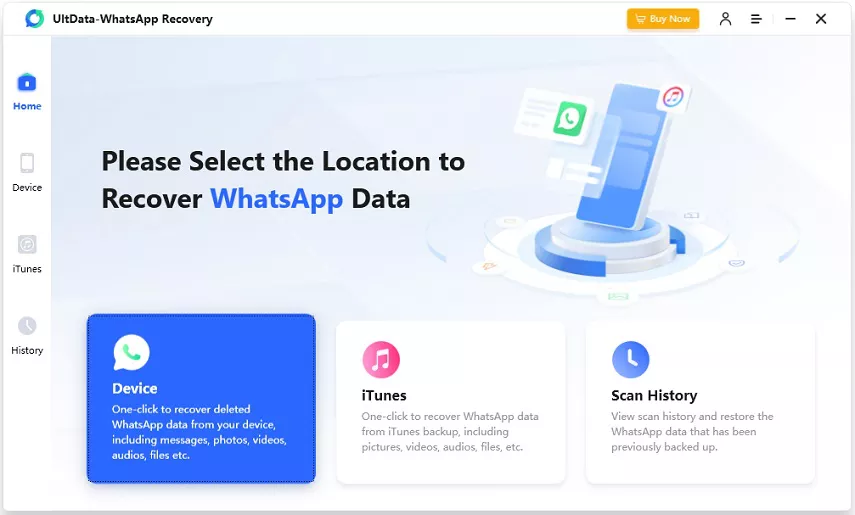
After marching into the official webpage of the UltData WhatsApp Data Recovery, you'll need to install the software and then start it afterwards. Click on the Device button to begin the proceedings.
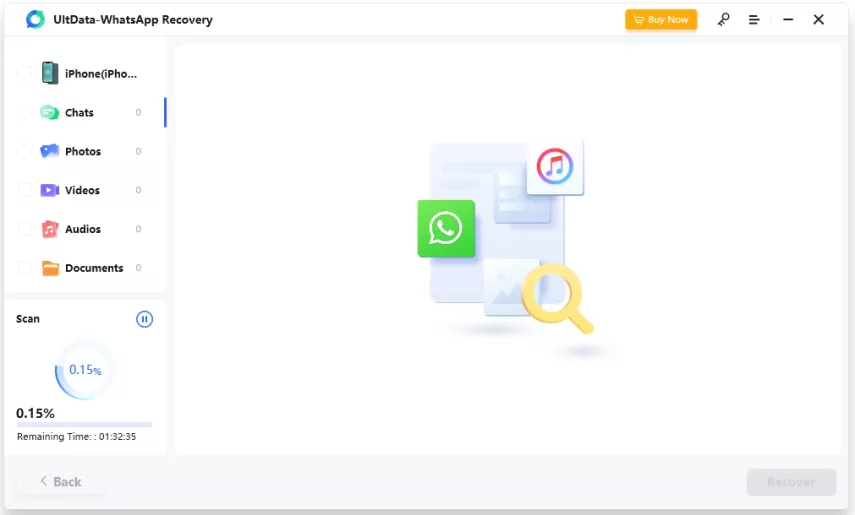
Connect the iOS device to computer through USB cable, and the tool won't take any extra time to detect the iOS device. You can then start scanning for lost data by hitting the ''Start Scan'' icon.
UltData WhatsApp recovery only takes a few moments to scan the lost data and then you'll need to review the credentials of the lost data. Now, you'll need to select the type of WhatsApp messages you want to recover and then hit the Recover button to initiate recovering the lost data.
Part 3: Comparing the Best Software for Recovering WhatsApp Messages
We've compared all the tools below to help you access the best software to recover deleted WhatsApp messages iPhone.
Please swipe to view
Software
Performance
Success Rate
Ease of Use
Rating
UltData WhatsApp Recovery (iOS & Android)
Excellent
99%
Very Easy
4.8/5
iSkysoft WhatsApp Data Recovery
Good
90%
Easy
4.5/5
Stellar Data Recovery for iPhone
Good
92%
Moderate
4.7/5
MiniTool Mobile Recovery for iOS
Good
85%
Easy
4.3/5
Jihosoft Android Phone Recovery
Good
88%
Easy
4.4/5
Quick Summary
If you've lost important WhatsApp messages, choosing the right recovery tool can help you check whether they can be recovered. In this guide, we've rounded up several tools to help you recover deleted WhatsApp messages on iPhone and Android.
If you're looking for the best software to recover deleted WhatsApp messages, UltData WhatsApp Recovery is worth considering. It offers a simple interface and scanning features that let you preview available recoverable data before selecting what to recover.






 iOS Tips & Latest Updates
 Bug Fixes, Unlock Guides
 Giveaways & Freebies




By Jenefey Aaron
2026-11-06 / WhatsApp Recovery