
 iOS Tips & Latest Updates
 Bug Fixes, Unlock Guides
 Giveaways & Freebies
then write your review

4uKey - One-Click Easy iPhone/iPad Unlocker
Unlock Screen Lock/Apple ID/MDM/Screen Time Passcode Instantly
Easy iPhone/iPad Unlocker
Unlock iPhone Passcode Instantly
Finding free music or movie sites unblocked at school to enjoy during breaks can be a challenge due to many sites being restricted. With schools often blocking popular music services like Spotify, it can seem impossible to listen to music during breaks, study sessions, or relaxation time.
However, there are several reliable, music unblocked at school sources that you can access freely. In this guide, we’ll introduce the 13 best platforms and ways for music unblocked at school.
Looking for music to listen to while studying or during a break at school? These websites offer different ways to explore music, from independent tracks and curated radio stations to classical recordings and educational music libraries. Compare their features, free access options, and account requirements below. Keep in mind that availability may vary depending on your school's network settings and device restrictions.
 Please swipe to view
Jamendo is a great option for discovering independent music and exploring new artists. It hosts a large library of music created by up-and-coming musicians and is completely free to use. Since it’s often not restricted, Jamendo is perfect for finding unique tunes for background study music or relaxing sounds.

LiveOne offers live streaming music and radio options, featuring various genres and curated playlists. It’s easy to navigate, and its free version allows you to listen without many ads. You can discover live shows and playlists here that might not be available on other platforms.

SongArea is a lesser-known music database with a simple interface, providing access to a wide range of genres. Although it doesn’t offer the most modern design, it’s straightforward, letting you search and stream songs with minimal ads, making it a popular choice for students.

AccuRadio lets you explore thousands of stations with music tailored to different tastes. You can enjoy music across hundreds of channels without interruptions, thanks to its music unblocked at school. The platform also allows customization, so you can skip songs and create a more personalized experience.

BlueBeat offers a mix of streaming and simulation music, with an interface similar to other popular services. You can explore numerous genres, curated playlists, and even artist radios. It’s free to use and provides an interesting alternative to mainstream music platforms.

PlaylistSound is an excellent choice if you’re looking for playlists curated by other users. It’s accessible from most networks and provides free access to playlists across various genres. You can find playlists specifically made for studying, relaxation, and productivity.

Soundzabound offers royalty-free music aimed at students and educational institutions. While it focuses on background music and sound effects, it provides a unique way to access safe, music unblocked at school projects or listening purposes without any licensing issues.

TuneIn provides access to live radio stations from around the world. With options for local radio, news, sports, and music channels, TuneIn is highly versatile. The platform is typically music unblocked at school and allows you to listen to a variety of music genres, from popular hits to niche selections.

Hungama is ideal for fans of Bollywood and international music. It has a massive collection of songs from India and abroad, including genres like pop, rock, and regional music. The platform’s free access at most schools makes it a fun, culturally rich option for listening.

Free Music Archive is a long-standing platform that provides free music across many genres, including jazz, electronic, and instrumental. It’s particularly popular for study sessions, as many tracks are instrumental and help improve concentration.

Grooveshark has a loyal following and offers a simple interface for streaming music across various genres. Although it’s not as extensive as other platforms, Grooveshark’s user-friendly layout and free access make it a solid choice for school networks.

Musopen focuses on classical music, making it perfect for studying or relaxation. It provides access to a broad library of classical compositions, including famous symphonies and instrumental tracks. It’s completely free and music unblocked at school, serving as an excellent resource for academic environments.

PureVolume allows users to explore indie and alternative music from new and unsigned artists. It’s geared towards discovering unique tracks that might not be available on mainstream platforms. The site is simple, free, and generally accessible on school networks.

Before playing music at school, take a moment to check a few things. These quick checks can help you avoid playback issues and understand whether a music website is suitable for your device and school network.
Please swipe to view

Why are music sites like Spotify blocked in schools? Here are some reasons:
If you're looking to bypass these restrictions and access music sites at school, here are a few reliable methods to consider:
A VPN routes your internet traffic through a secure server, masking your IP address and allowing you to bypass restrictions. This is one of the most effective ways to access blocked music sites safely. Some popular VPN services include:
A proxy server acts as an intermediary between your device and the internet, helping you access blocked websites. You can find free and paid proxy services, but always ensure the proxy is secure and trustworthy to avoid potential privacy risks.
You can simply access the proxy server through a browser or app and navigate to the music site you wish to unblock.
Web-based proxies are online tools that allow you to access blocked websites by entering the site URL on the proxy service’s platform. These tools mask your identity and can bypass school filters.
You can visit a web proxy site like Hide.me or ProxySite and input the URL of the music streaming site.
Tor is a browser designed for anonymous browsing. It routes your internet traffic through a network of volunteer-operated servers, which helps to mask your location and allows you to bypass many restrictions. However, the connection may be slower compared to VPNs or proxies.
If you have access to a mobile device with data, you can use it as a hotspot to bypass school Wi-Fi restrictions. This will allow you to connect to the internet through your mobile data and access music sites freely.
Turn on your mobile hotspot and connect your school device to it. Ensure you have sufficient data to stream music without interruption.
Please swipe to view
If you’re trying to listen to unblocked music on an iPhone or iPad with device restrictions, you might encounter limitations due to Mobile Device Management (MDM) locks, screen time restrictions, or website access blocks.
Tenorshare 4uKey is a powerful tool designed to remove MDM locks and bypass screen time passcodes on iOS devices. With it, you can unblock restrictions on your device, allowing access to music sites and apps even if they’re restricted at your school. 4ukey guarantees a safe process without data loss, and no password is required!


How to remove MDM restriction using 4uKey:
On your computer, install 4uKey and run the software. Choose the "Bypass MDM" feature.
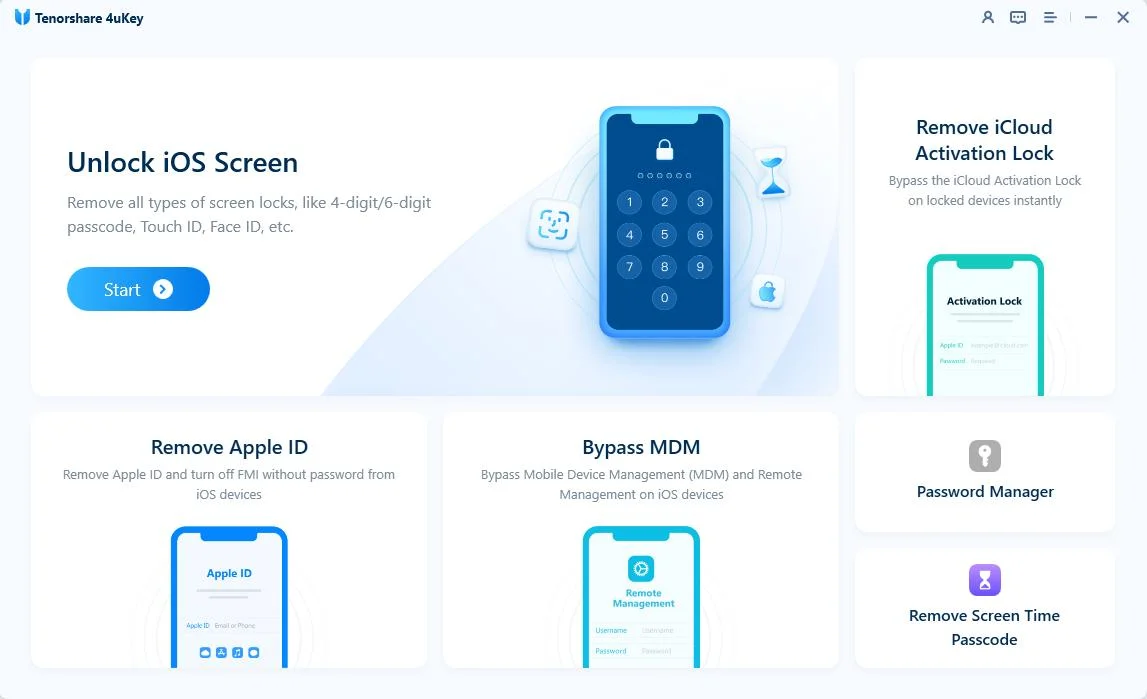
Make sure that your iPhone/iPad has been connected to the computer and is recognized. Click on "Start" to bypass MDM restrictions.

You have to turn off Find My iPhone. The process of bypassing MDM restrictions from your device will begin.

Then you will find you've successfully bypassed MDM restriction using 4uKey, then you can use your device freely!

Some websites offer free music streaming or radio, including Jamendo, AccuRadio, TuneIn, and Musopen. Each platform has a different music selection, and some features may require an account or subscription. Check the free access conditions before choosing a site.
Websites such as Jamendo, AccuRadio, and TuneIn can be accessed through a web browser on compatible Chromebooks. However, whether they work on a school Chromebook depends on the school's network filters, browser settings, and device management policies.
Yes. Many music platforms offer browser-based streaming, so you can listen directly through Chrome or another supported browser without installing an app. Open the website, choose a track or radio station, and start playing if the service is available on your network.
Some platforms allow visitors to browse or stream music without signing up. For example, AccuRadio and Musopen offer basic listening options without requiring an account. However, features such as saving playlists, downloading tracks, or accessing premium content may require registration.
This can happen when the website loads successfully but its audio player, streaming service, or required scripts are blocked or restricted. Check your browser's audio permissions, refresh the page, and try another track. If the problem is caused by school network restrictions, contact your school administrator rather than trying to bypass its policies.
Yes, if you prepare music in advance using a service that officially supports offline listening. Some platforms offer offline playback through paid plans or authorized downloads. Check the platform's download options and licensing terms before saving tracks, and make sure offline listening is permitted under your school's device policies.
Listening to music at school can be enjoyable, especially with access to music unblocked at school platforms that cater to a variety of musical preferences. For students facing device restrictions on iPhones or iPads, tool like Tenorshare 4uKey is recommended for unblocking MDM locks and screen time limitations.
then write your review
Leave a Comment
Create your review for Tenorshare articles
Easily Unlock iPhone passcode/Apple ID/iCloud Activation Lock/MDM
100% successful unlockShare this post


4uKey - One-Click Easy iPhone/iPad Unlocker
Unlock Screen Lock/Apple ID/MDM/Screen Time Passcode Instantly
Easy iPhone/iPad Unlocker
Unlock iPhone Passcode Instantly
By Sophie Green
2026-11-10 / Unlock iPhone