



 iOS Tips & Latest Updates
 Bug Fixes, Unlock Guides
 Giveaways & Freebies
then write your review


4uKey - One-Click Easy iPhone/iPad Unlocker
Unlock Screen Lock/Apple ID/MDM/Screen Time Passcode Instantly
Easy iPhone/iPad Unlocker
Unlock iPhone Passcode Instantly
Looking for an iHello HFZ download? The iHello HFZ Tool is one of the iCloud Unlock Services for supported Apple devices. Before installing the Windows or Mac tool, check your device model, iOS version, and required signal features.
This 2026 review covers the iHello HFZ latest version, pricing, compatibility, download steps, safety risks, and limitations. It also compares Tenorshare 4uKey as a guided alternative for supported devices.
Get the official Windows or Mac installer and follow a guided Activation Lock removal process on supported devices.
iHello HFZ is a third-party iCloud Activation Lock bypass tool for selected iPhones and iPads. Its device-specific packages use workflows based on the checkm8 exploit, DFU mode, and, in some cases, jailbreaking.
Depending on the package, iHello HFZ may skip the Activation Lock setup screen and restore limited SIM or signal functions. Results vary by device and iOS version, and a bypass does not necessarily unlink the device from the previous owner's Apple Account or restore every Apple service. Use it only on a device you own or are authorized to service.

Some packages also claim support for the App Store, iMessage, FaceTime, and notifications. These functions are not guaranteed on every device, and availability may change after an iOS update or reset.
The current HFZ information page mainly lists older iPhones and selected iPads. The list below reflects commonly listed models, but users should confirm the exact model, iOS version, and signal requirement before registering or paying.
Commonly listed iPhones:
Commonly listed iPads:
Support can range from iOS 12 to iOS 17 across different modules. A version number alone does not confirm compatibility, so check the device-specific service before downloading.
iHello HFZ version numbers are confusing because the main AIO tool, device services, and T2 Mac packages can use separate release branches. As of August 2026, hfzactivator.com labels its main package as iHello HFZ AIO Premium v5.0.8. However, the website also states that it is not the official HFZ source, so this should be treated as a site-listed version rather than an independently verified official release.
Before installing any “latest version,” verify the package name, release date, operating system, supported device, and license terms. Avoid modified copies from unknown mirrors.
The iHello HFZ installer may be free to download, but that does not mean every bypass or signal service is free. Registration, device activation, and AIO Premium functions can require a separate payment.
As of August 2026, the public third-party price list for iHello HFZ bypass tool displays the following services. Prices, availability, and refund terms may change, so confirm the final cost before submitting an IMEI or serial number.
 Please swipe to view
 Not every iHello HFZ module is currently visible on the public list. A missing model should not be treated as supported or discontinued without confirmation from the service provider.
iHello HFZ can be inexpensive for a specific older device, but users should compare the total service cost, compatibility, update policy, and support. A guided product such as 4uKey iPhone Unlocker may be easier to evaluate because its installer, feature compatibility, and support information are provided on one official website.




As of August 2026, the current iHello HFZ download page advertises Windows and Mac packages and labels its main AIO Premium release as v5.0.8. Compatibility still depends on the exact package, so do not select a download by version number alone.
The program file may be free to download, while device registration, signal restoration, or other server-based functions can require payment.
The following HFZ iHello download steps apply to the Windows tool. Menu names may differ between versions.

The current HFZ information page also advertises an iHello HFZ Mac package. Do not try to run the Windows .exe file on macOS. Confirm whether the Mac download supports your macOS version and Intel or Apple silicon. An “iHello HFZ v2.1 download” may refer to the separate T2 Premium AIO branch for selected Intel Macs rather than the main iPhone bypass tool.
iHello HFZ can be useful for a compatible older device, but it should not be described as completely free or risk-free. Consider both its practical benefits and its limitations before downloading.
Pros:
Cons:
No third-party bypass utility should be treated as 100% safe. Modified installers from mirror sites may contain malware or unwanted programs, while a failed jailbreak or restore can cause data loss or temporary system instability. Scan the package, avoid cracked versions, and do not enter your Apple Account password into an unverified program.
Even after a successful iHello HFZ bypass, features such as iMessage, FaceTime, notifications, SIM signal, or Apple services may remain restricted. The Activation Lock screen may also return after an iOS update, reset, or restore.
Use iHello HFZ only on an Apple device you own or are authorized to repair. Attempting to access a lost, stolen, or unauthorized device may violate local laws and Apple’s terms.
For a second-hand device, ask the previous owner to remove it from Find My first. The original owner can also enter the Apple Account credentials on the device. Users with valid proof of purchase can follow Apple’s official Activation Lock removal options or start a support request.

Users who prefer an official installer, guided interface, and dedicated support can consider 4uKey iPhone Unlocker as an alternative to the iHello HFZ bypass tool.
This iPhone Unlocker is available for Windows and Mac and provides separate functions for screen locks, Apple ID, MDM, and iCloud Activation Lock removal. Compatibility differs by function, so check the exact device and iOS requirements before starting.
The exact workflow can vary by 4uKey version and device. Follow the current onscreen instructions rather than using steps from an older build.
Download and install 4uKey from the official website. Choose "Remove iCloud Activation Lock", then connect your iPhone to the computer.
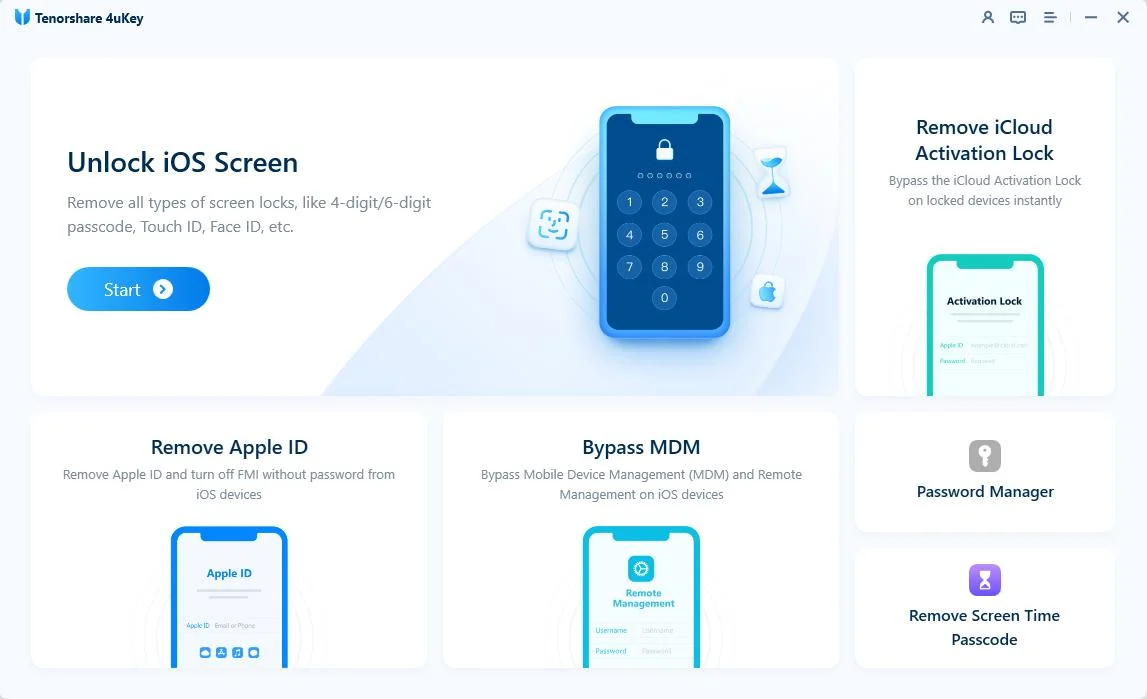
Choose “Next”. Follow the prompts if the device needs to enter recovery mode.


4uKey will prepare the device for removal. If the selected workflow requires jailbreaking, follow the onscreen guide and keep the device connected.

After the required device preparation is complete, 4uKey will begin to remove the iCloud Activation Lock.

Wait until the software confirms that the iCloud Activation Lock has been removed.
 Please swipe to view
 iHello HFZ may suit experienced users who need a specific service for an older device. 4uKey iPhone Unlocker is easier to evaluate for supported devices because it provides an official installer, guided workflow, feature-specific compatibility information, and technical support.
As of August 2026, hfzactivator.com labels the main package as iHello HFZ AIO Premium v5.0.8, but the website also says it is not the official HFZ source. Other version numbers may belong to older releases or separate device and T2 Mac branches.
The installer may be free to download, but many bypass, signal, registration, and AIO Premium services require payment. Check the final service price and refund terms before submitting device information.
iHello HFZ AIO Premium combines several activation and device-service functions in one package. Advertised features can include signal services, serial-number-related tools, setup skipping, and other technician options, but availability depends on the release and device.
iHello HFZ v4.2 is an older release term. It may still appear on archive or mirror sites, but an old build can be incompatible or modified. Use a verified package that clearly lists your device and operating system.
Support varies by device and module. Some services advertise compatibility through selected iOS 17 versions, but that does not mean every device or newer iOS release is supported. Do not assume iOS 26 or iOS 27 compatibility without confirmation.
Yes. The current download page advertises both Windows and Mac tools. Confirm whether the Mac package supports your macOS version and Intel or Apple silicon before downloading.
A SIM card may not be required for a Wi-Fi-only bypass, but signal-related services should be checked with the intended SIM. An internet connection is usually required for registration, license verification, and server-based functions.
iHello HFZ offers device-specific Activation Lock and signal services, but its version names, pricing, and compatibility can be difficult to confirm. The current page lists Windows and Mac downloads and labels AIO Premium v5.0.8 as the latest main package, while iHello HFZ v4.2 and v2.1 refer to older or separate branches.
Before starting an iHello HFZ bypass, verify device ownership, download source, exact compatibility, and total service cost. Users who want an official installer and a more guided workflow can consider 4uKey iPhone Unlocker for supported devices.


then write your review
Leave a Comment
Create your review for Tenorshare articles
Easily Unlock iPhone passcode/Apple ID/iCloud Activation Lock/MDM
100% successful unlockShare this post


4uKey - One-Click Easy iPhone/iPad Unlocker
Unlock Screen Lock/Apple ID/MDM/Screen Time Passcode Instantly
Easy iPhone/iPad Unlocker
Unlock iPhone Passcode Instantly
By Jenefey Aaron
2026-10-26 / Unlock iPhone