Playground Keeps Reappearing on Home Screen? How to Stop It

authorPic

By Jenefey Aaron

2026-11-03 / iPhone 18

Playground keeps reappearing on Home Screen when iOS reinstalls Image Playground, Apple's on-device image generator, or when you only removed its icon instead of deleting the app. Apple hasn't explained why, but user reports point to four causes: an iOS update or phone setup brought it back, a Screen Time or Apple Intelligence setting is prompting it, another device on your account is reinstalling it, or the app was never fully deleted.

Users on Reddit describe Image Playground reinstalling itself after deletion, and one watched it start downloading right after tapping Delete. This guide shows how to tell whether it has really reinstalled, which fixes to try first, and when a system repair such as ReiBoot makes sense.

Part 1. Why Playground Keeps Reappearing on Home Screen

Image Playground is Apple's AI-powered image creation app that lets you generate custom images in styles such as illustrations, sketches, and animations using text descriptions and other suggestions. It runs on the device and requires an Apple Intelligence-compatible iPhone, such as the iPhone 15 Pro or later. Because it is integrated with Apple Intelligence, iOS does not always treat it like an ordinary App Store download.

image playground apple intelligence tool

An Apple Community answer explains that the "New Apps: App Library Only" setting covers apps you download yourself, not new parts of iOS delivered by an update. That is a community explanation, not an Apple statement.

Image Playground reappears after deleting: reinstalled or just hidden?

Work out which problem you have before changing any settings. The quickest test takes about a minute.

swiper icon Please swipe to view
What you see
What it likely means
How to confirm
Icon returns, and the app is already in the App Library
You removed the icon only
Swipe to App Library and search “Playground”
iPhone Storage shows no Image Playground, then lists it later
A real reinstall
Check Settings > General > iPhone Storage after deleting, then again when it returns
No icon anywhere, but Playground works inside Messages or Notes
Hidden app, or the feature is still active in other Apple apps
Check the Hidden folder at the bottom of the App Library
A “Downloading support for Image Playground” message
Support files are downloading, not a new app
Stay on Wi-Fi and power; it usually finishes on its own

Image Playground keeps reinstalling: what users report

swiper icon Please swipe to view
Source
Device / iOS
What happened
Outcome
r/iphone post
New iPhone 18 Pro, data synced from iCloud
Deleted it 6 times in 3 days; watched a reinstall start right after deleting
No answer yet
r/iOS27 post
iOS 27
Came back after about 3 weeks gone; Siri always off
No fix; one unverified claim that some AI apps cannot be deleted
TidBITS Talk (Sept 29, 2026)
iPhone 16, iOS 27.0.1
Deleted 3 times; it returned even with system updates turned off
One participant said it stopped after disabling every update option, suspecting iOS 27
MacRumors thread
Not stated
Reinstalled through the day on home Wi-Fi; install pop-up in Low Data Mode
Replies pointed to Screen Time and another family Apple ID
Apple Community (iOS 18.3 era)
iPhone
Auto-installed despite the App Library setting
Community: setting applies only to App Store downloads

Image Playground reinstalls after iOS update and other likely triggers

The table ranks each suspected trigger by how much evidence supports it. "Moderate" means several independent users describe it; "Weak" means a single report.

swiper icon Please swipe to view
Suspected trigger
Evidence
Confidence
What to do
Icon removed, app not deleted
Apple Community replies on hiding versus deleting
Common
Repeat Fix 1 and verify in iPhone Storage
iOS update or new-device setup
TidBITS participants (iOS 27.0.1), the r/iphone new-phone post, iOS 18.2 to 18.4 reports
Moderate
Recheck after each update; consider ReiBoot if other glitches appear
Apple Intelligence provisioning
Apple Community explanation of the App Library setting; a Siri-off report that contradicts a simple fix
Moderate
Treat as design behavior; use the App Library fallback
Screen Time or Low Data Mode prompts
One MacRumors thread
Weak to moderate
Review Fix 2 settings one at a time
Another Apple ID or device in the family
One MacRumors reply
Weak
Check Family Sharing and Automatic Downloads

Part 2. Image Playground Keeps Reinstalling? 3 Free Fixes to Try First

If Image Playground keeps reinstalling, start with the three free fixes below. They are ordered from the simplest check to the setting changes that take longer to test. Work through them in order, and change only one thing at a time so you can tell which one made the difference.

Fix 1: Delete it the right way and verify

  • Touch and hold the icon, then tap Remove App.
  • Choose Delete App, not "Remove from Home Screen".
  • Open Settings > General > iPhone Storage and search for Playground to confirm it is gone.
  • playground keeps reappearing on home screen
  • Restart the iPhone, then check again after a few hours.

This applies to iPhone and iPad. Apple Community replies say Image Playground cannot be removed on a Mac, which is a separate issue.

Fix 2: Check Screen Time, Low Data Mode, Apple Intelligence and family accounts

  • Screen Time: open Settings > Screen Time > Content & Privacy Restrictions and look at the Apple Intelligence and Siri options (labels vary by iOS version). A MacRumors user reported that changing the Siri options there kept triggering install prompts.
  • Low Data Mode: the same user saw an install pop-up under Low Data Mode, while the app installed itself on home Wi-Fi. Turn Low Data Mode off for that network and watch what changes.
  • low data mode install popup
  • Apple Intelligence: switching it off may stop the app being provisioned, but a Reddit user with Siri permanently off still saw it return, so this is not guaranteed.
  • apple intelligence despite siri disabled
  • Family or other devices: one MacRumors reply said another Apple ID in a family reinstalled it. Check Family Sharing and Settings > App Store > Automatic Downloads. This lead is unproven for system apps.

Change one setting at a time and wait 24 hours before touching the next. Changing several at once makes it impossible to tell which one mattered, and the timing in user reports ranges from seconds to about three weeks.

Fix 3: Pause automatic updates, and know the trade-off

One user reported that Playground stopped returning after turning off every update option. To test this, review Settings > General > Software Update > Automatic Updates and the automatic download options in Settings > App Store. Treat it as a short experiment: delayed updates can leave you without security fixes, so re-enable them afterward and install updates manually.

Part 3. Image Playground Reinstalls After iOS Update? Try ReiBoot Repair

What ReiBoot is and when it makes sense here

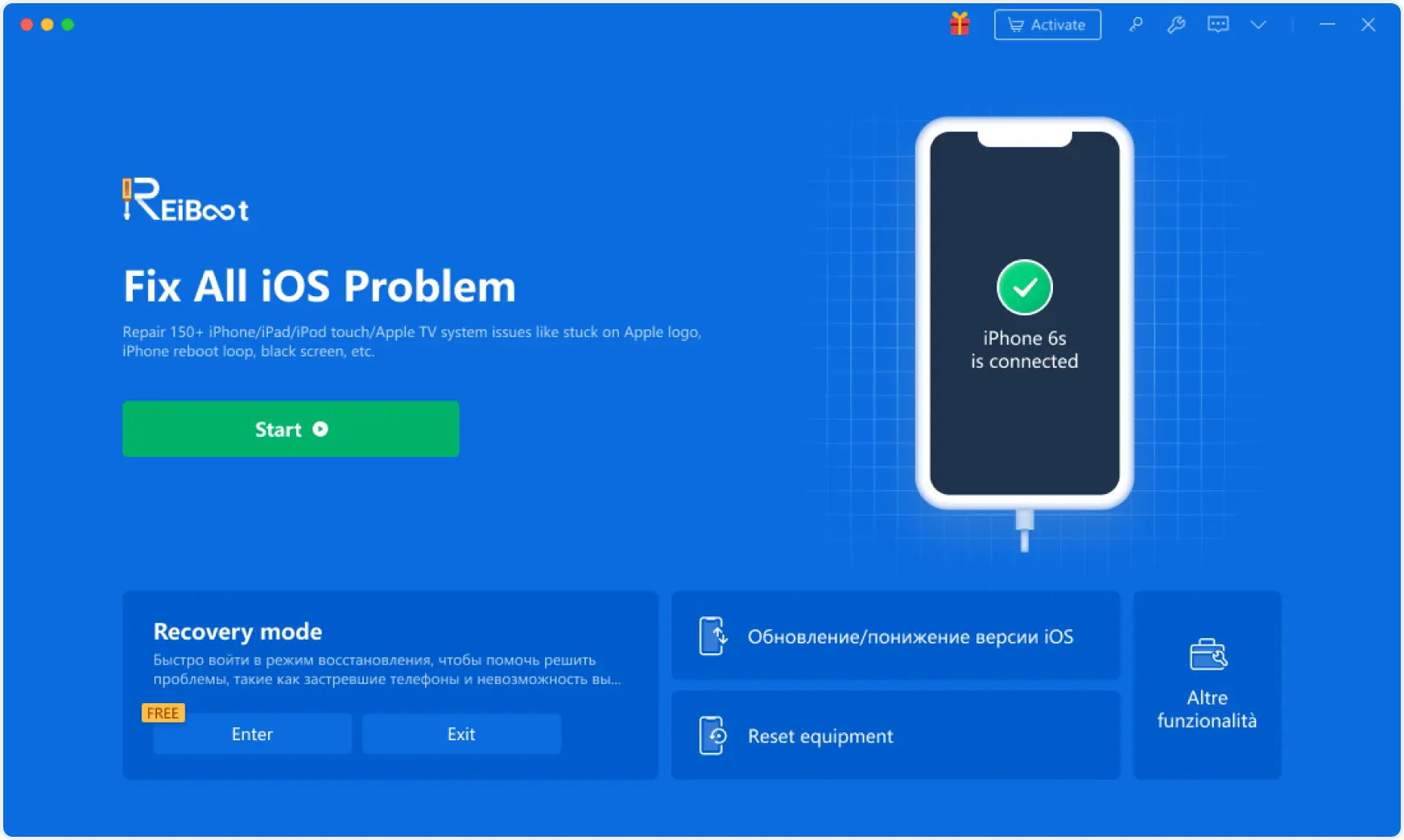
Tenorshare ReiBoot is a Windows and Mac tool that repairs iOS system problems. Tenorshare says it handles more than 150 issues, such as being stuck on the Apple logo, boot loops, black screens and failed updates.

It fits this problem in one situation: Playground began reappearing right after an iOS update or phone transfer, and you also see other oddities such as apps stuck on "Waiting", settings that will not stick or Apple Intelligence downloads that never finish. In that case a damaged install state is plausible, and a repair can rule it out.

ReiBoot key features that matter for this problem

  • 150+ iOS system issues: Tenorshare says ReiBoot covers problems such as failed updates, boot loops and a phone stuck on the Apple logo. These often show up after an update, the same point at which Playground tends to start reappearing.
  • Standard Repair: reinstalls iOS system files and is designed to keep your data. If Playground started reappearing after an update or phone transfer, try this first. It is the mode used in these 8 ways to fix iOS 27 boot loop without data loss.
  • Deep Repair: a more thorough repair that erases all data. Use it only if Standard Repair fails and the iPhone shows other problems, such as failed updates, and always after a full backup.
  • Enter / Exit Recovery Mode: puts the iPhone into or out of recovery mode with one click, useful if the phone hangs on an update screen. iOS 27 changed how recovery mode is entered, and the iOS 27 new recovery mode explainer covers the new steps.
  • iOS upgrade or downgrade: moves between iOS versions where Apple allows it. Handy if you want to test whether the reinstalling is tied to iOS 27.0.1.

How to use ReiBoot Standard Repair

  • Install and open ReiBoot on your computer, then connect your iPhone, iPad, or iPod touch with a USB cable. Once ReiBoot detects your device, click Start Repair.
  • Repairing Ios Device Using Reiboot Software
  • Select Standard Repair to begin the repair process while keeping your personal data intact.
  • Choose Standard Repair to Preserve Data
  • Check the firmware package shown for your device and click Download. Wait for the download to complete.
  • Download Firmware Package for Device
  • Click Start Standard Repair and keep your device connected while ReiBoot repairs the iOS system.
  • Start Standard Repair with Device Connected
  • Once the repair finishes, your device will restart. Open Messages and check whether iMessage is working again.
  • Verify Imessage After Restarting Device

Part 4. If Playground Still Comes Back: Next Steps

Image Playground added to Home Screen automatically: keep it out of sight

Set Settings > Home Screen & App Library > New Apps to App Library Only. The Apple Community answer above warns that this may not apply to components delivered with iOS, so it can still appear. If it does, use Remove from Home Screen to send it to the App Library, or move the icon into a folder on your last Home Screen page.

hide new apps from home screen

Image Playground reinstalls after iOS update: what to expect

Reports follow the release cycle. Users described Image Playground arriving by itself with iOS 18.2 and 18.3, tech media reported previously deleted apps returning for some people after iOS 18.4, and the newest threads involve iOS 27.0.1. The common thread is a major update or a new-device setup. After each update, check iPhone Storage again, and install point releases promptly in case Apple addresses it.

Report it to Apple

Apple cannot fix what it does not hear about. Submit feedback through Apple's feedback page or contact Apple Support, and include:

  • Device model and exact iOS version.
  • How you deleted it and how quickly it returned.
  • Your Screen Time, Low Data Mode, Apple Intelligence and automatic update settings.
  • Whether the device was set up from a backup or transfer.
  • device setup from backup or transfer

Part 5. FAQ: Playground Reappearing and Reinstalling

Why does Image Playground keep reinstalling itself after I delete it?

Apple has not explained it. User reports point to iOS updates, new-device setup, Screen Time or Apple Intelligence settings, and other devices on the same account. It may also be that only the icon was removed.

Why did a playground app appear on my phone?

It is Image Playground, Apple's on-device image generator, which comes with Apple Intelligence. It first appeared with iOS 18.2 on supported iPhones, and it can also show up after an iOS update or when you set up a new phone. It is not a virus or a sign of hacking. If you don't want it, use Remove App > Delete App, though some users report it coming back after updates.

Can I permanently delete Image Playground from my iPhone?

You can delete it with Remove App > Delete App, and it stays gone for some people. Several users report it returning after updates or setup, so there is no confirmed permanent method yet.

Why does my phone keep jumping back to the home screen?

This is usually a separate problem from Playground. The most common cause is an app crashing and closing itself, so check whether it happens in one app or everywhere. Update the app and iOS, restart the iPhone and free up storage. If it started right after an iOS update and happens in every app, a repair such as ReiBoot Standard Repair is an optional next step, with a backup first.

Conclusion

When Playground keeps reappearing on your Home Screen, first confirm in iPhone Storage that the app is truly deleted, then check Screen Time, Low Data Mode and update settings one at a time. If the problem began after an update or phone transfer, ReiBoot's Standard Repair is an optional next step (back up first).

If it still returns, move it to the App Library and report it to Apple. No permanent fix is confirmed as of November 2, 2026, so recheck after each iOS release.

img
Hey! 👋 Welcome to Apple tech Hub!
Need help iPhone setup guide?
New Guide iOS 27 Tips & Tricks 🎉

Apple Tech Hub

  • icon iOS Tips & Latest Updates
  • icon Bug Fixes, Unlock Guides
  • icon Giveaways & Freebies
Join Now
img

Speak Your Mind

Registrer/ Login

then write your review

Speak Your Mind

Leave a Comment

Create your review for Tenorshare articles
Related articles

All topics

Share this post

Tenorshare ReiBoot

ReiBoot - No.1 Free iOS System Repair Software

Fix 150+ iOS Issues without Data Loss & Safely iOS 27 Upgrade/Downgrade

ReiBoot: No.1 iOS Repair Tool

Fix 150+ iOS Issues, No Data Loss