If you're wondering whether a
3DS emulator is working on iOS 27, Folium is currently the
only Nintendo 3DS emulator on Apple's App Store, but its compatibility is not
guaranteed until the developer confirms it. Since iOS 27 was released in
September 2026, users have reported crashes during imports, broken save
states, and stuttering or freezing in games that worked on iOS 26. These
issues can occur after major iOS updates because 3DS emulation relies on
demanding custom rendering and Apple's restricted JIT environment.
This guide covers 3DS emulator working on iOS 27, the most common Folium bugs
and their causes, how to fix reported crashes, and whether upgrading to iOS 27
is worth it if you regularly use Folium for 3DS emulation.
Part 1. 3DS Emulator Working on iOS 27: Compatibility Snapshot and Performance
Apple hasn't published anything emulator-specific for iOS 27. What usually
causes trouble is more mundane: every major iOS version adjusts memory
management limits, Metal rendering behavior, and code-signing checks at the
OS level, and 3DS emulation cores sit close enough to those layers that a
small shift can surface as a crash, a black screen, or a broken save state.
The bigger constant is the JIT restriction. Apple still does not allow
third-party apps, emulators included, to use Just-In-Time compilation
outside a narrow browser exception, and that hasn't changed with iOS 27.
Confirmed status, app by app
Delta, the most widely used iOS emulator, doesn't include a 3DS core, so it
isn't part of this comparison.
Please swipe to view
App
Developer
3DS support
Price model
iOS 27 status (as tested)
Folium
Jarrod Norwell / folium-app
Full, via the Cytrus core
Paid, $2.99–$4.99
Launches and runs; reported crashes and save-state issues match pre-27
Cytrus bugs rather than a new iOS 27-specific failure
Manic EMU
Independent developer
Full, with a right-eye rendering toggle for performance
Free download, in-app credits
Runs, but users attribute inconsistent frame rates to Apple's JIT
policy rather than to iOS 27 itself
PP EMU
Independent developer
3DS and PSP
Free download, in-app credits
Changelog lists a fix for “a crash when importing games on iOS 27,”
confirming one real, acknowledged issue that has since been patched
iOS 27 vs iOS 26 for 3DS emulation: what's genuinely different
Hard, side-by-side benchmark data is still thin this early in the iOS 27
release cycle; specific frame rate numbers published right now would be
closer to guesswork than measurement.
PP EMU's own changelog lists a fix for a crash specifically tied to
importing games on iOS 27, which is direct, developer-acknowledged
evidence that the update introduced at least one genuine regression, not
just a user perception issue.
The JIT restriction driving most 3DS performance limits is unchanged
between iOS 26 and iOS 27, so the underlying performance ceiling hasn't
moved in either direction.
Should you update now, or wait
If your emulator apps are already on their latest 2026 build and you
aren't mid-playthrough on a save-sensitive title, updating to iOS 27
carries low risk.
If you've settled into a specific, working combination of an older iOS
version and a particular emulator build for one game, it's reasonable to
hold off for one or two patch cycles before moving to iOS 27.
If you use emulation tools outside the App Store, sideloaded builds and
App Store builds don't share an update cadence, so treat iOS 27
compatibility for those as a separate, unverified question.
Part 2. Folium 3DS Emulator on iOS 27: What's Actually Playable Right Now
Folium doesn't ship with game data. Users have to supply their own
encryption key file, aes_keys.txt, which is meant to be dumped from a 3DS
console they personally own.
Legal: copying a ROM from a cartridge you own, for personal use only and
without redistributing it, is permitted under US law.
Not legal, and risky: downloading ROM files or aes_keys.txt from a
third-party "keys download" site, which is both a legal gray area and a
common way to pick up a compromised file.
That distinction matters more right after an iOS update than usual, since
curiosity about quick-download sites for keys and ROMs tends to spike then,
and those sites are exactly where malware gets bundled in.
Titles people report as stable, and titles that aren't
Results vary by game far more than they vary by iOS version:
Animal Crossing: New Leaf -- comes up repeatedly as one of the more
consistently stable 3DS titles on Folium.
The Legend of Zelda: A Link Between Worlds -- generally playable, but
carries audio desync and frame rate dips that predate iOS 27.
New Super Mario Bros. 2 -- tends to run smoothly at first, with some users
reporting a crash after several minutes rather than at launch.
Pokémon titles -- need the extra setup step of correct save-state
handling; successful runs depend more on renderer settings tuned per game
than on the OS build.
What Folium's own update history says about this
Fixed save states from older app versions failing to load inside the
Cytrus core.
Fixed a thumbstick position bug that broke controller input.
Added a dedicated issue screen that surfaces per-core problems, so users
can check whether a bug is already known before assuming it's new.
Developer Jarrod Norwell has kept shipping Cytrus-specific patches on a
fairly steady cadence through 2025 and into 2026, so a title that's broken
today has a reasonable chance of getting addressed in the next update rather
than staying broken indefinitely.
Part 3. 3DS Emulator Not Working on iOS 27? Crashes After the Update, Causes
and Fixes
Just-In-Time compilation lets software translate code into native
instructions while it runs, and it's what makes it practical to emulate the
3DS's dual ARM11 and ARM9 processors at close to full speed. Apple blocks
third-party apps, including every emulator on the App Store, from using JIT.
Cytrus and comparable cores fall back to ahead-of-time interpretation
instead, which is slower on its own and more sensitive to exactly the kind
of memory allocation and code-signing changes that a major iOS release tends
to introduce. That's the mechanical reason a title that worked fine on iOS
26 can start crashing after an update, even when nothing about the game file
changed.
A fix checklist that resolves most reported cases
Update the emulator app before touching anything else. Emulator-side
patches for a new iOS release typically land within days to a few weeks,
and a surprising share of "iOS 27 broke my emulator" reports trace back to
an outdated app build.
Reimport the game instead of relaunching it from an old library entry.
Library or cache corruption is one of the most common causes of a crash
specifically on import.
Lower the resolution factor and turn off hardware shaders temporarily in
the Renderer settings. Reducing render load resolves a meaningful share of
freeze-on-launch cases, even for titles that worked before.
Restart the device itself after installing the iOS update, not just the
app. A stale cache from the OS installation is a common and easily
overlooked cause of a false crash report.
Check the app's built-in issue tracker before assuming iOS 27 is the
cause. What looks like a new bug is sometimes a known, already-logged core
issue with a fix already in progress.
When troubleshooting won't help
If a title was already unstable on iOS 26, largely because of JIT
limitations rather than the OS version, an iOS 27 update isn't going to fix
it. That instability is a core emulation constraint, not a compatibility
bug, and it applies about equally to Folium, Manic EMU, and PP EMU, since
all three work around the same Apple restriction in similar ways.
Part 4. Free 3DS Emulator Downloads and No-Jailbreak Options for iOS 27
Is there an actually free 3DS emulator for iOS
Folium -- paid download, $2.99--$4.99, no free tier.
Manic EMU -- free to download, with in-app credits for premium features.
PP EMU -- free to download, with in-app credits for premium features.
No App Store 3DS emulator is fully free with no paid component. Any site
advertising a "free full version" 3DS emulator download outside the App
Store isn't a legitimate distribution channel, since paid iOS apps aren't
cracked and redistributed safely. That kind of listing is a reliable signal
of a piracy or malware risk, not a real discount.
How to download Folium without the risk
Open the App Store and search Folium directly, rather than following a
link from a third-party blog or forum post.
Confirm the listed developer is Jarrod Norwell or the folium-app
organization before purchasing.
Source your own aes_keys.txt file from a 3DS console you personally own,
never from a third-party "keys download" page.
Export a save-state backup before every major iOS update, using Folium's
built-in export feature, so a bad update never costs progress.
Change Your GPS Location Without Jailbreak
Retro emulation isn't the only place iOS users run into Apple's jailbreak
restrictions. Location-based Nintendo games such as Pokémon GO carry a
separate one: changing a device's reported GPS location normally required
jailbreak access too. Tools such as
Tenorshare iAnyGo
apply the same no-jailbreak model to location data instead of to emulation,
running from a desktop app that simulates GPS movement on a connected iPhone
rather than patching the OS itself. iAnyGo lists iOS 27 compatibility
already.
Key features:
One-click GPS location change to anywhere on the map,
without jailbreak or root access. It also makes it easy to
change your location on iOS 27
when testing location-based apps.
Route simulation with adjustable speed, so movement looks
more natural rather than an instant teleport. For example, you can
play Pikmin Bloom without walking
by simulating movement along a custom route.
A cooldown timer between location changes, designed to
help reduce the risk of triggering a game's anti-cheat systems when
switching locations.
Support for multiple location-based apps beyond Pokémon
GO, including other social and dating apps.
Basic steps:
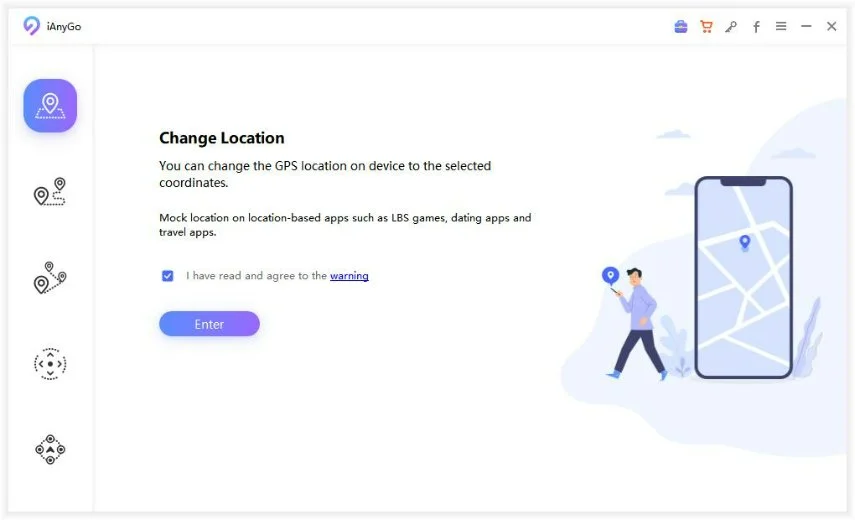
Download and install iAnyGo on your computer and click on "Start" while keeping the default mode "Change Location."
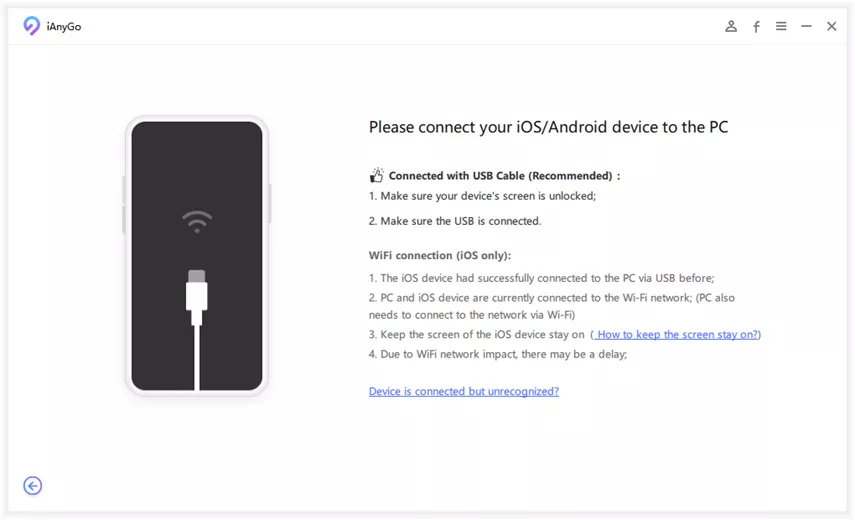
Connect your phone to the PC. Connect your iPhone or Android device to the PC with a USB cable and click on "Enter."
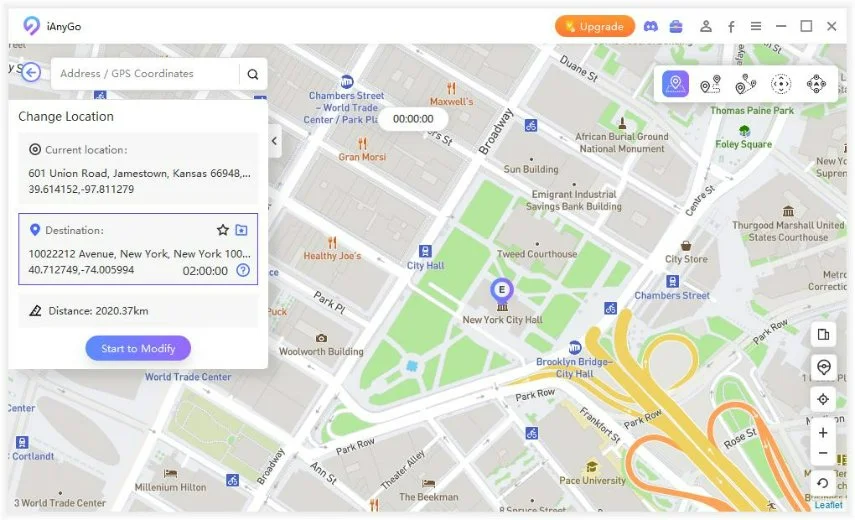
After connecting your device, you need to select a location in the iAnyGo map. Type the address or GPS coordinates in the search bar. And then click on "Start to Modify."
iAnyGo's core use case, changing a device's reported location for apps like
Pokémon GO, is a technically different problem from JIT-restricted 3DS
emulation. What both categories of tool share is the reason they took this
shape: it's the only model Apple hasn't been revoking certificates over.
Part 5. FAQ: 3DS Emulator Working on iOS 27
1. Does Folium work on iOS 27?
Yes, Folium launches and runs on iOS 27 without an App Store-wide
blocking issue. The crashes and save-state problems users are reporting
match pre-existing Cytrus core bugs rather than a new failure caused
specifically by iOS 27, so check the app's built-in issue screen and update
to the latest build before assuming iOS 27 itself is the cause.
2. Why does my 3DS emulator keep crashing after updating to iOS 27?
Most post-update crashes trace back to an outdated emulator build, a
corrupted library cache, or renderer settings tuned for the previous iOS
version, rather than to a fundamental iOS 27 incompatibility. Updating the
app, reimporting the game file, and lowering the resolution factor resolves
the majority of reported cases.
3. Is there a free 3DS emulator for iOS?
Not one that's fully free with no paid component. Folium is a paid
download, while Manic EMU and PP EMU use free downloads with in-app credits
for extra features.
4. Do I need to jailbreak my iPhone to run 3DS games?
No. Since Apple's April 2024 App Store policy change, 3DS emulators
including Folium install and run directly from the App Store, and
jailbreaking is not required.
5. Should I update to iOS 27 if I emulate 3DS games regularly?
If your emulator app is already on its latest 2026 build, updating is low
risk. If you rely on one specific, stable iOS-and-emulator combination for a
save-sensitive playthrough, it's reasonable to wait for a patch cycle or two
before moving to iOS 27.
Conclusion: Is 3DS Emulator Working on iOS 27 Worth the Update
For most users, a 3DS emulator working on iOS 27 is still a
practical option. Folium remains the only 3DS emulator on the App Store, and
Apple's JIT restriction remains the main performance limitation rather than
iOS 27 itself. Most post-update crashes can be addressed by updating Folium,
reimporting games, or lowering renderer settings. If you're in the middle of
a save-sensitive playthrough that currently works well, waiting for another
Folium update may be the safer choice.
For users who also need to test location-based apps or games on iPhone,
Tenorshare iAnyGo
provides a way to simulate GPS locations without changing the core Folium
setup. It does not fix Folium or improve 3DS emulation performance, but it
can be useful for location-based testing alongside your emulator setup.













By Jenefey Aaron
2026-11-03 / iOS 27