I’m thinking about using PDF Guru for my PDF editing, but is it safe? Has anyone tried it?---Reddit
PDF tools have become a daily necessity for students, professionals, and anyone working with documents. PDF Guru stands out for offering easy PDF editing, conversion, and management. But before trusting any online tool, it’s natural to ask, is PDF Guru safe?
In this 2025 PDF Guru review, we’ll explore everything you need to know its features, security measures, pricing, and legitimacy. By the end, you’ll have a clear understanding of whether PDF Guru is a reliable choice.
PDF Guru is an online PDF editor and converter designed for users who need quick and easy document management. Its main features include editing PDFs, converting files to different formats, merging multiple PDFs, compressing large files, and more. All files are processed through a cloud-based workflow, allowing you to access and manage PDFs from anywhere without installing heavy software.
Is PDF Guru Safe?
From a security standpoint, PDF Guru uses HTTPS connections, which encrypts data during transfer. This helps protect your files while they are uploaded and downloaded. However, the company does not provide detailed information on file retention policies, so it’s unclear how long uploaded files might remain on their servers.
Users should be cautious with sensitive documents, as cloud-based processing inherently carries privacy risks. The service is relatively new and the company’s background is not widely documented, which can raise additional concerns about long-term data handling and trustworthiness.
Is PDF Guru Legit or a Scam?
PDF Guru is a real and functional PDF tool. Users can successfully edit, convert, and merge files online. That said, some complaints have emerged that make people question its legitimacy:
Free trial auto-renews: Some users report that free trials automatically convert into paid subscriptions if not canceled in time.
Subscription terms unclear: Information about renewal cycles and pricing can be confusing or not clearly stated upfront.
Aggressive upsells: Some features advertised as free trigger prompts to upgrade once you start using them.
Note:
PDF Guru is not a scam — it does perform the functions it advertises. However, its pricing transparency, cloud-based file handling, and occasional aggressive upsells may be drawbacks for certain users.
While it works for basic PDF tasks, those who are concerned about data privacy or unclear subscription terms may prefer alternatives like PDNob PDF Editor, which offers similar features with local processing, clear pricing, and a more secure workflow.
Part 2. PDF Guru Reviews: What Real Users Say
Positive Feedback from Users
Based on PDFGuru reviews from Trustpilot , Reddit, and other platforms, many users find PDF Guru easy and convenient for basic PDF tasks. Common positive points include:
Easy to use: The interface is simple, intuitive, and straightforward, making it accessible even for beginners.
No installation required: As a web-based tool, users can edit, merge, or convert PDFs instantly without downloading software.
Works for basic tasks: Merging files, compressing PDFs, and simple conversions generally work reliably.
Quick access: Some functions can be used without creating an account, which is convenient for quick edits.
Good for one-time use: Many users appreciate that it’s suitable for temporary or occasional PDF tasks without committing to software installation or subscriptions.
Common Complaints and Red Flags from Users
While many users have positive experiences, there are several recurring complaints that may influence potential users:
Deceptive billing & auto‑renewal practices. On SiteJabber many reviewers say they signed up under the impression of a "free trial" or low-cost one-time service, only to be charged a recurring $49.99 (or equivalent) subscription after a few days. As one reviewer put it:
Poor transparency on pricing and cancellation. Several complaints cite unclear or obscure subscription terms, and difficulty cancelling. Some said they cancelled after the trial but still got charged.
Unhelpful or ineffective customer support. Users report they received little to no help even after contacting support, or that refund requests were ignored or denied.
Questionable website trust & security ratings. Independent analyses by platforms like ScamAdviser and Gridinsoft give pdfguru.com a very low trust score suggesting risk for users who input payment or sensitive data.
Mixed reliability on functionality. Some users say the tool fails on more complex PDF tasks for example, converting scanned or complicated PDFs often ended with incorrect formatting or failed conversions.
Part 3: PDF Guru Pricing, Subscription, and Refund Explained
PDF Guru Pricing Overview
PDF Guru offers a trial‑oriented subscription model. According to its subscription terms, when you sign up you may get a "trial" but unless cancelled at least 24 hours before the trial ends, you’ll be automatically charged for a paid subscription.
A typical offer (as of 2025) is: 7‑day access for a very low fee (e.g. $0.99 or $1.99), then automatic renewal at around $49.99/month if not cancelled.
They mention about "annual plan," though details and pricing may vary depending on region and payment method.
According to PDF Guru’s own terms, only "some limited features" are free; full functionality requires paid subscription.
How to Cancel a PDF Guru Subscription (Step‑by‑Step)
If you want to avoid recurring charges, here’s how cancellation should work:
Log in via PDF Guru login on their official website.
Navigate to account or subscription settings look for cancellation options. According to their terms, you must cancel at least 24 hours before the end of trial or your billing period to avoid auto‑renewal.
If already charged and you believe it’s erroneous or you want a refund, contact customer service at [email protected] (or via the support phone number +1 (866) 716‑6045) as given on their website.
(Optional but recommended) Keep a screenshot or confirmation of cancellation / payment‑screen where auto‑renewal was disclosed, in case of disputes. Their own Terms advise users to do so.
How to Request a PDF Guru Refund
According to PDF Guru’s official Refund / Money‑Back Policy:
Purchases are generally non‑refundable and non‑exchangeable.
The only time a refund is possible is if you encounter technical issues or errors with the product and you must contact support within 30 days of initial purchase, before the end of your subscription period.
Reasons such as "I don’t like the product" or "I didn’t expect the subscription renewal" do not qualify.
For users in the European Union (or certain jurisdictions) there is a right of withdrawal: you may cancel within 14 days of purchase and get a refund provided you notify the company via email before the deadline.
In many reported user complaints including recent ones (2025) people claim to have been charged monthly fees ($49.99) after what they thought was a one‑time or trial payment. Some attempted refunds via customer service, but in many cases got denied because their reason (unwanted auto‑renewal) didn’t meet the "technical issue" requirement.
Part 4: PDF Guru Login & Customer Service Guide
How to Log In to PDF Guru
Go to the official website via its PDF Guru homepage. Click on the "Login" button.
If you already have an account, enter your email and password to log in.
If you don’t have an account yet, click on the "Sign up" option, provide the required details (email, password, etc.), then confirm and log in.
Phone: They list a phone number: +1 (866) 716‑6045 for customer service.
If you have account issues, billing questions, want to cancel subscription, or request refund emailing or calling through these contacts is the official way as per their "Contact Us" and "Terms" pages.
For personalized support you can click on website contact us button and fill the form with your message and details and click send message.
Part 5. Safer& Reliable PDFGuru Alternative to Consider
Many PDF Guru users report unexpected monthly charges after assuming they had a one-time or trial payment, and refund requests are often denied. Some also find cloud processing slow for large files, and advanced features are limited or behind paywalls. Customer support can be slow, leaving users frustrated.
PDNob is a safer and more reliable alternative. It has a clean interface and fast performance, and includes OCR, editing, converting, merging, and signing. PDNob PDF Editor is lightweight, affordable, and easy to use, with no complicated subscriptions. It is ideal for students, freelancers, and small businesses who need a complete PDF solution with clear pricing and responsive support.
Key Features of PDNob PDF Editor
Fast & Clean Interface – Lightweight, intuitive, and easy to navigate.
Edit & Convert PDFs – Modify text/images and convert between PDF, Word, Excel, JPG, and more.
Merge, Split & Organize – Combine, extract, or rearrange PDF pages easily.
OCR & Annotate – Recognize text in scanned documents, add highlights, comments, and signatures.
Affordable & Reliable – Clear pricing, local file processing, no hidden fees, ideal for students, freelancers, and small businesses.
How to Use PDNob PDF Editor — Step by Step
Open PDNob PDF Editor, then click on the "Open PDF" button to import any PDF file you’ve downloaded.
Click the "Edit" button on the top toolbar, then select the text you want to modify. A text box will appear, allowing you to change the text, font, style, size, and color.
To add new text, click "Add Text" under the "Edit" section and place it where needed.
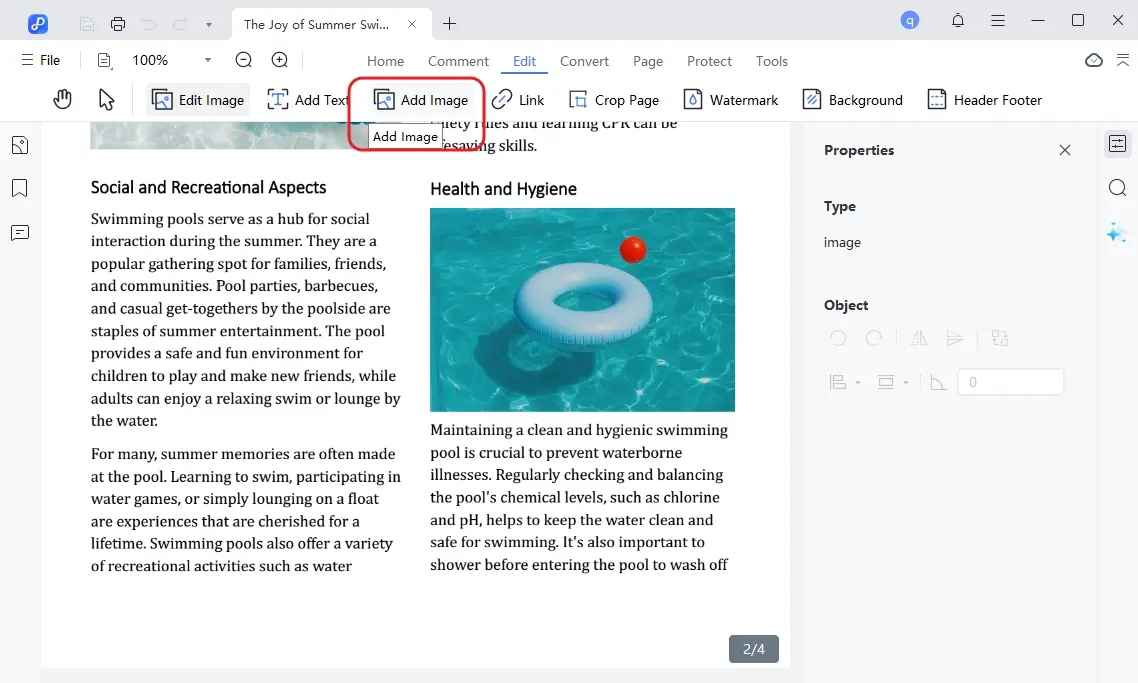
To insert images, click the "Add Image" button and choose the image file to add.
Once you have made all the necessary edits, click on the "Save" button in the top left corner.
Conclusion:
After reviewing features, user feedback, and subscription practices, it’s clear that "is PDF Guru safe" is a valid concern. While PDF Guru handles basic PDF tasks, issues like unclear billing, limited free features, and cloud-based risks make some users cautious.
For a safer, faster, and fully-featured alternative, PDNob PDF Editor is highly recommended. It offers offline editing, fast performance, and all essential PDF tools, giving users full control without hidden fees or privacy concerns.
The END
About PDNob
I am PDNob.
Swift editing, efficiency first.
Make every second yours: Tackle any PDF task with ease.
As Leonardo da Vinci said, "Simplicity is the ultimate sophistication." That's why we built PDNob.














 The END


By Jenefey Aaron
2026-10-26 / Knowledge