
then write your review
AI Celebrity Selfie: Take a Selfie with Any Star in Seconds
AI image generators have made it incredibly easy to whip up fun, ultra-realistic celebrity selfies, even if you’ve never met a star in person. Whether you’re after a playful fake celebrity selfie for some laughs, need a solid prompt to channel that celeb vibe, or just enjoy diving into the world of AI-generated celebrities, these tools can churn out surprisingly lifelike photos in no time. At the end of this guide, you will explore the best free uncensored AI to create real celebrity photos with. You can let your creativity run wild and produce social-media-ready celebrity shots whenever you like!

Show More
What Is an AI Celebrity Selfie?
Simple Definition for Beginners
An AI celebrity selfie is basically a fun edit where an AI mixes your photo with a celeb so it looks like you grabbed a quick selfie together. Think of it like those fan edits or aesthetic posts people make for fun, not something serious or fake-identity stuff.
You can drop in your own selfie, or if you’re feeling lazy, let the AI make a face for you. Then it pairs you with a digital version of your fave actor, singer, athlete, whatever. Most of these “selfie with a celebrity” tools also let you switch up the vibe super realistic, movie-style, cartoony, or whatever aesthetic you like. It’s basically just another creative way to level up your feed.
Celebrity Selfie AI vs. Deepfakes
Understanding the difference between fun AI celebrity selfies and harmful deepfakes really matters.
- Those AI selfie generators you see online are mostly built for entertainment. They turn celebrity photos into stylized, playful, or slightly exaggerated versions that fans can enjoy.
- Deepfakes are something else entirely. They’re created to fool people, copy someone’s identity, or be used in messed-up ways, which is why they’re a serious problem.
Most AI selfie platforms now include safety checks to prevent this kind of misuse. They block anything illegal, explicit, or harmful and try to push users toward creative, harmless fan edits instead.
Step-by-Step- How to Create an AI Celebrity Selfie
You can follow these steps with any tool, including popular options like PixPretty Figure Generator, Gemini-style AIs, or free models that allow prompt celebrity AI generate inputs.
Step 1: Pick a Pic (Or Let AI Do Its Thing)
If you have a selfie-style picture, use a clear photo with good lighting and no heavy filters. Keep the background simple and make sure your eyes are visible. If you don’t want to show your face? Scroll down and select the already given pictures. The AI will create a fictional version for you.

Step 2: Pick a Pose and Angle
The pose you choose can totally change your photo. Front-facing selfies are classic, top-down shots look cool, and mirror selfies show off your style. Street shots feel casual, red-carpet glam is fancy, and Polaroid vibes add a fun, playful touch.
Step 3: Write your AI prompt
Think of your prompt as a little guide for the AI here’s what to add:
- About you: Drop your age, hairstyle, outfit vibe, keep it fun. No real names needed.
- About the celeb: Just say “my favorite celebrity.” No need to pick someone specific.
- Pose & angle: “Selfie from above,” “standing side by side,” “mirror selfie,” anything that fits.
- Clothes & background: Red carpet, city streets, your bedroom mirror, a studio, whatever matches your mood.
- Style: Want it realistic, cinematic, soft portrait, or even cartoon/anime? Pick your vibe.
Step 4: Generate, tweak, repeat
- Don’t worry about getting the perfect shot on the first try. Experiment with lighting, angles, poses, expressions, and backgrounds to see what works best.
Celebrity Selfie AI Prompt Ideas (Copy-and-Paste)
Below are ready-made frameworks for creating celebrity selfies, fake celebrity selfie edits, overhead shots, and aesthetic portrait styles.
Classic Phone Selfie (Eye-Level)
 Please swipe to view
AI Prompt Result
Copy-Paste Prompt
Copy

Create a 4K realistic image of me and Taylor Swift standing backstage at a concert venue. We’re facing the camera, me holding up a phone for a selfie. Taylor is in a stylish tour outfit (denim jacket, stage‑ready), I’m in more casual “fan‑meets-star” clothes (jeans, printed tee). Her hair is slightly windswept, and she’s smiling playfully; I look excited and awed. The lighting is a combination of soft stage lights and ambient backstage lighting, casting gentle, warm glows. The background shows blurred stage equipment and colorful LED lights, giving it an authentic “backstage” feel.
Copy
Top-Down “Selfie from Above” (Overhead Angle)
Perfect for dramatic framing, closeness, and artistic vibes.
Ideas:
Please swipe to view
AI Prompt Result
Copy-Paste Prompt
Copy

Using the uploaded photo as a reference, generate a hyper-realistic, ultra-detailed 4K overhead selfie of a celebrity (or celeb-like person) lying on a plush velvet couch, looking up at the camera with a soft, introspective expression.
Lighting: warm golden-hour sunlight streaming through a large window, creating gentle cinematic shadows and a soft lens flare.Pose: slightly reclined, one arm draped over the back of the couch, the other resting near the torso, fingers relaxed, high-angle selfie perspective.Clothing: an elegant silk slip dress or satin pajamas, pastel hue (rose gold or champagne), slightly rumpled for a natural, relaxed feel.Background/Scene: stylish modern lounge room muted neutral tones, minimalistic decor, a few lush houseplants, soft throw pillows.Camera Style: DSLR-style, shallow depth of field (bokeh in the background), soft film grain texture, editorial-quality overhead selfie composition.Face Details: preserve original facial features, natural skin texture, subtle freckles or small imperfections, dreamy expression.Mood & Feel: calm, pensive, intimate like a behind-the-scenes candid celebrity moment.Other: golden glow on skin, soft shadows under cheekbones, hair gently falling around the shoulders.
Copy

Create a photorealistic 4K overhead selfie of two celebrity-style people sitting casually on stone city steps or pavement. Their heads are close together, leaning in warmly as if sharing a secret. Both people are looking up at the camera, capturing a genuine moment of friendship and intimacy.
One is wearing a soft cream cashmere sweater, the other a light denim jacket. Their expressions are relaxed, smiling gently, maybe a soft laugh. Warm golden hour lighting, soft shadows, realistic skin textures, and hair slightly moving in a mild breeze.
Background: cobblestone street or old stone stairway with some ivy or small plants growing between stones. Use shallow depth of field for a soft bokeh effect, highlighting faces and steps. Show fine details: fabric texture, skin pores, subtle hair highlights.
Copy
Mirror Selfie with a Star:
Please swipe to view
AI Prompt Result
Copy-Paste Prompt
Copy

/imagine: A 4K ultra-photorealistic scene of me and Taylor Swift standing side-by-side in a luxurious dressing room. We are facing a large mirror and I’m holding my phone, taking a selfie. Taylor is wearing a sparkling gold cocktail dress with sequins, soft wavy hair, and a radiant smile. I am dressed in Pair with strappy heels, statement earrings, and a clutch. The dressing room has warm, soft vanity lights reflecting off the mirror, makeup brushes and perfume bottles on the dressing table, and a chandelier above. Both of us have lively, festive expressions like we’re ready to attend an exclusive party.
Copy

Generate a 4K ultra-realistic mirror selfie of me and Taylor Swift in a modern gym. We’re standing in front of a large, full-length mirror. Taylor is wearing pastel workout leggings and a white crop top, smiling playfully at the camera. I’m wearing a fitted black tank top and shorts, holding my phone to take the selfie. Both of us are posing naturally, slightly leaning toward each other. Reflections are sharp, gym equipment in the background is visible, and sunlight streams through the windows. The vibe is casual, friendly, and energetic, perfect for social media.
Copy
Red Carpet & Stage Selfies:
Please swipe to view
AI Prompt Result
Copy-Paste Prompt
Copy

A very realistic, ultra high‑resolution 4K image of me (the provided picture) standing next to Taylor Swift at a glamorous red carpet event. She is wearing a shimmering silver gown, and I’m holding my phone up high to capture a selfie. Bright marquee lights, a shimmering red carpet behind us, paparazzi flashing cameras in the distance. Taylor is smiling genuinely, leaning slightly in toward me, with her iconic blond hair styled in soft waves. I’m dressed in a smart but casual outfit maybe a black leather jacket and white tee and I have an excited, awestruck expression. The scene is vibrant, with red carpet ropes, a step-and-repeat wall, and a golden glow from the lighting. Photorealistic, cinematic lighting, fine detail in skin texture, reflections in her jewelry, real-time depth of field.
Copy
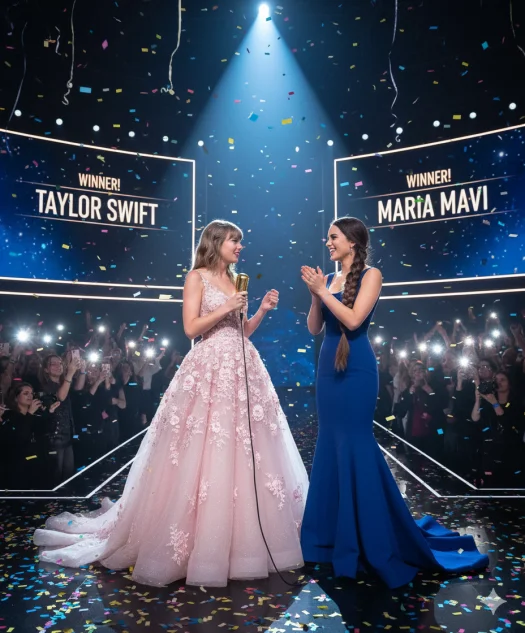
High‑resolution 4K image: Taylor Swift and me (picture provided above) on stage during the winners’ announcement, a spotlight shining down on us. Taylor is in a pastel pink ball gown with delicate floral embroidery; I’m in a dress hugging the body till knees and flaring out—perfect for highlighting curves. She is holding a microphone, looking into the crowd with a tear of joy; I’m clapping, looking proud and supportive. Massive confetti cannons have just exploded above us; multi-coloured streamers swirl through the air. In the background, silhouettes of cheering fans, camera flashes, and giant LED screens showing our names—one side with Taylor Swift and the other side named Maria Mavi (my name). The atmosphere is magical, emotional, and epic — like a fairy-tale music award moment. Ultra-detailed lighting, realistic skin textures, and a cinematic wide-angle shot.
Copy
Casual Street & Travel Shots:
Please swipe to view
AI Prompt Result
Copy-Paste Prompt
Copy

Instruction: Use my uploaded selfie as primary subject; place Taylor Swift beside me, shoulder-to-shoulder, both facing camera. Photorealistic 4K output.Prompt: Photorealistic smartphone selfie of two people shoulder-to-shoulder at the Eiffel Tower during golden hour, genuine candid pose. Subject A: the uploaded selfie (natural front-facing light, slight smile, lightweight denim jacket, hair gently windblown). Subject B: Taylor Swift standing to the right, wearing a chic cream trench coat and red beret, warm smile, soft natural makeup, looking at the camera. Background: Eiffel Tower bokeh at dusk, warm golden-hour rim light on hair and shoulders, slight motion blur in distant crowd for realism. Camera: 35mm-equivalent smartphone perspective, shallow depth of field (f/1.8), 1/125s, natural film grain, accurate skin texture, lifelike pores and hair strands. Composition: subjects centered, head-and-shoulders crop, even lighting across both faces (match skin tones and exposure). Post-process: upscale to 3840×2160 4K, sharpen fine details, maintain natural color grading, remove any watermark, no cartoon, no painting, no extra limbs, no distortion. Tag: photorealistic, ultra-detailed, authentic selfie, social-media-ready.
Copy

[IMAGE-REFERENCES: USER -> YOUR_SELFIE_REFERENCE, CELEB -> "Taylor Swift reference photo"]Generate a hyper-realistic 4K color photograph of two people taking a close-up selfie: the user (use USER reference) and Taylor Swift. Scene: busy urban street-food lane at golden hour — warm directional sunlight, soft backlight rim on hair, subtle bokeh from food stalls. Composition: 3:4 vertical, wide 35mm-equivalent, slight fisheye selfie perspective (arm-length, human-held phone angle), faces close together, both looking at camera.
User styling: casual-chic — denim jacket over graphic tee, relaxed smile, natural makeup, slightly wind-blown hair.Taylor Swift styling: showgirl-era inspired street outfit (glittery cropped jacket, mini skirt, subtle braids) — glamorous but casual. Use recent Taylor Swift public look references. :contentReference[oaicite:5]{index=5}
Lighting & camera: 35mm lens, f/2.8, shallow depth of field, ISO 100-200, high dynamic range, realistic skin textures, catchlights in the eyes. Color grading: warm golden-hour tones, slight film grain, realistic skin tones, high fidelity 4K detail.
Facial expressions: user — delighted, natural toothy smile; Taylor — playful smirk, eyes engaged. Add subtle motion blur on background people for sense of crowd. Output: photorealistic, no painterly effect, deliver 4K PNG.
Copy
Stylized or Safe Variations:
If you prefer not to use realistic likenesses, switch to stylized concepts:
Please swipe to view
AI Prompt Result
Copy-Paste Prompt
Copy

Create a 4K soft anime / cartoon styled selfie of [USER_PHOTO] sitting across a table with a stylized, non-realistic Taylor Swift figure in a cozy café scene. Style: painterly anime (soft brush strokes, warm palette). Composition: selfie-angle from slightly above the table, both faces visible, full shoulders, slight over-the-shoulder feature from [USER_PHOTO]. Clothing: [USER_PHOTO] in a warm oversized cardigan and beanie, Taylor-style character in a floral midi dress with a relaxed bob. Expressions: candid laugh from [USER_PHOTO], Taylor-style character mid-smile, eyes crinkled. Scene details: latte art on cups, window light streaming in (golden hour), plant in background, handwritten song lyric on a napkin (non-copyright short phrase). Camera: gentle filmic glow, natural grain, detailed fabric texture, 4K. Make sure faces read as anime/cartoon characters no photorealistic face-swapping; emphasize stylized features, line-art clarity, and appealing color keys for Instagram feed. Negative: no sexual content, no logos. aspect 4:5 quality 4k style "soft anime painting"
Copy

Generate a 4K (3840x2160) image: "Fantasy Rock Idol" an imaginative, stylized stage portrait inspired by modern celebrity glam but intentionally non-photorealistic. Subject: female rock-idol archetype inspired by Taylor-Swift-adjacent fashion cues (edgy bob, signature bangs hinted but not identical). Outfit: studded leather jacket with iridescent underlay, layered necklaces, theatrical fingerless gloves. Pose & expression: mid-performance, hair tossed, mouth half-open in song, fierce and theatrical. Lighting & camera: dramatic spotlights from above, smoke haze onstage, high contrast rim lighting, 50mm action portrait, motion subtle motion blur on hair for dynamism. Background: ornate Gothic stage props, amplified speakers, neon sigil motifs. Artistic treatment: gritty glam with pop-surreal accents high texture, painterly brush strokes on background, metallic highlights exaggerated. Color palette: deep indigo, molten gold, electric magenta accents. Output settings: 4K ultra-detail, emphasize stage lighting reflections on leather, stylized non-real face geometry, ensure character reads as a fictional rock idol. Add social crop safe zones for IG feed (square) and TikTok (vertical) variants.
Copy
Is It Legal and Safe to Make AI Selfies with Celebrities?
Rights, Privacy, and Platform Rules
AI celebrity photos can be fun to play with, and most people treat them like fan art — but there are still a few things you should keep in mind.
Celebs actually have control over how their face and image are used, so don’t do anything that crosses that line. Making edits for your own entertainment is usually fine, but using them to sell something or for any kind of commercial purpose isn’t a good idea. And whatever you do, don’t make it seem like the celebrity approved or supported the pic, because that can get messy fast. Most AI tools already add certain limits to stop people from creating harmful or misleading stuff, so just use the features responsibly, and you’re good.
Best Tools to Create AI Celebrity Selfies:
PixPretty is a solid option if you just want quick, clean AI selfies without getting too technical. It’s super beginner-friendly and gives you smooth, realistic results without that weird AI shine. You can switch between different selfie styles, and the face blending usually comes out natural with good skin texture and lighting.
嵌入购买下载按钮
Quick steps:
- Upload your selfie
- Pick the style you want
- Hit generate and wait a few seconds
Chat-based AI tools (e.g., Gemini, ChatGPT-style apps)
These are great if you like more control over your edits. Instead of just picking a template, you can describe exactly what you want and tweak every detail. You can even upload a photo as a reference and write different prompts until you land on the perfect look.
- Write your own prompts
- Upload an image as a reference
- Adjust style, vibe, and details however you like
Tips to Make Your AI Celebrity Selfie Look More Realistic:
Match Your Lighting and Background
To make your AI celeb selfie feel real, make sure both faces have:
- The same light direction
- Similar brightness
- Matching colors
Keep Poses Natural
Forget stiff poses! Real selfies have:
- Slight head tilts
- Imperfect smiles
- Relaxed shoulders
- The right distance between people
Avoid the Uncanny Valley
Make your AI selfie believable by:
- Skipping the over-smoothed skin look
- Checking for weirdly warped phones
- Making sure hands have the right number of fingers
Add Tiny Imperfections
Little details make a selfie feel organic:
- Slight grain
- Minimal motion blur
- Lens reflections
- Mild noise
FAQ – Common Questions About AI Celebrity Selfies
1. Is it really allowed to make selfies with celebrities using AI?
Yes, when used responsibly for fun or artistic fan edits. Avoid commercial use or misleading contexts.
2. Can I use these images as my profile picture?
You can, but avoid images that could misrepresent your relationship with the celebrity.
3. Why does the AI change my face or hairstyle?
Sometimes models adjust features for symmetry or lighting. Provide clearer photos for better accuracy.
4. How do I stop my images from looking too fake or creepy?
Use realistic lighting, avoid extreme filters, and try softer expressions.
5. Can I create celebrity selfies without uploading my real photo?
Absolutely, just let the AI generate a fictional person for you.
Speak Your Mind
Registrer/ Login
Speak Your Mind
Leave a Comment
Create your review for Tenorshare articles
Related articles
All topics
Share this post



By Jenefey Aaron
2026-09-10 / AI Insights