

 iOS Tips & Latest Updates
 Bug Fixes, Unlock Guides
 Giveaways & Freebies
then write your review
Nose Job Simulator Guide: Free, AI, 3D & Before–After Tools Explained
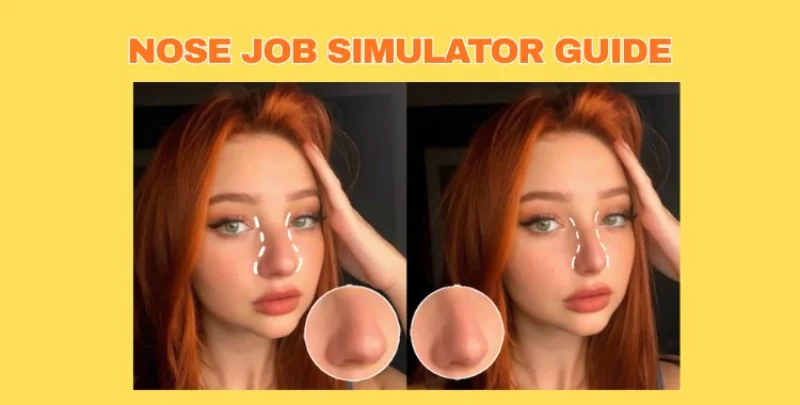
A nose job simulator helps you see how your nose could look with small changes or after rhinoplasty. You just upload a photo, adjust a few options, and preview natural before–after results.
This guide explains the best free tools, AI apps, and 3D simulators so you can choose the one that fits your needs whether you’re curious, comparing styles, or planning a consultation.
Show More
What Is a Nose Job Simulator?
A nose job simulator is an online or app-based tool that lets you preview how your nose might look after a rhinoplasty or after small cosmetic adjustments. You upload a front or side photo, and the tool uses editing sliders or AI to reshape areas like the bridge, tip, nostrils, and overall projection.
It’s a quick way to explore different nose shapes before making any real-life decision.

1.1 Who Uses Nose Job Simulators?
A wide range of people use a nose job simulator, each with their own purpose:
People curious about small changes
Many users just want to see how a slimmer tip, smooth bridge, or subtle lift might look. They are not planning surgery just exploring.
Individuals considering rhinoplasty
For those thinking about surgery, simulators help them understand what type of nose shape suits their face. It also helps them communicate clearly with a surgeon.
Surgeons and clinics
Medical professionals use advanced 3D tools to show realistic predictions. This helps set correct expectations before surgery.
Content creators and influencers
Creators on TikTok, Instagram, and YouTube often use nose simulators to test aesthetic trends, create before/after videos, or discuss beauty transformations.
People with confidence concerns
Some users try simulators to boost self-awareness, understand facial balance, or decide whether they need any change at all.
Free Nose Job Simulator vs Paid Options: What You Really Get
When choosing a nose job simulator, the main difference between free and paid tools is the level of accuracy. Free options offer quick edits and fun previews, while paid or advanced tools give more realistic, 3D results that look closer to real rhinoplasty outcomes. Below is a quick details of what each type offers and what you can expect from the most popular tools.
Facetouchup Nose Job Simulator (Most Accurate Overall)
Facetouchup is one of the most trusted options for anyone who wants realistic predictions rather than simple filters. It is not a nose job simulator free tool, but the accuracy is much higher than typical apps. It uses advanced facial mapping, controlled adjustments, and natural reshaping to show results that look closer to what a real surgeon might achieve. This makes it a strong choice for people planning rhinoplasty and wanting a true before–after preview.

Pixlr Nose Editor (Free Online Tool)
Pixlr is a good free nose job simulator for basic changes. It allows you to manually edit the nose shape using simple tools like smooth, reshape, and liquify. It won’t give you medical-level accuracy, but it’s helpful if you only want a quick idea of how a slimmer bridge or lifted tip might look. For a nose job simulator free option, Pixlr is easy to use and works directly in your browser.

YouCam Makeup Nose Reshape Tool
YouCam Makeup offers a clean, AI-based approach that many users love. It automatically adjusts the nose shape while keeping the face balanced, making it a strong mid-level nose job simulator. While not fully 3D, it provides natural results with minimal effort. The free version offers basic reshaping, and the paid plan unlocks more precise control.

Rhinoplasty 3D Simulator (Used by Clinics)
A 3D nose job simulator is the closest you can get to seeing real surgical results before surgery. Clinics use these tools to create a full 3D model of your face, so you can view changes from every angle front, side, and even under the chin. This type of before and after nose job simulator is highly accurate because it shows how the nose interacts with the rest of your facial structure.

Snapchat & TikTok Nose Filters (For Fun Simulation)
Snapchat and TikTok filters are informal versions of a nose job simulator app, mostly used for fun or quick testing. These filters instantly create a slimmer or lifted nose, making them popular in short videos. While the results are not medically accurate and don’t function as a real 3D nose job simulator, they do help users explore basic shape changes.

Free Nose Job Simulator vs Paid Tools (Honest Comparison)
 Please swipe to view
Feature / Factor
Free Nose Job Simulator (Free Tools / Apps / Filters)
Paid / Professional-Grade Simulator (3D Tools, Paid Apps, Clinic Software)
Ease of Use
Very easy: simple upload + automatic filter or slider-based edits; little/no learning curve
Moderate to advanced: may require photo prep, orientation, sometimes a small learning curve
Speed / Convenience
Fast edits take seconds to produce results
Slower 3D rendering, manual adjustments or clinic processing; may need side + front photos
Realism of Results
Low to moderate: results often look like filtered photos rather than natural face shape changes
High: 3D simulation accounts for structure, angles, facial balance more realistic, surgery-like results
Angle / Depth Perspective
Usually flat/2D: front or maybe side view only depth, profile view, rotation are limited
3D: multiple angles, profile, rotate, compare helps visualize realistic nose shape from all sides
Flexibility (Editing Controls)
Basic: sliders, auto-filters limited control over subtleties (bridge, nostrils, projection)
Detailed controls: tip, bridge, projection, nostril width, profile, symmetry high customizability
Before and After Comparison Quality
Basic side-by-side or filter on/off often flat 2D comparison
High-quality comparison: 3D vs 3D, multi-angle, realistic lighting, better for decision making
Step-by-Step: How to Use a Nose Job Simulator Correctly
- Upload Your Photo
- Use the Reshape Tool
- Fine-Tune
- Overlay Feature (Paid/Clinic)
- Annotate with Drawing Tools
- Preview Animation
- Save or Share
- Front View Adjustments
Open the facetouchup nose job simulator and upload a side or front photo.
Click and drag the nose area to adjust the bridge, tip, or nostrils. Changes appear instantly.

Zoom in, adjust brush size, and use undo/redo to fix mistakes.
For professional use, activate the Overlay feature. Turn on Remove Background and Show Outline to see how the new nose interacts with facial structure. Move the Blend slider to gradually reveal changes. This helps surgeons or users compare before and after realistically.

Doctors can use lines, freehand drawings, and text to mark planned incision areas or highlight corrections. This step is crucial for communication between patient and surgeon and makes sure everyone understands the proposed changes.

Click show before/after or animation to view the nose transformation.

Save images separately for “before” and “after,” and optionally save animated versions. Clinics can also email these images directly to patients. Keeping records helps track progress and ensures accurate consultation.
For a narrow nose, drag sides inward. Use shrink/grow tools for small corrections.

How to Use PixPretty for Quick Nose Reshaping in Minutes
PixPretty is an AI-powered portrait editor designed for precise and professional photo retouching. It offers advanced tools for nose reshaping, face sculpting, skin smoothing, and color correction, all in a user-friendly interfa
With smart presets and real-time adjustments, PixPretty allows photographers, studios, and beginners alike to achieve natural, pixel-perfect results quickly and efficiently, making it ideal for both personal edits and professional portrait workflows.
Here’s how to get professional-looking results fast with pixpretty:
- Download, Install, and Start the Tool
- Select Portrait and Facial Reshaping
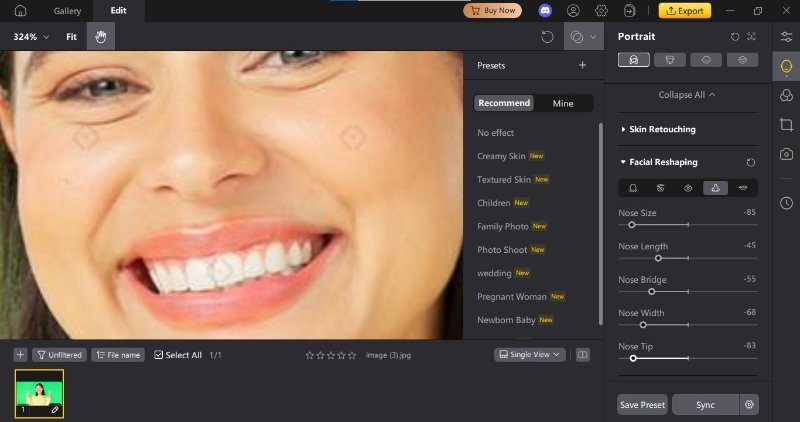
- Adjust Your Nose
Drag lines or sliders to modify:
- Nose length shorten or lengthen for balance.
- Nose width slim or widen the bridge.
- Bridge adjust the height and shape.
- Tip refine tip angle and shape.
Preview changes in real time to get a natural look.
- Preview and Save
Install the PixPretty photo editor on your desktop. Open the app and start a new project. Upload a clear portrait photo showing the nose you want to adjust.
Click on the Portrait section in PixPretty. Look for Facial Reshaping tools. The AI will automatically detect your facial structure for easy editing.

Toggle before/after view to see your adjustments. Once satisfied, save your photo or export it for social media or consultation.

Final Words
Exploring the world of nose job simulators from free tools to AI-powered apps and 3D before-and-after previews helps you visualize potential results before making any decisions. Whether you want detailed, clinic-level simulations or quick, fun edits, there’s a tool to suit your needs. For fast, precise, and professional nose reshaping, PixPretty stands out with its AI-powered facial editing, smart presets, and real-time adjustments. It is the perfect choice for both beginners and professionals alike.

Hey! 👋
Welcome to Apple tech Hub!
Need help
iPhone setup guide?
New Guide
iOS 27 Tips & Tricks 🎉

Speak Your Mind
Registrer/ Login
Speak Your Mind
Leave a Comment
Create your review for Tenorshare articles
Related articles
All topics
Share this post



By Jenefey Aaron
2026-09-28 / AI Insights