
Gemini Hairstyle Prompt Guide: See Your New Look Before the Salon
A well-written Gemini hairstyle prompt can help you get clean, realistic, and stylish AI hair results using Google Gemini. Whether you want a new haircut idea, a virtual makeover, or a polished look for social media, the right prompt makes Gemini understand exactly what style you want.
This guide gives you prompts that work well with Gemini’s image generation system, helping you create smooth hair textures, natural colors, and trendy hairstyles. Just copy, paste, and let Gemini generate the perfect look for you.

What Is a “Gemini Hairstyle Prompt”?
A Gemini hairstyle prompt is a simple instruction you give to Google Gemini that tells it how to change or style your hair in an uploaded selfie. Think of it as a guide for the AI to generate your new look exactly how you want it.
It’s become popular because it’s a safe way to preview new haircuts or colors without making permanent changes. Many people use it to experiment with trends, get inspiration for TikTok videos, or test bold styles before visiting a salon.
These prompts work for both real photos and fully AI-generated or drawn subjects, giving you flexible options for trying out different looks. Using clear AI prompt hairstyles helps Gemini produce realistic and stylish results every time.
How to Use Gemini for Hairstyle Changes (Step-by-Step)
Using hairstyle prompts in Google Gemini is easy and fun. Follow these simple steps to experiment with new looks safely and see realistic results.
- — Upload Your Selfie
- — Copy-Paste a Hairstyle Prompt
- — Adjust, Regenerate, and Pick Your Best Look
Start by uploading a clear selfie to Gemini. Make sure your hair is away from your face, the lighting is good, and no heavy filters are applied. This helps Gemini generate accurate results and keeps your hairstyle looking natural.
Next, choose a hairstyle prompt and paste it into Gemini. This is where the magic happens: the AI reads your instructions and transforms your hair in the selfie according to the style, color, or cut you described. Clear prompts help Gemini understand exactly what you want, whether it’s a bob, layered cut, or vibrant color.
After Gemini generates a version, you can adjust or regenerate it until you find your favorite result. Be aware that Gemini may alter face shape slightly unless you explicitly instruct it not to. Using detailed hairstyle prompts stable diffusion can help maintain realism and ensure the AI focuses onl y on your hair while keeping the rest of your features intact.
H2: 30+ Best Gemini Hairstyle Prompts (Copy-Paste)
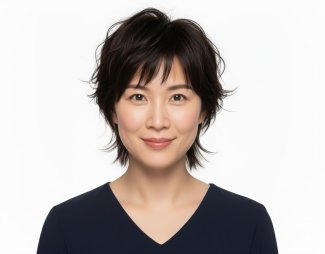
A. Short Haircuts (Bob, Pixie, Wolf Cut)
 Please swipe to view


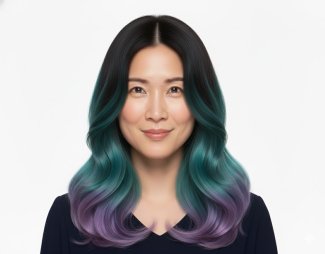
B. Long Hairstyles (Wavy, Straight, Layered, Mermaid Hair)
Please swipe to view


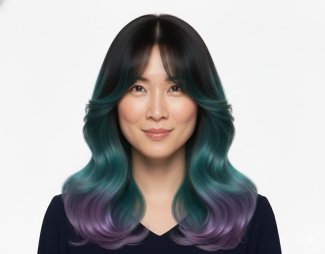
C. Bangs & Fringe Styles
Please swipe to view

D. Men’s Hairstyles (Fade, Undercut, Medium Length, Curls)
Please swipe to view


E. Hair Color Experiments
Please swipe to view


F. Creative + Social-Media-Style Prompts
Please swipe to view


(Important) Use an Editor to Fix Details After You Generate the Hair
Even the best AI hairstyle prompts from Gemini may need small adjustments to look perfectly natural. Hairlines, stray strands, color tones, and lighting can sometimes appear slightly off in the generated image. This is where an AI photo editor like PixPretty becomes invaluable. It allows you to refine your hairstyle with professional-grade precision without needing advanced Photoshop skills.
What You Can Do with PixPretty
After Gemini generates your hairstyle, PixPretty helps you:
- Refine Hairlines and Flyaways: Clean up stray hairs and make edges look smooth and realistic.
- Smooth Edges & Blending: Make sure your hairstyle blends naturally with your face and background.
- Adjust Colors & Contrast: Perfect for correcting overly bright or dull tones, making highlights, shadows, or color gradients look balanced.
- Fix Lighting Inconsistencies: Correct shadows, exposure, or highlights to match your original selfie.
- Apply Creative Filters (Optional): Give your hairstyle a polished, social-media-ready look without losing realism.
Here how pixpretty can fix hair:
- Go to PixPretty, create a new project, and upload the image you generated with Gemini.
- Click on Portrait and select Hair.
- Adjust the hairstyle as you like. You can fix hair settings, adjust the hairline, and drag the slider from 0 to 100 to achieve your desired result.

Why PixPretty Works Best
- No Photoshop Needed: Everything is online, simple, and fast.
- Professional-Quality Results: AI-driven tools handle fine details like hair strands, color, and texture.
- Time-Saving: Batch edits, smart presets, and automatic touch-ups save you hours compared to manual editing.
- Versatile Use: Works for selfies, professional portraits, or social-media-ready AI hairstyle results.

After generating a hairstyle in Gemini, upload the image to PixPretty and start with small tweaks first adjust hairlines, refine edges, and then enhance colors. This makes sure your final look is natural, polished, and Instagram-ready.
Final Thoughts
Using a Gemini hairstyle prompt is a fun, safe, and creative way to experiment with new hairstyles before committing to a cut or color. To make your AI-generated hairstyle even better, use PixPretty. It allows you to refine hairlines, fix stray strands, adjust colors, and correct lighting inconsistencies giving you a polished, professional result without any complex software.

 iOS Tips & Latest Updates
 Bug Fixes, Unlock Guides
 Giveaways & Freebies

Speak Your Mind
then write your review
Speak Your Mind
Leave a Comment
Create your review for Tenorshare articles
Related articles
All topics
Share this post



By Jenefey Aaron
2026-09-28 / AI Insights