How to Enable WhatsApp End-to-End Encrypted Backup and Get WhatsApp Encryption Key?
WhatsApp End-to-End Encryption is a system created to solve users' privacy and security concerns. The End-to-End Encryption feature aims to prevent potential third parties in the middle, such as internet providers and network administrators, from accessing the encryption keys needed to decrypt the conversation.
When you enable the end-to-end encrypted backup in WhatsApp, your messages and media are stored in the cloud. And you can set a password or let WhatsApp generate a 64-digit encryption key to protect your backup.
Here are the detailed steps on how to enable WhatsApp end-to-end encrypted backup and get the WhatsApp Encryption Key:
-
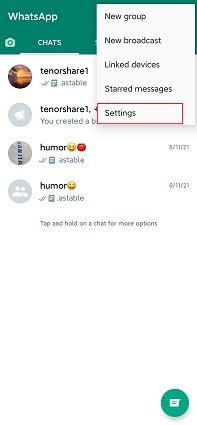
Open WhatsApp on your source device and tap the three dots in the upper right corner. Then select “Settings”.
-
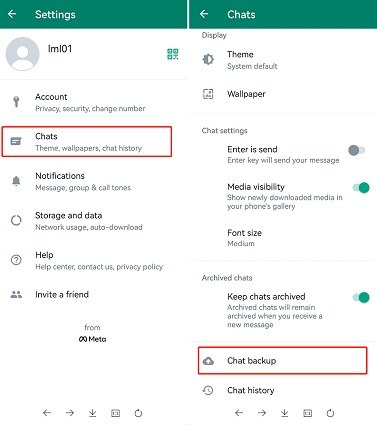
Tap on “Chats” and choose “Chat backup” to back up your WhatsApp chats data.
-
Now select “End-to-end encrypted backup” and turn on it.

-
Choose “USE 64-DIGIT ENCRYPTION KEY INSTEAD” and then continue to select “GENERATE YOUR 64-DIGIT KEY”.

-
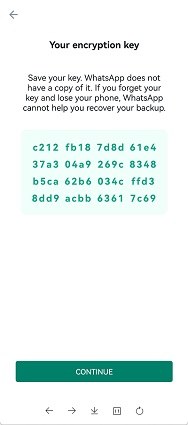
Here you will see the 64-digit code. Take a screenshot to save the encryption key. (WhatsApp will not have a copy of the key.)
-
When you have successfully saved the encryption key by taking a screenshot or using another method, tap on “CONTINUE” and choose “I SAVED MY 64-DIGIT KEY” to continue.

-
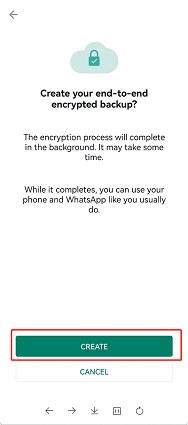
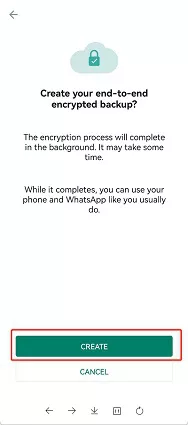
When all is set done, choose “CREATE”. Now you’ve successfully turned on the end-to-end encrypted backup and got the encryption key.
-
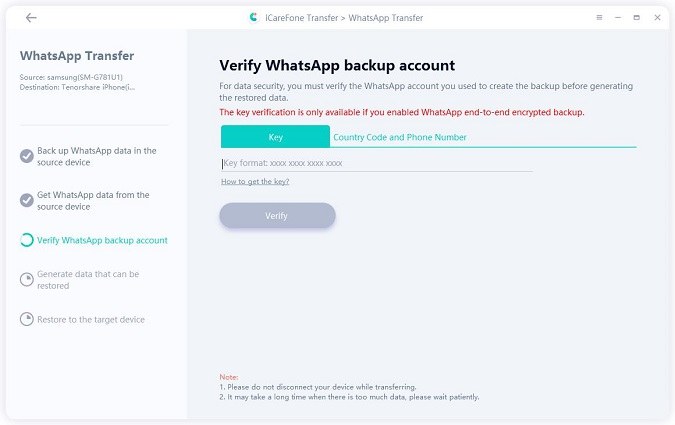
Now open the encryption key screenshot and enter the key on iCareFone Transfer to verify your WhatsApp account.




We value your privacy and data security. Tenorshare iCareFone Transfer won’t upload or save any of your data. And this will not affect your WhatsApp account.
